


Palworld has launched on Steam and Xbox. We will show you which graphic settings you can use to get the most out of the survival game.
Palworld is based on Unreal Engine, which requires adequate performance to run the game properly. MeinMMO presents settings that can improve your performance.
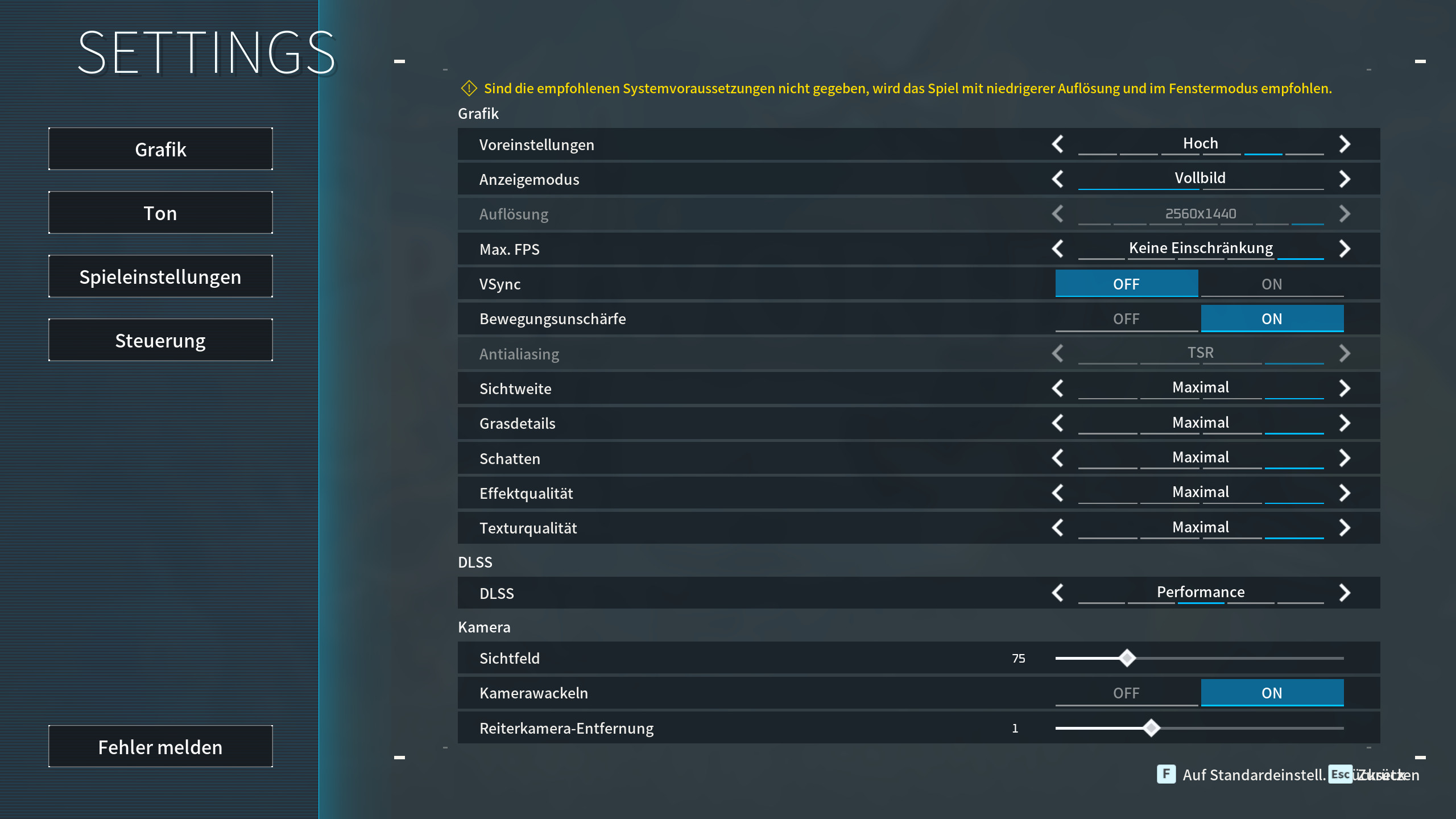
- Palworld: The best graphic settings for PC
- More tips on graphic settings: DLSS and FPS limit
- Palworld: Direct X 12 or Direct X 11
Palworld: The best graphic settings on PC
The following settings provide the best balance between quality and performance. Please note that you can only use DLSS with an Nvidia graphics card. If you have a powerful gaming PC, you can also increase the settings accordingly.
- Presets: Custom
- Screen: Fullscreen
- Max FPS: 90 FPS
- Vsync: Off
- Tip: Vsync prevents screen tearing but adds noticeable input lag. If you have a monitor with G-Sync or FreeSync, you should definitely turn off Vsync in the game since the monitor will handle that.
- Motion blur: Off
- Antialiasing: Off / TAA
- Tip: With a weak GPU, we recommend temporal antialiasing (TAA); the game may look slightly blurry but runs smoother.
- View distance: Medium
- Tip: The higher the view distance, the more your graphics card has to calculate. Therefore, it’s better to set this option lower than higher.
- Grass details: Medium
- Building render distance: 600
- The higher the render distance, the more your graphics card has to calculate.
- Shadows: Medium
- Tip: Major performance drain. If you want to save performance, reduce the shadows.
- Effect quality: Medium
- Texture quality: Depends on your VRAM, our recommendation: Medium
- Tip: If you have a graphics card with 12 GB or more of video memory, you can set this to high.
- DLSS: Only Nvidia GPUs, our recommendation: Balanced
- Field of view: 75
- Vertical field of view: Off
- Camera shake: Off
- Mount camera distance: 1
- Show allied Pals’ aura: On
- Tip: If you are traveling with many players, you can disable the aura, which saves performance.
We have set the maximum FPS to 90 FPS because the game runs the most stable at this setting. Some users and colleagues report that the graphics card runs at maximum load without an FPS limit. You can prevent this by setting the FPS limit. This also conserves your GPU. You can find the complete system requirements for Palworld in detail directly on MeinMMO.
Tip: Antialiasing is grayed out under certain circumstances (for example, at high presets). Switch to “Custom” to be able to edit antialiasing as well.
More tips on graphic settings
Activate DLSS: With DLSS, you can significantly boost your performance on PC, but you must have an Nvidia graphics card. With Performance, you get an average of 20 more FPS; with Quality, the image looks better. The best compromise between performance and quality is “Balanced”.
AMD’s alternative FSR is not yet integrated into Palworld. We can’t say whether the technology will come in the future, it would be desirable because FSR 4 is now highly recommended. We will update our article with new information.
What has the strongest impact on performance?
- Shadow quality, view distance, and antialiasing have the most significant effect on your performance.
- Texture quality plays a role if you don’t have enough video memory. This is especially true for weaker systems such as laptops or the Steam Deck.
What else can increase FPS? If you are experiencing very poor performance, we recommend reducing the resolution. However, this should be the last resort. It is preferable to increase the level of DLSS from “Balanced” to “Performance”. This also requires your computer to calculate less. However, this option is currently only available with Nvidia graphics cards.
Palworld: Direct X 12 or Direct X 11
If you start Palworld on Steam, you can choose between Direct X 11 and Direct X 12. Normally, the game starts with Direct X 11.
However, you can also start the game in DirectX 12. Specifically, with modern hardware, you can benefit from switching to Direct X 12. This allows you to optimize CPU usage on modern systems. With older systems, you benefit only to a limited extent.


More about the 1.0 release of Palworld: Do you want to know more about the official release of Palworld? You’ll find all important information directly in our article on MeinMMO. Here you can find all the details if you are not sure whether you should buy the survival game: Palworld 1.0 Release: Patch notes, price, roadmap, and features of the major update

Your opinion is important to us!
Do you like the article? Then let us know!