

Advertising is annoying, whether you see it on your phone, TV, or PC. However, for our tech author Jan Hartmayer, it is particularly bad on the latter. For instance, he can no longer use Windows 11 without adjustments beforehand.
Since I was a child, I have been using computers daily. I grew up with several versions of Windows and would love to switch back to my favorite from 2001: Windows XP. But that is hardly possible nowadays, and I have to deal with the latest version of Windows 11.
However, my problem is this: When reinstalling Microsoft’s operating system, you are bombarded with a ton of advertising. For example, even before you reach the desktop, you’re prompted to subscribe to the Xbox Game Pass. Additionally, unnecessary programs like Cortana and Solitaire are pre-installed after installing W11, which I don’t even use.
Therefore, I spend time with every installation subjecting the operating system to a sort of exorcism to make better use of my hardware.
Manually or simply via software
In the past, I spent hours manually uninstalling individual programs and making numerous adjustments in Windows 11 before freeing my operating system from unnecessary software bloat.
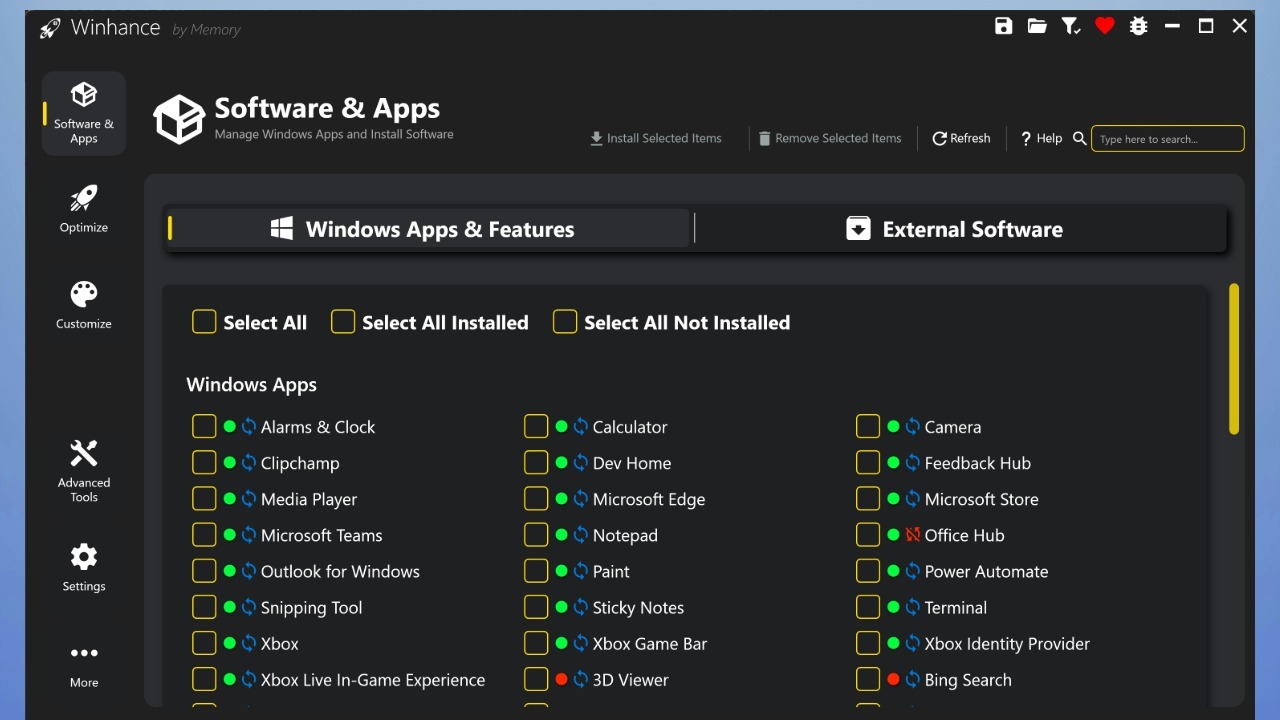
Tip number 1: There are various community software options, such as Winhance or Chris Titus Tech’s Windows Utility, which greatly simplify the debloating process. You just download a simple program and can click what Windows features and pre-installed programs you want to disable/uninstall with one click. The program then performs all selected actions in sequence.
Important: Since this is third-party/community software, Microsoft takes no responsibility if something on your PC stops working. So only change settings if you know what they do!
Tip number 2: Linux as an operating system would be an alternative, but unfortunately, I lack years of experience here. Additionally, due to my job, I test preview versions of games and software that often do not work (yet) on Linux. However, I can only recommend gamers take a look at the alternative operating system.
Community installations often have disadvantages
Tip number 3: As a last option, there are pre-built versions of Windows 11, such as Tiny 11 or Ghost Spectre, created by the community. Depending on the version, they usually contain few updates, limit background processes, have hardly any advertising, and are shrunk in size to save space.
But these Windows 11 variants often have the same problem: many of them disable many updates, including security updates, which are necessary to effectively protect your PC from malware and viruses. Therefore, I strongly advise against blindly installing a modified operating system from the internet. Also, you never know if newer software and games, such as Cyberpunk 2077, are compatible with modified community variants.


Nevertheless, I recommend all Windows users to take a look at their operating system and only activate the programs/settings they actually need. Everything else is unnecessary bloat that can impair your performance. Alongside me, many gamers are also annoyed by Microsoft’s latest operating system: Microsoft wants to regain trust in Windows, many players are demanding important changes
Which operating system do you use for gaming? Are you satisfied with Windows, or would you also love to switch? Let us know your opinion in the comments.

Your opinion is important to us!
Do you like the article? Then let us know!