

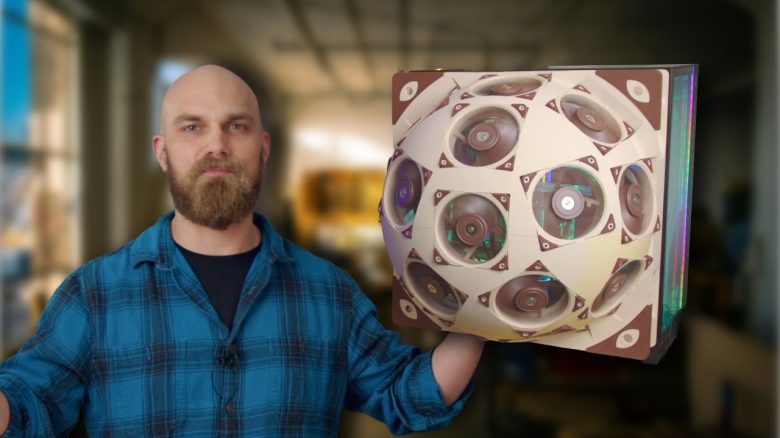
Cooling in a gaming PC is important. That’s why there are various ways to lower temperatures in a computer. However, a DIY enthusiast has taken it a step further and created the ultimate fan sphere to cool his computer.
What has the enthusiast crafted? Content creator Major Hardware showcases his latest creation in his YouTube video from April 12, 2026. Using a 3D printer and 15 120mm Noctua fans, he built a massive hemisphere designed to replace the side panel of his PC.
According to his own account, the idea originated from a viewer and is a successor to a previous project where the enthusiast mounted 15 30mm fans on a small hemisphere.
As of April 14, 2026, the 15 Noctua A12s alone cost about 450 Euros in Germany (via Geizhals). However, the YouTuber reportedly contacted the manufacturer directly, who provided him with all the fans and the appropriate filament for his 3D printer.
By the end of the project, the enthusiast was so satisfied with the improved temperatures of his computer that he offered the corresponding 3D printing files for free on the Thingiverse website, allowing anyone to recreate the build.
The upgrade is not just cosmetic
How well does the creation cool? The enthusiast also wondered how well the monster performs in action. To test this, he first played Battlefield 6 unmodified for a while and then replaced the side panel with the fan sphere.
It is said that the average temperature of his processor dropped from about 86 to around 66 degrees Celsius after he completed additional rounds for testing.
The YouTuber also noted that in his specific case, the construction worked so well because he configured all the fans to draw in fresh air into the sphere. Meanwhile, his two radiators at the bottom and top of the PC expel the heat.
Why is airflow so critical? Air circulation in a computer is particularly important as it can directly affect cooling and performance.
If heat circulates poorly in a computer or fans are improperly placed, it can lead to something known as “thermal throttling.” During this process, hardware components intentionally limit their performance to avoid overheating (via xidax).


Both air and liquid cooling systems operate by expelling hot air from your PC case and drawing in cooler fresh air. This effectively channels waste heat away from your computer and prevents overheating even during long gaming sessions. Besides airflow, the placement of your computer is also important: Tech YouTuber collaborates with NASA to determine the optimal distance of his gaming PC from the wall

Your opinion is important to us!
Do you like the article? Then let us know!