The Call of Duty League (CDL), the professional e-sports league in CoD, has been hosted by Activision since 2020. In a lawsuit, two CoD legends are now demanding 680 million USD from the publisher: They claim that the CDL constitutes an unlawful monopoly.
What is this lawsuit about? On February 15, 2024, prominent members of the e-sports organization OpTic Gaming filed a lawsuit against the CoD publisher Activision. CEO Hector “H3CZ” Rodriguez and ex-professional player Seth “Scump” Abner claim that Activision has established an unlawful monopoly over the e-sports scene in CoD through its Call of Duty League (CDL).
In a statement, Activision announced that it intends to “defend itself vigorously against the allegations.”
Start video
CoD MW3 & Warzone – Season 1 Trailer
Activision has wielded its power “like a virtual atomic weapon”
What are the allegations? The indictment states that Activision allegedly has the sole right to enter into contracts with sponsors and broadcasters. Teams and players are prohibited from “participating in or supporting other professional ‘Call of Duty’ leagues.”
Thus, professionals are not allowed to participate in any commercial games, not even informal friendly matches on stream.
According to the indictment, these contract clauses have allowed Activision to enrich itself at the expense of the players in the CDL. The publisher has wielded its power “like a virtual atomic weapon,” the indictment states.
H3CZ also accuses Activision of not allowing him to participate in the CDL as the sole owner of OpTic in 2021, even though he had the financial means to pay for the unpaid portion of the “extortionate entry fee” of 27.5 million USD.
Instead, he had to team up with Envy Gaming Inc. and grant investors a 92.5% stake in OpTic.
H3CZ and Scump had to forgo various sources of income due to the CDL, resulting in them incurring damages in the millions.
Here you see some excerpts from the indictment in English:
Recommended editorial content
At this point you will find external content from Twitter that complements the article.
I consent to external content being displayed to me. Personal data can be transmitted to third party platforms.
Read more about our privacy policy.
Furthermore, Activision is also accused in the indictment of having acquired the competition from Major League Gaming in 2016 without the approval of the FTC and thus obtaining a complete monopoly over the professional CoD scene. Organizers of other commercial competitions would not receive CoD licenses.
The U.S. financial regulator has recently had its sights set on Activision due to the planned takeover by Microsoft.
What does Activision say? In a statement to Dot Esports, the publisher describes the allegations from H3CZ and Scump as unfounded and announces its intention to fight back. Additionally, they express disappointment that it has come to this:
Mr. Rodriguez (alias OpTic H3CZ) and Mr. Abner (alias Scump) demanded from Activision the payment of millions of dollars to avoid this unfounded legal dispute, and when their demands were not met, they filed suit. We will vigorously oppose these demands, which are neither factually nor legally justified. We are disappointed that these members of the e-sports community are filing this lawsuit, which is disruptive to team owners, players, fans, and partners who have invested so much time and energy into the success of the Call of Duty League.
There is also trouble regarding Activision elsewhere. After it seemed that the billion-dollar deal was finally in the bag and Microsoft was allowed to acquire Activision Blizzard for 69 billion USD, the U.S. financial regulator is now complaining: Microsoft has broken its promises.
Ewan McGregor is an indispensable part of the Star Wars universe as Obi-Wan Kenobi. However, the actor was initially very reluctant about the role. The reason for this was the previous success of an indie film.
Ewan McGregor first donned the robe of Obi-Wan in the film Star Wars Episode I: The Phantom Menace (1999). Two more parts of the trilogy followed. In 2022, the character even received his own series.
But as the actor revealed to Variety on January 31, 2024, it wasn’t so certain for him that he would play the role. He had actually prioritized another film about Star Wars and wanted to stay in his comfort zone.
Here you see a trailer for Star Wars Episode 3, in which you can see Ewan McGregor as Obi-Wan:
Start video
Star Wars: Episode 3 – The Revenge of the Sith Trailer (English)
“I didn’t think it suited me at all”
Before Star Wars, Ewan McGregor mainly acted in smaller film projects. These included the indie film Trainspotting (1996) directed by Danny Boyle. In this, he played a drug addict trying to overcome his addiction.
Trainspotting became a major success for the actor. Since Danny Boyle was already planning another film project with The Beach, that took a higher priority for Ewan McGregor than Star Wars – he preferred to continue working with the director:
So the actor explained:
For me, it wasn’t a done deal. I didn’t think it suited me at all. I believed that at that time I was a Danny Boyle actor. The Beach was more important, and I meant it seriously; it wasn’t a frivolous decision. I asked a lot of people for advice.
But in the end, another Hollywood star, Leonardo DiCaprio, took the lead role in The Beach, and Ewan McGregor accepted one of the biggest roles of his career as Obi-Wan Kenobi.
What does McGregor think of Obi-Wan? Ewan McGregor continued: “I’m glad I’m that character for many people, but when these films came out, they were so unpopular. That was tough. The first film was panned, and we had to make two more! It was strange to be in a film that was poorly received.”
However, he would very much like to return to his well-known Star Wars role again and film a second season of the series. However, nothing regarding this is in discussion at Disney so far.
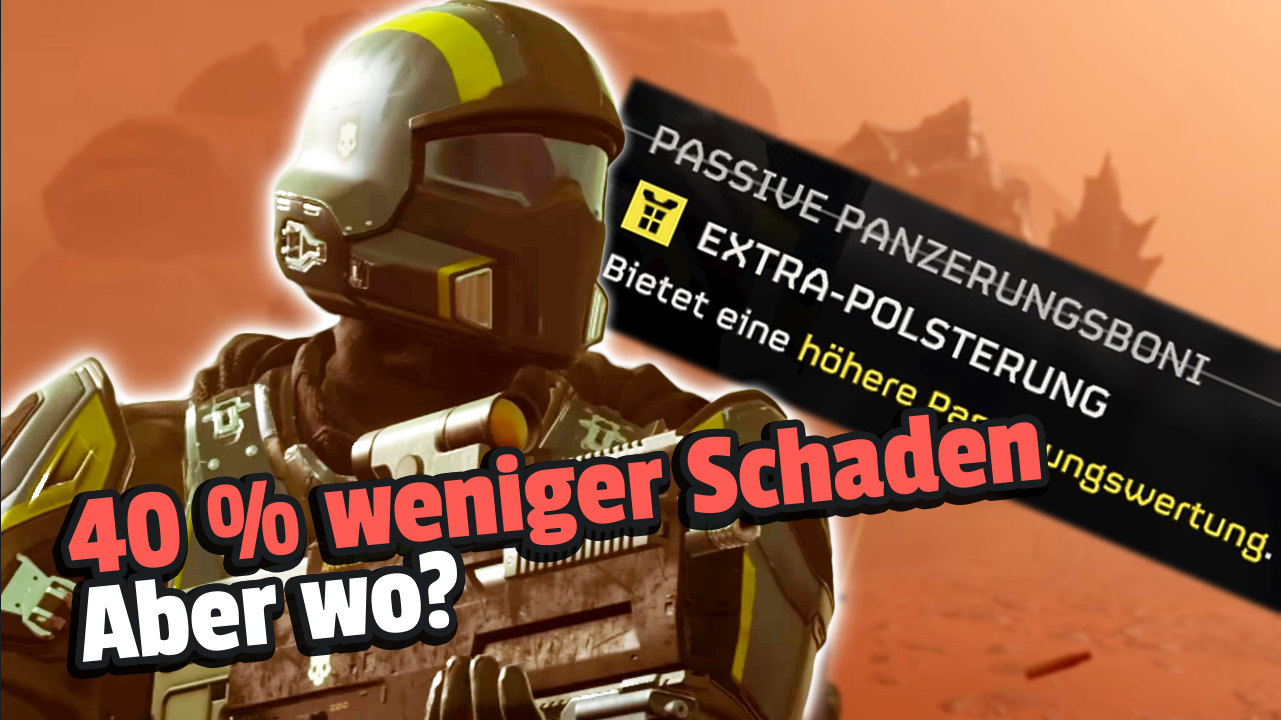
Helldivers 2 features many armors with passive effects and different stats that benefit you in combat. One of the first effects you receive is Extra Padding – the Extra Padding. But what exactly does it do?
What exactly is Extra Padding? The perk called “Extra Padding” in German is one of the first passive effects you can obtain in Helldivers 2. It can be used in your standard armor B-01-Tactical. According to the description of the effect, Extra Padding gives you a higher armor rating.
However, the armor rating does not change in the loadout. It always remains at 100.
Start video
Helldivers 2 Sorrow Titan Liberation Gameplay Video
What exactly does the effect do? In fact, the effect does not change the armor rating of the base armor – which was expected. If you are hit by a bullet, it still inflicts the same amount of damage even with Extra Padding active.
The colleagues from Gameleap.com conducted extensive testing and were able to identify the actual effect: When equipped with Extra Padding, you take less damage from grenades and landmines.
However, this does not mean that you can stand on landmines and withstand the explosion. With the effect, you will survive explosions that would otherwise certainly have killed you.
The base armor B-01-Tactical equipped with Extra Padding.
How did the community react? Since the armor rating did not change with the active effect, there was confusion in the community. In a thread, reddit user Scatamarano89 wrote that he is a big fan of heavy armor and has treated himself to a more expensive variant. However, he would like to have concrete numbers on it.
In another discussion, user szthesquid asks the same question, and in a third post, redditor Signature_Chewy describes his observation that he doesn’t notice any difference with the perk compared to before. Unfortunately, they receive hardly any helpful answers; instead, other players express their similar feelings of confusion.
User polkathot also conducted extensive testing and found that damage from landmines is reduced by up to 40% due to the effect:
Recommended editorial content
At this point you will find external content from Reddit that complements the article.
I consent to external content being displayed to me. Personal data can be transmitted to third party platforms.
Read more about our privacy policy.
What do you think? Is Extra Padding an effect you are considering for your next loadout? Or do grenades and landmines not matter to you? Feel free to leave us your comments.
The PvP in Destiny 2 has many issues that drive players to frustration. For this reason, a major overhaul is coming, which you will be able to try out next month. We will show you what is set to change.
What is the problem with PvP in Destiny 2? Anyone who has been playing Destiny 2 for many years probably knows how PvP has evolved during this time. While at the release all Guardians were running around with double primary weapons, Guardians are now throwing Ultis or grenades around and completely forgoing weapons.
Destiny 2: The Most Epic Moments of the Light and Darkness Saga
Fewer grenades and more health
What will change? One of the biggest changes includes the following points:
Your health points will be increased – From 70 to 100 points
Shields will be at 116-130 points, depending on how much resilience you have
Cooldowns on abilities will be increased, but they will deal more damage
Super
31% more damage
20% longer cooldown
Grenades
16% more damage (only Flux grenade)
15% longer cooldown
Melee
16% more base damage
15% longer cooldown
The system behind special and heavy ammunition will be adjusted:
Players will spawn at the start with enough ammunition to take down two Guardians
Ammunition can only be replenished by completing tasks or getting kills with primary ammunition
You will no longer lose ammunition upon dying
Earned ammunition is now cross-round
Several weapon types are also expected to deal more damage so that players with high health points do not survive too long. Despite this, the developers now aim to have more variety in adjusting weapons thanks to the high health points. You can find more about the changes in the official TWaB post.
When do the changes take effect? The changes will take effect with the upcoming update 7.3.5, which will be released on March 5. Until then, you can look forward to the coming changes, as they are likely to drastically change the happenings in PvP.
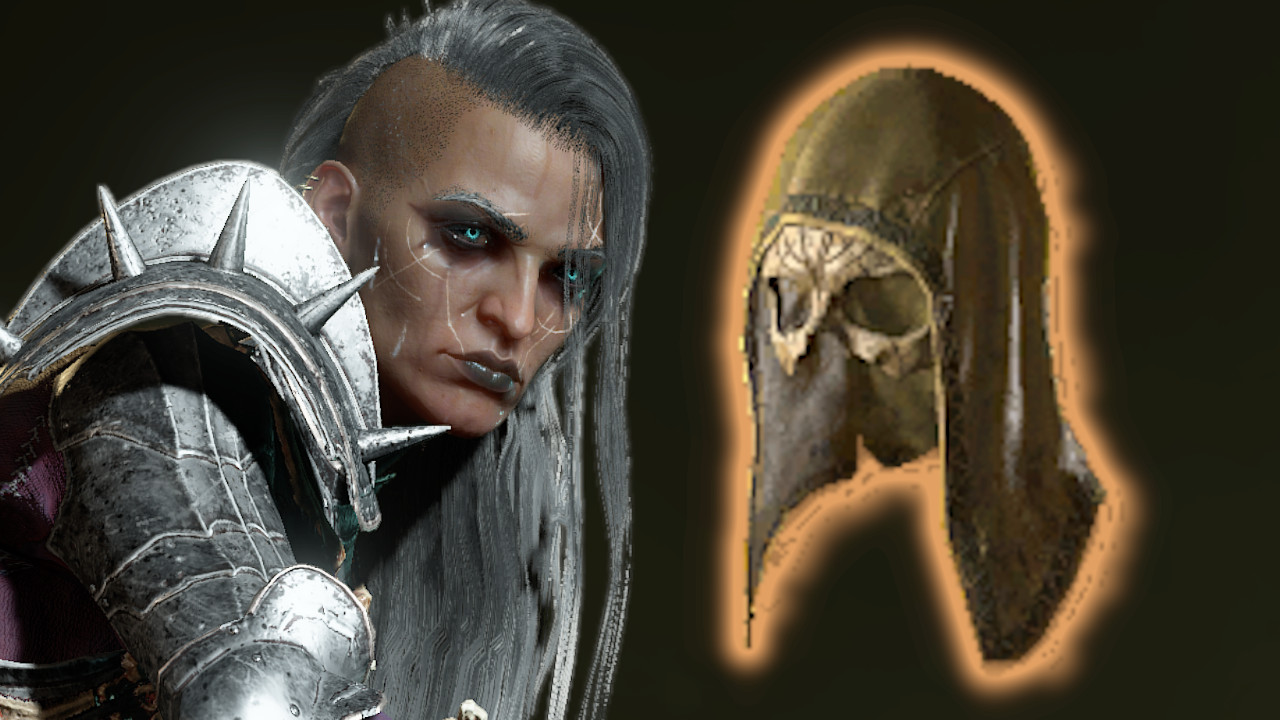
Uber Uniques are the most coveted items in Diablo 4, but these items are also incredibly rare. Aside from Duriel, it should be possible to obtain the items in other places, such as dungeons. However, a data miner found out that still only Duriel is worth it.
With patch 1.3.2, the chance that Uber Uniques also drop outside of Über-Duriel has been increased. However, a data miner found out that the chance is still so low that farming outside of Duriel is not worth it.
Start video
Diablo 4: Lunar Awakening – All new content of the event
The chance of receiving an Uber Unique from Über-Duriel is about 2%. Although that sounds quite low, when compared to the drop rate outside of the boss, it becomes clear that it is still more worthwhile.
As PCGamer summarizes, the chance for a Barbarian to receive a Harlequin’s Crown was about 1 in 10 million. After the current patch, the chance is now 1 in 7000. Although this sounds like a significant buff, the chance is currently still 0.01%. This calculation only applies to the Barbarian, as not every class can have every Uber Unique.
So despite the buff, Über-Duriel is still more worthwhile. The time one would need to invest to specifically farm an Uber Unique outside of Über-Duriel is simply not worth it. If one does not farm specifically, they might get lucky in dungeons, but whether that happens at 0.01% for regular players is questionable.
Uber Uniques are a constant topic in Diablo 4, and drop opportunities change from season to season. Have you ever received an Uber Unique outside of bosses? Do you think these items should drop more often? Let us know in the comments. Those planning to farm Uber Uniques can check our guide on Über-Duriel: Diablo 4: How to summon and defeat Duriel – Here’s how
This is an AI-powered translation. Some inaccuracies might exist.
One of the first major challenges you encounter in Palworld is the duo Zoe and Grizzbolt. In this guide, you will learn how to best approach the boss fight.
Who are Zoe and Grizzbolt? If you follow the tutorial at the beginning of Palworld, you will be tasked with defeating Zoe and Grizzbolt at the end. The Pal trainer and her companion are located in the tower of the Rayne Syndicate.
To take on Zoe and Grizzbolt, you should have reached at least level 10, better yet level 13. The higher your level, the easier the battle will be.
As for your equipment, you should definitely use ranged weapons. Especially the triple-shot bow or the crossbow are recommended.
Triple-shot bow (Level 10)
Crossbow (Level 13)
Fire arrow crossbow (Level 15) + fire arrows (Level 5)
You will also need enough ammunition. You should have at least 100 arrows ready.
Pals with active abilities can also be very useful in battle. To use them, you first need to craft the appropriate gear at the Pal workbench. The following can be unlocked early in the game:
Foxparks gear (Level 6)
Lifmunk submachine gun (Level 11)
Tanzee assault rifle (Level 12)
Pengullet rocket launcher (Level 17)
Also, craft the best armor and shield available to you.
General tips and strategies
1. Seek cover
The main task of your character is actually to avoid dying. To achieve this, you should always try to stay at a distance. Gizzbolt will usually attack you with ranged attacks. Fortunately, there are some columns in the tower behind which you can seek cover.
So, always run from column to column and dodge with a roll if necessary. Especially when Grizzbolt is busy with one of your Pals, it should be very easy to avoid any damage.
2. Utilize critical hits
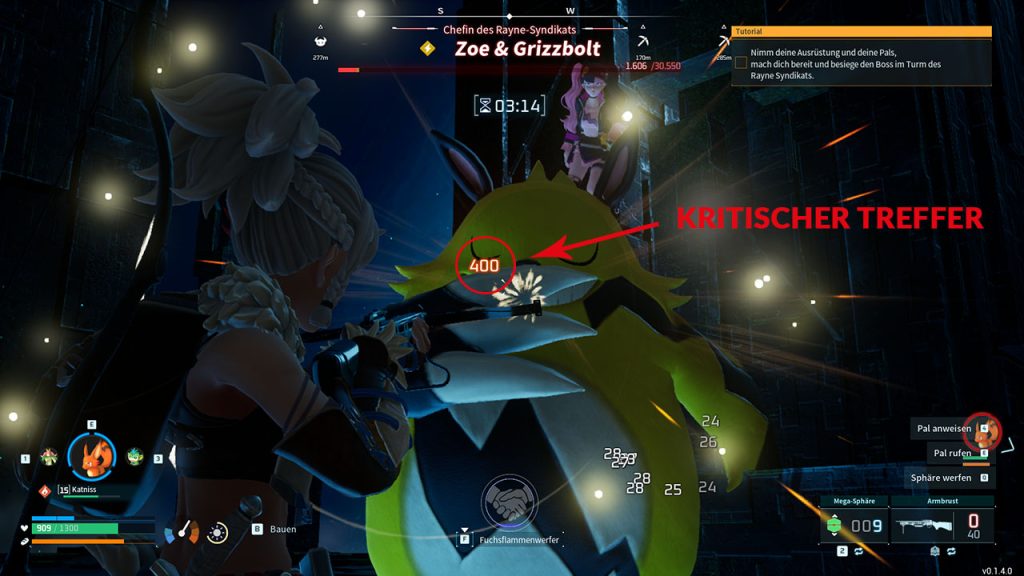
Now, to deal damage yourself, your chosen ranged weapon comes into play. It is particularly effective to aim for Grizzbolt’s face. This way, you can deal critical hits for more damage. This is indicated by red damage numbers.
I had the best experience here with the crossbow. It takes some time to reload, but I can land great headshots. I peek out from behind the column, shoot, and then go back into cover to reload.
3. Rotate Pals
The most important rule for boss fights is: Never let your Pals become incapacitated. Once a Pal loses all its health, it is completely out of this fight.
Instead, quickly call the Pal back into its sphere when it is close to getting knocked out. As long as it is not active (and has no hunger), it will regenerate health. During this time, you can simply continue fighting with the next Pal.
4. Avoid damage
If you are particularly quick, you can protect your Pals from certain attacks. Wait until Grizzbolt targets one of your companions and then immediately pull the Pal back into its sphere. Grizzbolt’s attack will then miss and deal no damage.
After that, you should immediately send another Pal into the fight to avoid losing valuable time dealing damage.
5. Reposition Pals
As convenient as the stone columns are for your cover – they can sometimes also become a hindrance. I often had the issue that my Pals got stuck behind the columns. Their attacks no longer hit Grizzbolt, and the fight dragged on unnecessarily.
Therefore, always pay attention to whether your Pals are actually dealing damage. If not, just resummon them – preferably in the open area in the middle of the room.
Choosing the right Pals
When choosing your team composition, you have many options available. Just try out what you like best, including a combination of several strategies.
1. Exploit elemental weakness
Grizzbolt is an electric Pal. This means that it is particularly susceptible to ground attacks. Equip your team with Pals of this element to deal more damage. Ground Pals that you can find early in the game include:
Gumoss
Rushoar
Fuddler
Alternatively, you can also use fruits to give Pals new abilities (of the ground element).
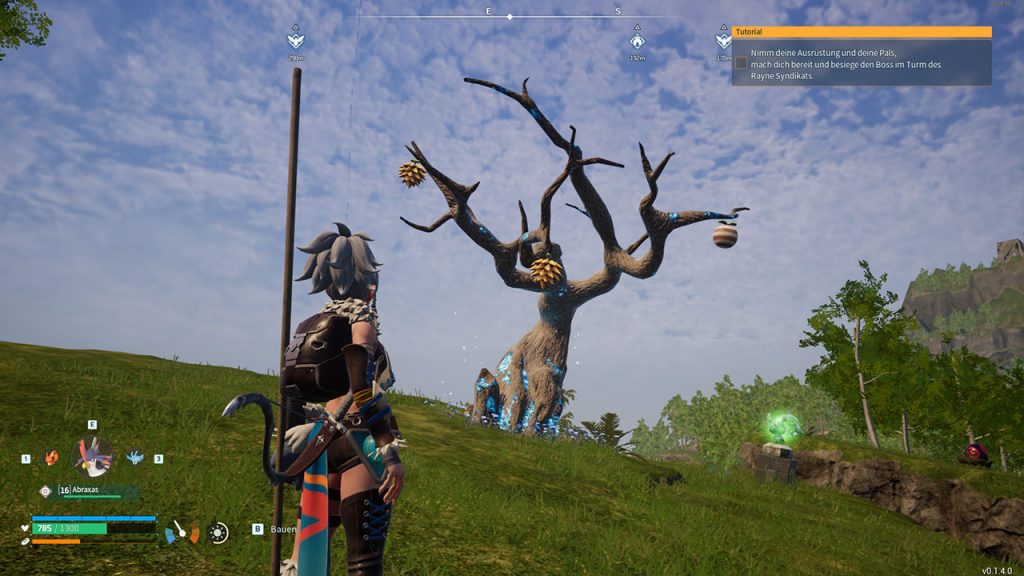
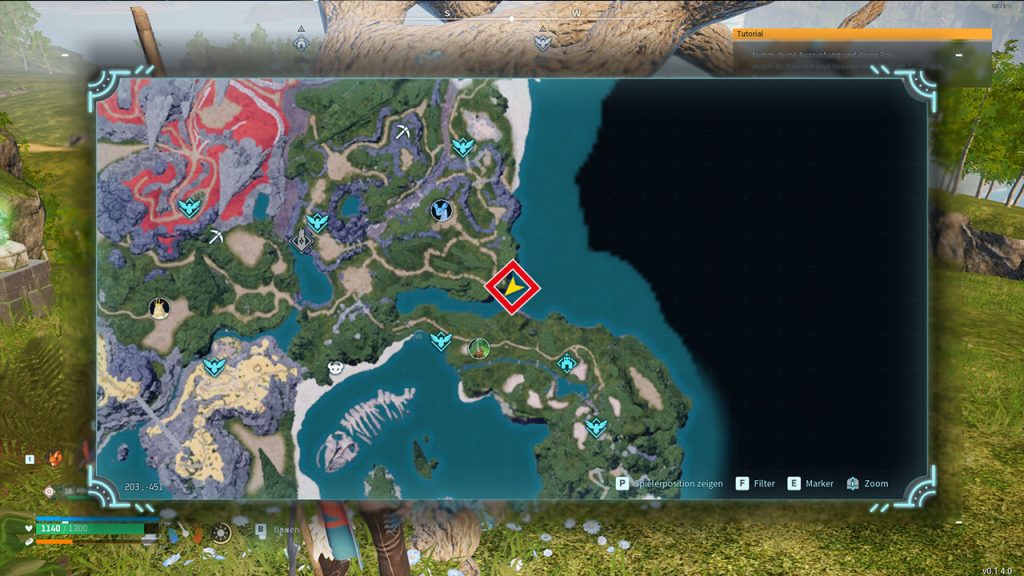
You can find ability fruits mainly on such trees.You can find such a tree, for example, near the spawn area.
As an electric Pal, Grizzbolt is also particularly effective against water Pals. So, you should probably avoid using those.
2. The classic: Tank and damage dealer
I have had particularly good experiences with a combination of tank and damage Pals.
For a good attack, especially Pals with an active damage ability, as listed above under Preparation, are suitable. Use this ability as often as possible. Let these Pals deal damage until they have very little health left.
Then summon a tank who will hold the position until the damage Pals are healed again. Repeat this process until you hopefully win the fight.
In my experience, the following Pals did the best job:
Attack: Foxparks (especially the ability Fox flamethrower)
Support: Rooby (increases Foxparks’ fire damage)
Tank: Dinossum
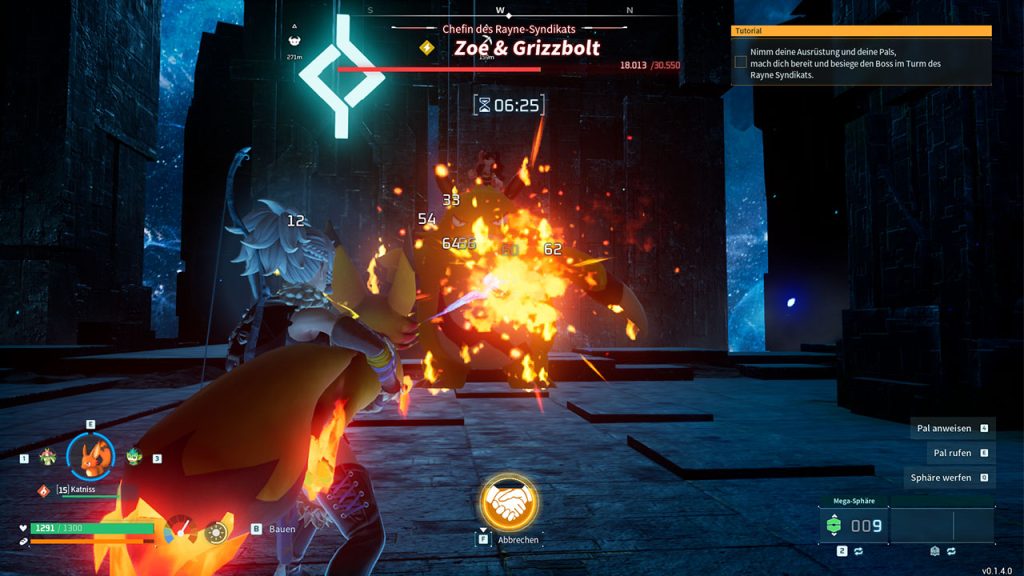
With my Foxparks as a flamethrower, I can deal a lot of damage.
Combo: For significant damage, you can also bring one or two ground-type Pals, as described in the previous tip.
3. The Daedream army
Another good tactic in the early game is a small army of Daedreams. If you have crafted a Daedream necklace (Level 8), all Daedreams in your team will support you in battle, even if you haven’t actively summoned them.
Since you can attack Grizzbolt with multiple Pals at the same time, you will deal damage much faster. This is especially recommended if you’re having trouble meeting the specified 10-minute time limit.
To further increase the damage of the Daedreams, you can also include a Hookrates in your team. This will enhance all shadow-type attacks.
Combo: If you have trouble staying alive, bring along a tank to keep Grizzbolt occupied.
We hope this guide was able to help you a bit and make the fight against Zoe and Grizzbolt easier. Have you already defeated the boss duo? What strategy did you use? Feel free to write it in the comments.
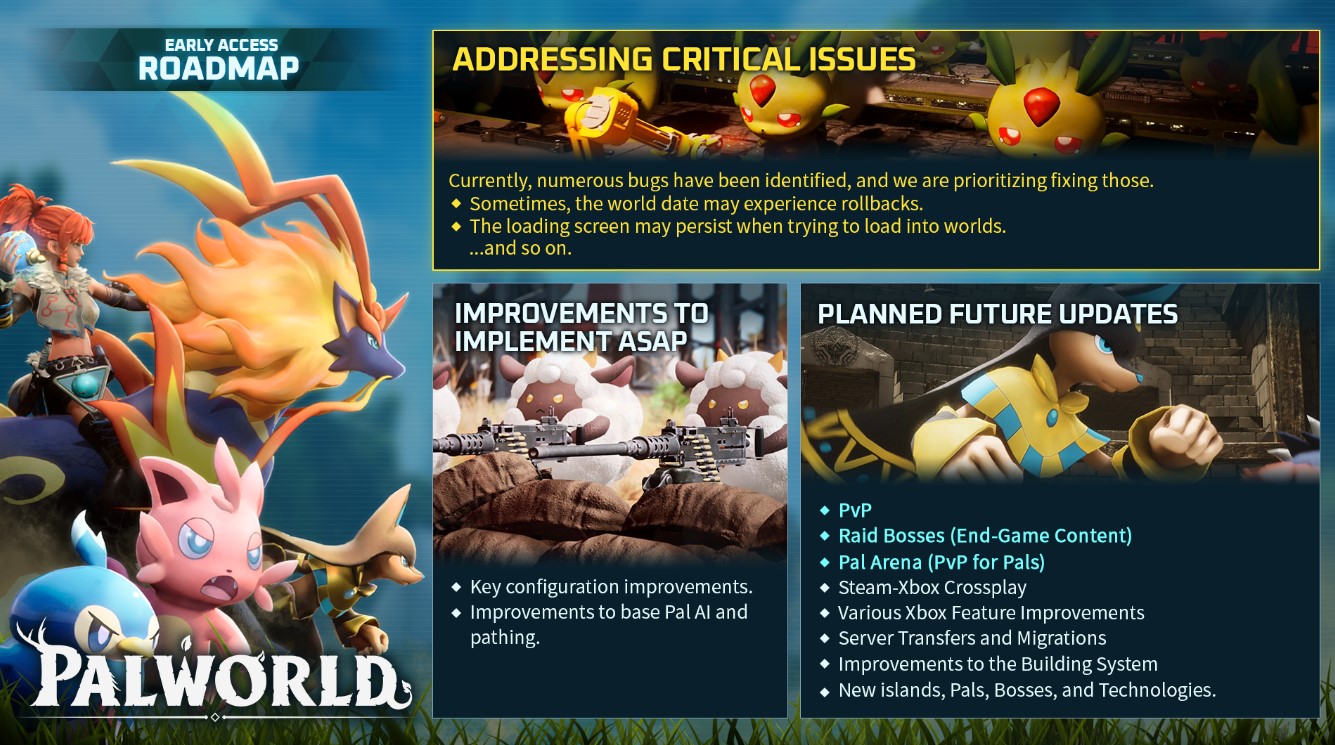
And even after you have defeated the first turn boss, there is still plenty to do. Moreover, Palworld is still in the early access phase. More content is certainly planned for the future. In a roadmap, the developer has revealed some initial plans. You can find out what these are with us on MeinMMO. Which of the announced features are you looking forward to?
This is an AI-powered translation. Some inaccuracies might exist.
For nearly two decades, only a single player has obtained this mount in World of Warcraft – now many are getting it if they put in the effort.
In World of Warcraft, there are now many hundreds of different mounts. Even for dedicated collectors, it has become nearly impossible to collect them all. The most coveted mounts are, of course, the rarest. Most players want to show off a mount that others do not own.
The absolute rarest mount has been obtained by only a single player in nearly 17 years. This is due to a Game Master who accidentally gave it out.
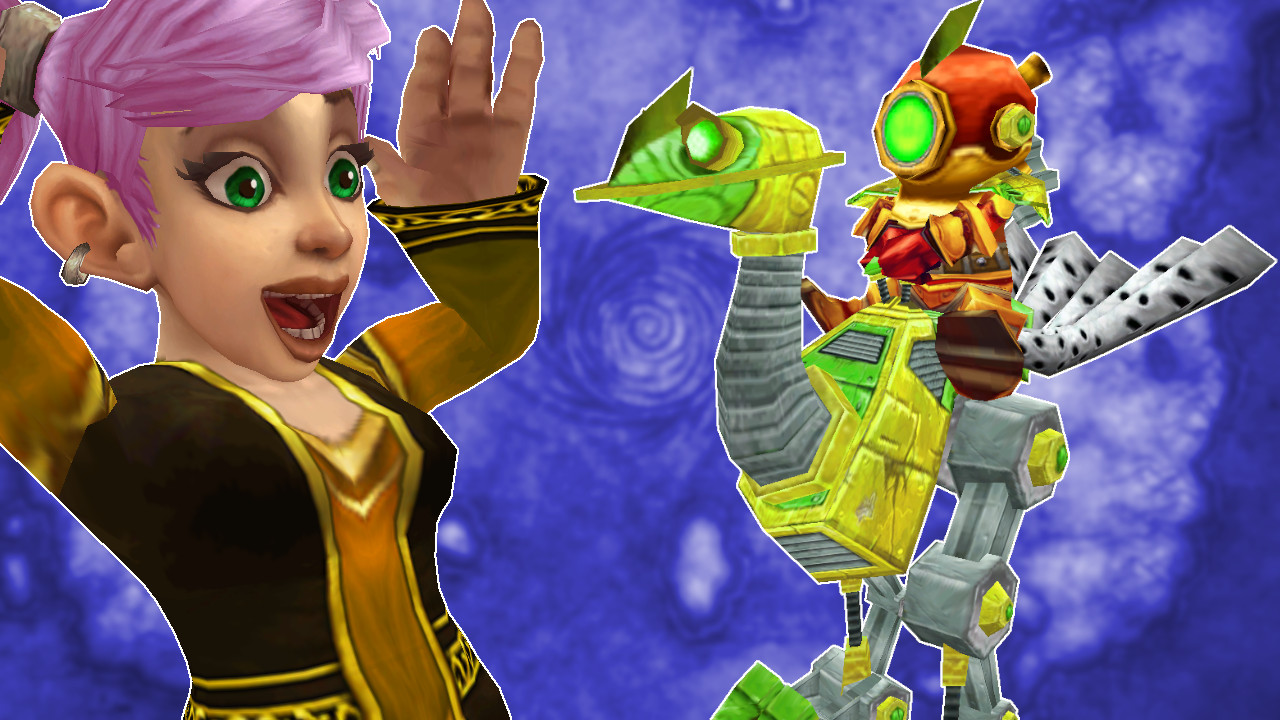
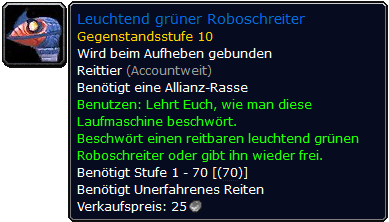
What mount is it? We’re talking about the “Fluorescent Green Mechanostrider.” As the name suggests, this is a mechanostrider and therefore belongs to the mounts of the gnomes. Unlike other mechanostriders, it has a greenish-yellow color and does not appear in this variant anywhere else in the game.
The rarest mount in WoW.
Why is this mount so rare? The mount is a recolor that has never been available in the game. The fluorescent green mechanostrider could not be bought from any NPC and did not exist as a drop. The mount was only in the game data, but it was never used – except for a single instance.
A player named Narshe came into possession of the mount when it was accidentally assigned to him by a Game Master. This was shortly after the launch of “The Burning Crusade,” over 17 years ago. The player had written a ticket because he had a problem with another mechanostrider. While fixing this bug, the Game Master accidentally assigned him the wrong mechanostrider – namely the fluorescent green variant.
For many years, Narshe was the only player to own this mount – making his account incredibly valuable.
At the time of Patch 6.2, Narshe reportedly tried to sell his account for a lot of money (via wowpedia). This has already been prohibited by the terms of service, and Blizzard became aware of it. In response, the mount was removed from Narshe’s collection, causing it to fade into obscurity once again.
Recommended editorial content
At this point you will find external content from Twitter that complements the article.
I consent to external content being displayed to me. Personal data can be transmitted to third party platforms.
Read more about our privacy policy.
Where can you get this mount now? Anyone hoping to finally add the mount to their collection in WoW Dragonflight should temper their excitement a bit. The “Fluorescent Green Mechanostrider” was found in the Season of Discovery. It drops from the final boss in Gnomeregan – which is a raid in the Season of Discovery, not just a simple dungeon.
More and more players are reporting on social media that they have come into possession of the mount and are accordingly excited about it. They say it is a “real classic experience” that this mount has appeared.
Whether the mount will be unlocked again in the “Retail” version of World of Warcraft, thus satisfying the collecting frenzy of mount fans, remains to be seen.
However, there is some hope – because the drop in the Season of Discovery shows at least that Blizzard is willing to work with game data that has existed unused for nearly 17 years.
The maximum capacity for Pokémon and items in Pokémon GO is limited. This has now been increased again.
What is the maximum storage capacity? The maximum storage capacity indicates how many Pokémon and items you can store in your bags at most. You can increase the initial capacity, which is quite low, up to the maximum storage capacity.
For this, you need the Item Bag to increase the item capacity and the item Pokémon Storage to increase the Pokémon capacity. You can find these for 200 PokéCoins each in the shop and they will increase your capacity by 50 Pokémon or items.
Trailer for the current season Timeless Travels
Start video
Pokémon GO shows the new season “Timeless Travels” in the trailer
Another increase of 500 slots each
What is the new maximum capacity? After the last increase of the maximum capacity in December 2023, the limits were at 7300 Pokémon and 6300 items. These have now been raised again by 500, so the new limits are 7800 Pokémon and 6800 items that you can store.
Who would benefit from such a high storage capacity? While these capacities are not reached or needed by most trainers, there are some trainers who will be pleased with the new increase. Especially for collectors who have what is called a Living Dex, where they keep a specimen of each Pokémon, or for collectors of all variants and forms, this increase can be interesting.
Such an increase can also be interesting for trainers who set up many teams for raids and the various battle leagues. Whether to collect even more Pokémon or to store more items, or to restore injured Pokémon after battles.
What about you? Are you happy about these increases or are they far from the capacities you need? How many Pokémon and items fit in your bag? Feel free to let us know in the comments. You can find an overview of the events in February 2024 in Pokémon GO on our site.
This is an AI-powered translation. Some inaccuracies might exist.
With Sons of the Forest, the popular survival game “The Forest” receives a successor that you can play cooperatively with your friends. But how many players can experience the title together?
In Sons of the Forest, you are trapped on a remote island where mutated cannibals roam and fight for your life with a selection of melee and ranged weapons. Your goal is to rescue a billionaire. However, you are not alone in this, as you can count on your friends for support.
How many players can play together? In Sons of the Forest, you can play together with up to 8 players and fight for survival.
However, this also means that you do not necessarily have to rush into the wilderness with eight players. The survival title is also playable with two, three, or even solo – but for now, only on Steam.
Sons of the Forest is the most awaited survival game on Steam – All information in 2 minutes
How was it with the predecessor? The Forest, the predecessor of Sons of the Forest, was already playable in co-op with up to eight players and even in local couch co-op.
However, playing together online had a catch: there was a host who started the session, and all players had to wait until the host was online before they could join the game world with the progress they had already made. Dedicated servers, as announced by genre competitor Nightingale recently, did not exist.
If you are interested in more about Sons of the Forest:
Before you dive into your adventure in Sons of the Forest, whether alone or cooperatively with friends, MeinMMO editor Maik Schneider has 5 tips for you on how to survive the first night in the survival game.
The night in Sons of the Forest can be terrifying, but with good preparation, you’ll be ready for the first sunset quickly. The developers have also provided 5 tips to help you survive the first night.
Sons of the Forest sees itself as a horror survival simulator and constantly puts pressure on you. If you’re not careful, your mutated neighbors will overrun your new camp right on the first night.
That’s why you’ll find 5 tips from the developers here to get you through the first night.
If you want a quick overview of the game, then start our video:
Start video
Sons of the Forest is the most awaited survival game on Steam – All information in 2 minutes
1. Tip: Collect everything and find a campsite
The game begins with a helicopter crash, and although your instinct tells you to leave this area immediately after the start – stay here and look around. Take everything you can carry. If necessary, come back later, but make sure to find a good campsite first.
Your camp should meet 3 requirements:
Normal weather conditions
Access to water
Many trees in the vicinity
At first, take a look around, but keep an eye on the sun and the time. Don’t take too long, and quickly look for a first campsite. If you’re playing coop, you can also split up.
While your first exploration, keep an eye out for healing herbs or important resources. You can also come back here and collect things later.
2. Tip: Build a shelter and mark your territory
Once you’ve found a cozy spot, chop down trees and build yourself a small shelter for the night. It doesn’t have to be anything special. What matters is that you have a roof over your head at night.
Because the nice cannibals from the neighborhood will surely have already set their first eyes on you.
Always keep an eye on your ammunition count and ensure a quick supply. Sometimes prefer the bow over a firearm. Ammunition for weapons is very limited.
Even on the first day, the curious neighbors could scare you. At first, they seem rather curious, at most somewhat skeptical. Make sure it stays that way for now.
Don’t panic and hit the first mutant that runs across your field of vision. Stay calm, leave the creatures alone for now, and only react when it becomes unavoidable.
If you still want to scare away the opponents, then assess the environment before a fight. Due to the dense forest, it can never be said for sure how many mutants you are actually facing.
The general rule should be: Remain passive toward the neighbors until they attack you or your shelter. Until then, you can calmly go about your tasks. And do not visit caves on the first day – no matter how tempting they may look.
Only confront the neighbors when it’s truly necessary.
5. Help Kelvin
One of the innovations of Sons of the Forest compared to its predecessor is NPC allies. And you can take the first buddy with you right from the start.
If you thoroughly inspect the crash site, you’ve probably already found Kelvin. If not – check back, he’s lying somewhere and needs your help to get up.
The crash has knocked Kelvin around quite a bit, so he can’t hear you. But with a notepad, you can give him commands to collect resources for you, carry, or even help in combat.
The tips come from a video with the developers of Sons of the Forest with some additions from us. If you want to see the English video yourself, you can find it here:
Recommended editorial content
At this point you will find external content from YouTube that complements the article.
I consent to external content being displayed to me. Personal data can be transmitted to third party platforms.
Read more about our privacy policy.
If you have any tips for starting out yourself, then leave a comment on the topic.
If you have time, mark your little kingdom with fences made of sticks. Initially, the boundaries will still command respect from the mutants. Additionally, you’ll immediately internalize the building system.
The tip is important from the first to the last day: Conserve ammunition. Whether initially for your bow or later for the heavy, modified shotgun – be mindful of your resources.
This applies not only to combat. Even when hunting, you should focus more on close combat. Generally, do not use ammunition if a problem can be solved with physical force.
Always keep an eye on your ammunition count and ensure a quick supply. Sometimes prefer the bow over a firearm. Ammunition for weapons is very limited.
Even on the first day, the curious neighbors could scare you. At first, they seem rather curious, at most somewhat skeptical. Make sure it stays that way for now.
Don’t panic and hit the first mutant that runs across your field of vision. Stay calm, leave the creatures alone for now, and only react when it becomes unavoidable.
If you still want to scare away the opponents, then assess the environment before a fight. Due to the dense forest, it can never be said for sure how many mutants you are actually facing.
The general rule should be: Remain passive toward the neighbors until they attack you or your shelter. Until then, you can calmly go about your tasks. And do not visit caves on the first day – no matter how tempting they may look.
Only confront the neighbors when it’s truly necessary.
5. Help Kelvin
One of the innovations of Sons of the Forest compared to its predecessor is NPC allies. And you can take the first buddy with you right from the start.
If you thoroughly inspect the crash site, you’ve probably already found Kelvin. If not – check back, he’s lying somewhere and needs your help to get up.
The crash has knocked Kelvin around quite a bit, so he can’t hear you. But with a notepad, you can give him commands to collect resources for you, carry, or even help in combat.
The tips come from a video with the developers of Sons of the Forest with some additions from us. If you want to see the English video yourself, you can find it here:
Recommended editorial content
At this point you will find external content from YouTube that complements the article.
I consent to external content being displayed to me. Personal data can be transmitted to third party platforms.
Read more about our privacy policy.
Helldivers 2 has become a surprise hit on Steam and PS5, but what makes the co-op shooter so good?
Helldivers 2 has surprisingly launched successfully and had over 150,000 players on Steam within a few days. However, the success of the co-op shooter is no accident, as it has various reasons.
MeinMMO editor Dariusz Müller has also looked at Helldivers 2 and spent some hours in co-op. Here you will find out the 5 reasons he attributes to the success of Helldivers 2.
1. Fun of flattening alien hordes with friends
Helldivers 2 skips PvP. The head of the development studio has even explained that they want to avoid toxicity within the community with this – and it really works well. The decision to completely focus on PvE works excellently within the game principle.
The shooter simply plays very relaxed, even when the gameplay is chaotic, stressful, and overwhelming. The masses of enemies are the adversary that players must collectively defeat. I have not once experienced that any of my teammates became toxic or salty. It didn’t matter whether I played with friends or randoms. I assume this is because Helldivers is just fun.
Even though the game faced some problems at launch, it gets the most important aspects right. The sound design is well done, feedback on hits is good, and shots feel powerful and impactful.
We were able to focus solely on playing and were so busy that there weren’t many occasions to think about other things. We started the game, were continuously occupied for 2-3 hours, being well entertained, and continued the next day. There was no breeding ground for frustration or complaining.
Helldivers 2 is dripping with humor. The entire game is a parody of the “world police”. Every sentence in the game mocks the idea of “We bring peace, democracy, and freedom to a foreign world – if necessary, also through the use of firearms and artillery”.
Sure, humor is extremely subjective, and not everyone finds this parodic approach funny, but if it resonates with your humor, then this is definitely one of Helldivers’ strengths.
Overall, the shooter aims to entertain us players: You should have fun and enjoy a good time with friends. The cooperative PvE shooting and the humor go hand in hand.
Start video
Helldivers 2 Announce Trailer PS5 PC
3. The reward system of Helldivers respects my time
Helldivers 2 is not a loot shooter. Everything we need we get at the end of a mission/operation or collect it together. You are not dependent on random drop rates or luck. I don’t have to force my friends to complete a specific mission with me for the tenth time because that pesky item just won’t drop.
Accordingly, it doesn’t matter whether you arrive at a target first or last. There’s no rush needed to not get all the loot snatched away in front of your nose. Similarly, you don’t have to wait for your teammates until they have picked something up before you can keep going. Everyone gets what another picks up. You don’t need to collect samples from the ground; it’s enough if your teammate does that.
This also completely eliminates sorting out bad loot. I can simply move from one mission to the next without having to sort out my inventory or equipment. Helldivers offers seamless action and respects my time.
4. The difficulty levels offer the ideal challenge
Helldivers 2 offers 9 different difficulty levels. We start on relatively easy settings, but as we level up, the difficulty levels also increase. Eventually, there comes a point where the gameplay provides a really tough challenge and you have to coordinate with your team.
This makes grinding and repeating missions interesting even for experienced shooter players because carelessness or wrong decisions are mercilessly punished. Thoughtless shooting can cost a mission and minutes of progress – but is better rewarded for it.
However, since you can choose the difficulty levels independently and lower them if needed, you don’t have to struggle with insurmountable challenges if you don’t want to. Just choose a level that is ideal for you and most fun, and play the shooter at your own pace.
5. Good balancing – especially regarding team coordination
The game seems to be very well balanced so far. There will always be weapons, gadgets, or loadouts that are stronger than others. That’s inevitable. But Helldivers seems to have found a great mix – especially when coordinating the equipment of the entire team to successfully complete a mission at a certain difficulty level.
At some point, simply bringing the heaviest weapons is no longer the most effective approach. Sometimes it will really be necessary to think and discuss which team member should take which equipment.
For instance, one person might have a backpack to carry ammunition and supply you with reinforcements during an intense fight. Another player, on the other hand, might carry a drone that automatically shoots at enemies and helps you fend off the adds.
If you are currently playing Helldivers 2 and are also enjoying the co-op shooter, you can currently secure a free armor whose design roughly resembles the suit of the Master Chiefs from Halo:Helldivers 2: Twitch Drops – How to secure the free armor
This is an AI-powered translation. Some inaccuracies might exist.
As in the first part, Sons of the Forest offers various endings. However, there is one ending that requires more effort and can be easily missed. MeinMMO reveals how to achieve the “secret” ending.
In Sons of the Forest, there is a special ending that you cannot trigger easily. Normally, at the end, you have the option to make a decision and choose your ending scene. However, there is also a secret ending that includes a Steam achievement, which is not easy to reach.
Spoiler Alert: In the text, you will learn how Sons of the Forest ends and what you can find along the way. If you want to experience the story yourself, you should not read further!
In the video, you will find all the information about Sons of the Forest in 2 minutes – also a handy buffer before any possible spoilers!
Start video
Sons of the Forest is the most awaited survival game on Steam – All information in 2 minutes
Sons of the Forest: Virginia Ending – What You Need to Do
What is the ending? At the end of Sons of the Forest, you have the choice to either stay on the island or escape. Depending on your decision, you will have different endings and earn different achievements:
If you pick up your backpack again, you stay on the island and receive the “Fighting Demons” achievement, and the helicopter leaves without you.
If you go straight to the helicopter, you escape and receive the “Fought Demons” achievement. If your nice companion Kelvin is still alive, he will sit next to you.
In the third, secret ending, the mutated lady Virginia can also escape with you, and even a romance is hinted at. However, there are currently various reports about how exactly to achieve this ending.
This is how you achieve the secret ending: In any case, you need to find Virginia and befriend her for the ending. Some players report that just doing that triggered the secret ending for them. However, they probably fulfilled other requirements by chance.
Because actually, you need to fully earn Virginia’s trust. This is marked by the achievement “Chivalry Is Not Dead.” Here are the steps you need to take to fully gain Virginia’s trust:
meet Virginia and befriend her
give her a weapon – she can carry a pistol and shotgun
give Virginia a GPS tracker, which you can find at “Team B”
find Virginia’s dress and give it to her – it is located in the bunker labeled “Food and Dining” (requires the VIP and maintenance keycard) – you will find the dress in the same bunker as the crossbow
build a shelter, a cabin with a bed should suffice
rescue Virginia when she is captured by cannibals
Virginia should be nearby when you enter the last cave, and you must not pick up the backpack at the end. The secret ending will reward you with the achievement “Keep Your Friends Close.”
You will save all available NPCs with this ending – Kelvin, Virginia, and the man you were supposed to rescue:
Kevin “Papaplatte” Teller tried his hand on Twitch in his stream from February 9, 2024, at the Steam game “Contraband Police.” However, even the tutorial proved to be trickier than expected – at least if you just can’t help but attack innocents.
What kind of game is he playing? Contraband Police puts players in the role of a border police officer in a communist country in the 1980s. You are tasked with checking the documents of visitors and deciding on their entry, apprehending smugglers, and, on top of that, stopping the rebels of the “Bloody Fist.”
This whole thing is reminiscent of the “claustrophobic exception-adventure” Papers, Please (via GameStar), but in 3D and with gunfights. Contraband Police was released on March 8, 2023, on Steam and enjoys a rating of “Very Positive” with 95% positive reviews there.
Good reason for Twitch streamer Papaplatte to take a look at the game.
Start video
Check documents, catch smugglers, and prevent a rebellion in Contraband Police
“I’m in the tutorial, bro”
How did it go for Papaplatte? At first, very promising. The streamer masters the first checks brilliantly and ends the day with a “perfect” score before retreating to his trailer for a well-deserved evening off.
But already on the second day, difficulties arise: Papaplatte actually wanted to let the arrested smuggler escape from his cell but accidentally attacks him with his knife. “Bro, I’m in the tutorial,” comments the Twitch streamer on his first “Game Over” screen.
For the next nearly two and a half hours, Papaplatte and his viewers can admire the “Game Lost” title several times while his character repeatedly relives his first days at work, just like in “Groundhog Day.”
Oh, a pitchfork, what do we do with that? First, stab the next best person and promptly get shot, of course. “I won’t kill anyone anymore,” Papaplatte promises regretfully as he starts day 2 again. However, the good intention is quickly forgotten when a trader is actually reckless enough to sell the Twitch streamer a firearm.
“What do we need weapons for?” asks Papaplatte as he shoots the trader. Back to square one. The Twitch streamer announces: “I need to stop messing up, real talk, we’ve been in the tutorial for an hour.” There’s a cut, and in the next scene, Papaplatte beats an innocent driver with a crowbar. Well, maybe next time.
You can watch a recording of the stream here:
Recommended editorial content
At this point you will find external content from YouTube that complements the article.
I consent to external content being displayed to me. Personal data can be transmitted to third party platforms.
Read more about our privacy policy.
Streamer fails for two and a half hours, fans love it
What does Papaplatte say about the game? After almost two and a half hours, Papaplatte has mastered the tutorial and his first real workday. Satisfied with his performance for the day, he closes Contraband Police and delivers his verdict: It was a lot of fun, would love to do it again.
And the Twitch streamer’s viewers are also enjoying the fun. The highlight reel of the stream is currently ranked second in the trending section for Gaming on YouTube, and in the comments, many fans are calling for more content for Contraband Police. However, some have also expressed sympathy for the chat that had to witness it all live.
No one knows better than Trymacs that Twitch is less about gaming skills and more about entertainment value. He describes himself as a “streamer without skill” and proves this joyfully at every opportunity, such as in the new survival hit Enshrouded:
Those who work a lot in Sons of the Forest and are working on the security of their home consume a lot of energy. However, not everyone can or wants to wait for the night to rest.
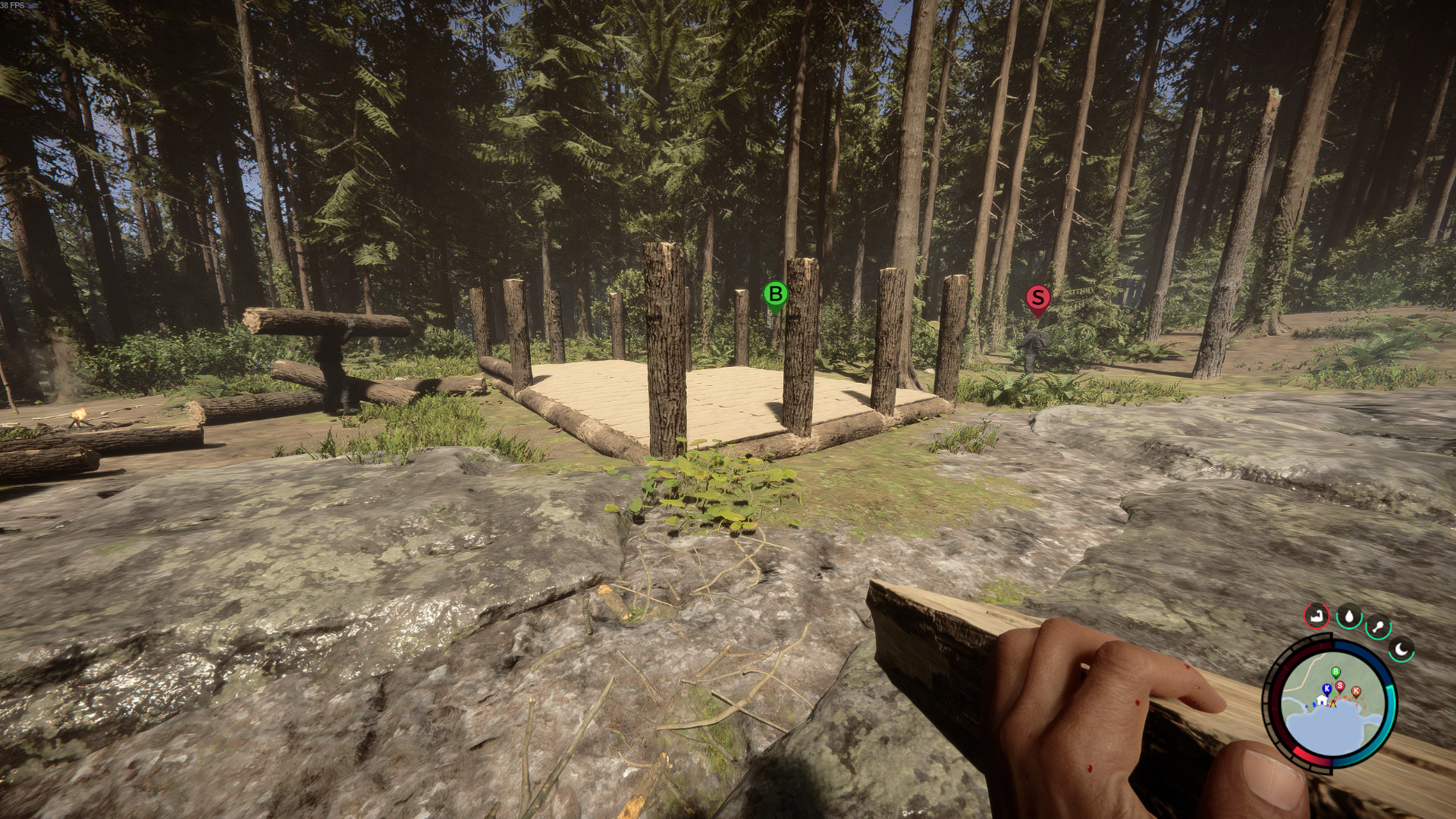
What is energy? In Sons of the Forest, you have four symbols at the bottom right corner of your screen, directly above the minimap, displaying the physical state of your character. On the far right, there is a symbol that looks like a crescent moon. Around this symbol is a circle, similar to hunger and thirst, indicating how much energy you have left.
If the energy is depleted, you will mainly notice it on your stamina bar. It’s significantly smaller and consumed more quickly when your energy is low.
Once your energy is depleted, the game recommends that you should sleep in a tent or bed. However, this takes several hours.
Start video
Sons of the Forest: Fear, Laughter and a Teamkill after 30 Seconds – How Crazy Our First Hours Were
How do I regenerate energy without sleeping? If you don’t want to sleep in Sons of the Forest or don’t want to wait for night, you can remedy the situation with simple structures.
Simply build a bench or a chair and sit down for a few minutes. This will regenerate your energy while you occupy one of the seating areas.
However, sitting regeneration of your physical fitness takes several minutes, and the in-game time continues to progress. Additionally, you can still be attacked by enemies during this time – a certain MeinMMO author might have experienced going briefly to the kitchen while his character was sitting on the bench and ended up as a cannibal snack.
How do I build a bench or a chair? The building system in Sons of the Forest has two menus:
free building
building with blueprints
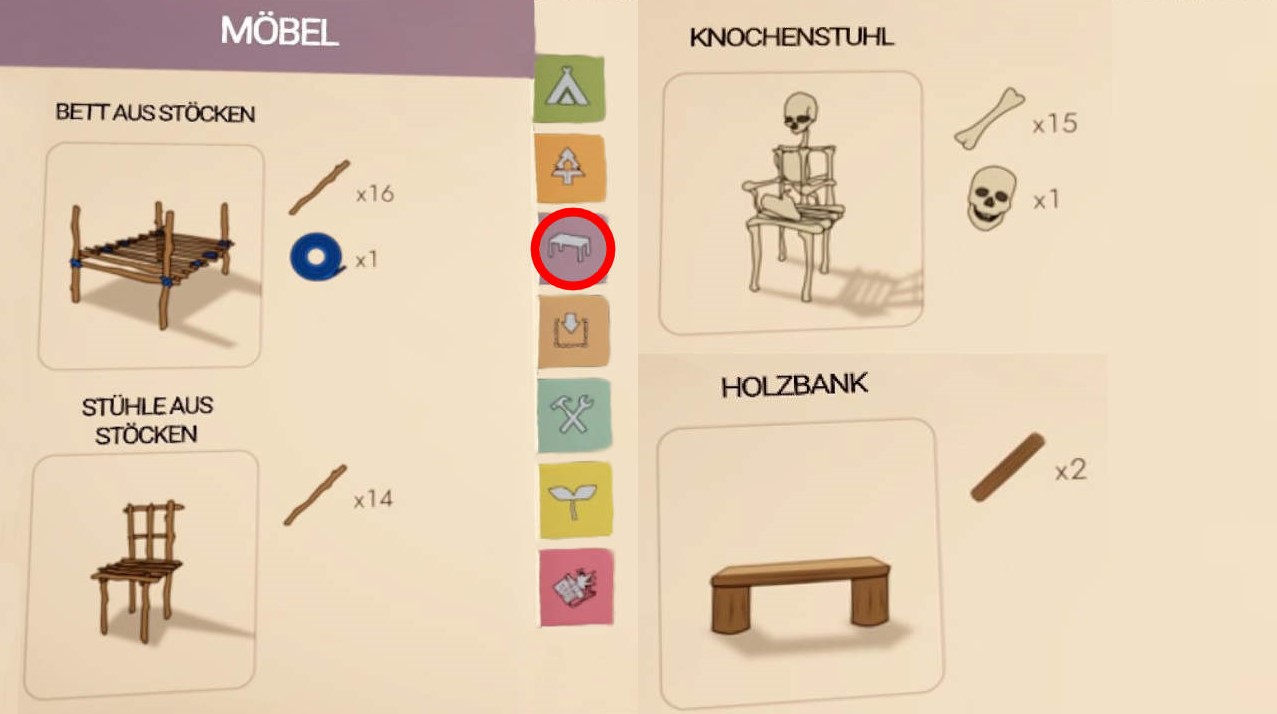
If you want to build a bench or a chair, you need to switch to the blueprint menu. You do this on the keyboard with the X key and with the controller by pressing the square (PlayStation) or X button (Xbox controller).
You can find the furniture pieces under the third point. The wooden chair is on page 1, the bone chair on page 2, and the bench on page 4.
Select the blueprint for the respective structure and place it at your desired location. Then you need to gather the necessary resources for construction:
the wooden chair requires 14 sticks
the bone chair requires 15 bones and a skull
the bench requires 2 logs
What is the benefit of regenerating energy without sleeping? From our own experiences as children of the forest, there were times when we went to bed too early. This sometimes meant it was still pitch dark when we awoke.
If you still want to build something, your energy is depleted, and it’s too early for bed, then the bench appears to be a sensible alternative. And while you take a break, Kelvin can continue working – unless you have a treehouse. Then you should be careful.
Sons of the Forest has been launched in Early Access on Steam and is captivating hundreds of thousands of players. However, if you play purposefully, you can finish it in just 10 hours. What else is there to do? 5 tips for more fun in the Forest.
How long does it take to complete? Sons of the Forest is a survival game with an exploration focus. There is a vast world and deep caves to discover, as well as neighbors to ambush and mutants to annoy.
However, the game can also end quite quickly. If you purposefully explore the correct caves or are constantly exploring without paying attention to other things, you could run out of content in 10 to 15 hours.
But if you take your time, you can easily double that. MeinMMO has therefore prepared 5 tips for you to help you enjoy the Forest adventure a bit longer.
The MeinMMO editorial team also plays Sons of the Forest. You can check out the intro from our video producer Anna in the video:
Start video
Sons of the Forest: Fear, Laughter and a Teamkill after 30 Seconds – How Crazy Our First Hours Were
Number 1: Find all weapons and attachments
There are 18 weapons to find on the map – some are found in pairs. Only if you explore the entire map and its Points of Interest will you ultimately have the complete arsenal.
Check your inventory to see if you have actually looted all available weapons:
Additionally, there are a few attachments for the pistol and shotgun, but not much can be found yet:
5x attachment mounts for shotguns
2x attachment mounts for pistols
Flashlight attachment
Silencer
Laser attachment
Examine every point displayed on the map. If you want to explore purposefully, here is a map with the POIs of Sons of the Forest: mapgenie.io – activate the points “Weapons” and “Utility Item”.
Number 2: Make the most of the building system
In Sons of the Forest, building a proper base offers only a few advantages. However, the building system gives you a lot of freedom, even though it is currently not very extensive.
In your houses, you can completely forgo blueprints and build a wonderfully cozy log cabin. Or an entirely extravagant treehouse that engulfs the entire surrounding forest.
However, your neighbors are not particularly happy about the new properties popping up on the island. Building well is really only possible in cooperative mode when fellow players help fend off attacks while carrying logs on the side.
Or you can start a new game with “Peaceful” as the difficulty level or turn the enemies completely “OFF”. Then you can peacefully build your little log cabin paradise and enjoy the fun building system.
The building system offers you a lot of freedom – check your options in the building manual with the button “B”.
Number 3: Go sledding
For 1,000 printer resin, you can get a sled from the 3D printer of your choice. The sled helps you survive great heights unharmed and quickly race down a slope.
In cooperative mode, you should also have a race or explore the mountain together and find the fastest way down.
This way, you can have a fun outing across the island, discover some nice views, and find out that the sled is totally OP and likely beats any sports car – at least when going downhill.
Kelvin and Virginia support you in your island adventures. While Kelvin is there from the start and assists you as a diligent hand, Virginia is excellent for defending the base.
She slowly becomes more comfortable with you. Later, she can be equipped with a weapon, and her third arm seems to be equipped with an aimbot. With her headshot rate, the anti-cheat from CoD: Warzone would probably have become suspicious.
Players have also discovered that there is a secret ending with Virginia. You can find more about it here:
Sons of the Forest started as an improved version of The Forest, but does not have the scope of the first part. If you don’t know the predecessor and haven’t had enough of the gameplay, then play Forest 1 now.
The graphics are somewhat dated, but not ugly. You will recognize some mechanics from Sons of the Forest, but also notice that Forest 1 has much deeper mechanics in many areas.
Additionally, there are many mods available online to enhance and/or expand the gameplay experience of Forest 1. If you haven’t had enough of the forest – then go find Timmy.
Sons of the Forest currently offers no way to build proper gates for your palisade walls. But you can trick a bit – here you will find 3 variants.
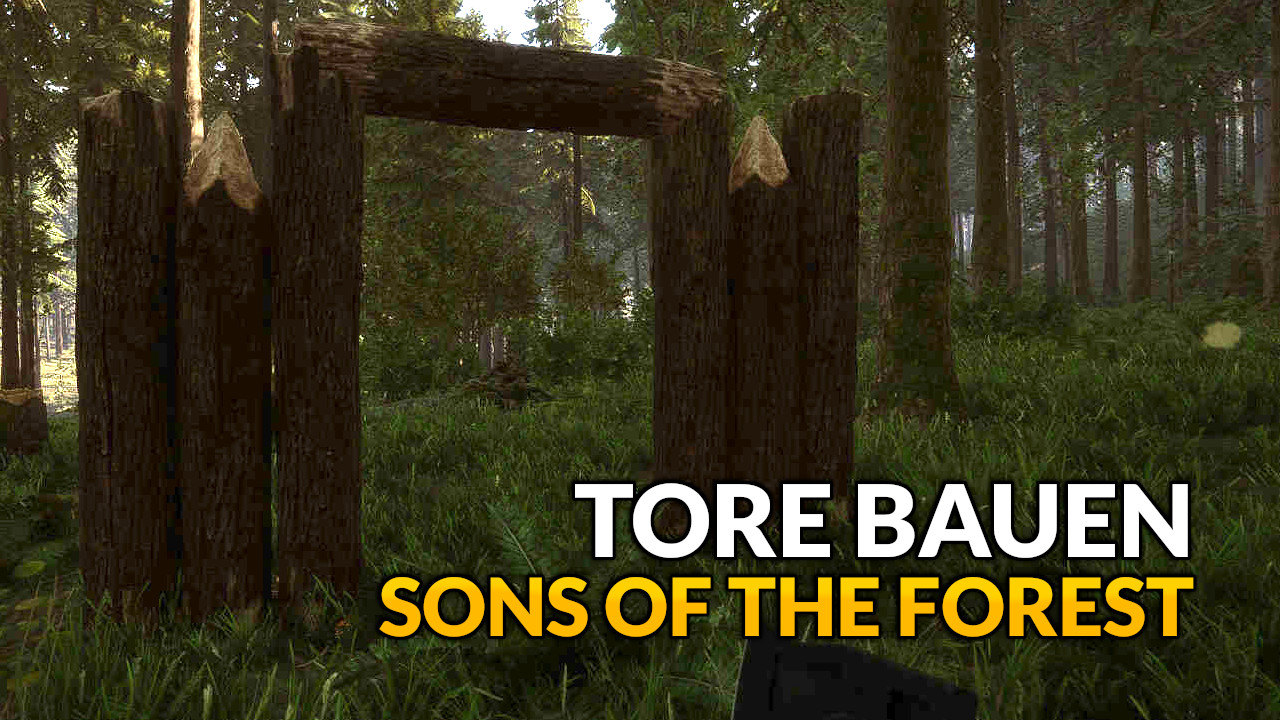
What kind of gates can you build? If you want to equip your palisades with gates, you currently have 3 options:
Offset gate with door
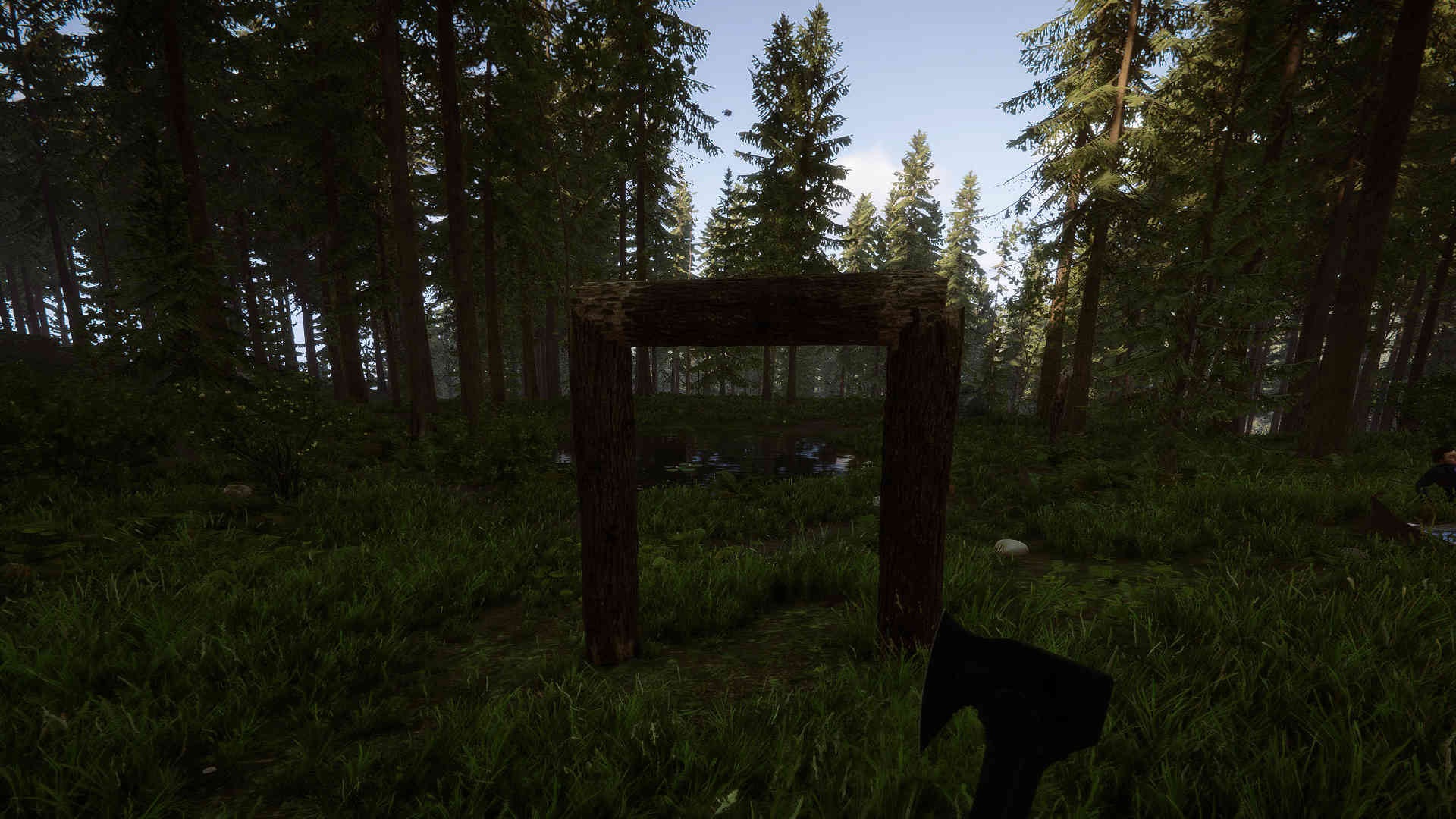
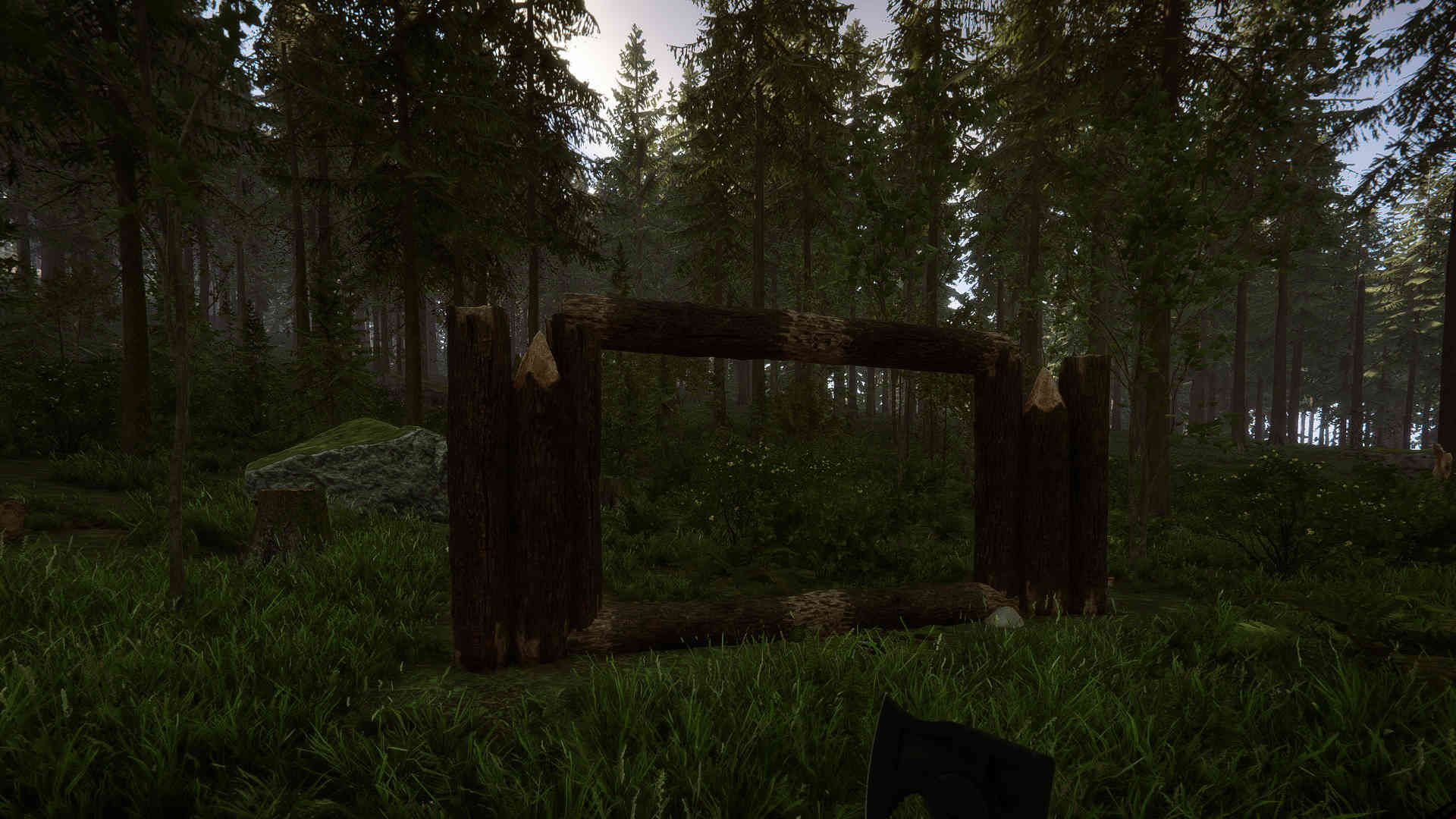
Simple frame
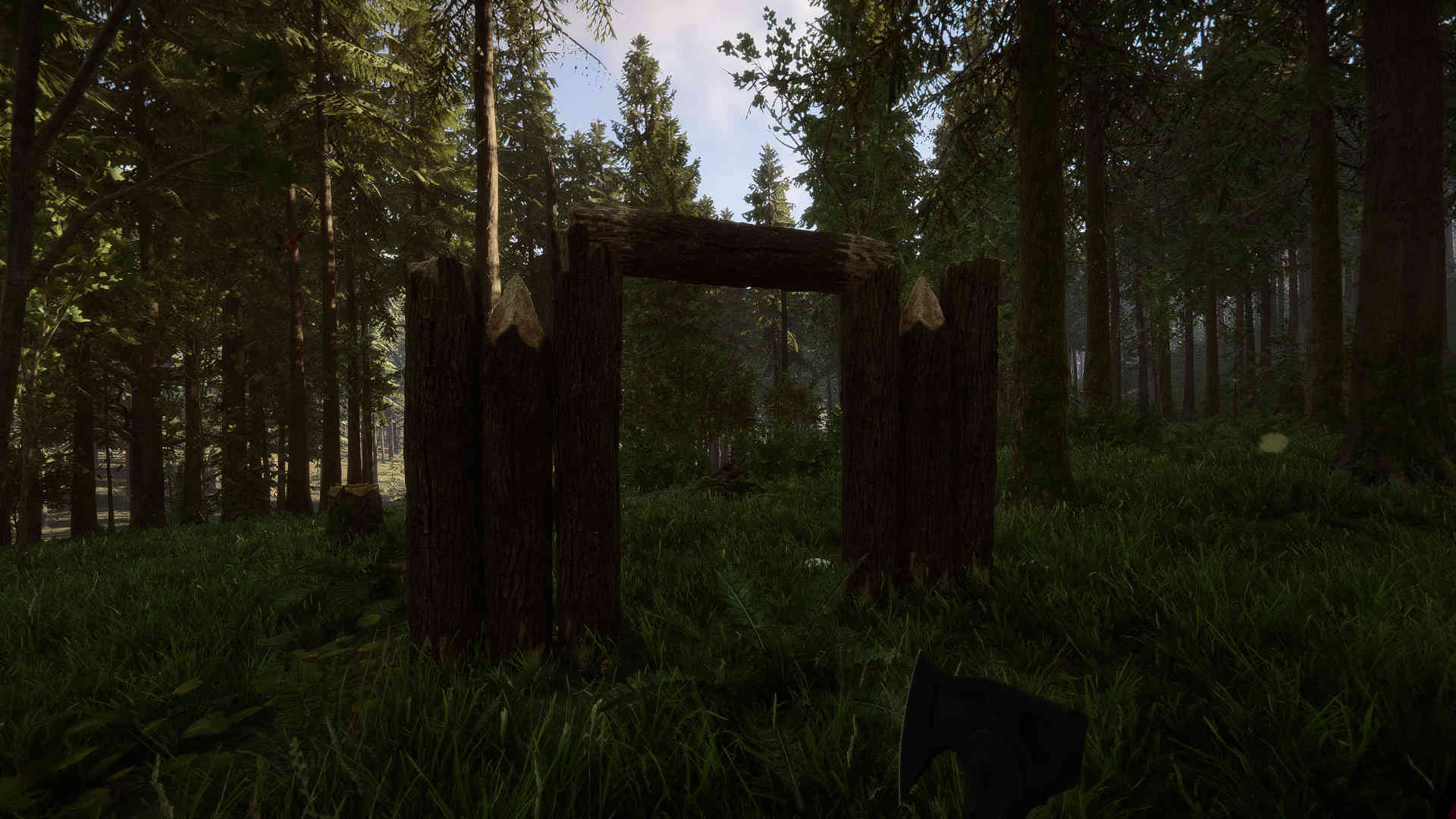
Double frame
Gates 2 and 3 are open gates that provide you with a good appearance. Only with gate 1 can you actually close your palisades. Here you will find instructions for all 3 variants with pictures. For all gates, you only need logs. Are you looking for tips for beginners? Then start our video:
Start video
5 Tips for a Good Start in Sons of the Forest
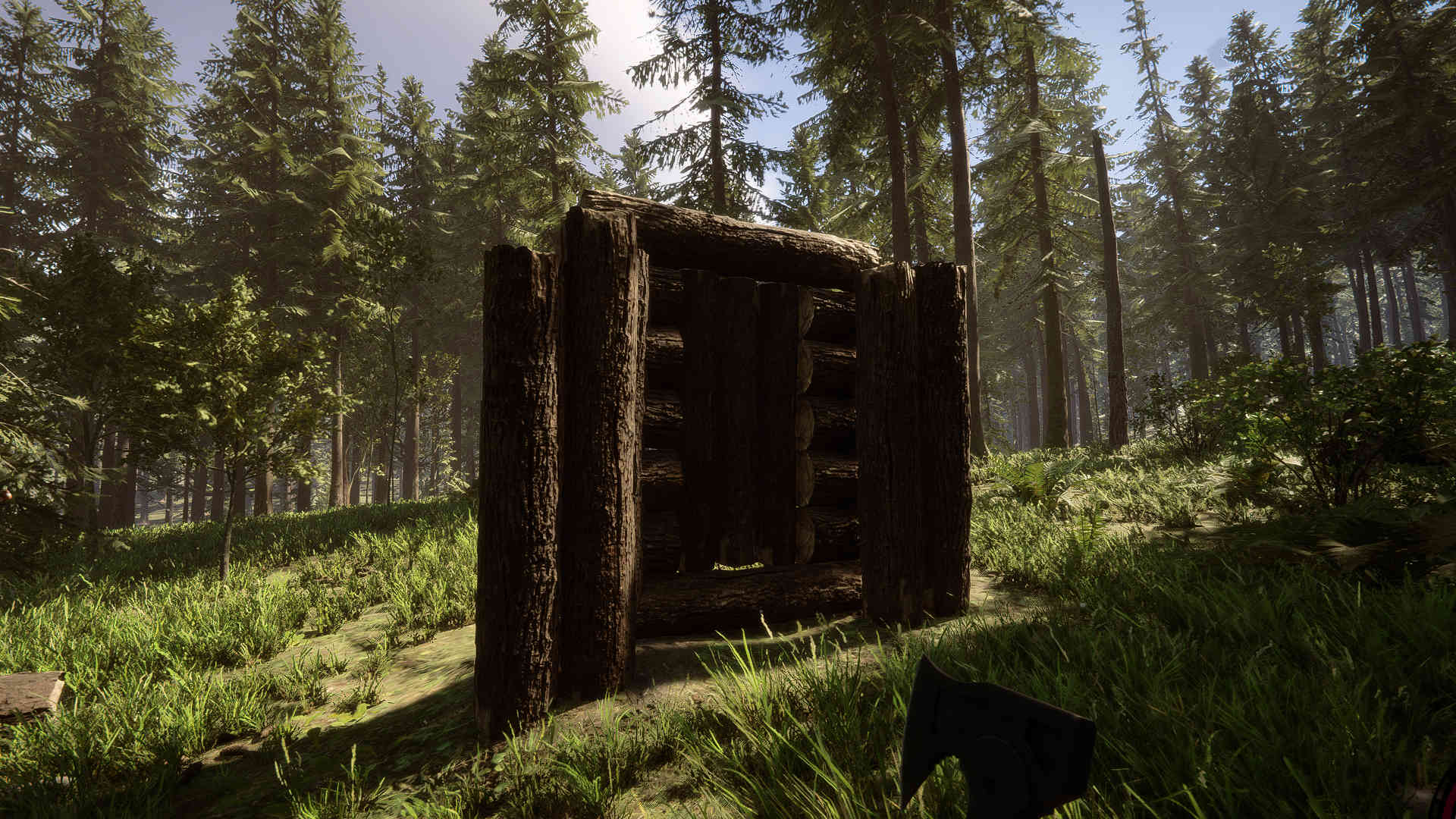
Building gates: Offset gate with door
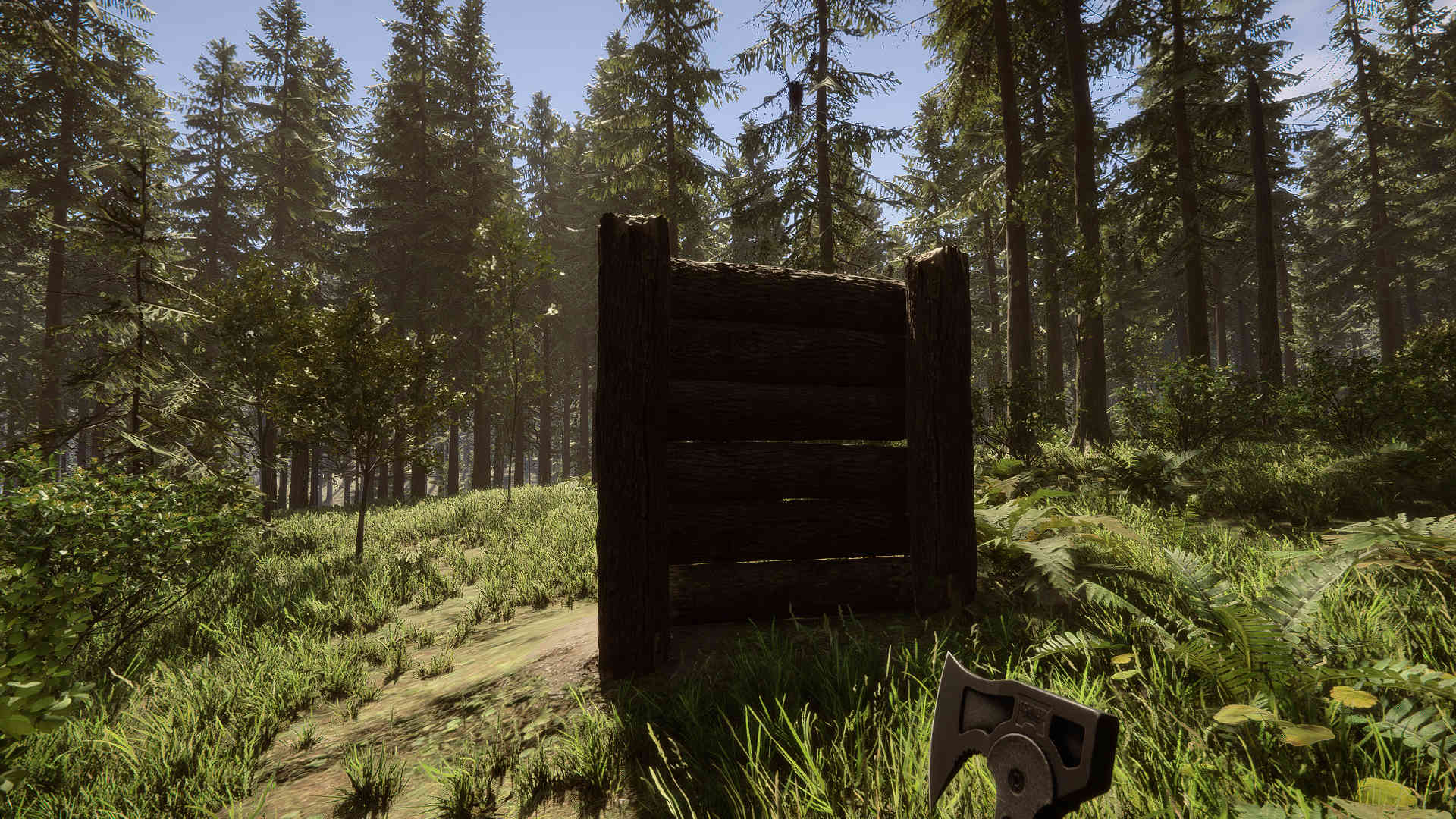
For this gate, you will build an extra wall that stands as close as possible to the palisade.
How do you build the gate? Grab some logs and let’s go:
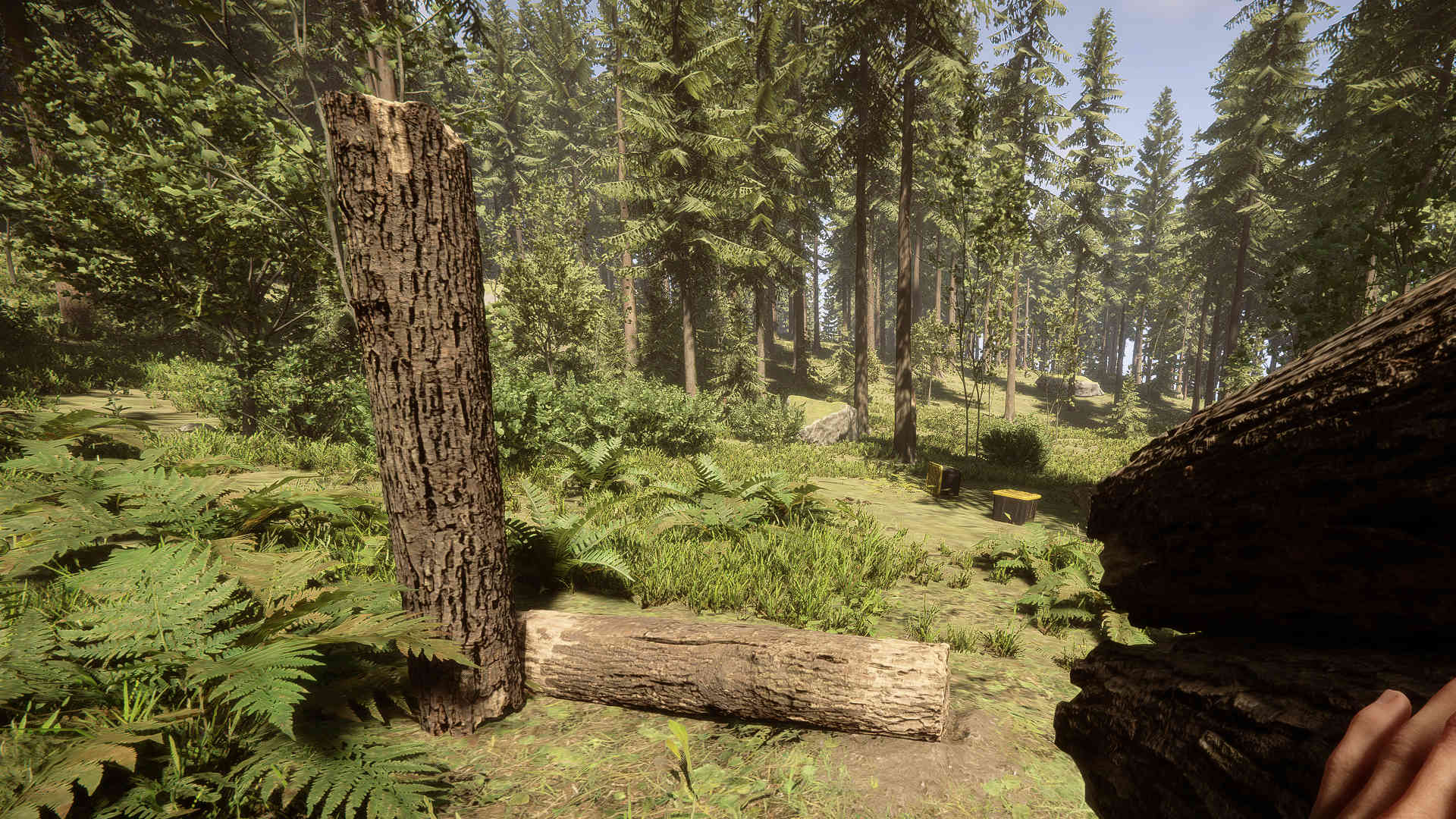
Stand a log upright
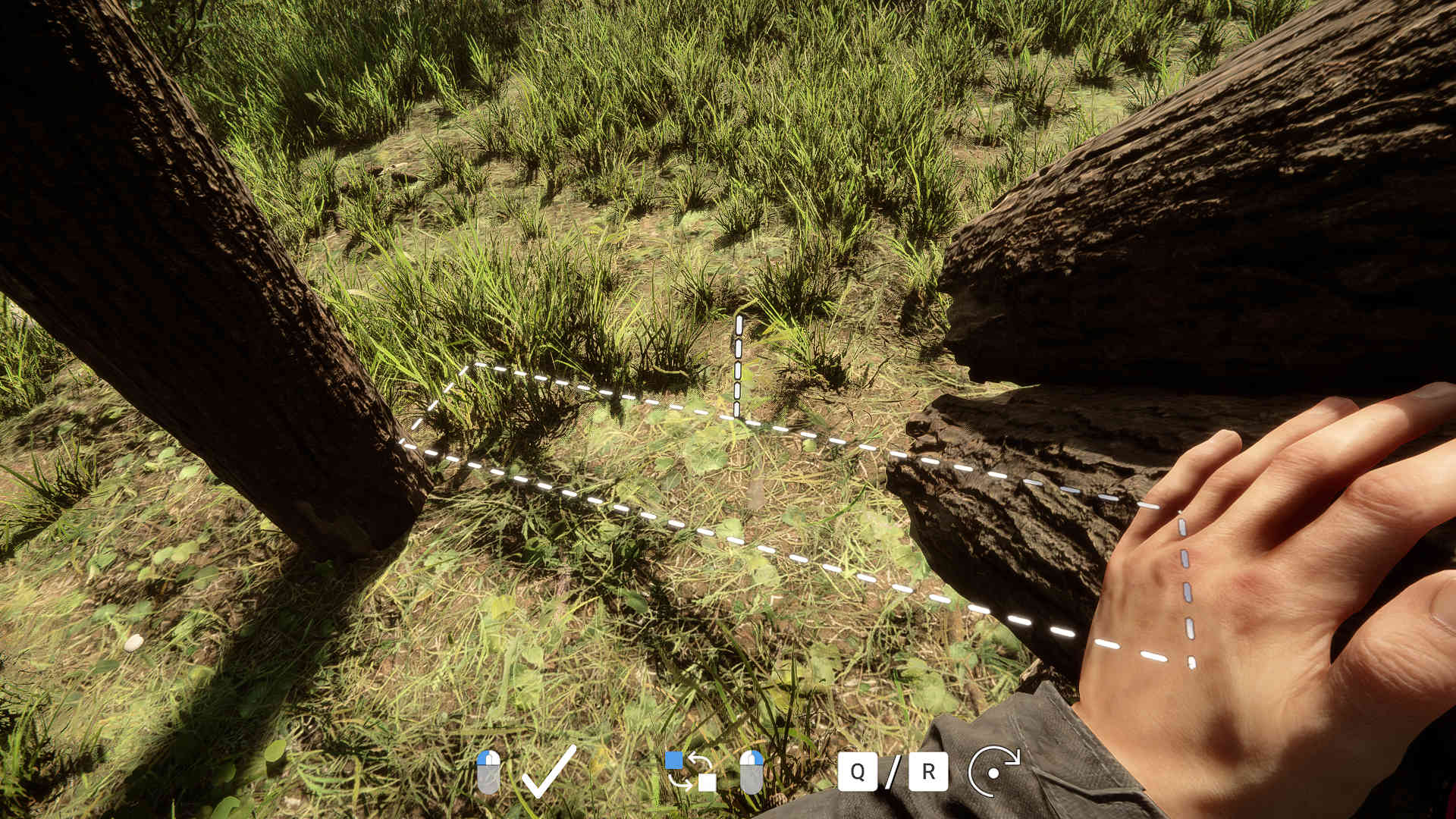
Place another log upright – use the dashed line for the appropriate distance
Lay a log horizontally on the ground: This log should lie exactly between the two upright logs – slightly offset but as close as possible
Now stack a total of 7 logs on the horizontal log
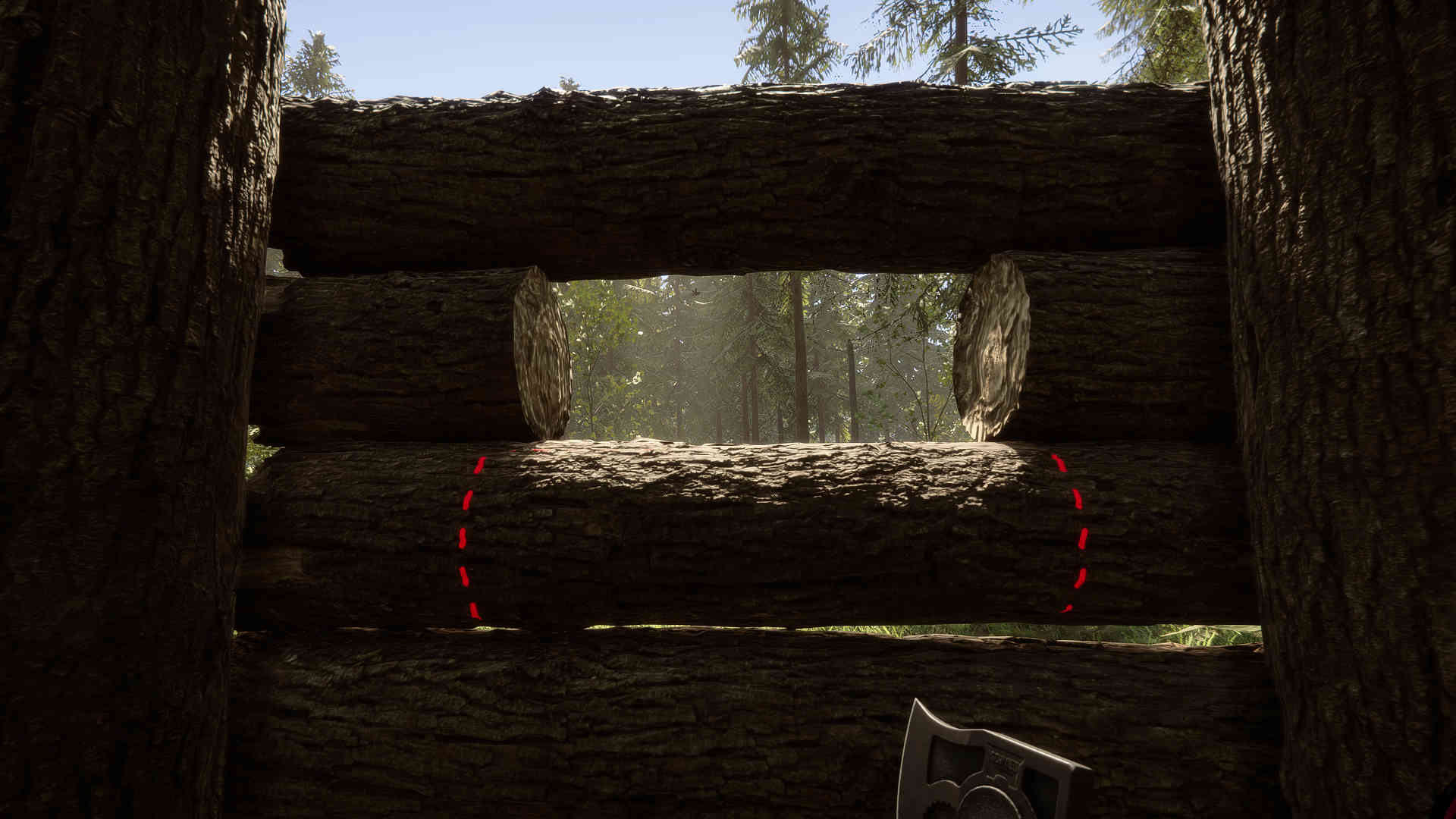
Approach with the axe closer and remove half of the 5 middle logs – you will get a corresponding marking when you are close enough with the axe
You can now fill the opening with half logs
On the left and right, you can extend the upright logs into palisades
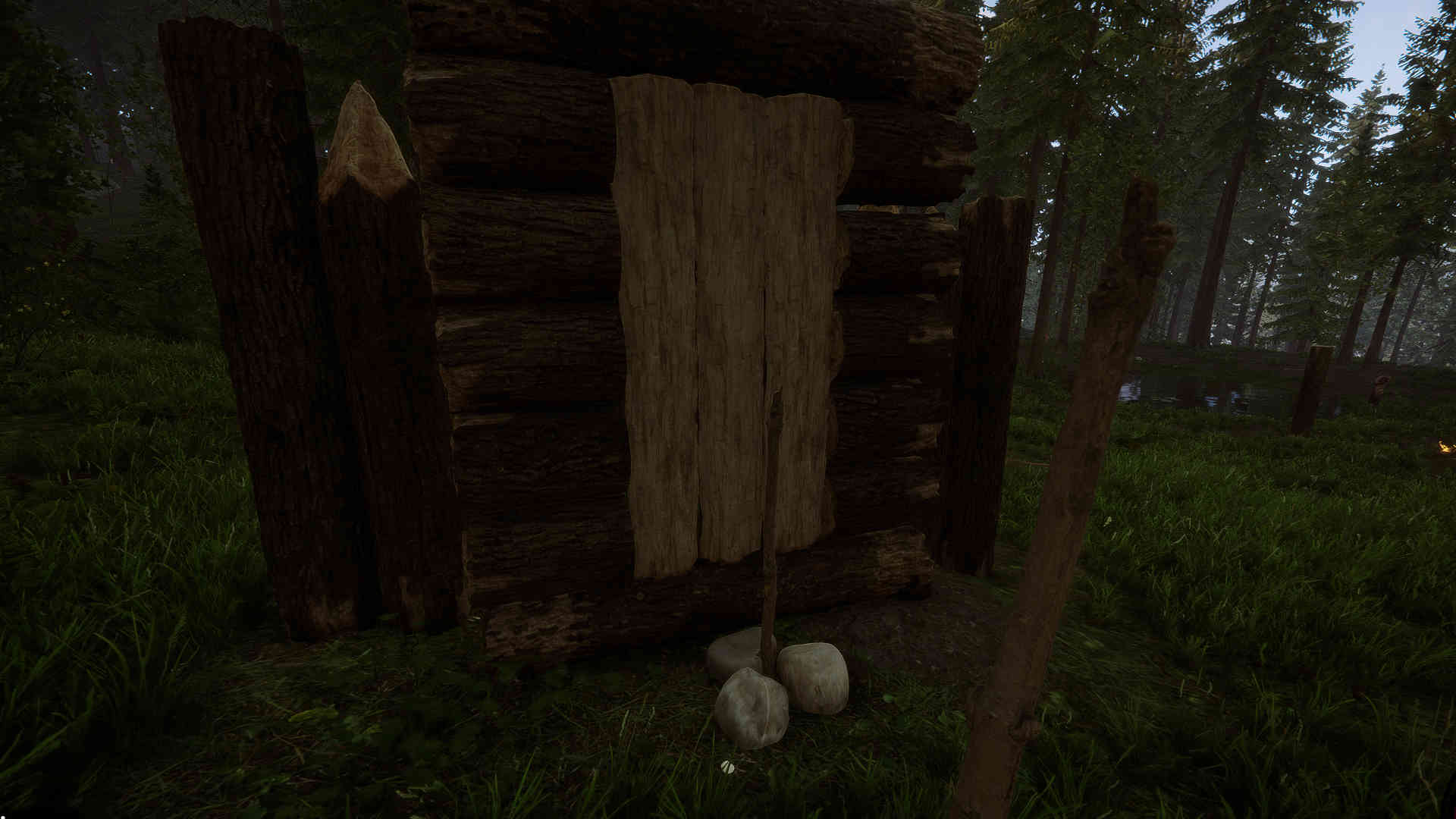
If you want to close the gate, there is a little trick. Place a stick close to the door and secure it with stones. Towards the stick, the door can no longer be opened:
The makeshift door lock in Sons of the Forest
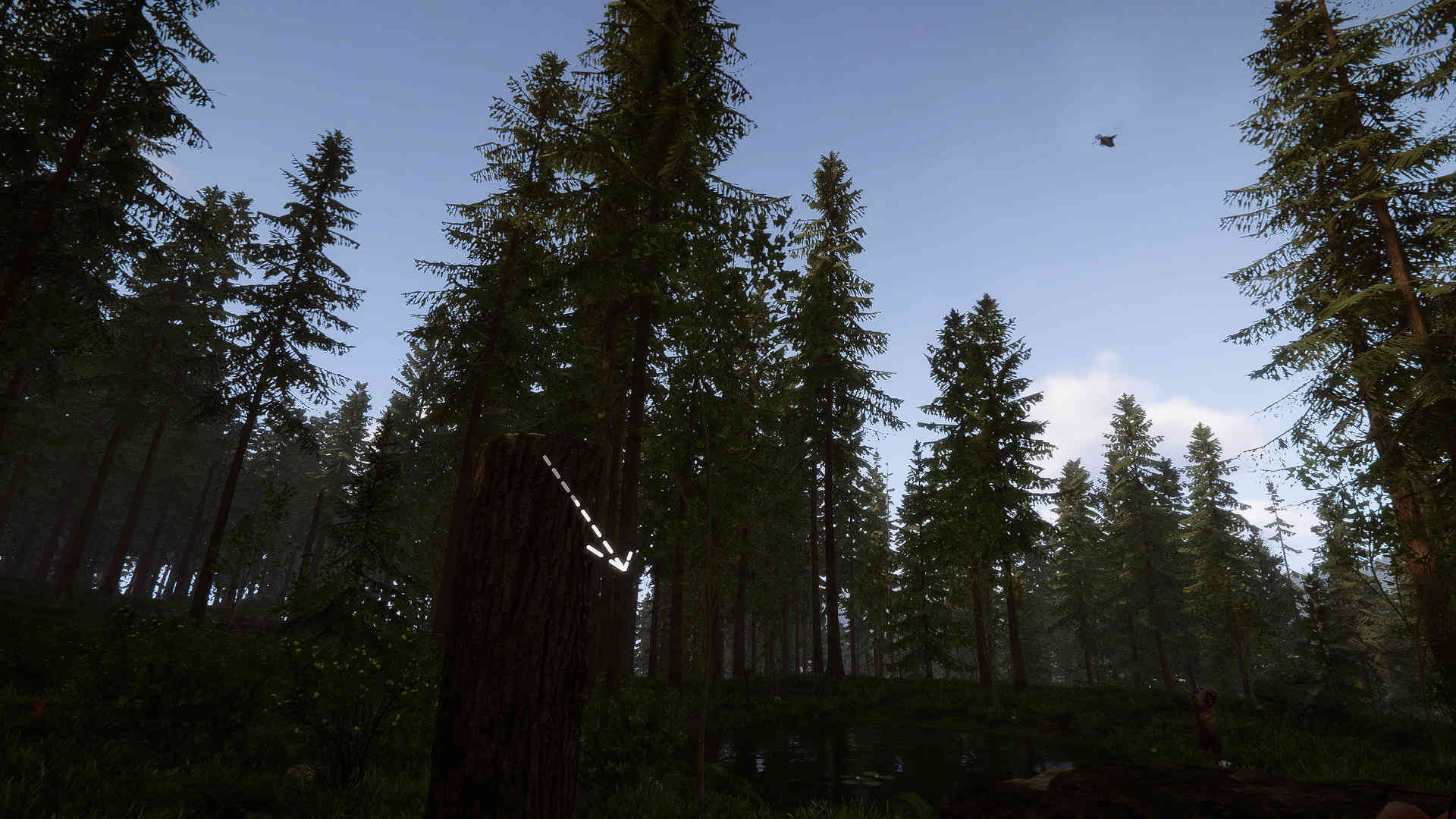
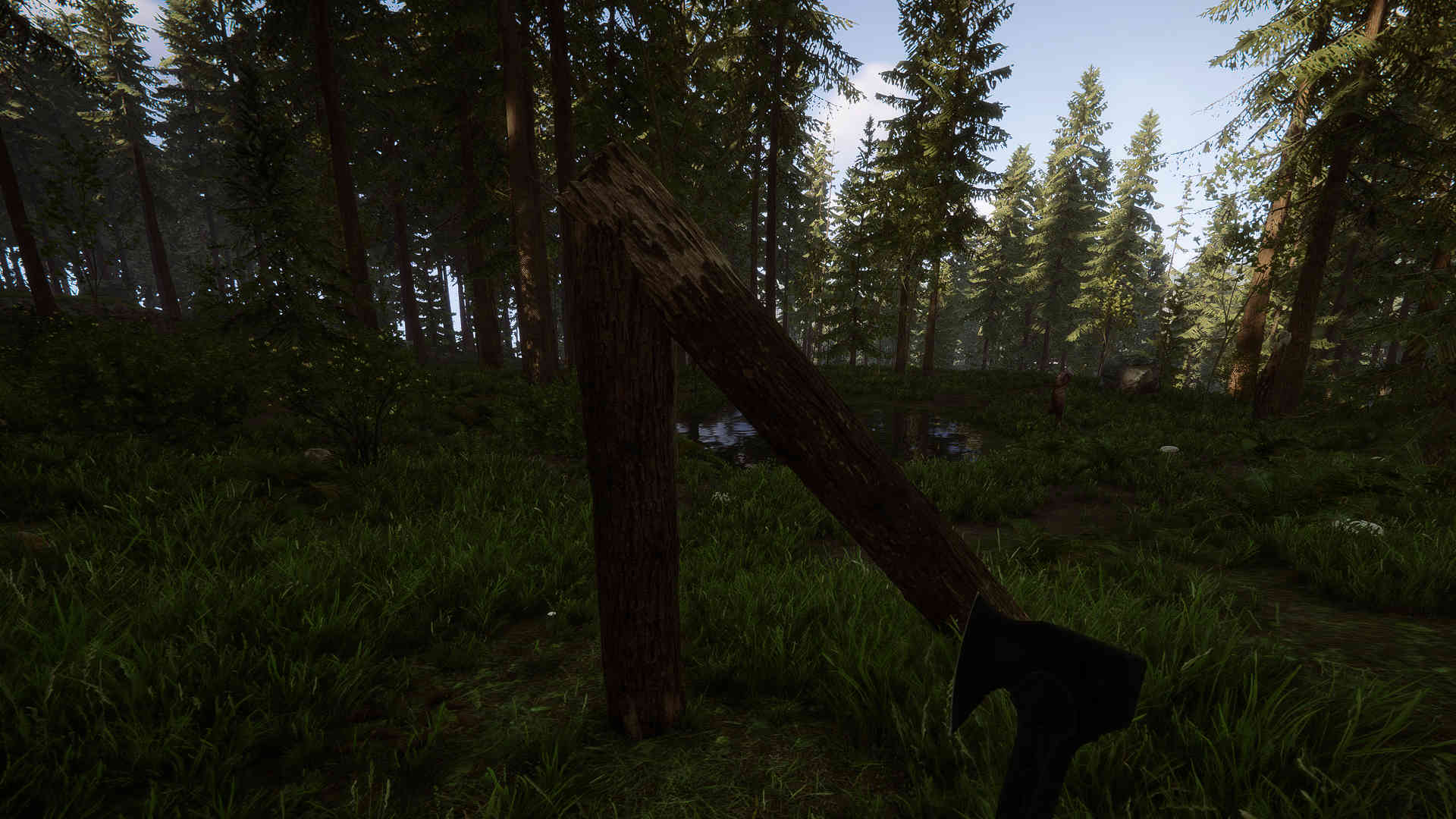
Building gates: Simple frame
Here you won’t get a door, but a passage for your palisade.
How do you build the gate? Here you have to pay attention to little. Build a passage and place the palisade at the end.
Stand a log upright
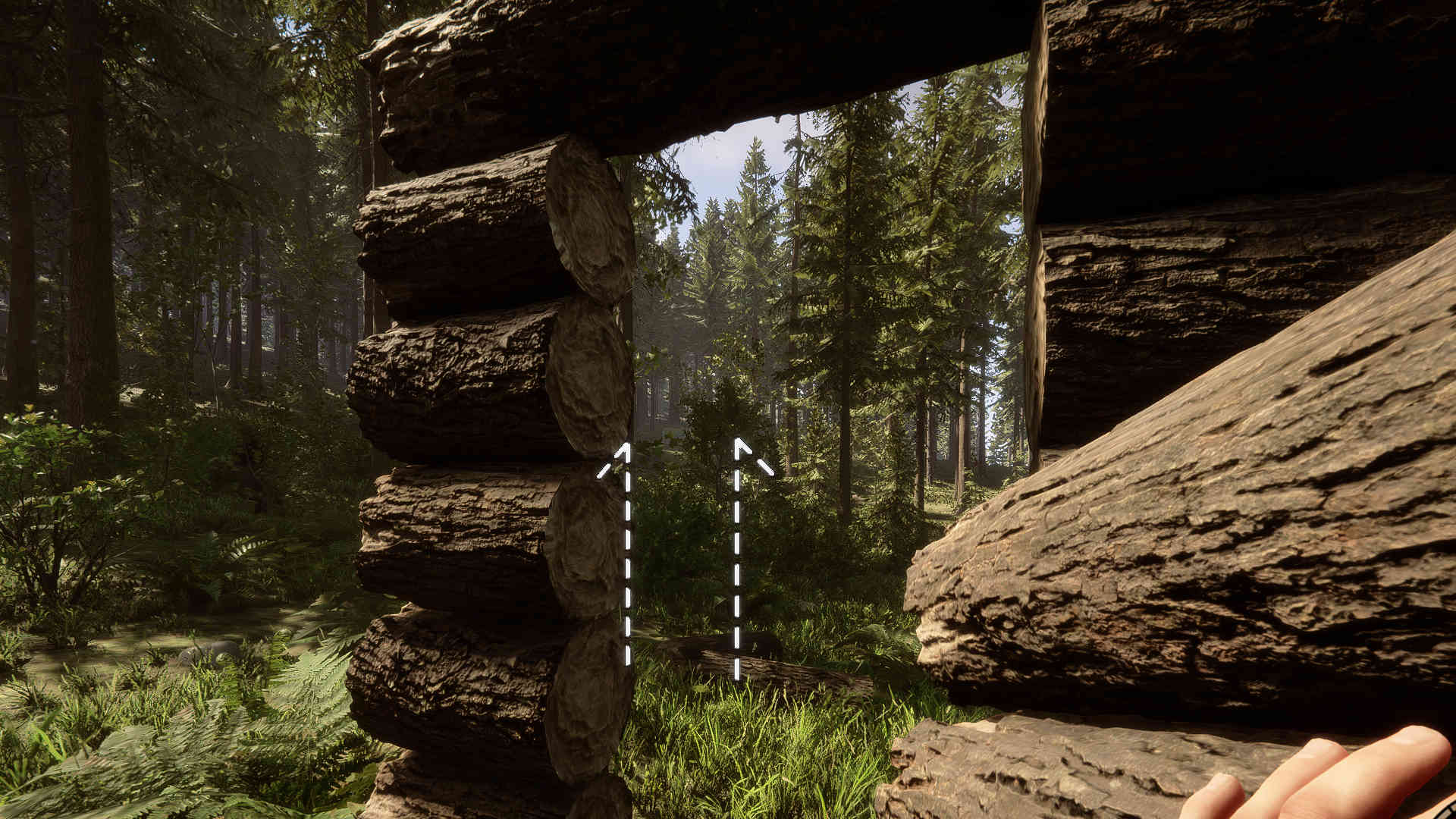
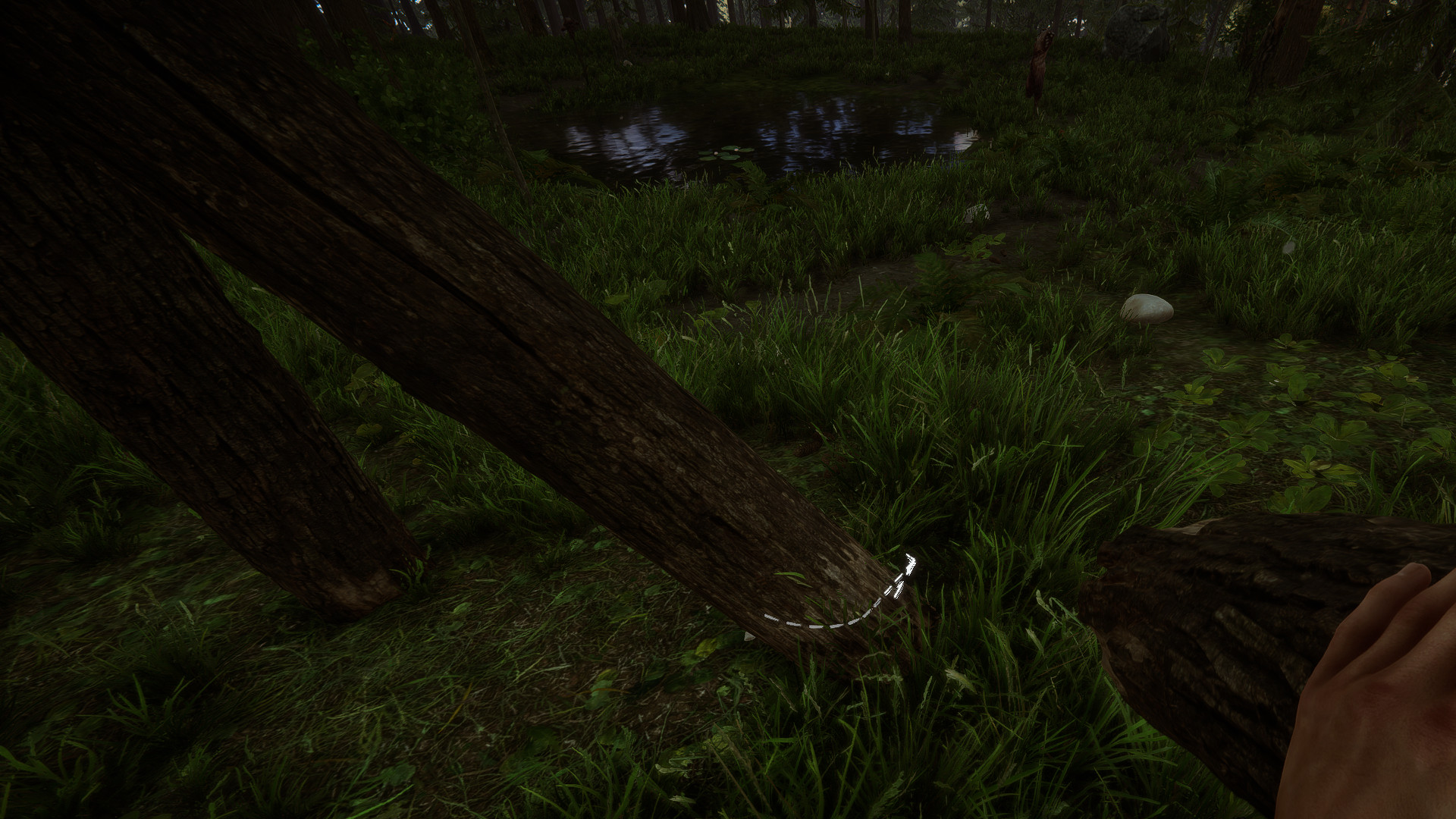
Look at the upper end of the standing log with another log on your shoulder to place an angled beam
Grab another log and look at the lower end of the angled beam and place it upright
The frame is standing and the upright beams can be extended into palisades
Double frame
As with the second gate, you won’t get a door here, but a larger passage for your wooden wall.
How do you build the gate? This gate requires two horizontal logs on the ground as a foundation.
Place two logs horizontally on the ground
Stand one upright log at each end
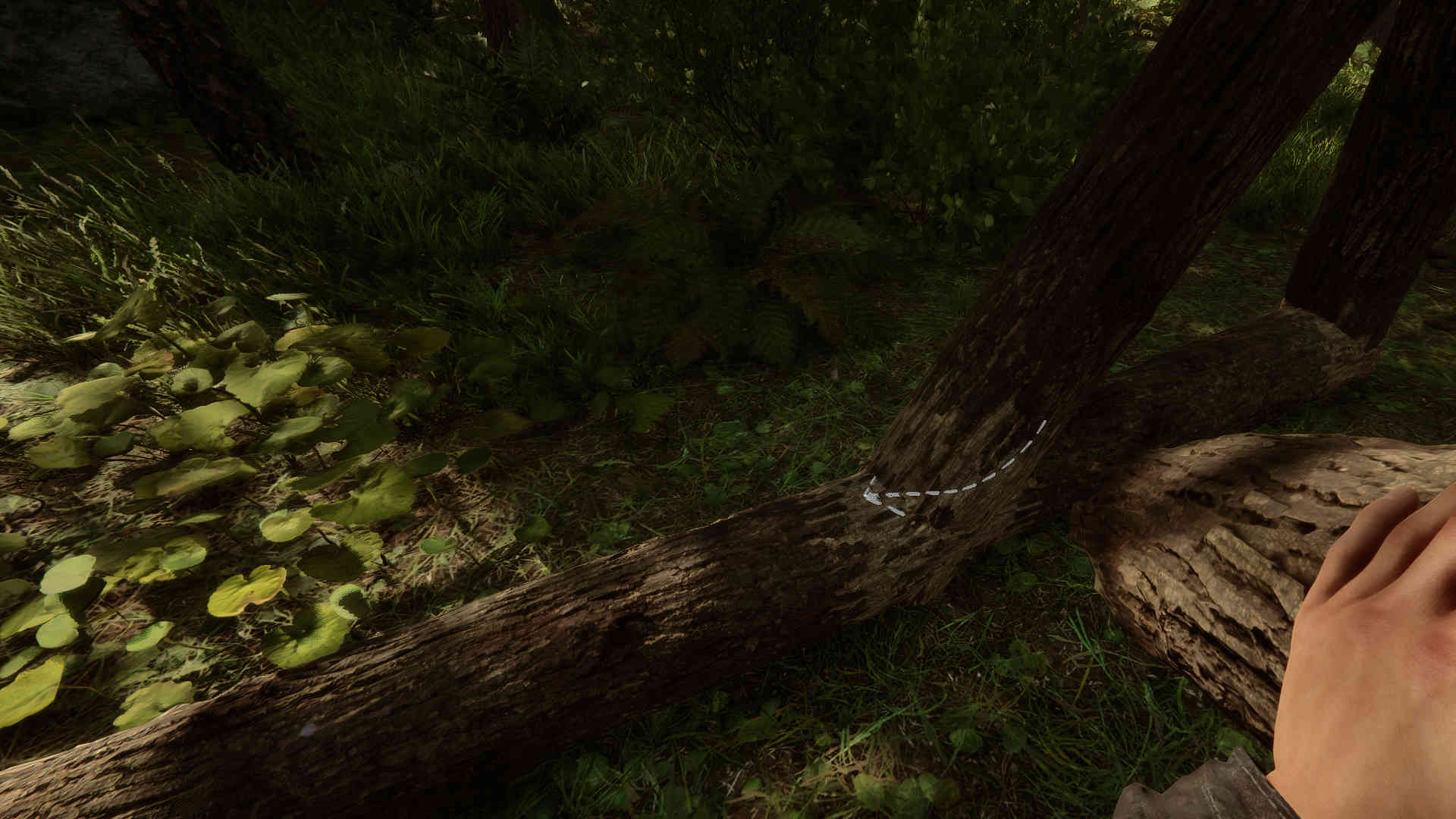
Look at the upper end of one of the upright logs with a log and place an angled beam
Look at the lower end of the angled beam with a log and raise the angled log with it
Place a horizontal log on top between the middle log and the standing upright log that is still free
Now you can remove the middle log with “C”
The upright logs can be extended into palisades on the sides
Sons of the Forest is still in Early Access and is still missing some features, especially in the building system, and is still somewhat prone to bugs. If you have trouble placing the logs as shown in the photos, try to experiment a bit. Unfortunately, it sometimes acts up a little.
If you have questions about the gates or the building system in general, leave a comment on the topic. If you are also looking for a map for the game, you will find the right one here: Sons of the Forest: Map with the most important locations
This is an AI-powered translation. Some inaccuracies might exist.
The second part of the fourth season in FC 24 Ultimate Team has begun and focuses on the mascots. In addition to plush accessories for your stadium, the new Season Pass offers much more. We present the highlights and show which rewards you should choose.
What is the Season Pass?
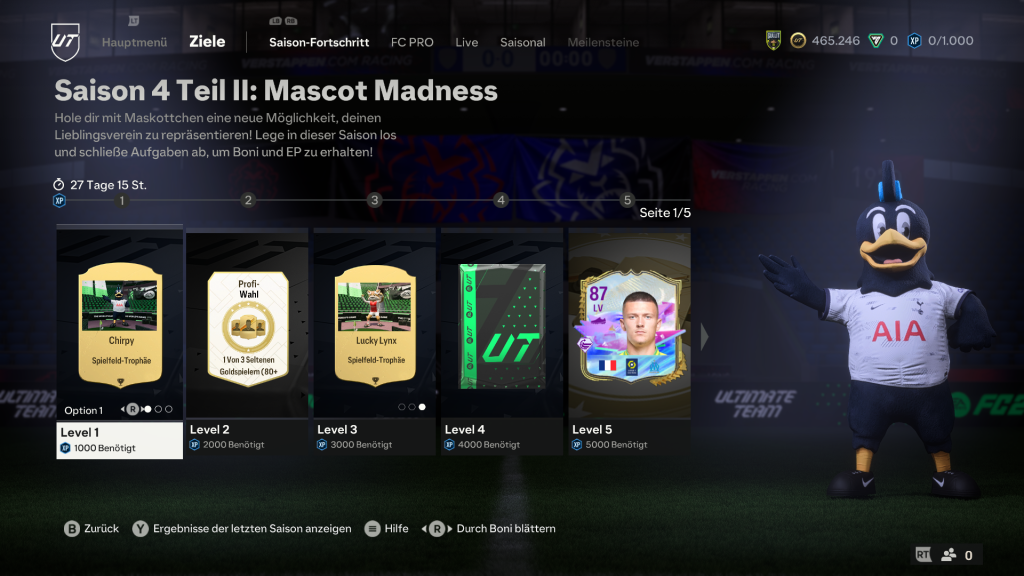
On Thursday, February 15, the new Season Pass, which is available for a total of 28 days, was released in FC 24 Ultimate Team. To complete it fully, 25,000 XP (1,000 XP per level) is required.
This time, mascots are the focus as objects for your own stadium. The Season Pass also offers other rewards in the form of picks, packs, or players (all untradeable) that are assigned to each level, just like in past seasons.
You will earn the necessary experience points by completing tasks. To do this, you need to regularly start the virtual trading card game and play the various modes. EA specifies the specific requirements.
Future Stars, an icon, and strong packs: These rewards you can unlock
What can you expect in the new Season Pass?
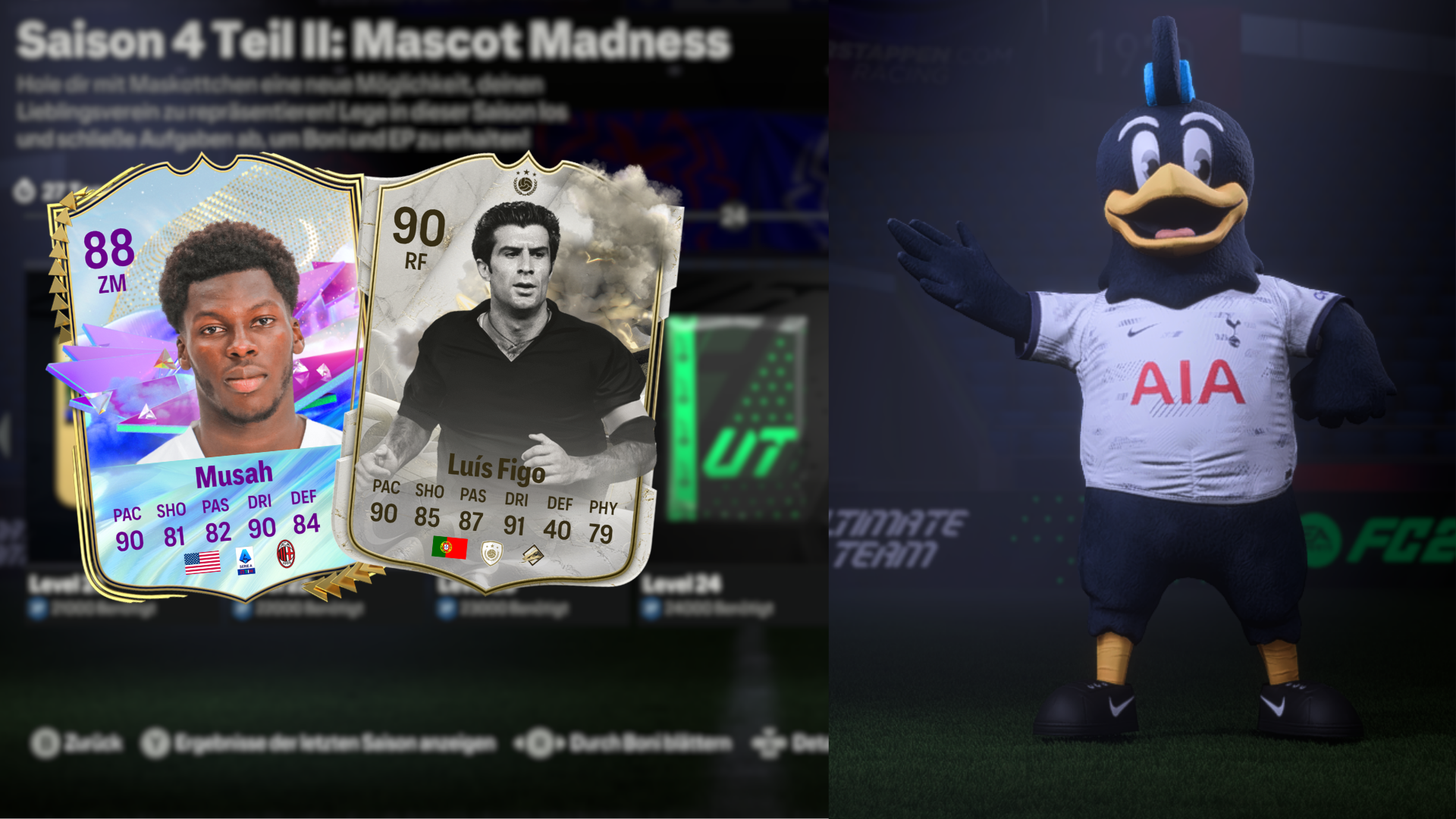
The Season Pass represents the second part of the fourth season and is called “Mascot Madness”. At levels 1, 3, 6, 9, 12, 14, 18, and 21, you can choose from a selection of two to three mascots as so-called field trophies for your stadium.
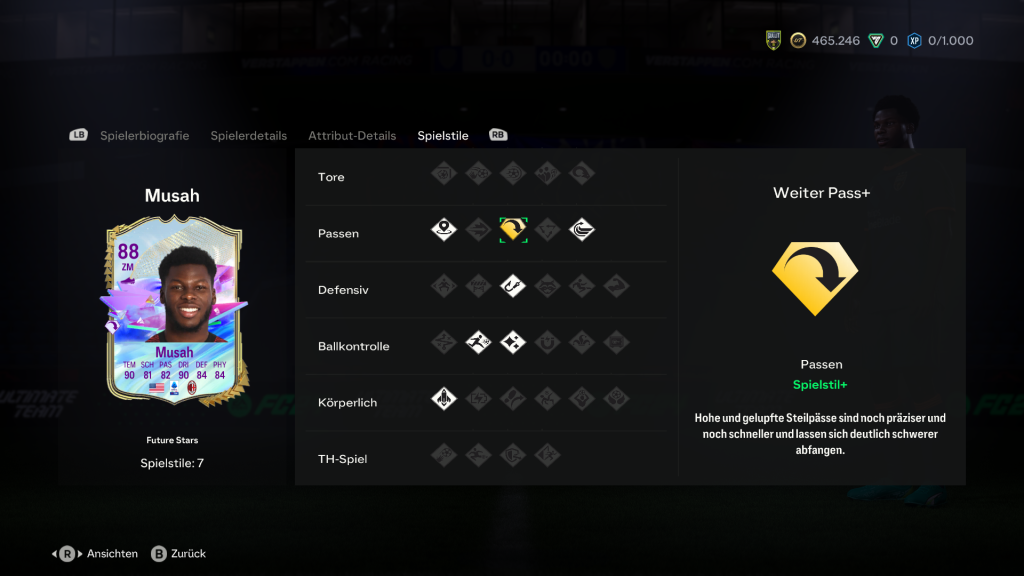
If you like collecting special cards, make sure to reach level 5 (87 Merlin) and level 10 (88 Musah), as there is an exclusive Future Star to be obtained here, which cannot be obtained otherwise. Especially, the card of Musah comes with strong values.
However, the highlight awaits you at level 25. There, you can unlock the Thunderstruck version of the Portuguese icon Luis Figo, unless you want to try your luck with the 84+x20 pack or the player choice (1 of 3 Fantasy Team 1/2 players untradeable).
On the way there, you still have to make more difficult decisions, and we want to help you with that.
Level 15: Either an untradeable Future Star from Team 1/2 or an 85+x7 pack?
Since most players now have a good team and the majority of the Future Stars cards released so far are not particularly convincing, you should choose the pack here. Equipped with plenty of SBC fodder, you can then tackle a Squad Building Challenge that can strengthen your team more specifically.
Level 20: Either an 85+x10 pack or an 87+x4 pack?
Although the 85+x10 sounds very tempting, you should always be aware that most players will only have an 85 or 86 rating. These players will hardly be needed for expensive SBCs. Moreover, the likelihood of drawing these players from the weaker Season Pass packs is significantly higher. For this reason, we recommend the 87+x4 pack, as you can definitely use every single player.
Also Sons of the Forestoffers many cheats that you can enter using console commands to spawn items or NPCs. We explain how to enter them and what codes exist.
What do cheats bring in SotF? You can also enter cheats in Sons of the Forest to modify your save file. There are cheats that allow NPCs to spawn, if you have lost them or provide you with a lot of items that you can choose yourself.
This way you can create quirky and funny situations and create an army of Kelvins or Virginias to cleanse the island of mutants and cannibals. Your possibilities are endless.
How do I enter cheats? To enter the console commands, you first need a collection of mods that allow you access to the debug console. You need the following mods:
Once you have downloaded all the mods, simply start the modded version of Sons of the Forest by selecting this version in the Thunderstone Mod Manager. The start may take a while if this is your first time doing it.
Once SotF is started, create a new save file or load an existing one. Once in the game, just press F1 to open the debug console. After that, you can enter your cheat in this console and get started.
Start video
Sons of the Forest: The first trailer for the survival game on Steam
All cheats for Sons of the Forest at a glance
We divide the console commands into their respective areas. There are some that can only affect you as a player, the NPCs, or items. However, let’s start with cheats that pertain to you.
Cheats for your player
godmode on/off – Makes you immortal
survival on/off – Activates or deactivates survival
addallitems – Grants you every item in the game
goto [x y z] – Teleports you to a coordinate you enter
showhud on/off – Activates or deactivates your HUD
settimeofday [1-24] – Changes the game’s time to your desired hour
These cheats are codes that have not been tested yet. Some can be entered as they are, while others only work if you additionally append numbers. The following are known:
All other cheats
addallbookpages
ammohack
animallimitmult
animalsenabled
addallitems
addallstoryitems
animstatesgui
addcharacter
anisoenabled
addmemory
addprefab
debugplayermelee
demomode
destroy
destroyfreeformstructure
destroyragdoll
destroywildcard
additem
additemswithtag
Anisominmax
applydefaultmaterials
areashadow
astar
audio2dtest
audiodebug
audiodebugstates
audiodescription
diagrenderers
diggingclear
disablecomponent
disablegameobjecttester
disablego
disablegowildcard
disablescene
addvirginia
aiangerlevel
aianimspeed
aiarmorlevel
aiarmortier
aidisable
aidodgetest
aidummy
aiforcestrafe
aighostplayer
aigodmode
aijumpdebug
aiknockdowndisable
aimemoryadjust
aipause
aipoolstats
airadar
airunworldevent
aishowanims
aishowdebug
aishowdebugcamera
aishoweventmemory
aishowhealth
aishownavgraph
aishowpaths
aishowplayerinfluences
aishowstats
aishowsurvivalstats
aishowthoughts
aistatadjust
aistructurelog
aitestsleep
aithought
audioparameter
audioplayevent
billboardenabled
billboardignorechanges
blockplayerfinaldeath
breakobjects
buffstats
buildermode
buildhack
cameradiss
camerafov
capsulemode
cavelight
characterlods
checkattachedentities
checkexitmenu
checkfrozenentities
clear
clearallsettings
clearaudioparameters
clearbushradius
clearmidactionflag
cloudenable cloudfactor
cloudshadowsenable
combatteststart
count
countgowithlayer
countlinkedstructures
counttag
createlight
aithoughtnocooldown
aivailstats
aiverboselog
creepyvillage
aivillageclosest
aiworldeventstats
aiworldstats
aizonestats
allowasync
disconnectplayer
disconnectplayers
dismemberradius
dumplobbyinfo
duplicateobject
dynamicresolutioncycletest
dynamicresolutionoverride
dynamicresolutiontarget
enablecheats
enablecollisionbasedkillbox
enablecomponent
enablego
enablescene
enablestructureghosts
energyhack
exportlinkedstructurestojson
exposuresetspeed
filteraudio
findobjectswithshader
firstlookforce
follow
followstop
footstepdebug
forcecloud
forcecloudprofile
forceplayerexpression
forcerain
forceremovetrees
freecamera
gainstrength
gameoverdelaytime
rumbletest
save
saveplayer
season
sendmessageto
setcurrentday
godmode goto
gotocoords
gotoforce
logshownone
logshowwarnings
logtextures
logvirtual
gototag
gotozone
mipmapstreaming
mipmapstreamingbudget
gravity
heallocalplayer
mipmapstreamingdiscard
setdifficultymode
mousexsensitivity
setexitedendgame
mouseysensitivity
setgamemode
navgraphforceupdate
help
hideworldposfor
grabsgeneratebuilt
greebledrockscollision
hitlocalplayer
igniteradius
importlinkedstructuresfromfile
inspectgo
instantbookbuild
instantrespawnhere
invertlook
invisible
netanimator
netskinnedbones
netspawnplayer
openmacrosfolder
outputsnappointstofile
physicsupdatetime
playcutscene
playdeathcutscene
playdeathmarker
playdeathmarkerindex
joinsteamlobby
playeranimparams
jumptimeofday
playerdebugcamera
kickplayers
killlocalplayer
killradius
knockdownlocalplayer
lightninghittreechance
lightninghittreemustbeinfrontplayer
lightninginterval
listactiveentities
listdeathmarkers
listitems
listgowithlayer
listitemswithtags
listobjects
loadmacros
loaddebugconsolemod
loadplayer
loadscene
loadscenesingle
locktimeofday
loddebugbillboards
loddebugmaterials
loddebugranges
lodforce2ddistance
lodforce3ddistance
playerinterruptkeys
playernetanimator
playervisibility
playgameover
postprocessingcomponent
profilersample
profilersnapshot
qualitytexture
radiodebug
refillcontainers
refreshentities
regenhealth
removeallitems
removeallstoryitems
removedead
removeitem
removeliving
removeshader
renderspheres
replaceshader
Reporterrors
reportlogsnow
reportwarningsnow
resetinputaxes
resetsettings
revivelocalplayer
gamepaddeadzone
gamepadxsensitivity
damagedebug
gamepadysensitivity
logging
damagefreeformstructure
gccollect
loghack
deathcount
getgamemode
logshowerrors
robbycarry
getlayerculldistance
logshowinfo
debugplayerhitlog
robbyincutscenes
setgamesetupsetting
setgametimespeed
setinventorypercent
setlayerculldistance setlookrotation
setopeningcrash
setplayerrace
setproperty
setsetting
setspeakermode
setstat
setstrengthlevel
settimeofday
setwindintensity
setworldobjectstaterange
showactivelights
showbutterfly info
showcollisionobjectnames
showdebugzones
showfps
showhud
showinworldui
showmeshmaterialnames
showmeshobjectnames
showmeshtrianglecounts
showobjectlocation
showprojectiletrails
showstimuli
showtriggercollision
showworldobjects
showui
showworldposfor
slapchop
spawnedobjectstats
spawnfallingtree spawnitem
spawnpickup
spawnrenderspheres
spawnworldobject speedyrun
sprinttoggle
superjump
survival
targetframerate
terrainparallax
terrainpixelerror
terrainrender
terrainrendersimple
terraintess
terraintessdist
testeventmask
testingsamplefps
timeofdayconnectiondebug
timeofday
timescale
togglebeamdebug
togglefiredebug togglefpsdisplay
togglego
togglegrabberdebug
togglegrabsfacedebug
toggleocclusionculling
toggleoverlay
toggleplayerstats
togglestructureresistancedebug
togglesuperstructurerooms visualdeb
ug
togglevsync
toggleworkscheduler
trailer3
treecutsimulatebolt treefallcontactinfo
treeocclusionbonus
treeradius treescutall
unloadscene
unloadunusedassets
unlockseason
Select your favorite weapons in our survey:
What you need to keep in mind about cheats: When using cheats, you must be aware that you are manipulating the game. You are causing things that would not occur in Sons of the Forest. It could therefore happen that your save file may become corrupted and you might lose your progress. Therefore, you should save your original save point separately so you can access it if your file gets corrupted.
These were all the important info about cheats, which exist and how you can activate them. Will you try out cheats? Let us know in the comments!
Almost a whole month has passed since the launch of Palworld, and Pocket Pair has already provided you with several patches. The roadmap has also promised quite a bit already – which of the features are you most looking forward to?
Since the Early Access launch on January 19, 2024, almost a month has passed – a very successful month for Palworld. Recently, the community manager spoke about the decline in player numbers on Steam and is looking forward to the future of the game.
With the first month behind us, we now want to know from you which of the features announced in the roadmap are most important to you. Please also write us the features that are currently not listed in the roadmap in the comments.
This survey is closed! You can find the results here:
Is Pocket Pal quick with updates? In fact, the development team behind Palworld seems to be very dedicated. Since the launch in Early Access, they have already released three patches in addition to the roadmap. These primarily dealt with bug fixes and preventing cheating:
At the end of January, many players complained on Reddit about Pals being stolen by other players as well as one-sided PvP. The stealing of Pals and PvP should not have been possible at all. Pocket Pal responded promptly with one of the above-mentioned patches.
Are there already wishes in the community? Of course, we would like to know specifically from our MeinMMO readers what their or your wish features are. Some users have already collected ideas on Reddit. Among them are bigger features, but also quality-of-life adjustments.
Here is a selection:
Pinnable crafting recipes
Automatically end Pal attacks when the opponent has 20%-15% health left
A priority list for the tasks of Pals in the base
Item assignment for boxes
Automatic running
Are these also things that you want for the game? Or do you have entirely different needs? Vote above and let us know in the comments what Palworld still needs from your perspective.
The map in Sons of the Forest shows you the most important locations, but it is rather unwieldy and only advances you in the story. Therefore, you will find here an interactive map equipped with many points of interest.
In Sons of the Forest, you have a small GPS device for your hiking trips through the forest:
M – Opens/Closes the map
Mouse wheel click – Zooms the map
If you want more information about the many small spots on the map, you will find here an interactive map that is constantly being updated. The map comes from colleagues at the site Gamepressure:
Recommended editorial content
At this point you will find external content that complements the article.
I consent to external content being displayed to me. Personal data can be transmitted to third party platforms.
Read more about our privacy policy.
Click on one of the points and you will also discover a screenshot of the location and often also an inventory list of which items you can find on site. The map is filled by users and constantly updated.
If you are looking for an alternative, also take a look at the interactive map from Mapgenie – via mapgenie.io.
Tip for beginners: Sons of the Forest can be completed quite quickly if you use guides. The optimal experience is provided by the survival hit if you go exploring on your own.
Gradually explore the caves, do not let yourself be guided by guides or maps – use the in-game map to plan your strategies.