Elden Ring: Nightreign should be playable today at a network test, but before players could try it out, the servers crashed.
What was supposed to start today? Today, on February 14 at 12:00 PM, the first network test of Elden Ring: Nightreign was supposed to start. However, this is not an open test. Players had to register for access weeks before the start to have a chance to participate. Now that the day has come, the rush is so enormous that the servers cannot handle it. There are issues.
Elden Ring Nightreign: In the new multiplayer mode, you must summon comrades!
Network test hits its limits
What are players struggling with? The start of the test went smoothly at first, even for us. We were able to log in briefly on the PS5, test individual characters, and inspect our equipment.
But every time we wanted to log in for a round, the server kicked us out – and we were not alone. Countless streamers on Twitch – especially those on PS5 – are currently unable to log in (via Twitch). Instead, they are facing the start screen and seeing messages about the current state of the servers.
As for the players on Xbox, they report flawless servers without any issues. It seems that there are currently only problems with the PS5. FromSoftware is currently working to resolve the issue (via x.com).
Can I resolve the issue myself? According to the post from FromSoftware, the servers have been restarted to resolve the issues. They suggest that players restart their game to log in again.
Gladiator is one of the most legendary historical films of all time. This is also due to the acting performance delivered by many actors. Tragically, an important actor passed away during the filming. Instead of recasting his role, filmmakers used tricks to still present the character.
Which actor is it about? Oliver Reed plays the former fighter Proximo in Gladiator, who manages the gladiator school where Maximus also ends up, training future attractions for the Colosseum.
Before the end of filming, Oliver Reed tragically passed away from a heart attack. Instead of simply recasting or replacing the character, filmmakers used cinematic tricks to honor his performance.
The title picture comes from the trailer of the 4K version of Gladiator (via YouTube)
Start video
English trailer for Gladiator starring Russell Crowe
Cuts, CGI, and old footage
How was Proximo shown despite the missing scenes in the film? As CinemaStrix describes in a video (via YouTube), the character had to die in the film, yet Proximo’s role had to remain in the film.
A mix of different cinematic tricks was used to depict the character along with footage of Reed in the film. To kill him off in the film, a double was used, shown only from behind.
For other scenes, CGI was utilized in combination with unused footage. This was combined with additional double scenes, creating a coherent story with the character.
The most important aspect here is the cuts. Cuts tell the progression of a conversation or action. Old scenes that were not used are combined with new shots, creating a dialogue or sequence that was not originally planned but still works. An important point is that all cuts match the continuity of the scene.
All of this was innovative at the time. CGI was not yet widely used, especially not in combination with other techniques.
You can see what this looks like in this section of a video from CinemaStrix:
Recommended editorial content
At this point you will find external content from YouTube that complements the article.
I consent to external content being displayed to me. Personal data can be transmitted to third party platforms.
Read more about our privacy policy.
Other films and series also use CGI to have deceased actors in the film
In which films and series is something similar done? As Screen Rant reports, actors who have passed away also participated in other series and films.
In The Sopranos, actress Nancy Marchand died before the 3rd season. She plays Tony’s mother. To give them a final scene, old footage and doubles were also used.
Philip Seymour Hoffman died before he could shoot his scenes in The Hunger Games: Mockingjay Part 2. Here, too, the mentioned tricks were used.
In Star Wars: Episode 9, old dialogues and scenes from Carrie Fisher were used to give her character an appearance in the final part of the trilogy.
During the filming of Fast & Furious 7, Paul Walker died in a car accident. His brother took over for the remainder of the film.
This topic is indeed controversial. The question often arises whether deceased individuals should be utilized with CGI for films at all. Nowadays, this is not only done for actors who passed away during filming. For Star Wars: Rogue One, actor Peter Cushing was used to show Moff Tarkin again. However, Cushing passed away in 1994, which is why CGI was entirely relied upon. A war film by Clint Eastwood is praised by historians because it takes a step that is uncommon in Hollywood
This is an AI-powered translation. Some inaccuracies might exist.
Anyone who owns a PS4 often knows the problem that the console can become very loud. We present some tips on how to reduce the volume.
A loud PS4 can be very distracting while playing. The reasons for the noise can be diverse. Many MeinMMO readers also complain that the PlayStation 4 can be way too loud in the long run.
MeinMMO has looked into the causes of a loud console and what you can do about it. In our article, we address the following points:
Attention: All presented tips are done at your own risk! We accept no liability for damage caused to your console due to carelessness.
We also cannot give you an absolute guarantee that the tips will definitely help.
Version notes of the article (Updates):
Update: This article was first published in April 2022. We updated the article on February 14, 2025, to the latest state, replaced links and products, and slightly adjusted the structure. We also added a note about the PS5 Pro.
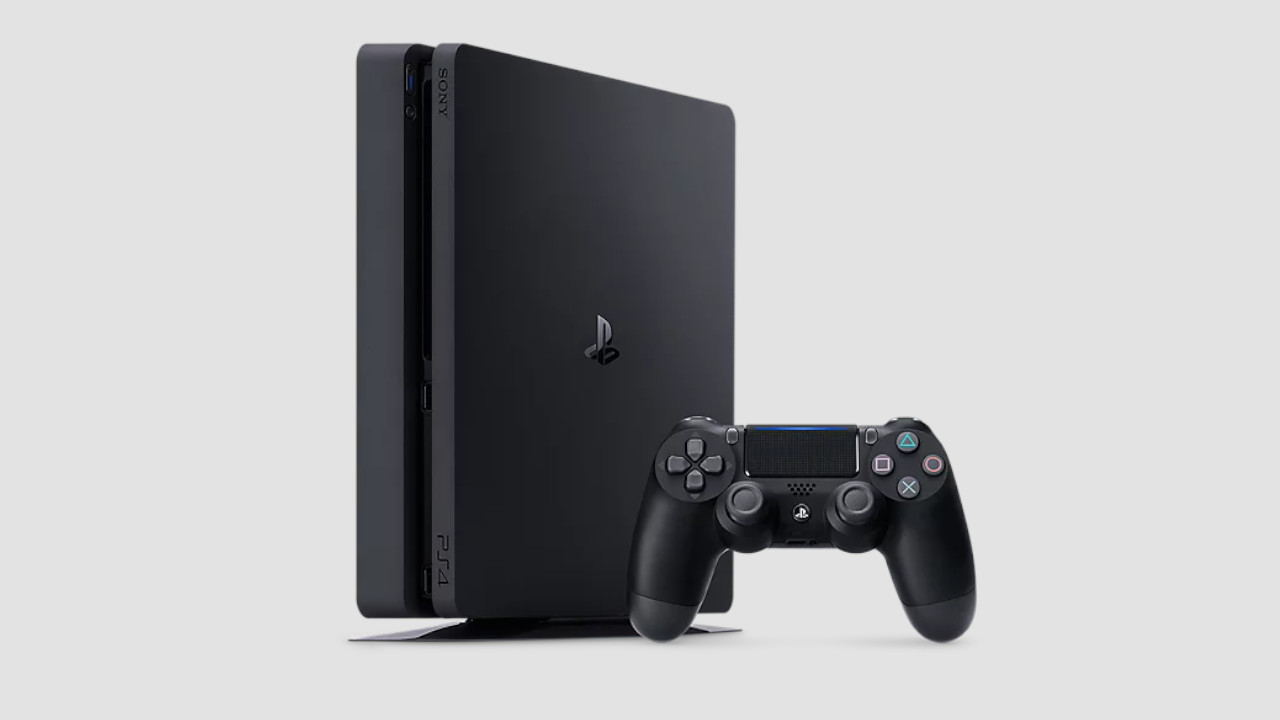
The PlayStation 4 can become very loud. This can have various causes.
There are several reasons why the PlayStation 4 can become very loud:
Fan gets loud while playing: The fans usually carry the heat of the system (console, processor, motherboard) outside. With poor cooling, the console overheats, becomes loud, and eventually turns off automatically as a self-protection measure.
Hard drive: The internal hard drive is one of the main reasons for a loud PS4. The hard drive has to write data and this causes noise. The older the drive becomes, the more noticeable this is.
Console: The console makes noise if parts are loose or if it is on an unstable surface. Then components vibrate and this vibration causes noise.
Position: A vertical position can cause the console to become louder.
Age: Every electronic device suffers from wear and tear. The PlayStation 4 is also aging and wears out with continuous use. This can lead to increased noise levels.
Once you have figured out why your PS4 is so loud, you can try to solve the problem. We present 6 tips and tricks that could help you.
1. Check the console’s position
Even a vertical position of the console can be responsible for a high noise level and heat generation.
Required: No special items needed | Time required: 15 – 30 minutes | Cost: none | Difficulty: Easy
The simplest way is to check the position of the console. A simple adjustment can help reduce the noise.
First check if the console is blocked by anything. For the console to operate correctly and quietly, it should ideally stand freely. Place the PS4 in a spot where there is enough “room to breathe” so that air exchange can occur quickly and easily.
Do not place anything on the console, such as books, cloths, or other items.
It is best not to place the console in any TV cabinet to ensure “airflow” is guaranteed. Sometimes the console barely fits into a cabinet and then there is too little space on the sides.
2. Check and update PS4 firmware
Required: No special items needed | Time required: 2 – 3 hours | Cost: none | Difficulty: Easy
If the system files are corrupted, this significantly increases the CPU load. Here it helps to rewrite the system data to relieve the CPU. The effort itself is low, but you need to back up your data and after the full “initialization”, you will need to re-download your games:
Open the “Settings” and then select “Initialization”.
Here, either select “Restore Default Settings” or “Initialize PS4”.
We recommend “Initialize PS4” because the first option only resets personal data, so user accounts and settings are deleted. Games remain installed, so select “Initialize”.
Then you can choose between “Quick” and “Full”. We recommend you choose “Full”.
“Full” may take several hours, but the system files will be rebuilt. Corrupted or damaged data will be removed. The console does this automatically.
Note: “Full” will delete all data on the PS4, including games and save data. Either back this up with an external storage medium or via the cloud – but you need PSPlus for that.
3. Clean and quiet the PS4 fan
Required: T8 Torx security screwdriver/repair kit, compressed air | Time required: 60 minutes | Cost: approximately 15 Euros | Difficulty: Medium
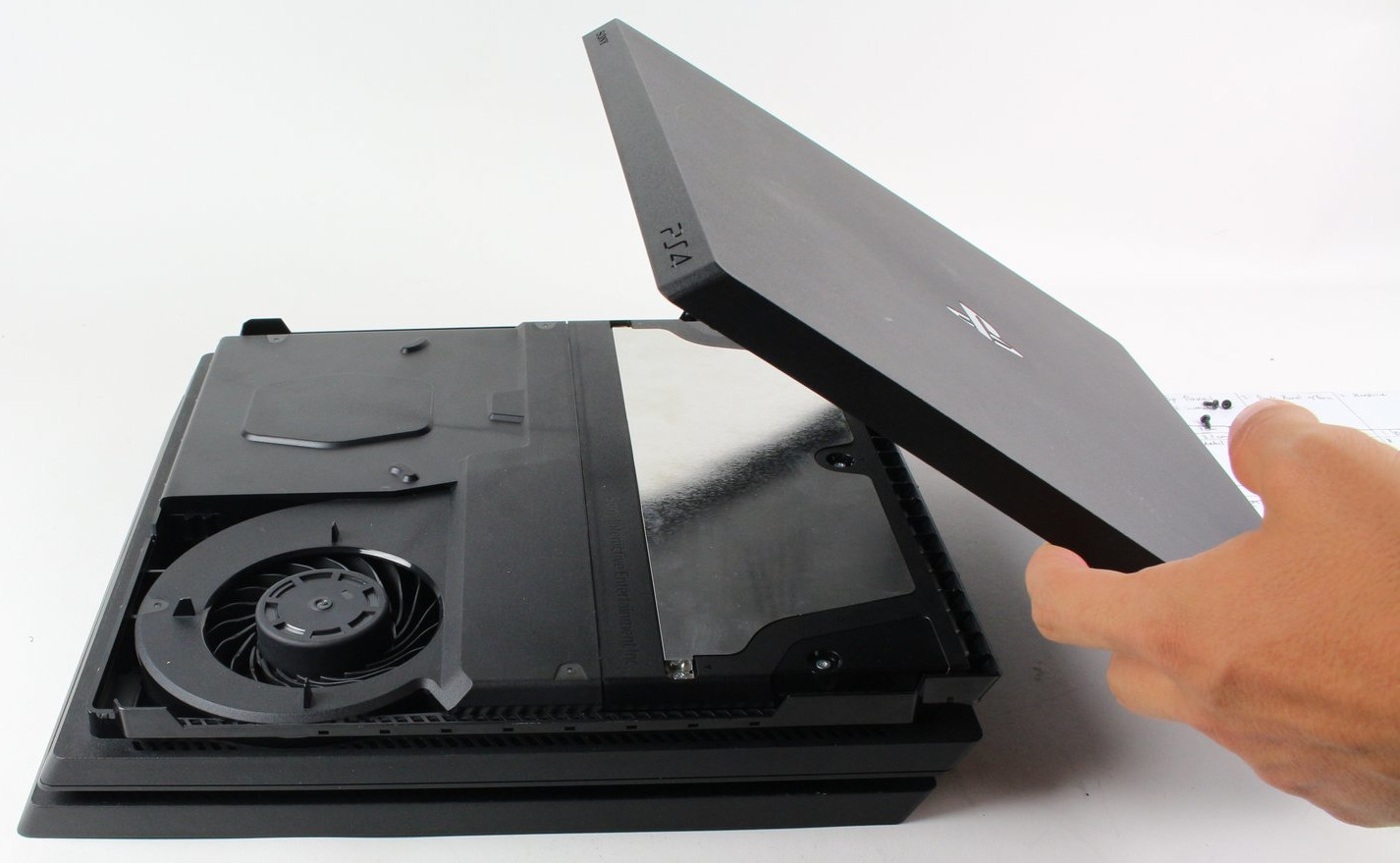
To remove dust from the ventilation, you basically only need to remove the cover of the console (here the PS4 Pro model). Image source: Fixit.com
If the first tips haven’t helped, you can open the console and do quite a bit inside to reduce the noise.
Key combination for the PS4 to clean the fan? With the PS3, you could run the fans at high speed to get rid of dirt. This is no longer possible with the PS4 and PS4 Pro.
Clean PS4 Pro without losing warranty
Be careful not to destroy the warranty seal of the console! The original PS4 model cannot be opened without destroying the seal, which voids the warranty. With the PS4 Slim and Pro versions, you can open the console without damaging the seal or voiding the warranty.
How often should you clean the fan? Regularly cleaning your fan means less work in the long run, and noise levels will remain manageable.
Have the right tools on hand: For the PS4 Slim and Pro, you need a T8 Torx security screwdriver and ideally compressed air in a can. You cannot open the console with a standard T8 screwdriver.
Toolset: If you have the wrong tools, there is a risk of damaging the console. Repair kits that cost around 10 Euros are recommended here.
Compressed air spray: We generally advise against using a vacuum cleaner or similar for cleaning the console. There is a risk of damaging sensitive components. A compressed air spray is recommended for this purpose. This allows you to remove dust and dirt selectively.
Oops, unfortunately this affiliate widget is no longer available.
It is important that you hold the compressed air spray upright while cleaning, as moisture can leak from the spray otherwise.
Cleaning the PS4 fan: Inside the console, the first thing you should do is remove the dust from the ventilation.
For the PS4 Slim and PS4 Pro, it is sufficient to lift off the cover of the console. For this, you need a T8 screwdriver to remove the security screws.
You can then blow the fan out with compressed air to remove dust and dirt.
After cleaning, the ventilation can work again, preventing the console from overheating and making it significantly quieter again.
How much does it cost to have the PS4 cleaned? A professional cleaning usually costs between 40 and 100 Euros and is therefore more expensive than doing it yourself.
Start video
Sony releases the official reveal trailer for the PS5 Pro
4. Replace the thermal paste of the PS4
Required: T8 Torx security screwdriver/repair kit, thermal paste | Time required: 2 hours | Cost: approximately 20 Euros | Difficulty: Medium to Hard
If you are technically savvy, you can also replace the thermal paste of the processor. The thermal paste ensures that heat from the processor and the graphics unit (GPU) is quickly dissipated, preventing overheating of the components.
Recommended thermal paste for the PS4: Standard thermal paste is usually sufficient. The Arctic MX-6 has 4.7 stars with over 3,000 reviews and is generally very reliable:
Oops, unfortunately this affiliate widget is no longer available.
What should you consider? Replacing the thermal paste is not so straightforward, as you need to disassemble the entire console to do so. It is not enough to just lift off the cover.
This video on YouTube shows the individual steps to take if you want to replace the thermal paste:
Recommended editorial content
At this point you will find external content from YouTube that complements the article.
I consent to external content being displayed to me. Personal data can be transmitted to third party platforms.
Read more about our privacy policy.
This can lead to a significant improvement in noise levels in the long run.
The PS4 is still loud despite new thermal paste: Check our other tips: Where is your console positioned, does it have enough space, and is there enough airflow to the PlayStation 4? The system can also be “initialized” again after replacing the thermal paste, which may also help.
5. Loud and slow – Replace the PS4 (Pro and Slim) hard drive with an SSD
Required: T8 Torx security screwdriver, thermal paste, hard drive (HDD or SSD) | Time required: 2 – 3 hours | Cost: approximately 120 – 150 Euros | Difficulty: Easy to Medium
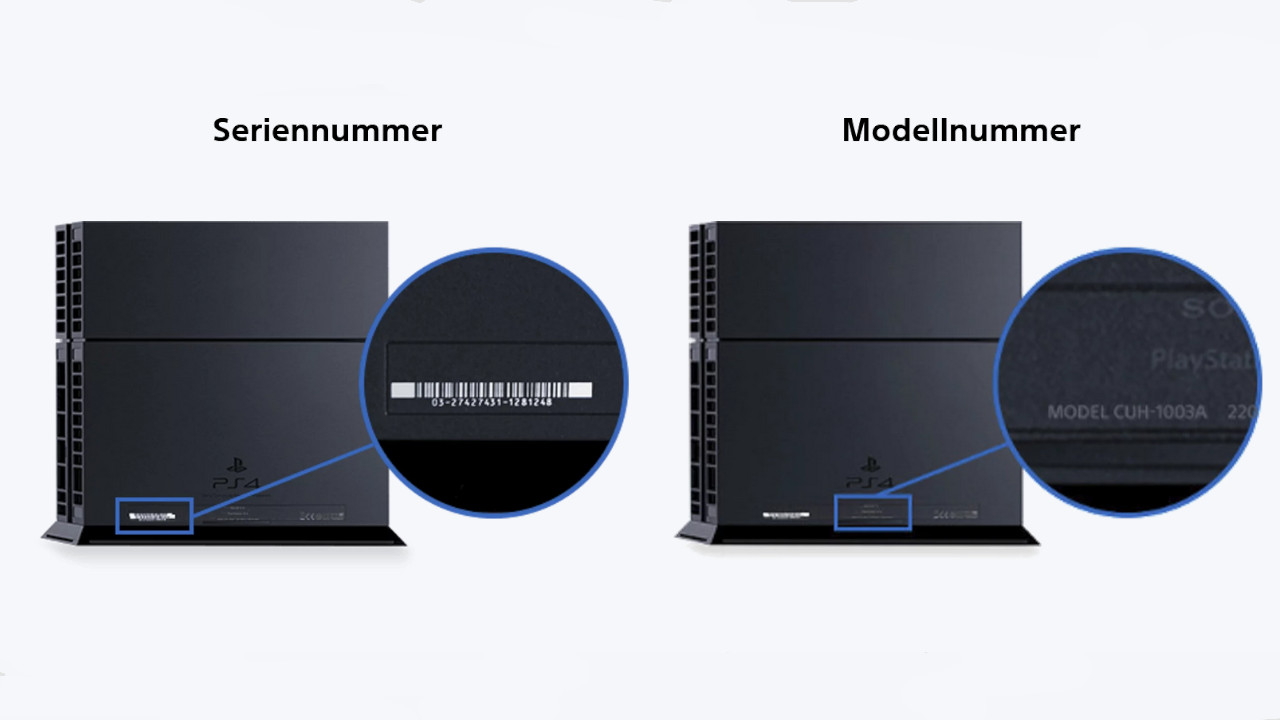
The model number is helpful when installing a new hard drive (via playstation.com).
Anyone who uses their PlayStation 4 extensively and intensively writes a lot of data to the hard drive. This long-term use can stress the drive, causing it to become loud and slow. The upgrade to an SSD could be worth it. By the way, the process is a bit different with the PlayStation 5. Here, there is a quite simple method if the PS5 storage gets full.
Backup data before replacing the SSD: Before replacing the PS4 hard drive, you should definitely back up the data from the drive:
First, connect a USB stick or an external hard drive to your PS4.
Then select “Settings” in the PS4 system.
Here select “Application Saved Data Management” and then select “Saved Data in System Storage” and then “Copy to USB Storage Device”.
Finally, mark the files you want to back up with X and then press “copy”.
The PS4 normally supports hard drives with a maximum height of 9.5 mm – up to 2 TB of storage is supported.
Which SSD is recommended? In principle, any SSDs that are not larger than 2.5 inches will fit in your PS5. You can find the best SSDs for your PS4 listed on MeinMMO. Recommended models include those from the MX500 series by Crucial. For 1 TB, you typically pay between 50 and 70 Euros:
Oops, unfortunately this affiliate widget is no longer available.
Replace PS4 hard drive with SSD – Consider this when installing: Before removing the hard drive, the PS4 should be completely turned off. If an orange light is blinking, the console is only in standby mode. Properly shut down the console and unplug it. The hard drive you install should be formatted to FAT or exFAT.
The installation varies from version to version. You can identify which console you have by the version number, which is usually located on the back or bottom of the console.
Sony explains on its help page exactly how to remove the hard drive based on the version number.
Install PS4 firmware on new hard drive: After replacing the hard drive, you need to update the system to use the drive:
First, download the PS4 firmware from the official site.
Then create a folder named PS4 on the USB stick and within it a folder named UPDATE. Copy the downloaded file (PS4Update.pup) into this folder.
Insert the USB stick into the PS4 and now start the console. Hold the power button for 7 seconds until a second signal is heard. The safe mode now starts.
Select “Initialize PS4” and “Reinstall System Software”. The system will do the rest automatically.
6. Buying Tips against loud PS4 – Combat causes of noise
PS4Dust Protection: For around 10 Euros, you can dust-proof all openings of the console by using a dust protection kit. This will reduce the dirt and you will have to clean the console significantly less often. This kit allows you to specifically cover all openings:
Oops, unfortunately this affiliate widget is no longer available.
PS4 Cover: With a dust and waterproof cover, you can also protect your console from external influences. These covers usually cost around 10 to 15 Euros and protect the PS4. When you turn on the console, you should definitely remove the cover, as the console may overheat otherwise.
Oops, unfortunately this affiliate widget is no longer available.
PS5 or Xbox: If you are considering putting your old PS4 away and getting a new console, check out the following article on MeinMMO. Here we explain the pros and cons of the PS5 and Xbox Series X and which console might be worth it for you:
A Reddit user shares their experience with the customer support of a cooler manufacturer because they wanted to use their tried-and-true cooler on their new processor. For this, they requested the appropriate mounting kit. The manufacturer responded promptly and surprised the user with their reaction.
On Reddit, the user 1corn shared their experience with the customer support of Noctua. Noctua is an Austrian manufacturer of PC components that specializes in cooling solutions. Their fans are characterized by a brown-beige color. The user reported that they wanted to install their 12-year-old fan with their new hardware. However, the old cooler was not compatible with the new processor socket.
This was the user’s problem: Until then, the cooler had been mounted on an Intel Core i7-4790K. Now, the cooler needed to be installed on an AMD Ryzen 5 7600X3D, which has different mounting point requirements and brackets. Therefore, the existing mounting set did not fit, making a special mounting kit necessary to adapt the old cooler to the new AMD socket.
How did the support react? To mount the fan on their new processor socket, the user contacted Noctua’s customer support and requested the appropriate mounting kit. Within less than three hours, they had already received a tracking number. To their surprise, the kit was not only sent immediately but also for free. Now, the user is looking forward to finally assembling everything together over the weekend.
Start video
Check out the brilliant Collector’s Edition of the NVIDIA TITAN Xp in Star Wars style in the video
The community stands behind the action
It is rare for a manufacturer to provide a free component in today’s time. Positive experiences like this are remembered and can ensure long-term customer loyalty to a manufacturer. Particularly in a highly competitive market like PC hardware, good service can be a decisive factor. It is no wonder that in the Reddit comments, numerous users praise the manufacturer for their service.
Here are other users’ experiences: The Reddit user probotzor commented that he runs a small YouTube channel and has already received free coolers from Noctua for testing. Another user shared a curious experience: He had ordered three Noctua fans with a specified delivery time of over two weeks. However, after just one week, he received the shipment – along with a note from Noctua apologizing for the long wait. His comment on this: “Guys, you are a whole week early – I hadn’t even received my other PC parts yet!”
Cases like these show how important long-term customer satisfaction is in the hardware industry. Especially as the market continues to evolve. The Ryzen 7 9800X3D is currently setting new standards in gaming performance, while Intel is struggling with issues in its new Arrow Lake processors. A manager from AMD explained that they were surprised by the demand for the processors.
This is an AI-powered translation. Some inaccuracies might exist.
Diablo 2 is still considered the highlight of the series by many fans. A player who is currently enjoying Diablo 4 wants to know if the game is still as good as everyone says. Although many idealize Diablo 2, users receive plenty of sober answers.
Diablo 2 is that popular:
Diablo 2 was a milestone for its time and improved the already revolutionary gameplay of Diablo.
How good is Diablo 2 still in 2025? Diablo 2 was released in 2000, making it older than many in Gen Z. Of course, the original has aged, but a player on Reddit wanted to know if it really is as good as everyone says.
The user writes that he is a casual player, enjoyed Diablo 3, and is now having a lot of fun with the new Season 7 in Diablo 4. His question about whether Diablo 2 is still good today or if it all relies on nostalgia has garnered over 500 responses within a few hours.
The surprising tone: Diablo 2 was good back then, but today it likely wouldn’t be well-received. In the past, when people had time for it, the grind was great. Nowadays, with work, perhaps children, and less free time, that is not practical.
In fact, according to modern standards, Diablo 4 is the better game – or at least one that better meets modern needs. Diablo 2 still has its justification for existence.
Start video
Diablo 2 Resurrected – Cinematic zu Akt V
“I came to Diablo 4 a year ago and have never regretted it”
A user explains in the comments: “[Diablo 2 and Diablo 4] are extremely different games.” Diablo 2 is much slower, with greater focus on skills and building builds, while Diablo 4 is much faster. Without rose-tinted glasses, another user writes:
I passionately played Diablo 2 from 2000 to 2005, then occasionally until Resurrected came out, which I played for a while.
Doesn’t hold up well today. It was fantastic for its time, but too many people “love the old, hate the new” and refuse to acknowledge the improvements in newer games.
Diablo 4 is the best Diablo so far. Like all Diablo games (including Diablo 2), the base game at launch was rough but improved significantly over time. Every game is better than the last.
A new action game for the PS5 entices with fantasy knights in a devastated London and a voice that many of you may recognize.
What game is this about? We are talking about Tides of Annihilation. The action game was announced at Sony’s State of Play 2025 with a trailer and is being developed by Eclipse Glow Games – a new studio from China that is also backed by Tencent.
You can watch the announcement trailer for Tides of Annihilation here:
Start video
Tides of Annihilation: Announcement trailer for the new action game for PS5
“Stellar Blade” with Fantasy and a Voice from Baldur’s Gate 3
What does the trailer show? Tides of Annihilation plunges you into modern London, but the city has been devastated after an invasion from beyond this world. The new London consists of overgrown ruins, rubble, and debris – it is a dark, dirty, and truly desolate place.
You take on the role of Gwendolyn: The last survivor of London and owner of a mysterious power that allows her to summon the knights of the round table. The protagonist is voiced by Jennifer English – the voice of Shadowheart in Baldur’s Gate 3.
Sword-fighting action and characters that could have stepped out of a model magazine: Tides of Annihilation is already strongly reminiscent of Stellar Blade, but with fantasy instead of sci-fi. The whole is combined with designs reminiscent of Elden Ring and colossal knights that you will also fight against.
What are the reactions to the trailer like? For many, Tides of Annihilation was the highlight of this year’s State of Play – at least that is evident from the comments under the trailer on YouTube. Both the gameplay and the design have impressed so far, and there is also enthusiasm about the voice of the main character.
For which platforms will the game be released? Since it was announced at the State of Play, the game will naturally be available for the PS5. Players on Xbox Series X|S and PC (Steam, Epic Games Store) will also not end up empty-handed. The release date for Tides of Annihilation has yet to be determined.
With the Switch OLED, the Switch Lite, and the Nintendo Switch, there are currently three models of the popular console. The Switch OLED and the regular Switch are very similar, but which one is worth it the most? MeinMMO presents the similarities and differences.
As of now (February 2025), there are a total of three different Switch consoles from Nintendo:
Nintendo released the first model of the Nintendo Switch in March 2017, achieving huge success.
With the Switch Lite, Nintendo launched a stripped-down version without a docking station at a lower price in September 2019.
Nintendo has officially introduced a Switch 2, which is set to be released sometime in 2025.
The Switch and Switch OLED are very similar, but what are the specific differences? Is it worth paying an extra 30 euros if I can already get the regular Switch cheaper? MeinMMO explains the similarities and differences.
This article was first published in June 2022. On February 14, 2025, we updated the article to the latest status. We added a note about the Switch 2 and made some structural changes to the article.
Last updates: 14.02.2025, 1.03.2024, 1.06.2023, 27.06.2022
[toc]
Nintendo Switch OLED or Nintendo Switch – Which is better?
The Nintendo Switch OLED and the regular Nintendo Switch do not differ in terms of performance:
No matter which Switch you ultimately buy, you will receive the same performance.
Operating system, battery life, and display resolution are also the same
What advantages does the Switch OLED have over the Switch? There are a few advantages that you only get with the Switch OLED:
OLED Display: The OLED display is the biggest advantage. It provides more vibrant colors and higher contrasts, as each pixel is individually lit. There should also be no burn-in issues with the Switch.
Larger Display: The Switch OLED has a 7-inch display, while the regular Switch has “only” a 6.2-inch display. However, the resolution remains identical.
Better contrasts and viewing angle stability: Thanks to OLED, the black values are much more natural. With the individual lighting of each pixel, the display is also easier to read in sunlight.
More storage space: The Switch OLED offers 64 GB of internal storage, while the regular Switch only has 32 GB. You can expand the storage space with memory cards on both models at any time.
Docking station with LAN connection: You can also connect the Switch OLED via an LAN cable. You are no longer just dependent on WLAN.
Better speakers: Nintendo has installed slightly better speakers in the OLED version and changed their position. This makes the sound stronger and no longer flat.
More stable stand: Nintendo has built a new stand for the OLED. It is much more stable than the regular model.
Nintendo Switch
Nintendo Switch OLED
Screen Size
6.2 inches
7 inches
Display
LCD
OLED
Resolution (Handheld)
1280x720p, 60 Hz
1280x720p, 60 Hz
Resolution (TV)
1920x1080p, 60 Hz
1920x1080p, 60 Hz
Battery Life
4.5-9 hours
4.5-9 hours
Weight
399 grams
421 grams
Storage
32 GB
64 GB
LAN
Yes, with new docking station
Yes
Price
329.99 euros RRP
359.99 euros RRP
Nintendo Switch OLED vs Nintendo Switch – Which model should I buy?
Which Switch is better? Nintendo has mainly refined small details with the OLED version. This includes the better and larger display, an improved stand on the back, and the larger internal memory, which is now 64 GB.
With both the Switch OLED and the regular Switch, you can play all current top titles from Nintendo, as there are no exclusive titles for the OLED version.
For whom is the OLED model worth it? If you already own a Nintendo Switch, the upgrade may only be worthwhile to a certain extent. Because apart from a better display, there are no significant improvements. If you want to play mainly in handheld mode and do not own a Switch yet, we would recommend the Switch OLED. The richer colors and especially the better lighting speak for it.
Oops, unfortunately this affiliate widget is no longer available.
Who should opt for the regular Nintendo Switch? If you mainly want to play in docked mode, you should go for the old model. You can currently buy the docking station with a LAN connection for around 50 euros and can also use it with the old model. Depending on the offer, the price difference between the two consoles is around 80 euros.
You can read a detailed preview of the Nintendo Switch OLED by MeinMMO editor Benedikt Schlotmann directly on MeinMMO:
Nintendo Switch OLED vs Nintendo Switch – All details in comparison
In the following section, we will once again look at the individual aspects of the Nintendo Switch OLED and the regular Nintendo Switch. Here you will find all the similarities and differences detailed.
Currently, there are three models of the Nintendo Switch
Commonalities
What commonalities do the devices have? Nintendo has made some adjustments with the OLED version, but much remains the same. You can use the same gameplay modes with both devices. Both Switch models can be used in handheld mode or on the TV.
The screen resolution is also identical: in handheld mode, you can use an HD resolution (720p), and in docked mode, Full HD (1080p) is possible.
Nvidia’s Tegra processor is also built into both devices. Therefore, there is no better or faster processor in the OLED model than in the previous version. Nintendo also did not install a larger battery in the OLED version.
You can play all Switch games on both models, as there are no exclusive games for the Switch OLED.
Similarities between Switch and Switch OLED in detail:
Available gameplay modes: Handheld, tabletop mode, and TV
Resolution: 720p (handheld), 1080p (TV)
Internal hardware: Processor (Nvidia Tegra X1)
Battery life: 4.5 to 9 hours
Differences
Size and Weight
Where are the differences? The Nintendo Switch OLED is a few millimeters larger than the regular version. Despite the larger display, the Switch has hardly increased in size. The OLED model is also slightly heavier at 320 grams compared to the regular model (297 grams). You probably won’t feel this much in everyday use.
The Switch only gets significantly heavier when you give the console an “upgrade”:
Where are the differences? The regular Nintendo Switch uses a 6.2-inch LCD display. The OLED model comes with the name-giving 7-inch OLED display. In direct comparison, this is also the biggest difference between the consoles. Both the regular Switch and the Switch OLED offer a maximum refresh rate of 60 Hz.
Nintendo Switch vs Nintendo Switch OLED in display comparison.
Housing and Stand
Where are the differences? Due to the larger display in the OLED model, there are significantly smaller display borders. Additionally, the size of the ventilation slots has changed slightly, and the power button has received a new design. Otherwise, the design of the Switch has remained identical.
A lot has changed in terms of the stand. Nintendo has installed a stable and high-quality stand in the Switch OLED. With the regular version, there was hardly any talk of a stand.
The new stand is significantly more robust than the old model.
Speakers/Audio
Nintendo has installed slightly better speakers in the OLED version and changed their position. This is meant to make the sound stronger and not sound so flat anymore.
Docking Station
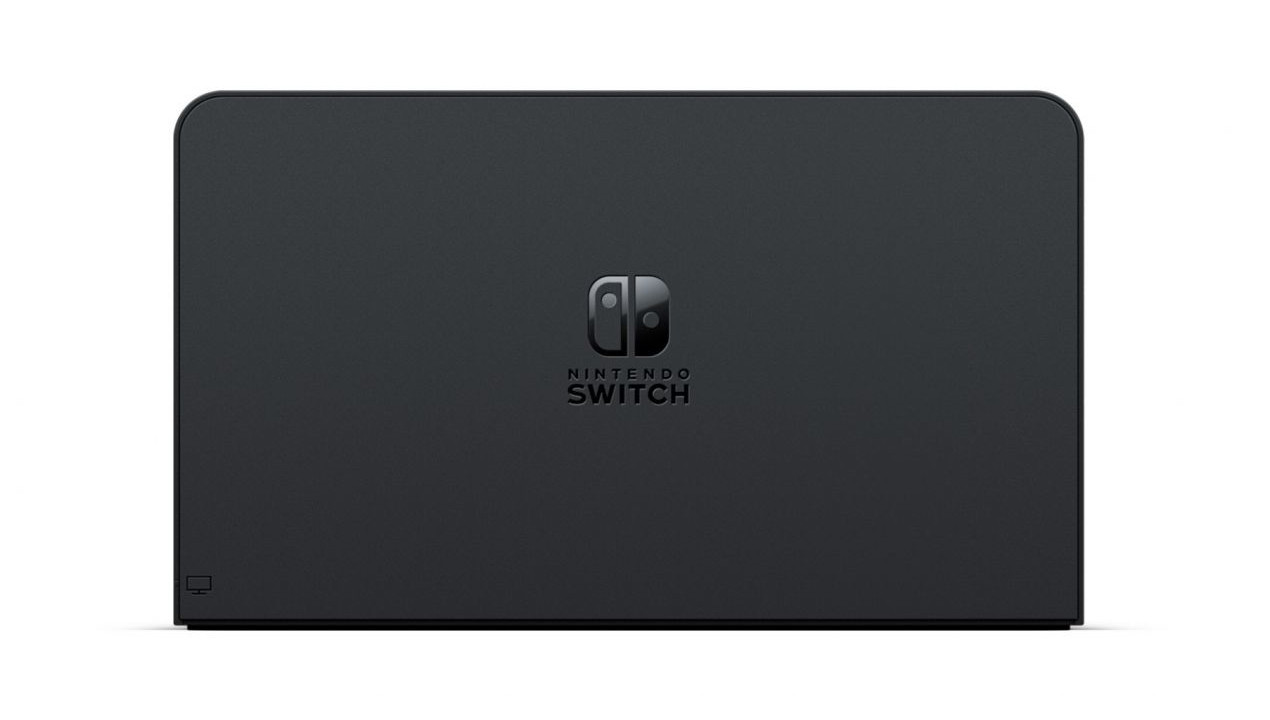
The docking station of the OLED version has changed slightly. Nintendo has rounded the corners and added an integrated LAN connection. Previously, an Internet connection was only possible via WLAN.
The new docking station has rounded corners and a LAN connection.
Price
The regular Switch costs 329.99 euros (RRP). The Nintendo Switch OLED is around 30 euros more expensive at 359.99 euros (RRP). As of now (2024), you can already get the Switch for around 260 euros. The OLED model is at 310 euros.
More about the Nintendo Switch: If you have purchased a Switch or are starting it for the first time, the Switch will take care of many settings. However, in addition to the basic settings, there are also a few additional tips and notes that you should consider: 8 tips and settings for the Nintendo Switch that you should definitely know
This is an AI-powered translation. Some inaccuracies might exist.
The four known Chaos Gods of Warhammer have gained a new member. A giant rat now belongs to their cool quartet and is causing trouble in the world of Age of Sigmar. Will it also appear in the popular Warhammer 40,000? MyMMO explains.
Chaos is the, well, chaotic force of the universe as a counterbalance to order, which is represented by humans, elves, and dwarves. Chaos seeks disorder and destruction – roughly speaking.
In fact, the pantheon of Dark Gods in the Warhammer world consists solely of Nurgle, Tzeentch, Khorne, and Slaanesh. However, in the fantasy version of the world, Age of Sigmar, a fifth god has ascended.
Already in the summer of 2024, Games Workshop, the company behind Warhammer, officially confirmed the Horned Rat as a new Chaos God. And this new god has quite a lot to offer.
Start video
Der Cinematic-Trailer zu den Skaven in Warhammer: Age of Sigmar
The God of Evil Ratmen is the newest Chaos God
The Horned Rat is the only god worshipped by the Skaven, a race of nasty giant rats. Skaven live only for reproduction and to stir up unrest. To clarify: The rats have no use for gold. Nevertheless, they mine it just so that no one else can have it.
The Horned Rat is exactly that: a giant rat with twisted horns, whose depiction somewhat resembles Beelzebub. It represents – similar to Nurgle – disease, disorder, and decay. Additionally, it is the reason why Skaven can wield magic at all.
The Skaven have built an entire religion around the Horned Rat with rules and laws. They adhere to the 169 commandments (which come from 13×13; 13 is the holy number of the Horned Rat). Similar to other Chaos Gods, the Horned Rat has different “aspects” that are revered to varying degrees by individual Skaven clans:
The tail-whipped conqueror, worshipped by the Verminus clans
The Great Corruptor, the model of the Pestilens clans
The Great Inventor, who inspires the inventions of the Skryre clans
The Breeder clans worship the Twisting Progenitor
and finally, the Murder Shadow is considered the patron of the Eshin clans
By the way, Age of Sigmar is the continuation of Warhammer Fantasy, which was essentially discontinued many years ago. With Age of Sigmar, Games Workshop has a new playground to experiment with content and try new things – like the Horned Rat as a Chaos God.
Will Warhammer 40,000 soon get a giant rat as a new god?
If you are now thinking: “Sounds cool, but it would disrupt the sci-fi setting of Warhammer 40,000”, you are probably right. And that is very unlikely to happen.
The worlds of Warhammer 40,000 and Warhammer Fantasy or Age of Sigmar are strictly separated. Although they share many aspects, they are self-contained and independent worlds. Games Workshop has emphasized this several times. Warhammer 40,000 is not the “future” of Warhammer Fantasy.
This is evident even in the fact that Slaanesh exists in the world, even though it is actually only born through the hubris of the Aeldari many thousands of years in the future. Then again, time for Chaos simply runs differently.
However, it is unlikely that the Horned Rat will make it into the world of Warhammer 40,000, simply because there are no Skaven there. While it is not completely out of the question, as Games Workshop has all the freedom to experiment with things, it would likely require finding a way to meaningfully bring rats into space first. And currently, the newest race is a collection of space dwarfs: In Warhammer 40,000, there are space dwarfs, and they are even tougher than in Deep Rock Galactic
This is an AI-powered translation. Some inaccuracies might exist.
Some Pokémon cards have sold for high prices in recent years. That’s why the trading card game attracts more and more fans who start with their first boosters. A little boy experiences a truly heartwarming situation when he receives his first cards as a gift.
What luck did the little boy have? At a trading card fair, a man approaches a seller and hands him a collector’s binder filled with numerous Pokémon cards. He wants the binder to be given to a child who happens to stop by the booth.
The seller is quite surprised, as the binder contains many rare cards, including some holo cards.
You can watch the video of it here:
Recommended editorial content
At this point you will find external content from YouTube that complements the article.
I consent to external content being displayed to me. Personal data can be transmitted to third party platforms.
Read more about our privacy policy.
A few minutes later, a little boy comes to the booth and looks at the selection of Pokémon cards. The father mentions that his son wants to start collecting, but he himself has no idea about it.
The seller sees his chance and hands the little boy the binder. He can hardly believe his luck and first asks if the binder is really free. But the luck doesn’t end there: A man at the booth gives the father-son duo another graded card, which is presumably of high value. He jokes that the little one is on a loot hunt.
Those who don’t want to spend money on Pokémon cards might also enjoy TCG Pocket:
Start video
Pokémon TCG Pocket scores with pure nostalgia
Pokémon cards are in demand among collectors
Why is this such a great gesture? In recent years, Pokémon cards have fetched outrageous prices. Although some cards have now decreased in value, they are still worth several thousand euros. Cards from the first editions can even fetch up to 400,000 euros.
Even the new cards from current editions are highly sought after. In many places, current editions are completely sold out. One store didn’t even want to sell the boosters, fearing the rush of buyers.
Therefore, it is a beautiful gesture to simply hand over rare and valuable cards to the young man. We hope that he has fun collecting for many years to come and perhaps even acquires one or another investment through it.
Cat or dog in the house and the computer under the desk? MeinMMO editor Benedikt Schlotmann explains why you should regularly clean your gaming PC. Because what he pulled out of the PC after 6 weeks was quite surprising.
As much as I love our two cats, they have a major downside: They shed, and not just a little. And if I don’t have fluff and hair in my nose and eyes during the day or night, then especially one thing suffers: My computer.
My gaming PC is currently still under my desk, but in the long term, the device should move to the table. The cats jump, climb, and play on my PC for half the day. For some time, both of them also slept on my computer. But for my computer, that means every time that more hair gets into my PC. Or, at best, is caught by my dust filters.
Start video
In Germany, there are over 400 USB sticks protruding from walls – What is the ‘Dead Drops’ project?
After 6 weeks, bundles of hair in the dust filters
How bad does the computer look? While it’s not as bad as some players, whose components are completely covered with dirt and grime, it is still a task to get the computer clean again. Dust and hair tend to accumulate in the fans of the processor and graphics card, but most of the fluff stays stuck in the dust filters of my case.
In the picture, you can see the cat hair and dust that I pulled out of my computer after about 6 weeks. Normally, I clean my computer every 8 weeks, and I would strongly recommend you do the same if you have pets. Because the hairballs that eventually block every crack in the case will prevent fresh air from entering the system and especially warm air from escaping.
A warm gaming PC is great for sleeping. My hardware doesn’t like that much.
What do I recommend to you? Regular cleaning. With two house cats that shed like crazy, it’s worthwhile every 6 to 8 weeks. Another recommendation: Either buy a case with good, pre-installed dust filters or install some afterward. Usually, you won’t pay much for dust filters, but good models keep most dirt from penetrating deeper into your system.
For cleaning, you should use brushes or a soft brush or a vacuum cleaner for the coarse dirt. Removable dust filters can also be cleaned well this way. However, you should not vacuum sensitive components because you could damage them. Nintendo advises against cleaning hardware by blowing, as moisture can reach the hardware through the air.
Cleaning after 6 weeks: I fished out all this hair from my computer’s dust filters. Ignore the cat litter; that was already on the dustpan.
How does this make itself noticeable? You can especially notice the hair and dust through the noise level. Dirt and dust clog the air intake paths for the fans. This then causes some components or parts to not dissipate heat properly, leading them to overheat. To lower the temperature, your fans work harder.
Dirty fans are therefore much louder because they have to spin faster to cool components like the CPU or the graphics card sufficiently. This usually results in increased wear on the installed hardware.
I have replaced two monitors in my daily life with a large one. And this has been one of the most sensible decisions for the home office. Because I found the time with two monitors to be quite chaotic, also due to the poor monitor mount. Why I can recommend this switch to everyone, you can read in the following article: I swapped 2 monitors for a large one and never want to go back
This is an AI-powered translation. Some inaccuracies might exist.
You really want to buy an Xbox but don’t know which model to choose? MeinMMO explains the similarities and differences between Xbox Series X and S.
The most important points at a glance:
The Xbox Series X and Xbox Series S are Microsoft’s current consoles and the direct competition to Sony’s PS5.
The Xbox Series X is the most powerful console and comes with a disc drive. The Xbox Series S relies on slower hardware and has no disc drive, making it only usable digitally.
With the Xbox Series X, you get the best performance, the finest graphic quality, and 4K performance. The Xbox Series S is especially worth it for casual gamers or as a budget second console alongside the PS5.
Both consoles are backwards compatible with games for Xbox One, Xbox 360, original Xbox games, and older accessories.
If you want to buy an Xbox, you must choose between the Xbox Series X or the Xbox Series S. But which console is the best for me? MeinMMO explains the similarities and differences between the two Xbox consoles and tells you what to consider when buying.
The article was first published in June 2022. On February 14, 2025, we updated the article: We have updated prices, added a note on the new 1TB model of the Series S, and also included a summary of the article (The most important points at a glance) at the beginning of the article.
Last updates: 14.02.2025, 27.08.2024, 12.03.24, 21.06.22
Xbox Series X vs Xbox Series S: Appearance, Design, and Build
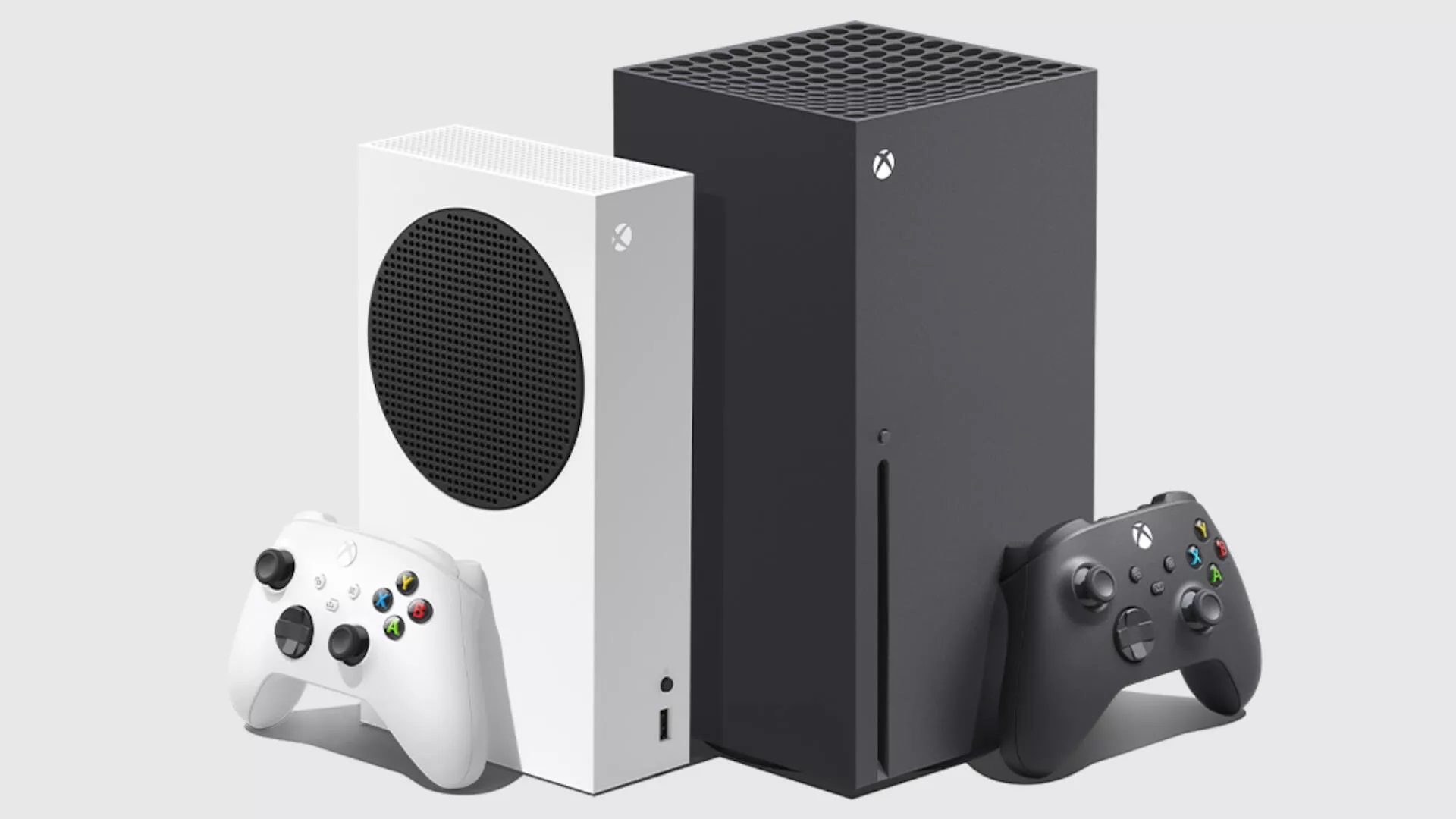
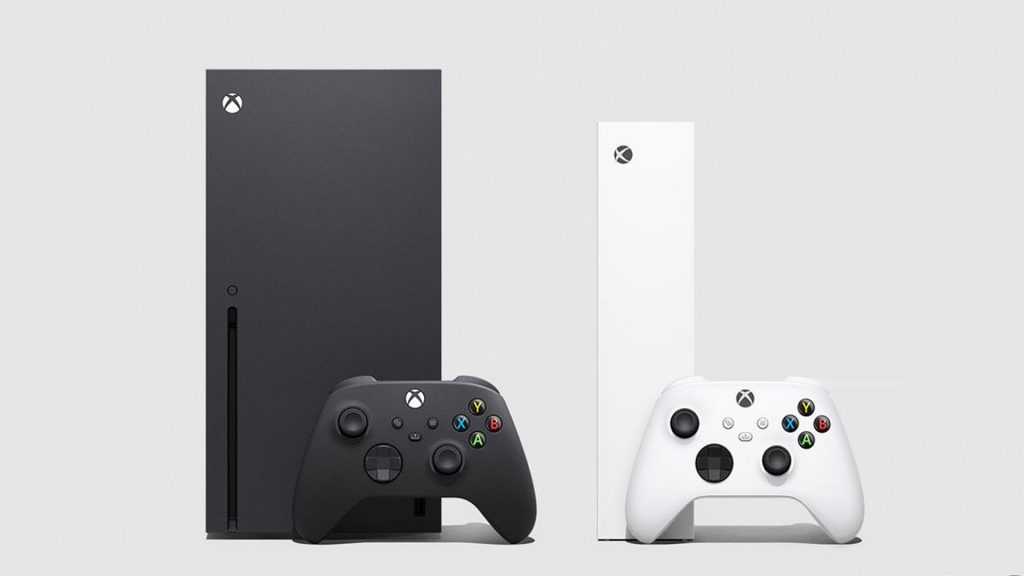
What does the Xbox Series X look like? The Xbox Series X is in a simple black design and is a rectangular cuboid. There are no other special features in the design of the Xbox Series X. Weighing 4.4 kg, the console is about 100 grams lighter than the PS5.
The Xbox Series X (left) and the Xbox Series S (right).
What does the Series S look like? Microsoft opts for a white design with black accents in contrast to the Series X for the Xbox Series S. Nowadays, the Series S is also available in a black design.
Weighing in at 1.9 kg, the Series S is significantly lighter than the Xbox Series X (4.4 kg) or the PS5 (4.5 kg). The Xbox Series S is the smallest next-gen console in terms of size and weight. Microsoft even claims that the Xbox Series S should be 60% smaller than the Series X.
Dimensions and weights of PS5, Xbox Series X, and Series S in comparison:
Unit
Xbox Series X
PlayStation 5
PlayStation 5 Digital
Xbox Series S
Dimensions in cm
30.1 x 15.1 x 15.1
39 x 10.4 x 26
39 x 9.2 x 26
27.5 x 6.5 x 15.1
Weight
4.4 kg
4.5 kg
3.9 kg
1.9 kg
Xbox Series X vs S: Specs and Hardware
What does the Xbox Series X offer? The Xbox Series X is equipped with an AMD processor with a graphics chip. The processor clocks at 3.8 GHz and the graphics chip has a raw performance of 12 teraflops. In addition, it has 16 GB of RAM and a 1 TB SSD with a write speed of 2.4 GB/s. The Xbox Series X supports Full HD, WQHD, 4K, and 8K resolutions. What teraflops are and what they bring can be read on MeinMMO.
What does the Xbox Series S offer? An AMD processor is also installed in the Xbox Series S. The CPU runs slightly slower than in the Series X, and the graphics chip is also slightly slower. The Xbox Series S can be purchased with either 512 GB or 1 TB of storage.
What do both consoles offer? On both consoles, you can play all the current Xbox games and use the Xbox Game Pass. Both consoles also offer hardware-based ray tracing, making the games look even better. Backward compatibility with older Xbox consoles is also included on both consoles.
Xbox Series X vs Xbox Series X in comparison:
Xbox Series X
Xbox Series S
Processor (CPU)
AMD Zen 2 (8 cores, 3.8 GHz)
AMD Zen 2 (8 cores, 3.6 GHz)
Graphics card (GPU)
AMD RDNA2 with 1.845 MHz
AMD RDNA2 with 1.565 MHz
Graphics chip performance(GPU)
12 teraflops
4 teraflops
Hard drive storage
1 TB SSD (2.4 GB/s)
512 GB or 1 TB SSD (2.4 GB/s)
RAM (RAM)
16 GB GDDR6
10 GB GDDR6
Frame Rate
up to 120 Hz, Variable Rate Shading
up to 120 Hz, Variable Refresh Rate
Resolution
up to 4K (native or upscaled), support for 8K
up to 1440p at 60 FPS, up to 120 FPS possible. 4K Upscaling
Xbox Series X vs S in direct comparison
Xbox Series X vs S: Which games?
Which games can you play on the Xbox Series X? On the Xbox Series X, you can play all the current top titles. You can also subscribe to the Game Pass and gain access to hundreds of additional games. With a trick, you can even save money with Xbox Game Pass.
Additionally, you can also use old Xbox 360 and Xbox One game discs with the Xbox Series X. Thanks to backward compatibility, the Xbox supports almost all games from older Xbox generations.
Which games can you play on the Xbox Series S? On the Xbox Series X, you can also play all current top titles and have access to the Game Pass as well. However, you will have to compromise on performance and can play your games at a maximum of WQHD resolution.
Since the Series S has no disc drive, you cannot use your old games from older consoles. If you want to use the Xbox’s backward compatibility on the Series S and play old Xbox 360 games on the Series S, you will need to have purchased them digitally.
Another disadvantage compared to the Series X: When you start Xbox One games on the Xbox Series S, you can only play them in Full HD resolution (1080p) and not in higher resolutions of up to 4K, as the Xbox Series X provides.
Xbox Series X vs Xbox Series S: Price of the consoles
How much does the Xbox Series X cost? The Xbox Series X currently costs 549 Euros. The package of the Xbox Series X includes an “Xbox Series X” console, a controller, an HDMI cable, and a power cable.
How much does the Xbox Series S cost? The Xbox Series S currently costs 299 Euros. The package of the Xbox Series S includes an “Xbox Series S” console, a controller, an HDMI cable, and a power cable. Nowadays, you can also get the console for 270 Euros.
What special feature is there? However, you can also buy Xbox consoles as a subscription with the Xbox Game Pass. Here you pay a fixed price over 24 months instead of the full price (as of March 2024):
Xbox Series X (1 TB): 35.99 Euros per month (24 months), including 24 months Xbox Game Pass Ultimate.
Xbox Series S (1 TB): 26.99 Euros per month (24 months), including 24 months Xbox Game Pass Ultimate.
Xbox Series S (512 GB): 24.99 Euros per month (24 months), including 24 months Xbox Game Pass Ultimate.
Check out the Xbox Series X in the official trailer
Xbox Series X vs Xbox Series S: Which console is better for me?
What speaks for the Xbox Series X: On paper, the Xbox Series X is currently the fastest console on the market. If you want the fastest console with 4K resolution and BluRay drive, then you cannot go past the Xbox Series X. If you have a large collection of disc games or many movies on BluRay, then the Series X will also be the better alternative for you.
What speaks for the Xbox Series S: The Xbox Series S is currently the cheapest next-gen console at around 280 Euros. It is especially suitable for gamers who don’t care about 4K and do not want to invest in a 4K TV in the near future.
The Series S is also suitable compared to the Xbox Series X for people who have already purchased an Xbox Series X or PS5 and are looking for a second console for their bedroom or children’s room. You can also find an extensive buying guide about the Xbox Series S here on MeinMMO:
Xbox Series X and Series S – The main similarities
Both consoles offer DTS 5.1, Dolby Digital 5.1, Dolby TrueHD with Atmos, and Windows Sonic.
Both X and S offer Variable Refresh Rate (VRR), Auto Low Latency Mode (ALLM), and HDR (High Dynamic Range).
Both devices offer 3x USB 3.1 Gen 1, HDMI 2.1, 802.11ac WLAN, and 1 Gbit/s Ethernet.
Both the Xbox Series X and Series S include a controller and an HDMI cable.
Both consoles are backwards compatible with games for Xbox One, Xbox 360, and original Xbox games.
Both Xbox Series X and S are compatible with old accessories from Xbox One.
With both consoles, you can use the Xbox Game Pass (Ultimate).
Xbox Series X and Series S – The main differences
The Xbox Series S offers a maximum resolution of WQHD (1440p). While you can use 4K, it is not “real” 4K like with the Series X. The Series X offers native 4K.
The Xbox Series X does not have a BluRay drive installed. Therefore, you cannot use disc games or watch BluRays.
The Xbox Series S contains a weaker chip that runs slower and provides less performance (4 vs 12 teraflops).
The Xbox Series S is available in both black and white.
The Xbox Series S is smaller and significantly lighter (4.4 kg vs 1.9 kg).
You can only play “Xbox One” games on the Series S in Full HD resolution (1080p), while the Xbox Series X supports higher resolutions of up to 4K.
Start video
Check out the Xbox Series X in the official trailer
Conclusion: Buy Xbox Series X or Series S?
The Xbox Series X is currently Microsoft’s top model and here you get objectively the best Xbox system. The Series X offers more computing power, games in 4K at 120 Hz, with HDR and VRR. Added to this is backward compatibility.
The Xbox Series S is “only” a trimmed-down version without a drive, with which you can still enjoy games in 1440p or upscaled 4K.
Xbox Series X or Series S:
If you want 4K gaming in beautiful graphics and the current fastest console on the market, then buy the Xbox Series X.
If you have many games in the form of DVDs or Blu-rays and enjoy buying used games, then the Xbox Series X is the better console.
If you’re looking for a budget second console alongside the PS5, an Xbox Series X, or a PC, then check out the Series S.
If you can do without 4K and don’t want to upgrade in the future, then the Xbox Series S is the better option.
Casual gamers who play a few rounds of FIFA, Fortnite, and the like and don’t require high performance should also take a look at the Xbox Series S.
Xbox or rather PS5? Do you want to buy a PS5 or Xbox but don’t know which console to choose? MeinMMO explains in a detailed guide what both consoles offer and which one is best suited for you: PS5 vs Xbox Series X – Which console should I buy?
This is an AI-powered translation. Some inaccuracies might exist.
Romance anime are very popular and touch their viewers with emotional stories, charming characters, and heartwarming moments. We present to you the five best that are rated highest by the community on MyAnimeList.
How were the series selected? MyAnimeList is one of the largest anime and manga databases worldwide and is known for its extensive ratings and rankings. The community rating on this platform is crucial for the placement.
The ratings were calculated based on a weighted average that takes into account both the number of votes cast and their significance. Only votes from users who have watched at least one fifth of a series are considered.
We now present the top 5 best romance anime in detail.
[toc]
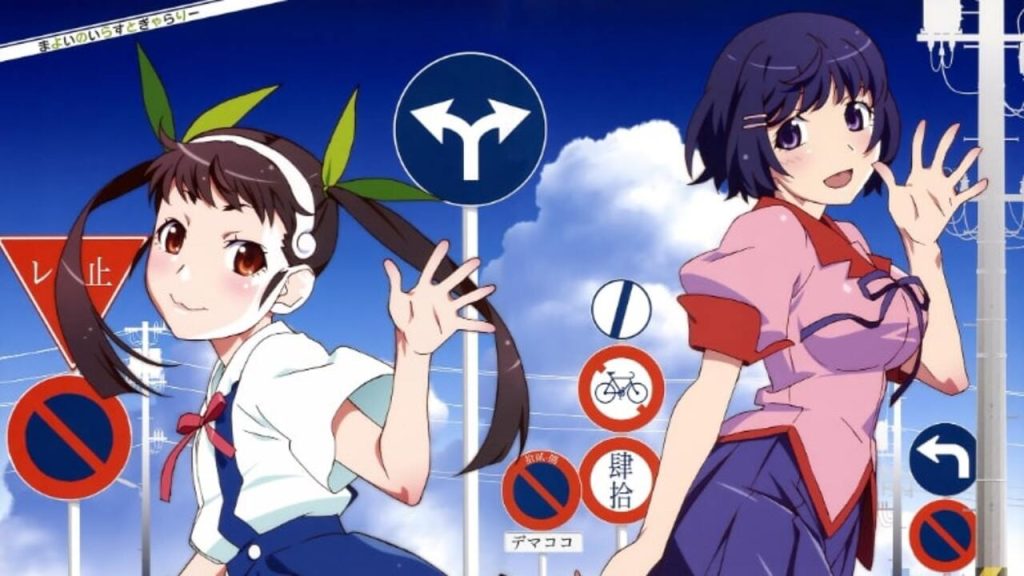
Rank 5: Monogatari Series: Second Season
Release Year: 2013 Rating: 8.76 out of 10 (based on 690,000 ratings)
What is it about? Monogatari Series: Second Season is a continuation of the Monogatari series, which is based on the light novels by Nisio Isin.
The series consists of several interconnected story arcs that revolve around the protagonist Koyomi Araragi and his relationships with various girls affected by supernatural phenomena.
In Second Season, the series delves into the psychological and emotional conflicts of the characters, while the supernatural elements continue to play a central role.
Start video
New Secrets, Old Demons – Monogatari Series: Second Season
What makes the anime so special? The relationship between Koyomi Araragi and Hitagi Senjougahara is a central aspect of the series. Their romance is unusual because they get together relatively quickly and only get to know each other properly afterward.
Moreover, the series is characterized by an artistic and creative storytelling style that often employs unconventional camera angles, quick cuts, and visual metaphors.
This is an AI-powered translation. Some inaccuracies might exist.
In EA FC 25 you can currently secure the fastest female player thanks to an upgrade. At MeinMMO, we will show you how this works.
What kind of upgrade is this? In the Evolution menu of Ultimate Team, the Evolution (EVO) “Star Potential I” is available to you for 40,000 coins until February 22.
Only Future Stars with a maximum rating of 88 overall points are eligible for the EVO upgrades. Additional requirements are:
Defense: max. 77
PlayStyles: max. 10
PlayStyles+: max. 2
What does the upgrade offer? In addition to numerous smaller stat improvements and a new silver PlayStyle “Trivela” for more precise outside-of-the-foot shots, you can expect a new golden PlayStyle called “Faster Step”. This allows you to accelerate significantly faster with your player.
How to get the fastest female player with this upgrade, you can read now.
Start video
Tips for a Perfect Start in EA FC 25 – Ultimate Team
Fastest female player thanks to special PlayStyle combo
What kind of player is she? Sveindís Jane Jónsdóttir is an Icelandic footballer playing for VfL Wolfsburg in the German Google Pixel Women’s Bundesliga. The 23-year-old typically has a rating of 82 in FC 25 and can be deployed variably on both wing positions (RF, LF, RM).
As part of the Future Stars event, the forward received a special card that fits the requirements of the EVO “Star Potential I”. With the upgrades from the promo and the EVO, Jónsdóttir looks as follows:
Overall Rating: 82→89
Speed: 92→97
Shooting: 73→87
Passing: 76→84
Dribbling: 81→88
Defense: 46→51
Physical: 71→78
New PlayStyles+:
Rage (faster dribbling in sprint)
Faster Step (more effective acceleration)
All further upgrades can be seen here:
New PlayStyles:
Curling Shot (more precise curve shots with R1/RB)
Lob (more effective lobs with L1/LB)
First Touch (better ball control after passes)
Power Shot (faster execution of the power shot with L1+R1/LB+RB)
new position: ST
Skill upgrades:
Weak Foot: 3★→5★
Special Moves: 3★→4★
New Player Roles:
Winger++
Center Forward Pro+
Striker Pro+
Future Stars Jónsdóttir costs about Futbin about 26,000 coins (as of: 14.02.25, 12:00 Uhr)
This is how the PlayStyle combo makes Jónsdóttir the fastest player: After completing the EVO, Jónsdóttir has a combination of golden PlayStyles with “Rage+” and “Faster Step+” that no other player in FC 25 has so far. Probably for good reason, as the effect of these two playstyles allows you to be at least one step faster than your opponents in both acceleration and top speed.
You activate Faster Step as soon as you press the sprint button (R2/RT). Rage is activated when you sprint while dribbling. Especially in the first few meters, the speed advantage is clearly noticeable. This way, you can leave the opposing defenders behind with a sudden speed increase.
On the weekend, the Raid Day is happening with the unleashed Hoopa in Pokémon GO. But even your banned Hoopa will now be useful.
What kind of event is this? On Saturday, you can take part in plenty of raids against the powerful, unleashed Hoopa from 2:00 PM to 5:00 PM. You will receive some free raid passes, thus giving you the chance to secure the strong attacker. All info and tips about the Raid Day with Hoopa can be found here.
Now there is another interesting point: In the English announcement of the event, it was added that your already caught, banned Hoopa can also become an unleashed Hoopa (via pokemongolive.com). We summarize all the info for you here.
Start video
Pokémon TCG Pocket: Trailer for the Collision of Space and Time Expansion
What is behind the banned Hoopa?
What is changing now? Starting from the Raid Day, the Pokémon GO team writes in the announcement, the form change for Hoopa will be unlocked for all trainers. It doesn’t matter whether you have completed the special research “Unleashed Mischief” or not. Additionally, from then on you can also send the unleashed Hoopa to Pokémon HOME – that was not possible before.
You need the following for the form change:
50 Hoopa candies & 10,000 stardust from banned to unleashed
10 Hoopa candies & 2,000 stardust back from unleashed to banned
This is what Hoopa unleashed looks like
You should note: If you don’t have a banned Hoopa with very strong stats, it is presumably more worthwhile to catch the unleashed Hoopa anew during the Raid Day. Because the 50 Hoopa candies needed for the form change can also be used well for other purposes, like leveling up or learning an additional move.
What is the banned Hoopa? The banned Hoopa first appeared during the “Season of Mischief” in 2021, where one could catch the monster in the context of a special research. This Psychic-Ghost Pokémon did not have the option to switch to the stronger, unleashed form.
During the event “Unleashed Mischief,” this changed: Another special research was added, which you received once you completed the first one. After completing it, you were allowed to switch Hoopa to the unleashed form at the end.
However: Claiming this second research was only free for a limited time. Those who never completed it could not secure the form change for the banned Hoopa. Later, there was the Top Raid Day with the unleashed Hoopa, but at that time the Pokémon was very difficult to defeat. Many players might still be missing this monster today.
This is an AI-powered translation. Some inaccuracies might exist.
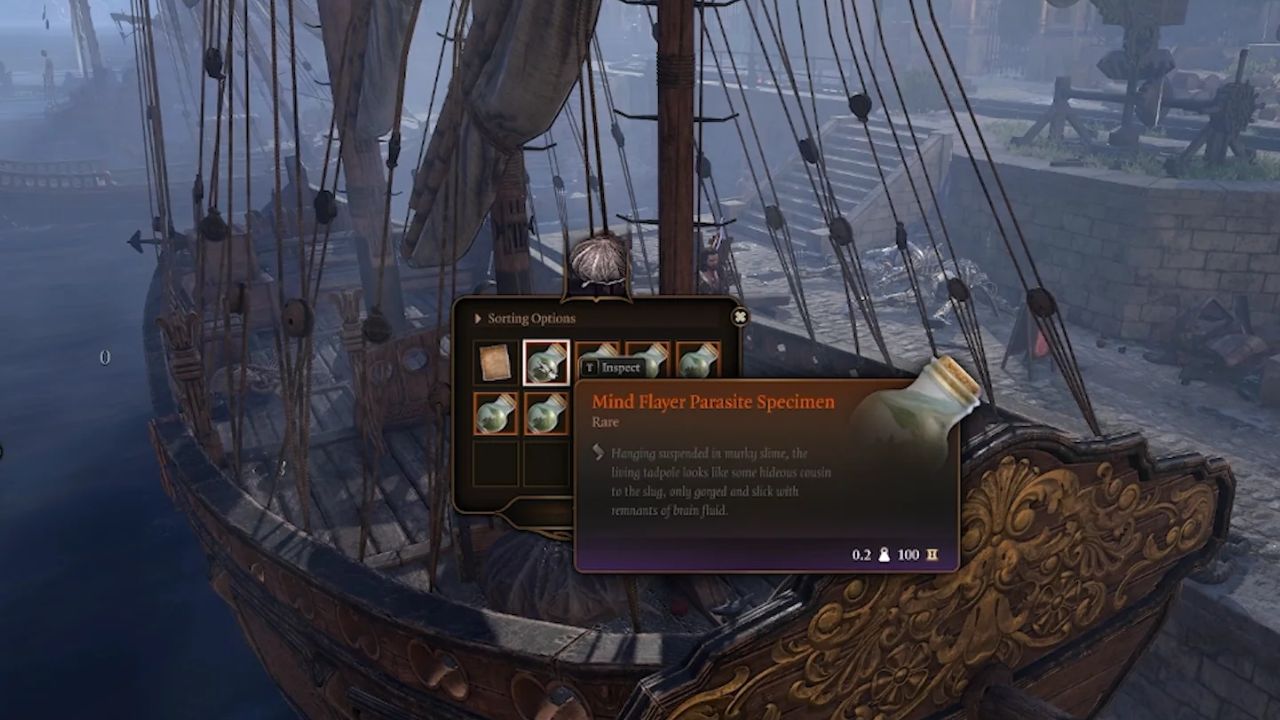
In the third act of Baldur’s Gate 3, there is a ship in the city harbor that carries a particularly valuable cargo. Although it is not gold, it is still heavily guarded.
What kind of treasure is it? It is a chest that contains a total of 6 mind flayer larvae. The larvae can be consumed and unlock illithid abilities that can make your characters significantly more powerful.
You can divide the larvae among your party (as long as the companions agree), or invest them all in one character to unlock as many new abilities as possible. But how do you get to this loot?
Here you can see more about Baldur’s Gate 3:
Start video
There are secret rooms in Baldur’s Gate 3 that only a few of you will ever see
The worm is in there
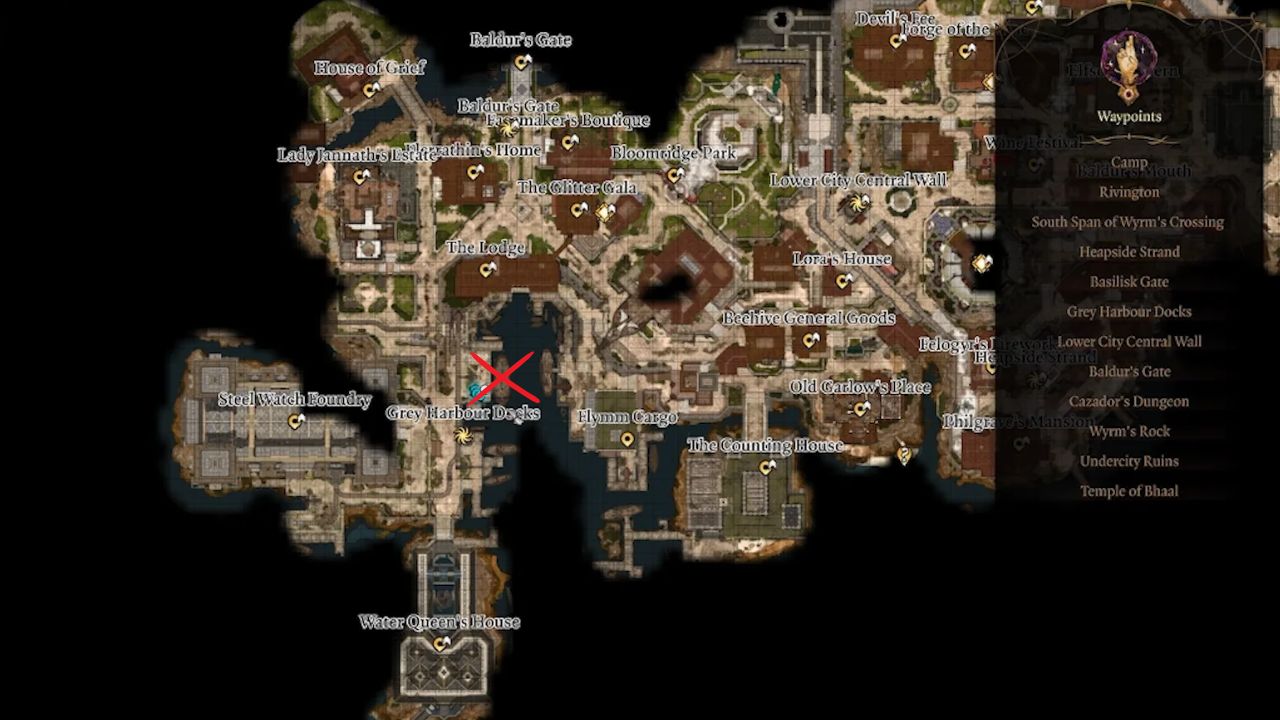
Where exactly is the chest located? The chest is located in the third act of the game on a ship in the city harbor. There you can find the hiding place on deck and pocket the larvae.
Here you can see the exact location of the chest, shared by the player SpookyPops on Reddit:
Ship with the larvae (Image source: SpookyPops on Reddit)Location of the ship on the map (Image source: SpookyPops on Reddit)
How do you get to the chest? The ship is located in a restricted area where you should not be discovered if you want to avoid conflict. However, there are various ways to still reach the loot.
Of course, you can just fight your way through, but that is easier said than done. The area is guarded by the Steel Watch, who can deal considerable damage and restrict your movement.
A much more relaxed method is to make yourself invisible and sneakily grab the larvae. That way, no one will notice, and you can quickly make your escape to enjoy the powerful delicacy.
Is it even worthwhile to eat the larvae? Each player is free to decide whether to consume the mind flayer larvae. This decision is not imposed by the game, but it does have consequences.
If you choose to do so, it unlocks the skill tree of illithid abilities, which can be of great benefit in combat or even outside of it. Additionally, there may be further dialogue options in certain situations that can influence the direction of the game.
However, a decision may become significantly harder towards the end of the third act if you have consumed even one of the little worms. But we don’t want to spoil that for you. If you want to read more on this topic, you might be interested in this article: Baldur’s Gate 3: Should you eat the larvae or not?
This is an AI-powered translation. Some inaccuracies might exist.
The producer of some of the best parts of GTA is making his own shooter, which is set to be released even before GTA 6.
Who is it about? Leslie Benzies was a producer at Rockstar North until 2016. He was responsible for the development of GTA San Andreas, Liberty City Stories, Vice City Stories, GTA IV, and GTA V, as well as Red Dead Redemption.
Especially GTA San Andreas is popular among fans of the series and has achieved a sort of legendary status. As Carl Johnson, it took players to San Andreas for the first time, featuring 3 cities as part of the game world.
Meanwhile, Benzies has founded his own studio called “Build A Rocket Boy” and is developing his own shooter called “MindsEye,” which is set to be released on Steam in the summer of 2025.
You can see the first gameplay trailer here:
Start video
The shooter ‘MindsEye’ shows first gameplay in the new trailer
What kind of game is this? In MindsEye, you play as the former soldier Jacob Diaz, who suffers from memory loss and carries a mysterious neural implant in his head. Throughout the game, you embark on covert missions and confront political corruption and corporate espionage. Additionally, artificial intelligence is said to pose a constant threat.
The gameplay trailer gives a first taste of what to expect in MindsEye – and even resembles GTA a bit: There is a sunny metropolis, fast cars, third-person shooting, a cover mechanic, and, of course, wild chases with plenty of explosions.
Perhaps a game is being created here that can shorten the wait for the release of GTA 6.
While MindsEye aims for a release in the summer of 2025, GTA 6 is currently targeting fall 2025. Additionally, Borderlands 4 is set to be released in September. However, this is not a problem for the CEO of Take-Two, the parent company behind GTA developer Rockstar Games. The company is planning releases so that you can enjoy both games: The head of GTA 6 wants you to have enough time to play – narrowing the release window
This is an AI-powered translation. Some inaccuracies might exist.
Nvidia presented its latest graphics cards from the RTX 5000 series at CES 2025. MeinMMO brings you all the important information about the GeForce RTX 5070.
[toc]
The most important points at a glance:
The RTX 5090 will be Nvidia’s new flagship and likely the fastest graphics card of 2025.
Nvidia has introduced three more graphics cards: the RTX 5080, RTX 5070 Ti, and RTX 5070.
The RTX 5070 will be released on March 5, 2025, and the RTX 5070 Ti on February 20, 2025.
Prices start at 649 euros for the RTX 5070; custom models are likely to be slightly more expensive.
In direct comparison to the RTX 4090, the RTX 5070 offers significantly less memory bandwidth and less video memory. However, both graphics cards have similar boost clock speeds. Especially at high resolutions, the RTX 4090 is likely to remain faster.
With the RTX 5000, manufacturer Nvidia has introduced its next generation of graphics cards. MeinMMO presents all known information about the new graphics cards and explains what you should know before the release.
The article was first published on January 9, 2025. On February 14, 2025, we updated the article and added the official release dates for the RTX 5070 and RTX 5070 Ti.
RTX 5070: Release and Price
When will the RTX 5070 be released? The RTX 5070 and the RTX 5070 Ti have an official release date:
The GeForce RTX 5070 will be released on March 5, 2025.
The GeForce RTX 5070 Ti will be released on February 20, 2025.
How much does the RTX 5070 cost? The recommended retail price in Germany is 649 euros (including VAT). The RTX 4070 Super has a suggested retail price of 659 euros. By now, prices are more around 600 euros.
RTX 5070: Pre-order and Buy
Where can you buy the RTX 5070? In Germany, Notebooksbilliger.de is the official partner of Nvidia. The so-called “Founders Edition” (FE) is expected to be available there. Models from third-party manufacturers (custom designs) will also be available at other retailers like Mindfactory or Alternate.
In recent years, the launch of Nvidia graphics cards has always been around 3 PM. At Notebooksbilliger.de and Mindfactory, sales often started a bit earlier.
Can you pre-order the RTX 5070? Not at this time. We will update our article if this changes.
Start video
Check out the brilliant Collector’s Edition of the NVIDIA TITAN Xp in Star Wars style in the video
RTX 5070 vs RTX 4070 Super vs RTX 4070: The Specs of the Graphics Cards Compared
GeForce RTX 5070
GeForce RTX 4070 (Super)
GeForce RTX 4070
Base Clock
2,160 MHz
1,980 MHz
1,920 MHz
Boost Clock
2,510 MHz
2,475 MHz
2,475 MHz
Memory
12 GB GDR7
12 GB GDDR6X
12 GB GDDR6X
Memory Throughput
28 Gbps
21 Gbps
21 Gbps
Memory Interface
192-bit
192 Bit
192 Bit
Memory Bandwidth
672 GB/s
504 GB/s
504 GB/s
TDP (in Watts)
250
220
200
Price (RRP)
649 Euros
659 Euros
659 Euros
RTX 5070 vs RTX 4090: The Specs Compared
GeForce RTX 5070
GeForce RTX 4090
Base Clock
2,160 MHz
2,230 MHz
Boost Clock
2,510 MHz
2,520 MHz
Memory
12 GB GDR7
24 GB GDDR6X
Memory Throughput
28 Gbps
21 Gbps
Memory Interface
192-bit
384-Bit
Memory Bandwidth
672 GB/s
1,008 GB/s
TDP (in Watts)
250
450
Price (RRP)
649 Euros
1,949 Euros
Is the RTX 5070 better than the RTX 4090? Both graphics cards have similar clock speeds in direct comparison, with the RTX 4090 being slightly faster. However, the more important and decisive difference is the memory interface and bandwidth. The RTX 4090 offers a significantly better interface and more throughput than the RTX 5070. Additionally, the RTX 4090 has significantly more video memory (12 vs. 24 GB) than the RTX 5070.
This is especially relevant at high resolutions: the higher the resolution, the more important memory bandwidth becomes. At resolutions like 4K or even 8K, the RTX 4090 is still likely to be significantly faster than the RTX 5070. The final results will be available around the release, when the first independent benchmarks are published.
Furthermore, the RTX 4090 provides significantly more so-called AI TOPS. While the RTX 4090 is equipped with 1321, the RTX 5070 offers “only” 988 AI TOPS. TOPS (Trillions or Tera Operations per Second) is an example of a simplifying metric indicating how many computations an AI chip can perform in one second.
In other words: The RTX 4090 offers around 30% more performance in AI calculations on paper compared to the new RTX 5070. How this looks in practice will need to be demonstrated by independent benchmarks in the future.
RTX 5070: First Benchmarks
Are there already benchmarks? Yes, Nvidia has already presented its graphics card in its own benchmarks (via nvidia.com).
With DLSS enabled, the RTX 5070 is significantly ahead of the RTX 4070 and is sometimes more than twice as fast. Without DLSS, the gap is not quite as large, being more around 15 to 20%. However, it is important to note that these are official data and not independent test results. If you want independent values, you will have to wait for the first proper tests, which are expected shortly before the RTX 5070 release in February 2025.
Valve has removed a game that infected gaming PCs with malware. Valve has sent a message to affected users.However, according to user data, it is unlikely that many players are affected.
What game is it about? Specifically, it is about the free game PirateFi, which was released on Steam on February 6, 2025. However, just a few days after the release, the game was already taken offline.
Why was it taken offline? SteamDB reports on x.com that some players received an email from Valve. In this email, they were informed that there were suspicious files in the last build of the game “PirateFi.” At the same time, the email warned players that their system might have been infected with malware. Specifically, it states:
We are contacting you because you recently ran PirateFi on Steam. The Steam account of the developer for this game has released builds on Steam that contained suspicious malware. You played PirateFi on Steam while these builds were active, so it is possible that these malicious files were launched on your computer.
How many players are affected? Probably very few. According to SteamDB, the game had a peak of 5 players, and the website estimates the users who have registered the game on their account to be somewhere between 800 and 1,500. Therefore, the chance is very low that you have downloaded this app.
Start video
In Germany, there are over 400 USB sticks protruding from walls – What is the ‘Dead Drops’ project?
Antivirus Software, Check Installation, and Format Partition
What can be done about it? The first and most important step, if you really suspect you are affected by malware: Disconnect your computer from the internet. Because usually, the software communicates with the fraudster sitting somewhere on the internet.
In the next step, you should switch to Windows Safe Mode. Only the most essential data is loaded here. Ideally, the virus has not yet settled in: Press F8 as soon as you start the computer and select the menu option “Enable Safe Mode.” Next, delete all temporary files using Windows Disk Cleanup. Ideally, the malware hasn’t gotten further.
Valve also mentions several options that you can take against malware:
Check your computer with an antivirus system of your choice. Ideally, use an external solution, as malware may have also infected your installed antivirus software, thereby distorting the data.
Check your system for any new software installed in the last few days that you did not install yourself.
Valve recommends formatting the corresponding partition to completely eliminate the malware: However, note that all files on the formatted partition will be lost. This includes games and personal data.
In Nightreign, there will not be the possibility to create and customize your own character, as it is possible in Elden Ring. Instead, in the new game, you will encounter a total of 8 different so-called Nightfarers, of which you can already get to know 4 in the Network Test.
Who are the Nightfarers? The Nightfarers are the playable characters from Elden Ring: Nightreign. Each of them has a specific playstyle, as well as personal starter weapons and special abilities that can be utilized differently in the game.
Every Nightfarer has a Character Talent (hold the PS5 △ button and press L2) and an Ultimate Art (hold the △ button and press R2). Both of these abilities have a cooldown that recharges automatically. We will introduce the abilities of each Nightfarer in this article.
Here you can see the gameplay trailer of Elden Ring: Nightreign:
Start video
Gameplay trailer for Elden Ring Nightreign shows a boss from Dark Souls 3
These are the first 4 Nightfarers from the Network Test
Here you will find out who the heroes of Nightreign are, what they can do, and for which playstyle they are suitable:
Image Source: Bandai Namco
Wylder
Wylder is a generalist who is particularly well-suited for beginners. He starts with a great sword and a buckler, as well as a crossbow attached to his forearm, which can fire a grappling hook or explosive bolts.
Character Talent: Claw Shot – Fires a claw to pull enemies within range. The talent can also be used for more agile movement through the environment.
Ultimate Art: Onslaught Stake – A powerful single attack that fires an iron stake with a large explosion.
Tip: His Ultimate can hit multiple targets if fired into a group. The high damage is also suitable for simultaneously reviving both teammates, which is especially useful if you are the last survivor.
Image Source: Bandai Namco
Guardian
Guardian is a paladin, whose head resembles that of a Stormhawk from Castle Stormveil in Elden Ring. He wears heavy armor, a tower shield, and a large halberd. A character with high defensive abilities who can withstand fierce enemy attacks with his shield.
Character Talent: Whirlwind – Guardian’s wings create a whirlwind that sweeps enemy targets off their feet.
Ultimate Art: Wings of Salvation – Guardian jumps up and then crashes down in a dive onto an area.
Tip: Similar to Wylder, his Ultimate hits multiple targets and can therefore be used for damage against multiple enemies and for reviving several teammates. As long as he is in the air during his Ultimate, many enemies cannot reach him.
Image Source: Bandai Namco
Recluse
Recluse is a sorceress who masters cursed magic, allowing her to cast powerful spells. She focuses on magical ranged damage as she has weak defense, but can absorb health from her opponents.
Character Talent: Magic Cocktail – Collects the affinity residues (standard damage, magical, flaming, holy, bloody, etc.) of the target to unleash an affinity explosion.
Ultimate Art: Soulblood Song – Unleashes a forbidden blood song to brand nearby enemies with blood seals. The branded target takes more damage.
Tip: While gathering affinity residues through Magic Cocktail, Recluse’s FP is recharged to allow her more spellcasting.
Image Source: Bandai Namco
Duchess
Duchess is a precise assassin who relies on swift attacks and can dodge repeatedly in quick succession. She has weak defense, but her evasion abilities can compensate for that. She wears a silver mask, fine leather clothing, and begins with a decorative short sword.
Character Talent: Restage – Surrounds and damages nearby enemies with an illusion of herself. This doubles the damage they received in the last seconds.
Ultimate Art: Finale – Cloaks herself and nearby allies to hide from enemies.
Tip: Duchess’s abilities can be very rewarding with good timing. If you use her character talent right after an ultimate art of a teammate, you can quickly melt the health bar of the opponent. Her Ultimate is suitable for a brief break as enemies cannot see hidden targets and cannot attack directly.
What else should you know about the characters before the Network Test? It can be quite exciting to test different group compositions. It is sensible to have a character available for each task (Tank, Damage, Support), but it can also be exciting to take a completely different approach.
A Nightfarer can be chosen by multiple players simultaneously. Therefore, in theory, there could be a whole group of Recluses who rely solely on magic, or a flock of Guardians. How strong (or not) this idea is, you will have to find out for yourself. If you want to know more about the Network Test of Elden Ring: Nightreign, you can find information here on MeinMMO: Elden Ring: Nightreign – All information about the release, crossplay, and the network test
This is an AI-powered translation. Some inaccuracies might exist.
The dream of World of Warcraft on PS5 and Xbox was real for a brief moment. Now, the head of the MMORPG has clearly rejected it for everyone.
Finally being able to play World of Warcraft on consoles. At least for the Xbox Series X/S, this dream seemed to come within reach when concrete hints appeared that Microsoft would add WoW to the Game Pass a few days ago. Numerous people were informed via email that WoW would soon be available on Xbox in the Game Pass – but that was just a mistake, as Microsoft quickly admitted.
Now, the Game Director of WoW has commented on the issue and unfortunately has bad news.
There has already been a clear statement regarding WoW 2.0:
Start video
For the 20th Birthday, Blizzard Speaks About ‘WoW 2’ and What We Think About It
The promotional email about WoW was really just a mistake
What happened? When Microsoft purchased Activision Blizzard over a year ago and the first Blizzard games landed in the Game Pass, many thought it was only a matter of time before World of Warcraft would be playable there as well.
The dream seemed to come within reach when a promotional email specifically highlighted this – World of Warcraft in the Game Pass and even on the Xbox. At least, that was suggested.
When they then backtracked and said it was apparently a mistake, many responded with a mischievous grin: “But of course that was a mistake. You just announced it too early by accident. Just go ahead and say that WoW is coming to console.”
The hope has likely been dashed for the time being.
What was said now? In a long interview with VICE magazine, Ion Hazzikostas, the Game Director of World of Warcraft, spoke about such a console version. He was asked about how WoW is already quite playable with a controller and they wanted to know when a console version would finally come. Hazzikostas responded:
There are no current plans that we could announce, but we have done a lot of work to support a lot of peripherals. There are not only the standard controllers but also things like Microsoft’s accessibility controller, which uses much of the same interface that our players with physical disabilities use.
We want WoW to be playable as widely as possible. Whether you want to do that with mouse and keyboard or with a PC Surface tablet on the go.
We want to support as much as possible here, but at this time we have no plans for Xbox or PlayStation.
That Hazzikostas is expressing himself so clearly about something is rather unusual. He is generally known for making statements that are a bit vague and at least leave all options open.
That a console version and the current development of it have now been clearly denied will likely bury the hope of “WoW on console” for now. It seems that this is not something we should expect even in 2025 – if it ever happens at all.
Would you be interested in playing World of Warcraft on PlayStation or Xbox? Or do you think a game like WoW can really only work well on PC? Even though a console version has now become significantly less likely – World of Warcraft is finally fulfilling other wishes after many years. Because in 2025, player housing is finally coming and will be really strong.
This is an AI-powered translation. Some inaccuracies might exist.