

If you want to learn about World of Warcraft and the new expansion The War Within, you often stumble upon coordinate specifications, especially in guides. However, these are not shown in the game itself. MeinMMO presents you three addons with which you can view coordinates.

What are coordinates? Coordinates are numeric combinations in the X/Y format that indicate a latitude and a longitude. They tell you where on the map you can find something.
They are used, for example, to determine the location of certain NPCs. If you want to farm rare mounts, you often deal with coordinates to determine the exact location.
Generally, they are more or less standardized for WoW, so the information is consistent for each display. However, to see them, you need addons.
Most addons for map and minimap already have this function integrated. Here we present you three addons that are practical and easily incorporate the coordinates.
MapCoords
What is MapCoords? As the name suggests, MapCoords does nothing other than display the coordinates on the map. If you are solely focused on this feature, you can confidently go for this addon.
How does it display coordinates? The display is actually better in MapCoords than in most other addons. You see both the position of the player and your cursor on the map. Below your portrait and under the minimap, you additionally see the position of the character.
MapCoords offers several settings, allowing you to set:
- where you see the coordinates (below the minimap, on the map, and below the portrait)
- whether you want to see the coordinates of the cursor
- whose coordinates you see – you can even display the locations of party members
- whether the coordinates should be displayed with decimal points or rounded
In terms of coordinates, MapCoords is the most comprehensive and simultaneously the leanest addon. However, it does not offer any other features.
Here you can find MapCoords on Curse
Mapster
What is Mapster? The addon is particularly designed for the actual map of World of Warcraft. Here, Mapster offers several useful features, such as:
- Revealing all unexplored areas
- Free scaling of the map size
- Fading the map when you move, making it translucent
This makes Mapster particularly useful if you are looking for a general addon for your map to enhance it with more features.
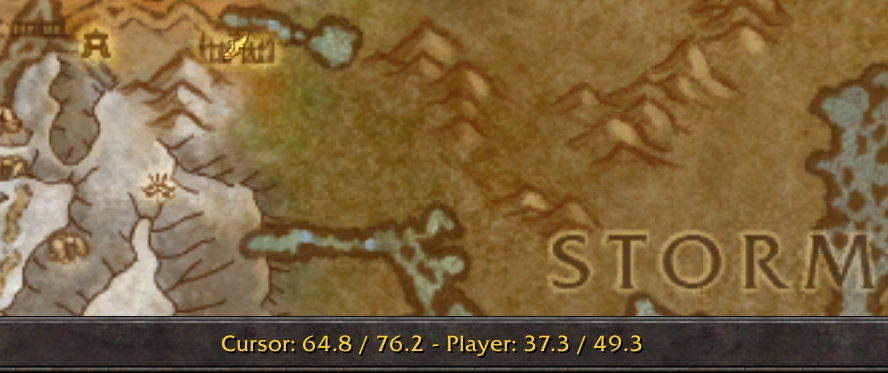
How does it display coordinates? The coordinates are displayed directly under the map (default button: “M”). There you will find both the position of the player and your cursor, making it easier for you to navigate.
Disadvantage: You need to open the map to see the coordinates.
Here you can find Mapster on Curse

SexyMap
What is SexyMap? Unlike Mapster, SexyMap only alters your minimap. Here, however, you have various options to make it look a bit nicer. For example, you can change the shape and the border of the minimap to adorn it with runes, a fiery frame, or skulls.
Additionally, SexyMap allows you to change the shape of the map, so you can set it to a circle, a square, or even wacky shapes like a heart or a snowflake. If you want to arrange multiple buttons for additional addons around the minimap, it can be helpful to adjust the shape.
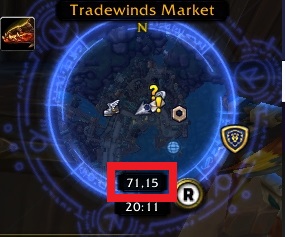
How does it display coordinates? SexyMap displays the coordinates directly under the minimap. There you will find a numeric combination that directly represents your character’s location.
Advantage: You always have the coordinates in view. Disadvantage: You cannot search for coordinates with the cursor.
Here you can find SexyMap on Curse



Installing addons – Here’s how
If you want to install addons, you can use a client. Some time ago, Curse switched to Overwolf, a new tool for updating your addons.
Alternatively, you can manually visit the respective website of the addon and download the file. Then unpack the corresponding files in the folder “World of Warcraft_retail_Interface_AddOns” on your respective hard drive.
In our guide, you will find more useful addons for World of Warcraft and how to install them.

Your opinion is important to us!
Do you like the article? Then let us know!