

Players game for various reasons. Many want to relax while sitting in front of the screen. Our tech author Jan Hartmayer feels the same way and has quickly transformed his computer into a wireless gaming console for his TV.
Since I was young, I have loved gaming. I used to play much more competitively; today, I prefer a more relaxed style but at a higher difficulty level. Nevertheless, one thought has been bothering me over the past weeks and months: Why don’t I just play on my TV? Then I could lie back comfortably on the couch.
However, to level up my laziness to the max, there were a few issues I needed to address:
- How do I connect my PC to my TV? Wireless would be the easiest.
- Which input device should I use?
- Can I actually operate my computer properly with a gamepad?
There are two simple solutions to these problems in the form of Steam Link and Valve’s Big Picture Mode. Both features allowed me to create the ultimate lazy setup.
I wouldn’t mind having a Steam Machine under my TV. The upcoming console from Valve would fit perfectly into my couch setup:
Wireless and easy to use
Steam Link allows games to be streamed wirelessly from a PC to almost any smart TV or streaming box. All that is needed is a fast internet connection. Big Picture Mode, on the other hand, transforms the Steam interface into a console experience that is easy to operate with the controller at the push of a button.
Once set up, I only start my PC, which automatically opens Steam, press the menu button on Valve’s new gamepad, and bam, Big Picture Mode activates, and gaming can begin. The gamepad is so good that I bought four of them at once at release.
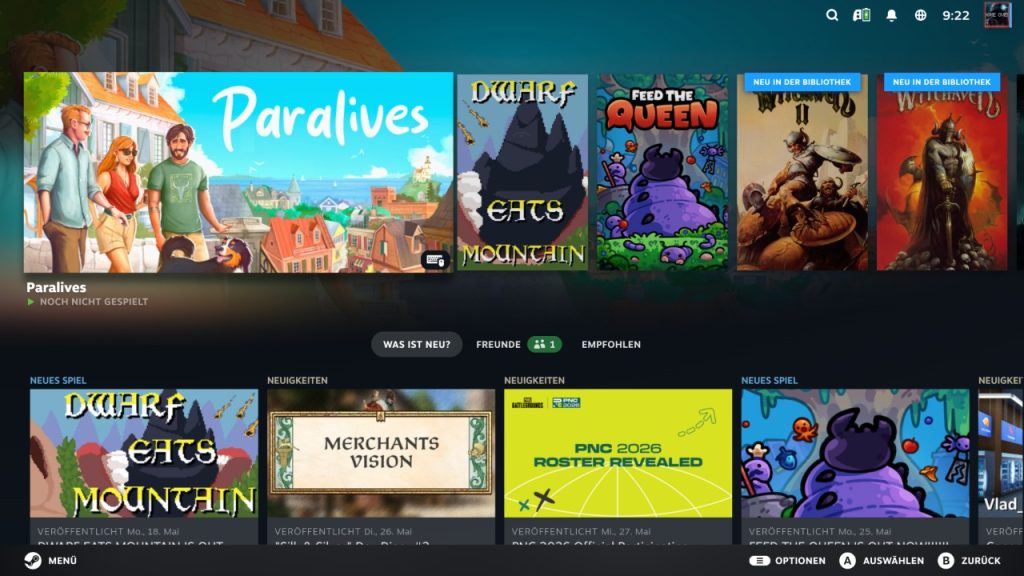
Even games or programs from other sources can easily be added as “Steam Non-Steam Game” and then activated through console mode. For example, I start Diablo IV through the Battle.net launcher, even though I don’t own the game on Steam.
Besides my daily gaming sessions, I also use the mode for party nights. I connect multiple input devices, such as four Steam Controllers, start a couch co-op game like Worms or Brawlhalla, and beat my friends’ characters to a pulp.
Best of Both Worlds
But my favorite feature remains the ability to shut down the computer at the push of a button. Because within Big Picture, I press the menu button and then “Shutdown System.” This way, I don’t even have to get up to turn off my computer, maximizing my lazy points. I have taken the best aspects of PC and console and created my own hybrid:
My gaming rig, equipped with an RTX 5090, is not only more powerful than any console but also allows me to access free multiplayer, mod support, and many other PC features without losing the ease of use and convenience of a console.
Another advantage is that I spend more time with my partner. For example, we often sit together on the couch in the evenings, either playing co-op together or she reads while I game away.


Since I discovered the combination of Steam Link and Big Picture, I primarily game on the TV. Why not? Because I sit a lot at the desk due to work, and I enjoy being able to lie down in the evenings after sports. Furthermore, I’m not the only one who has discovered the streaming app. Our tech author Julian has also gotten a taste: With a small device, I comfortably play my Steam games on the couch without having to place a bulky gaming PC in the living room.

Your opinion is important to us!
Do you like the article? Then let us know!