


Many users are considering installing Windows 10 on the Steam Deck. A tech expert has now tried this on YouTube and strongly advises against it. The performance is significantly worse on Windows.
What is the Steam Deck? In June 2021, Valve introduced the Steam Deck, a handheld console. With it, Valve aims to provide a mobile gaming PC, as you can install and play anything you want on the device.
Valve had already stated in advance that you could also install Windows 10 on the Steam Deck and has now provided the appropriate drivers for Windows 10.
Why should you even install Windows? Initially, the operating system Steam OS is installed on the Steam Deck. This is based on Linux and brings some peculiarities compared to Windows. However, the problem is that many multiplayer games do not work on the Steam Deck. Additionally, Linux is not compatible with anti-cheat software.
With Windows, users could also use other launchers like GOG, EA Origin, or Epic. The Xbox Game Pass is also a reason why many people are tempted to install Windows. A well-known tech YouTuber has now tested Windows on the Steam Deck.
Windows on the Steam Deck is not very intuitive and delivers weak performance
Who tested the Steam Deck? Linus Sebastian from Linus Tech Tips tested both Steam OS and Windows on two devices. Together with his team, he conducted several tests. You can find the official tests of the Steam Deck, including the test of Linux, summarized on our site.
Linus wanted to find out in his video how well Windows runs on the Steam Deck and whether games have a better performance there. We have embedded the entire video from Linus about the Steam Deck here for you:
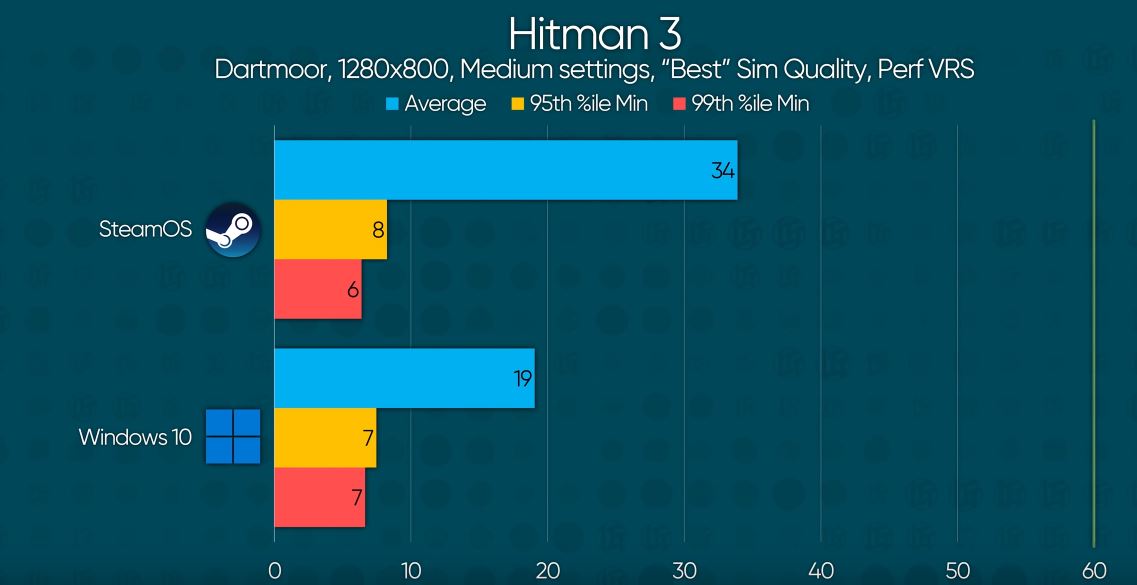
How do games perform under Windows? The performance on the Steam Deck with Windows is sometimes abysmal. While you get stable 30 FPS in Hitman 3 under Steam OS, there are only 19 FPS under Windows. The situation is similar for Doom Eternal: Under Steam OS, the game easily achieves 60 FPS, under Windows, it’s only 47 FPS.
What is the reason for the weak performance? Linus explains in his video that many performance issues must stem from poor optimization of the Steam Deck for Windows. Normally, the same hardware should deliver the same performance under both Linux and Windows.
What other problems are there? The Steam Deck also does not offer a “Back to Desktop” button, like other handhelds with Windows do. It’s therefore not easy to terminate a program or quickly switch to the task manager using built-in tools. There are still numerous bugs, such as the inability to change the screen brightness through Windows settings.
“We would not recommend Windows for Steam Deck at this time”
Linus gives a clear conclusion in his video: At this time, the Steam Deck with Windows is not recommended. You can download all the important drivers for GPU, WLAN, and Bluetooth from the official website and then install Windows, but the performance is far from perfect, and many functions, such as the touch control, work only intermittently.
By the way, there is still no official audio driver for the jack and USB-C ports, but one is expected to be released later.
Steam OS feels much smoother and “more polished”. The games run better, and Valve has also adapted all menus to the Steam Deck. It feels more intuitive and smoother than the controls under Windows. However, this is probably not surprising to most users.
If you want to buy the Steam Deck but your favorite games do not run under Steam OS, you should be patient.
Alternatives to the Steam Deck? If you have no time or just no patience and want to get started now, you might want to look at various alternatives to the Steam Deck. MeinMMO presents the best alternatives to the Steam Deck in detail:
Steam Deck: Here are the 4 most exciting alternatives of 2021

Your opinion is important to us!
Do you like the article? Then let us know!
Comments