


In Valheim, there are various ways to play together in co-op. In the MeinMMO guide, we explain how it works. You will learn how to host a game locally, how to set up a dedicated server, and where you can rent servers.

While you can also play Valheim alone and make progress, it is much more fun with friends. You can even use your own save game and host it as a server on your own PC.
This is how you host your save locally: The easiest and fastest method to play Valheim in co-op is to host the game on your own PC. We recommend this method if you are playing with two or three people. A good internet connection and a PC on which Valheim runs stably are required.
- Start Valheim and select “Start Game” in the main menu
- Select an existing character or create a new one
- Select the desired world and activate “Start Server”
- Start the local server using the “Start” button
- With Shift+Tab, you can invite your friends through the Steam friends list

Once the local server is running, friends can also join the game directly through Steam. This can also be done through the Steam friends list. Your friends select your name here and click on “Join Game”.
Create Dedicated Servers for Valheim
On a dedicated Valheim server, up to 10 players can currently play together. Setting up your own server involves some effort and requires several steps.
This is how you create your own dedicated server:
- Start Steam and in your library, the tool “Valheim Dedicated Server” and install it
- After the installation, create a new world or copy one of your saves to the server.
You can find your save games in the following folder: C:UsersUSERNAMEAppDataLocalLowIronGateValheimworlds - Open the folder SteamsteamappscommonValheim Dedicated Server
- Select “start_headless_server” and open it with a text editor
- In the text editor, configure your server:
- Server name goes after “-name”.
- World name after “-world”
- Password after “-password”.
- Public (Value “0”) or private server (Value “1”) after “-public”
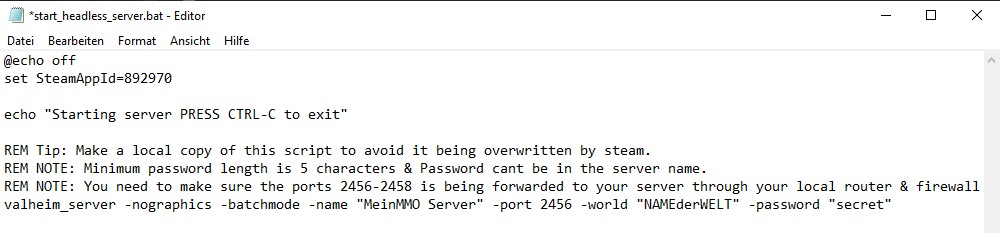
Make sure that the server and world names must be different. Additionally, the password for a private server must not contain the server or world name.
A detailed guide in English is located in the installation directory of the Valheim Dedicated Server.
Once you have entered all the data, save the file and create a backup of it in another folder. After each game update, “start_headless_server” is deleted. To avoid re-entering the data, you should copy the backed-up file back to the installation directory after an update.
You start the server by double-clicking on “start_headless_server”. Your own server should then be found in Valheim under “Join Game”.
If you cannot find the server, it may be due to the ports of your router or your firewall. For a dedicated Valheim server, the ports TCP/UDP 2456-2458 must be open.
This is how to join a private server in Valheim: Private servers do not appear in the server list and you can only join them if you have the IP and the port of the server. You will receive the IP and port from your game server provider or from whoever created the dedicated server.
In the game itself, you can enter the data by selecting your character, clicking on “Join Game” and then selecting “Join IP”.
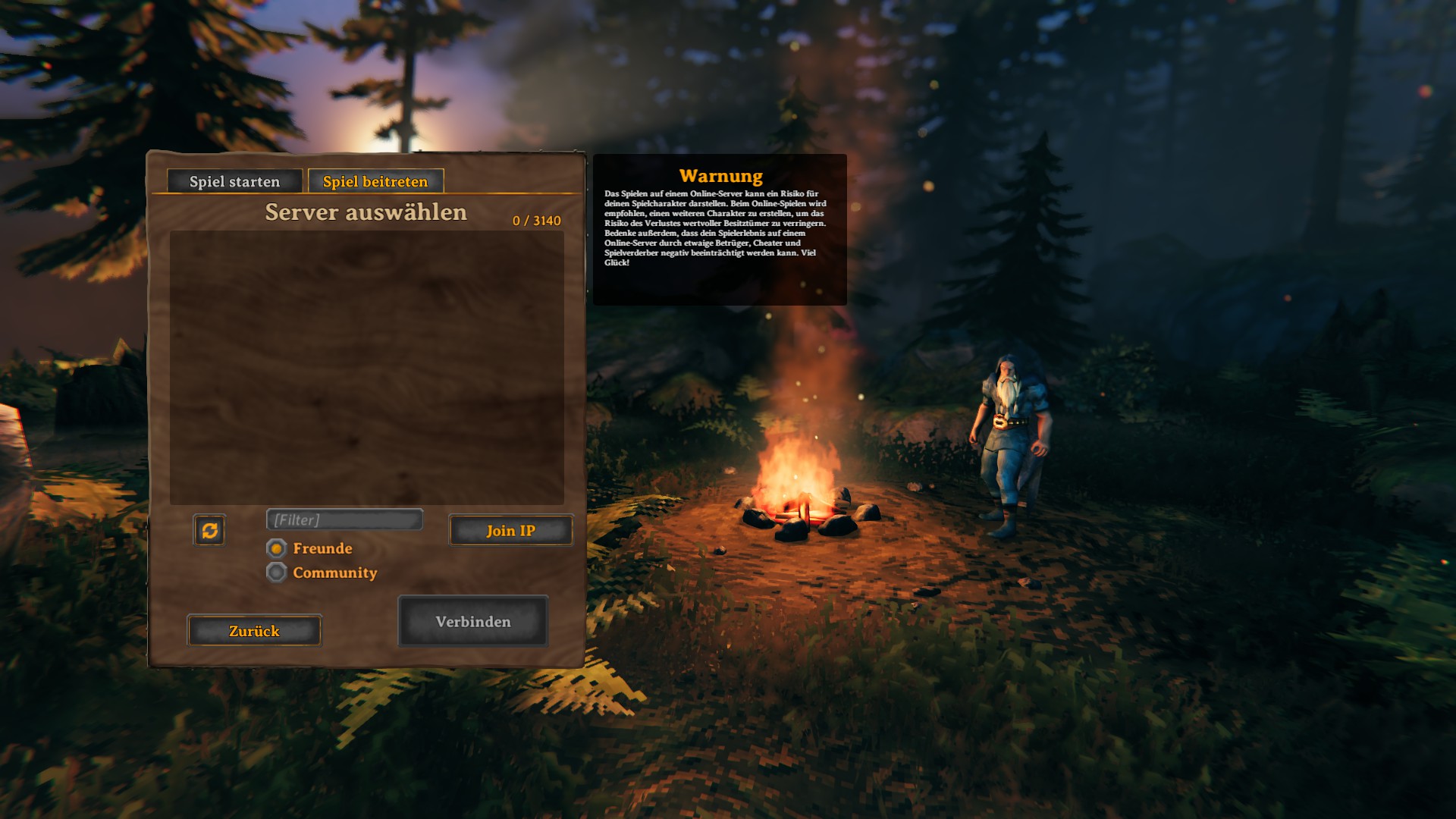
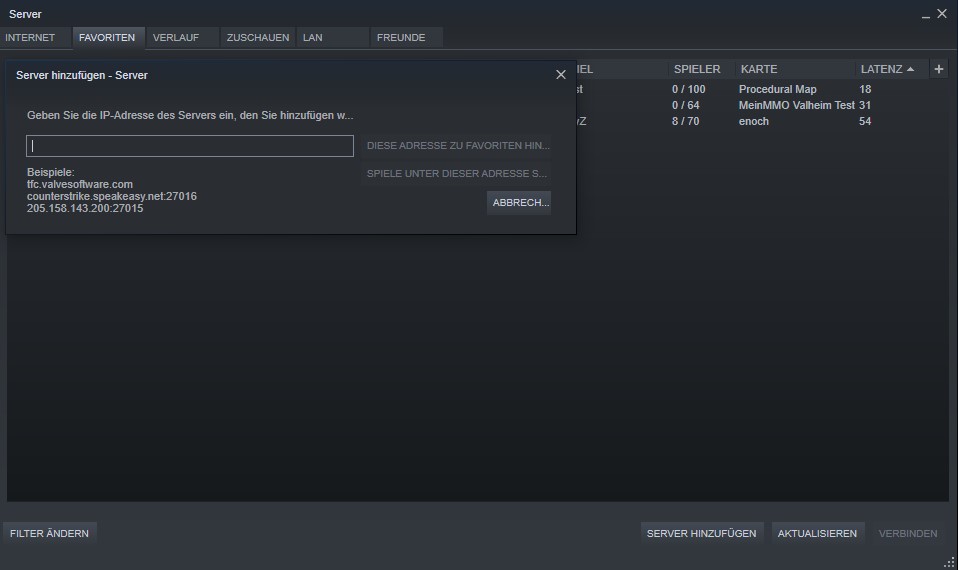
Alternatively, you can also add the server via the Steam server browser. This way you have the advantage that the data remains stored.
- Open Steam and select “View” – “Servers” in the menu
- Click on “Favorites” in the new window and then on “Add Server”
- Enter the IP and port
- Add the server and then refresh the list
Rent Your Own Valheim Server
You can also play Valheim on a rented server. When choosing the provider, pay attention to your requirements. Therefore, compare the different providers and costs.
We have chosen two German-speaking providers:
- Host-Unlimited.de: €9.98 for a maximum of 10 players per month
- Nitrado: €10 for a maximum of 10 players per month
- DeinServerHost.de: €6 for a maximum of 10 players per month
So that you can play stress-free with your friends on your server, we recommend considering the following points when choosing the game server provider:
- Prepaid Payment: If you want to rent your own Valheim server without a minimum contract period, you must pay in advance. If you no longer want to play Valheim, you can let the server expire and are not tied to a contract term. However, you must keep enough credit if it is to continue running.
- DDoS Protection: A good rented server has some protection against malicious attacks. Many providers offer DDoS protection.
- Server Location in Germany: Most game servers in Germany are located in Frankfurt. A short and direct connection to the server location guarantees you low ping and fewer lags.
Why is Valheim so popular?
In Valheim, there are survival mechanics that are not as pronounced as in comparable titles. You cannot starve, and at the beginning, you have 25 health points. You can boost these with buff food.
Furthermore, the game has offered a lot and varied content since its release in Early Access on February 2, 2021. The reviews on Steam are very positive, with over 96%. There is some criticism of the graphics, which MeinMMO author Andreas Bertits cannot understand as an ‘old sack’.
Valheim manages to create a wonderful atmosphere through harmonious light and shadow compositions, and the varied boss fights challenge solo players and groups alike.
If you do not like fighting bosses, you can engage in plenty of activities in your own base and express your creativity. This way, Valheim unites different player types, which only very few survival titles have succeeded in doing.

Your opinion is important to us!
Do you like the article? Then let us know!
Comments