

Fortnite: Battle Royale (PC, PS4, Xbox One, iOS, Switch) can be played cross-platform with all available platforms. But how exactly does Fortnite cross-play work?

Fortnite: Battle Royale is now available on PC, the consoles Xbox One and PlayStation 4, and the Nintendo Switch, Android, and iOS phones and tablets. Cross-play between PS4, Switch, and Xbox is now finally possible.

But usually, the platforms stay among themselves. So how can you activate the cross-play and play together with your friends on the console, PC, or mobile?
Update: This article from March 21, 2018, was updated on September 26, 2018.
Step by step to cross-platform cross-play
Depending on which platform you are using, it is more or less complicated to get cross-play working. Here you will find a step-by-step guide to activating the cross-play feature in Fortnite.
Step 1 – Create an Epic Account
If you play Fortnite on PC or mobile, you can skip this step because to play, you already had to register with Epic. Console players can choose at game start not to create an account, but Epic will then automatically create an alias account that is difficult to change. So it’s better to link your Xbox or PlayStation accounts with your own Epic account right away.

Go to the official Fortnite website and hover over the icon in the top right that looks like a head (see image).
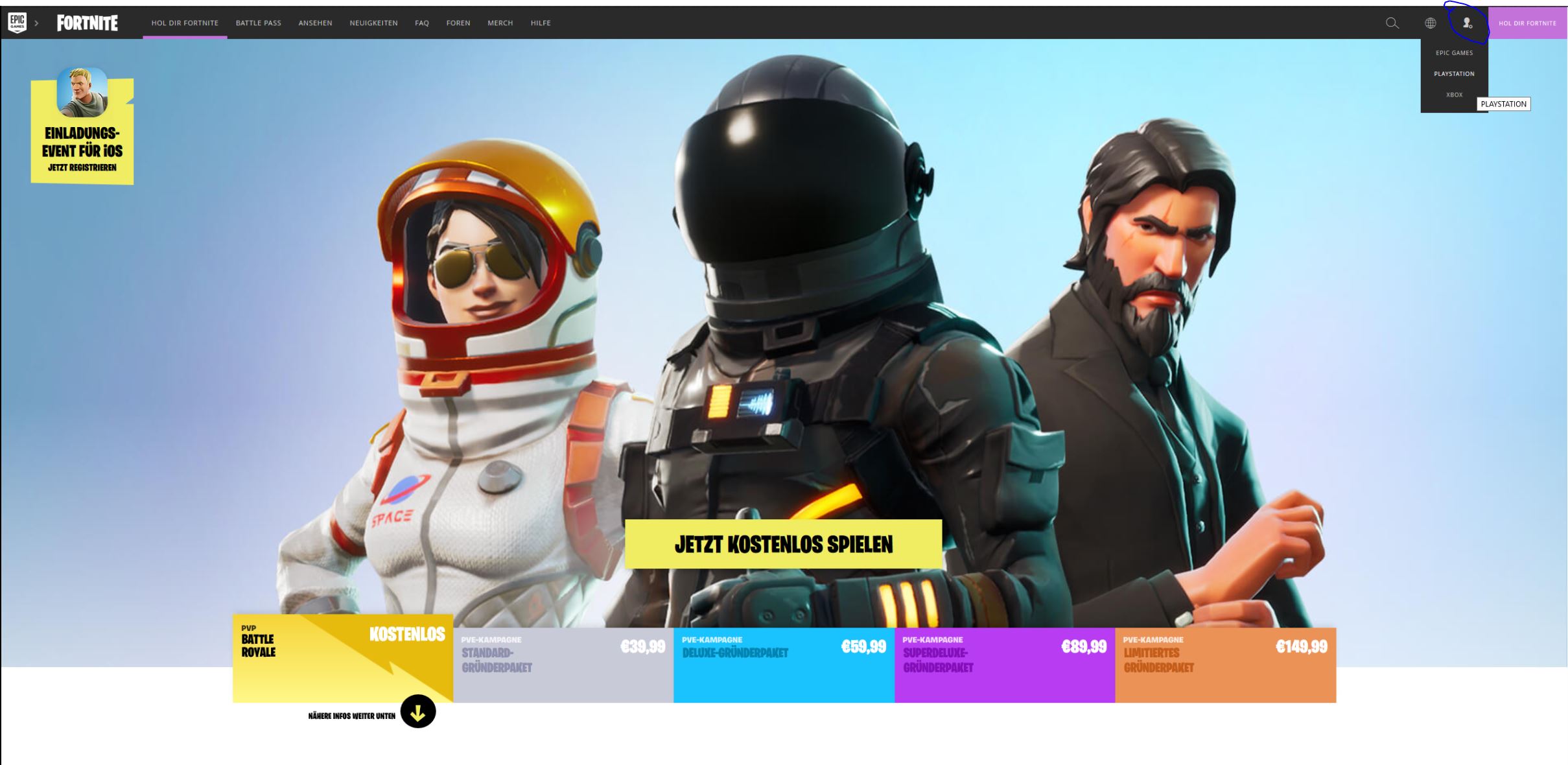
Then select PlayStation or Xbox and log in with your respective credentials.
How to do it on the Switch

On the Nintendo Switch, you also need to create an Epic account and then download the game. Make sure that your friends on Xbox One are all registered with an Epic account and add them through the selection menu. Make sure to write their names (Epic account names) correctly so you can find them. PC and iOS players are already logged in with their Epic account.
Step 2 – Add Friends
Next, you need to add all your willing friends who also have an Epic account to your Epic friends list. Console players first need to download the Epic Launcher to fill their friends list.
Attention: To find your Epic friends, you must enter the name they registered with at Epic, not their gamer tag on Xbox or the PlayStation Network or on Switch.

Step 3 – Create a Crossplay Team
Next, go to the lobby in the game. There you should be able to show your friends list on the right. Create a team with up to three friends and you should all be able to play together.
Wait, which servers am I playing on in cross-play?
Normally, all platforms play against their own kind. However, for cross-play teams, something different applies. Players are preferentially placed into the matchmaking of the highest-ranked platform. The order of the platform hierarchy is:
- PC
- Consoles (PS4, Xbox One)
- Mobile
Matchmaking is always based on the player with the highest-ranked platform in the team. So if a PC player, a PlayStation gamer, and a mobile gamer play together, they will most likely land in a selection dominated by PC gamers.

This is quite bad for console players, but mobile gamers are likely at a disadvantage against mouse and keyboard players due to touch screen controls.
Update: Soon Fortnite will recognize if you have a mouse or keyboard connected to your console and will place you accordingly in playlists for controller or M&K players.
How can we talk to each other?
The internal voice chat usually works quite well on your own platform, but it could get complicated in cross-play. Especially since the mobile version currently does not offer any voice chat.

So it’s best to use an external voice chat program for communication. For example, you can use programs like Discord, Skype, PS4 streaming, or the Xbox app. Clever players also play with one ear in the chat on a laptop and have the game sound in the other ear.
With these tips from the best Fortnite player, you’ll rock it in cross-play too!

Your opinion is important to us!
Do you like the article? Then let us know!
Comments