

With Valorant Riot’s new tactical shooter has been launched. MeinMMO gives you tips on the best hardware and Valorant graphics settings. We also explain what the Valorant Anti Cheat Error is and what you can do about it.
Riot’s new tactical shooter Valorant is live. But what do you actually need to play Valorant, and which graphics settings are most worthwhile if you want to save performance for more FPS?
What is it about? In our article, we tell you what you need to consider regarding hardware and performance in Valorant. If you want to know more about Riot’s new tactical shooter, check out this article: Here we introduce you to everything you need to know about the release of Valorant.
In this article, we explain everything about hardware and graphics settings. This includes…
- the requirements for Valorant
- what you need for 30, 60, and 144 fps
- what you can do against the Valorant Anti Cheat Error
- which graphics settings you can adjust
Update 3.6.2020: Recommendations adjusted for 60fps
Valorant – Requirements
Even in beta, we explained that you don’t need powerful hardware to play Valorant. However, there are a few minimum requirements you should pay attention to if you want to play at more than 30 FPS. Because as with every shooter, the more FPS, the better. The following requirements exist (as of June 2, 2020):
| At least for 30 FPS | Minimum for 60 FPS | High end for 144 FPS |
|---|---|---|
| Intel core 2 Duo E8400 | Intel i3-4150 | Intel Core i5-4460 |
| Intel HD 4000 | Geforce GT 730 | GTX 1050 Ti |
You can also check the requirements on the official page.
Valorant: What you need for 30 FPS
Riot recommends an Intel Core 2 Duo E8400. Since this is more than a 10-year-old processor, we offer the Ryzen 3 3200G as an alternative. This entry-level processor is a quad-core with more than enough performance, and the integrated GPU is sufficient for at least 30fps.
For comparison: The iGPU RX Vega 8, built into the Ryzen 3 3200G, offers more than three times the performance of the Intel HD 4000.
On Amazon, the AMD processor is rated very positively with 4.7 out of 5 stars based on 979 reviews. If 30 FPS is sufficient and you have no other high demands on your CPU, the Ryzen 3 3200G is a good choice.
For Valorant on the lowest settings, you do not need a dedicated graphics card. A processor with a fast, integrated chip from AMD is completely sufficient.
Valorant: This graphics card is needed for 60 FPS
Riot recommends at least a GT 730. However, this is now outdated.
Nvidia graphics card: In the low-end range, the GeForce GT 1030 is recommended. This uses the smallest GPU from the Pascal architecture and offers a significantly more modern architecture than the GT 730, which still relies on Kepler or Fermi. Pascal also supports modern standards such as H.265, DisplayPort 1.4, and HDMI 2.0b. Programs like the in-house Nvidia Share for screen capture are not supported by the GT series.
The performance is sufficient for most older titles, and even more modern titles can be played smoothly with reduced details. However, if you primarily want to game, you should look at the recommendations for more than 100 fps.
Alternative from AMD: The Radeon RX 550 from AMD is also positioned in the low-end range. The 550 is the second series of Radeon graphics cards with Polaris-12 chip. The RX 550 represents the lower end of the Polaris graphics cards.
The graphics card is mainly made for games like CS:GO and Dota 2, which are less demanding or at least somewhat older. For comparatively modern titles like Overwatch, you will need to reduce the graphics settings somewhat.
Even GameStar comes to a similar conclusion in their verdict: For competitive games, the performance is entirely sufficient, but for more gaming, one should consider another card.
Valorant: The graphics card you need for more than 100 FPS:
Nvidia graphics cards: For Nvidia, the GeForce GTX 1050 Ti is recommended. The advantage of this card is that it has only a radial fan, making it very small and fitting into almost any case. If you want to upgrade your computer but have little space available, this is a good option.
The card itself is quite quiet and has low power consumption. The build quality and design are also good in this price range.
Alternatively, you could go for the GeForce GTX 1650 Super. This is generally a bit more expensive but offers improved architecture and more performance. The performance of the GTX 1650 Super is, according to our colleagues from GameStar, about at the level of the 5500XT.
The only downside of the GTX 1650 Super: If you are considering playing significantly more demanding games, 4GB of video memory could become cramped over time. However, it still represents a solid entry into the gaming world and is sufficient for most MOBA and less demanding titles.
Alternatives from AMD: Currently, there are two options from AMD that are suitable in this area. One is the RX 560/70 series. However, we recommend the 570 series, as it offers significantly more for a slightly higher price than the smaller model. For more money, the 580 series is also worthwhile.
If you want to spend a bit more, we recommend the RX 5000XT series, which will replace the 500 series in the long run and represents the most modern variant. Our colleagues from GameStar describe the 5000 series as “long overdue replacement for AMD’s aging Polaris architecture.” However, if you already own a Polaris card (400 and 500 series), the additional performance of about 10 percent may not be worthwhile.
Whether you choose the GTX 1650 Super, the RX 570, or the 5500XT, with these graphics cards, you won’t have any problems achieving more than 100fps in Valorant.
Valorant Anti Cheat Error – what you can do about it
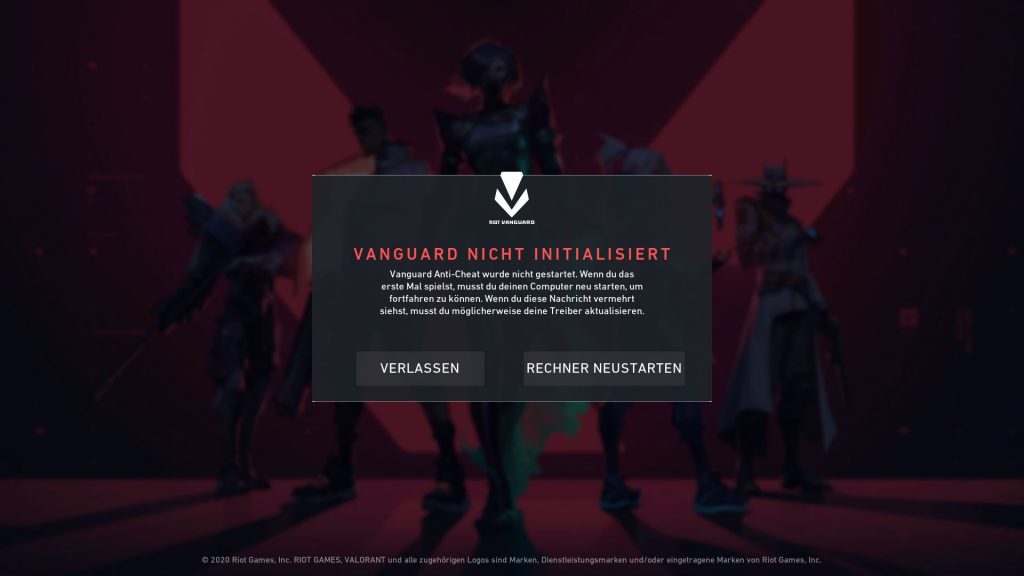
What kind of error is this? If you have just installed Valorant on your gaming PC, the following error may appear: “Vanguard not initialized.”
What is Vanguard? Vanguard is Riot Games’ anti-cheat solution for Valorant and Riot is heavily criticized for its Vanguard tool: The software deeply integrates into the system and also requires admin rights, which many users find bothersome.
How to fix the error: The easiest solution is to restart the PC. This way, the Vanguard tool can also restart, and then the game usually runs without issues.
Valorant graphics settings – how to set them up best
Below, we give you a few tips you should know when starting Valorant. We explain which points in the graphics settings are important and which you can do without if you can sacrifice performance for more FPS.
General Settings
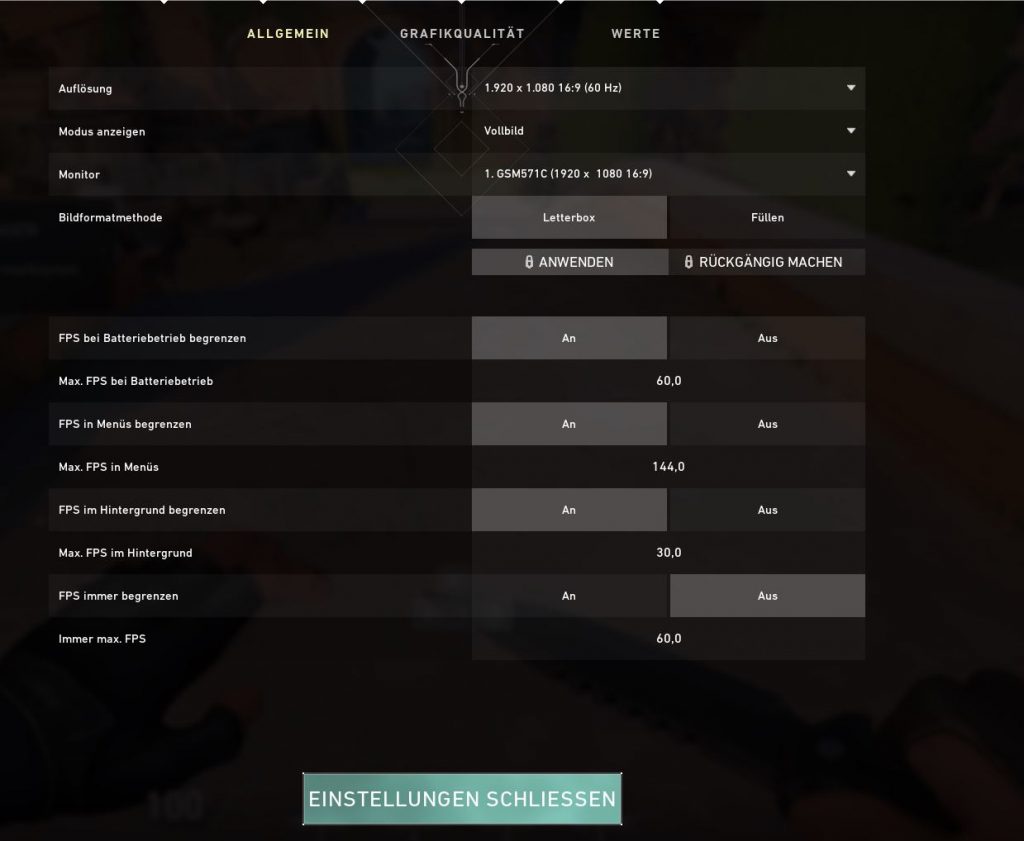
In the “General” tab, you can adjust the resolution in which you want to play Valorant. You can also select the correct monitor here. The following settings could also prove useful for you:
- Limit FPS on battery: If you game on a laptop, you can save performance this way. This setting only takes effect as long as you have your laptop unplugged.
- Always limit FPS: If you have a 60Hz screen that cannot display more than 60 FPS, you can limit the FPS to your screen’s refresh rate here. This gives you a few more FPS, thanks to increased performance.
Valorant Graphics Settings
In the graphics settings, you can customize the game to your liking. With a few settings, you can usually save performance if you prefer high FPS numbers over graphics.
Turn VSync on or off: With VSync, your graphics card synchronizes the refresh rate to the monitor. If your monitor only supports 60Hz, the graphics card switches to 60 FPS as well. However, VSync also requires corresponding performance. Turning off VSync can significantly reduce the performance used by several percentage points.
Adjust Antialiasing: Antialiasing or edge smoothing makes the game look more realistic. Sharp edges and corners are smoothed out and softened by the graphics card. Reducing this setting also brings performance improvements. Antialiasing is often the biggest performance eater on a PC, along with shadow rendering.
Anisotropic Filtering: Anisotropic filtering processes the game’s textures. This makes the transitions between different textures smoother and more pleasant to the eye.

Valorant: Further Tips for the Settings
In the “General” tab, you can adjust your mouse settings. This is especially important for fast skirmishes: Here you can set how sensitive your mouse is when aiming or how your mouse behaves.
The best way to do this is to head to the practice range and test the mouse sensitivity until it fits perfectly in your hand.

Just before its release, Valorant lost a large part of its hype on Twitch. Viewer hours fell by almost 50%. It remains to be seen if Valorant will become relevant again when released on Twitch or if the boost was mainly due to the desired drops.

Your opinion is important to us!
Do you like the article? Then let us know!