
In EA Sports FC 27 the new German commentators must be set up first. You can find out how to do that here on MeinMMO.
If you want to enjoy EA FC 27 with German speakers, you need to navigate to the following settings:
- Go to the main menu
- Then select Game Settings (gear icon)
- Go to Audio
- Then scroll to Rush or 11v11 audio
- Set the commentary language to German
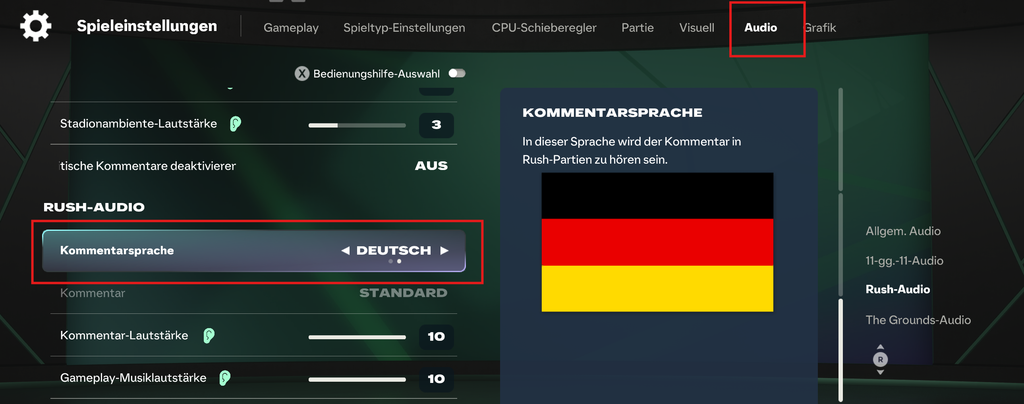
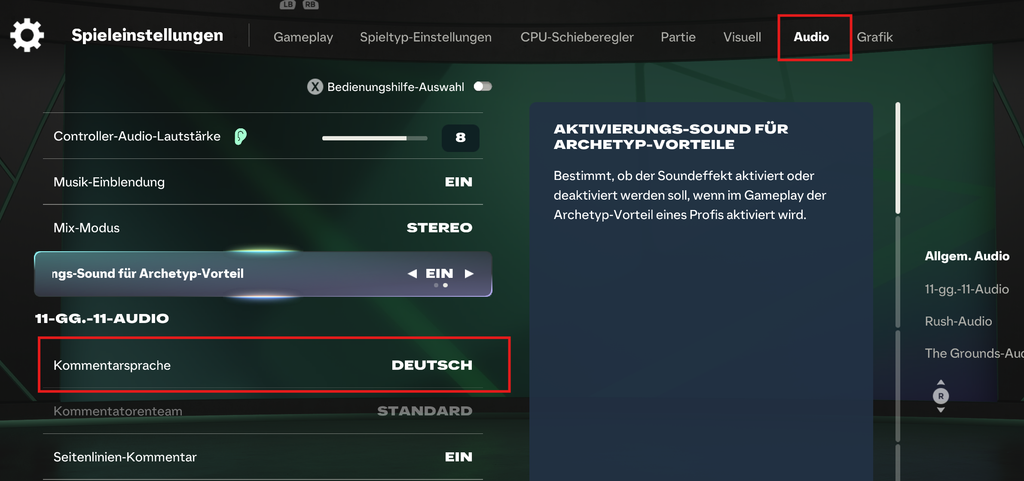
Below you will find additional settings, such as the commentary team and various volume levels.
Why is this option not available for me? On the Nintendo Switch, you need to download the German voices as an external language pack from the shop. You can find it there as a free DLC. You can find the relevant shop page under this link.
On PlayStation and Xbox, you will receive a short message that additional data needs to be downloaded when you select the language in the options.
On Steam and in the EA app, the German language pack should be automatically available when you set the language. Otherwise, select EA FC in your library, right-click on Properties and change the language to German there. On Steam, you should check the game files for errors again after changing.
Who comments in German? This year again, Jan Platte and Florian Schmidt-Sommerfeld (alias Schmiso) will welcome you as commentators. This year you will also have to do without Frank Buschmann and Wolff-Christoph Fuss. Moderating will once again be Esther Sedlaczek as the studio reporter.
Once you find the settings, you can get started and let the three icons accompany your matches. With EA FC 27, some things in career mode also change. If you want to see an overview of what to expect, check here: EA FC 27 Career Mode: All important innovations at a glance
Your opinion is important to us!
Do you like the article? Then let us know!