

Patch 2 for Baldur’s Gate 3 has finally been released and brings numerous changes to Steam – including important improvements.

Although Baldur’s Gate is praised by many, there are still numerous issues. Especially Act 3 is plagued by bugs.
Now the big Patch 2 for Baldur’s Gate 3 has gone live. It includes not only many detail improvements but also important updates for controller support. This is particularly important just before the PS5 release.
Important Improvements for Controller Shortly Before PS5 Release
When can I download the update? As of today, August 31, 2023, Patch 2 for Baldur’s Gate 3 is available.
How large is the update? The update for Baldur’s Gate 3 is about 500 MB and you can download it directly via Steam. If the update does not start, restart Steam.
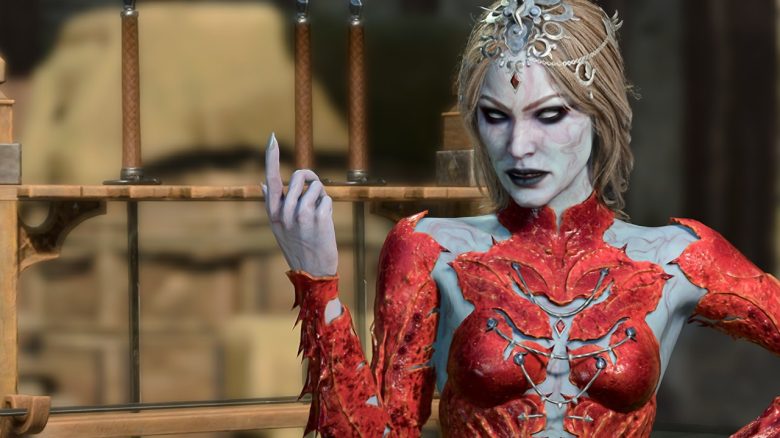
What improvements does Patch 2 bring? Patch 2 brings several improvements, which we already presented to you in detail on MeinMMO. These include updates for Minthara and new content that previously did not work. Additionally, the romance with Karlach receives some improvements.
But interesting are also the adjustments for players with controllers. This is especially important with the upcoming PS5 release. It includes better menus that no longer overlap or options to zoom in better. Also, you can now invite your teammates directly when you are using a controller.
All updates for controller support are hidden here behind the spoiler. Be careful, as there are dozens of fixes included in the update.
All Improvements for Controller Support with Update 2
- Radials
- The shortcut menu and character selection are now accessible from the Action Radial menu.
- Added Fast Travel to the character radial menu.
- Added shortcut prompts to the Jump and Hide actions on the Action Radial menu.
- Added a short delay to stick input after selecting an Action in the radial menus to avoid accidentally selecting something immediately after that or moving the camera.
- Limited the maximum number of radial menus.
- Fixed ritual spells not being marked as such on the Action Radial menu. We promise, they don’t cost a spell slot!
- Fixed tooltips showing up in the Action Radial menu even if you have nothing selected.
- Added additional error messages for the radial menus.
- Added more detailed warning messages on controller to indicate why you can’t perform a certain spell or action.
- Spell variants will now be placed at the top of the Action Radial menu instead of in the next available free slot, making it more consistent and user-friendly.
- Added a missing icon for Heal in the radial menu.
- Character Sheet
- Made several improvements to the Character Sheet, for example by adding zoom capability; updating the style of lists, the XP bar, and equipment slots; and adding an indicator for the
- character’s main Ability.
- Fixed the Light Source menu not filtering light sources properly.
- Added a brief description of what reactions are.
- Fixed the abbreviations for Abilities not fitting properly in Russian.
- Fixed some clipping and overlapping in the Character Sheet.
- Moved the Consume action to the context menu and restored the Equip action as the default in the inventory panel.
- Fixed the prompt to toggle tooltips showing in the Character Sheet filters, and fixed the background of the slots increasing if the text on them is long.
- Fixed Character Sheet navigation issues when using filters.
- Equipping an item via the equipment slot pop-up in the Character Sheet will no longer close the pop-up immediately.
- Repositioned tooltips slightly when checking equipment slots.
- Fixed some missing tooltips in the Character Sheet.
- World Interaction
- Added information about the state of containers (e.g. if they’re empty) to the Active Search menu.
- Fixed a small issue in cursor error messages.
- Fixed the ping action not exiting the ping state on Left Stick Press.
- Fixed the Examine panel on objects or characters with multiple resistances not scrolling properly.
- Made it possible to select and inspect more items in the Examine panel, like item descriptions and conditions.
- Fixed some portraits missing in the Examine panel and polished the selector.
- Fixed the context menu not being navigable using the D-pad.
- HUD
- Fixed issues with overlapping text and UI fading in the Party Line and the Resource Bar.
- Fixed an issue preventing you from grouping or splitting summons when you only have one party member available.
- Removed arrow icons from D-pad button prompts.
- Updated button prompts and made them look consistent.
- Added a background image for Luck Points to match the other resources.
- Fixed the Long Rest button prompts falling off the edge of the screen or overlapping other button prompts, particularly in translated languages.
- Fixed the button prompts overlapping the Resource Bar in Turn-Based Mode.
- Cleaned up button prompts at the bottom of the screen to make them more consistent.
- Made improvements to the action resource bar, such as position and colour changes. Also reworked the movement indicator to account for larger numbers, and increased icon width to avoid stretching.
- Spells
- Fixed not being able to cast a spell with variants from a spell scroll.
- Fixed some overflowing text in the Spellbook for translated languages.
- Tweaked the appearance of default spells in the Prepared Spells section of the Spellbook so they don’t look inaccessible.
- Added more information to the Spellbook about when you can and cannot change your spells, even if you’re not a spellcasting class.
- Combat
- Made it more obvious if you’re low on health at the start of your turn in combat.
- Fixed not being able to attack stalactites with ranged spells.
- Tweaked the Reactions UI.
- Added surface information to the cursor on controller, rearranged some of the cursor target details, added a new overlay for surfaces when D-pad is pressed down, and added the Actions prompt
- in combat.
- Improved readability in the Combat Log by reducing empty space and tightening up the list.
- Made reactions that are turned off still readable and gave them a greyed out icon.
- Tooltips
- Adjusted some margins and sizes in tooltips to avoid issues like damage text getting cut off.
- Improved the tooltips: added new icons; tidied them up with new font sizes and placement; fixed the Inspect prompt; added the right colour and icon for the Equipped line; and added a new
- frame, footer, and header style.
- Tooltip prompts now show if they’re enabled or not.
- Tweaked the placement of tooltips for open containers.
- Fixed tooltips showing up in dialogue while the dialogue options are still hidden.
- Fixed the width of pinned tooltips changing when selected.
- Trading
- Pressing your cancel button will now close the filter pop-up in the Trade UI.
- Fixed the trade button prompts overlapping the split item button prompts.
- Fixed the trader attitude not showing up in the Trade window.
- Character Creation, Level Up
- You can now rotate and zoom in and out on your character in Character Creation when you’re choosing a name.
- You can now access multiplayer settings during Character Creation as well.
- Fixed scrolling with controller in the Prepare Spells section of Level Up.
- Fixed characters in Character Creation sometimes getting obscured by tooltips on controller.
- Added a grid icon and button prompt on Character Creation options that open up a grid for selection (like when choosing colours) on controller.
- On splitscreen, if one player is watching an Origin character’s introduction and another is zooming in and out and spinning their character around in Character Creation, that second person’s
- button prompts will no longer affect the Origin character’s introduction.
- Spell tooltips in Character Creation will now always show up in the same horizontal alignment.
- Fixed the alignment of chevrons in the Character Creator.
- Miscellaneous
- Fixed the Enter Invite Code textbox for Direct Connect getting cleared when you deselect it.
- Made general visual improvements to the controller UI.
- Fixed scrolling and cropped text in the Journal.
- Added information about how long you need to press-and-hold.
- Fixed some issues with navigating the Dialogue History UI.
- Updated the layout of the Save/Load window, added in-game locations for quicksaves and autosaves, and made it possible to see longer savegame names.
- Adjusted line heights in the multiplayer lobby and Options menus to save space and reduce the need to scroll.


Release of Baldur’s Gate 3 for PS5 is already in a few days
When will Baldur’s Gate 3 be released for PS5? The role-playing game launches on September 6, 2023, on PlayStation 5. The preload on PS5 has already started, so you can play the game directly upon release. On PC, the game is about 120 GB in size, and it is likely to be no smaller on PS5.
More about PS5 and Xbox: Everything you need to know about Baldur’s Gate 3 on PS5 and Xbox can be found in the following article directly on MeinMMO:
Baldur’s Gate 3: Everything about release, prices, and classes for PS5 and Xbox Series X/S

Your opinion is important to us!
Do you like the article? Then let us know!
Comments