
Aion 2 offers a very fast action combat system where you can trigger multiple skills with just one key. MeinMMO has a trick for you that not only simplifies the fights further but also increases damage.
Through our table of contents, you can jump directly to the points that matter to you:
What are Macros? You have probably noticed that you can link multiple attacks with one slot of your skill bar in the skill menu of Aion 2. You stack these like a tower and then execute the attacks in sequence by pressing a key. The skill at the very bottom has the highest priority, followed by the skill above, and so on.
This is already quite convenient, but it has two disadvantages:
- You have to manually press the corresponding key over and over again
- Your spam attack without cooldown cannot be optimally interwined between the active skills with cooldown this way
Our trick addresses precisely these two disadvantages!
How does this lead to more damage?
If you want to deal maximum damage in Aion 2, you actually need to deal with the premature cancellation of skill animations and the weaving of the basic attack into the rotation. Sounds like professional gameplay for min-maxers, but with macros, it can also be easily accomplished by casual players. You execute the animation cancellation with your basic attack, which you activate by default with the left mouse button.
The only thing you need to know now is that you can make both your basic attack and your macro work simultaneously by simply holding down both keys at the same time (!). In that case, your character processes the fundamental skill priority sequence of the macro while repeatedly weaving in your base attack. This leads to higher damage, even though you are only holding down 2 keys.
Aion 2: Using Macros and Common Mistakes
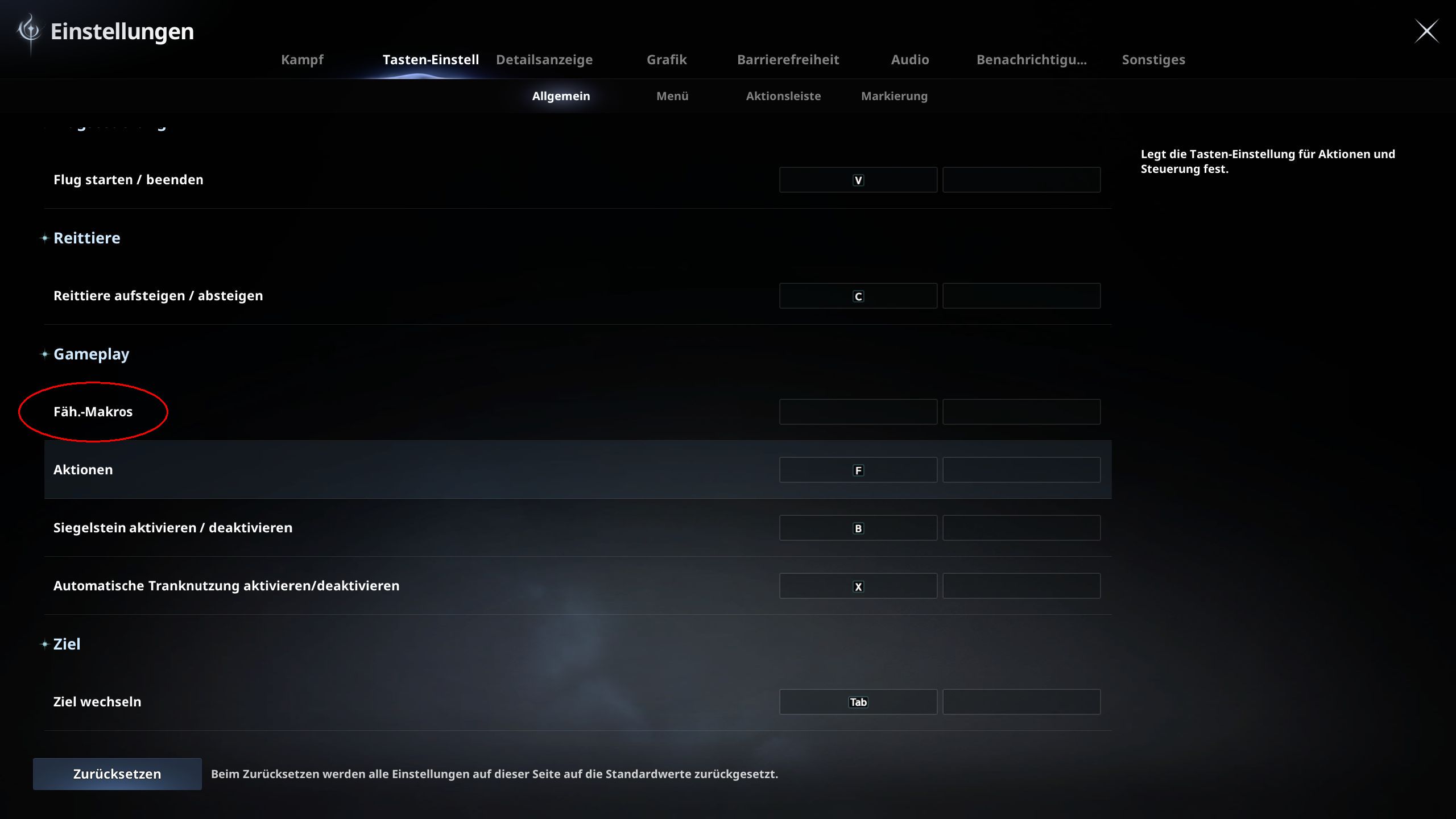
How to use Macros? First, you need to define a key for “Skill-Macros” in the options under “Key Settings” / “General” / “Gameplay”, for example, the right mouse button.
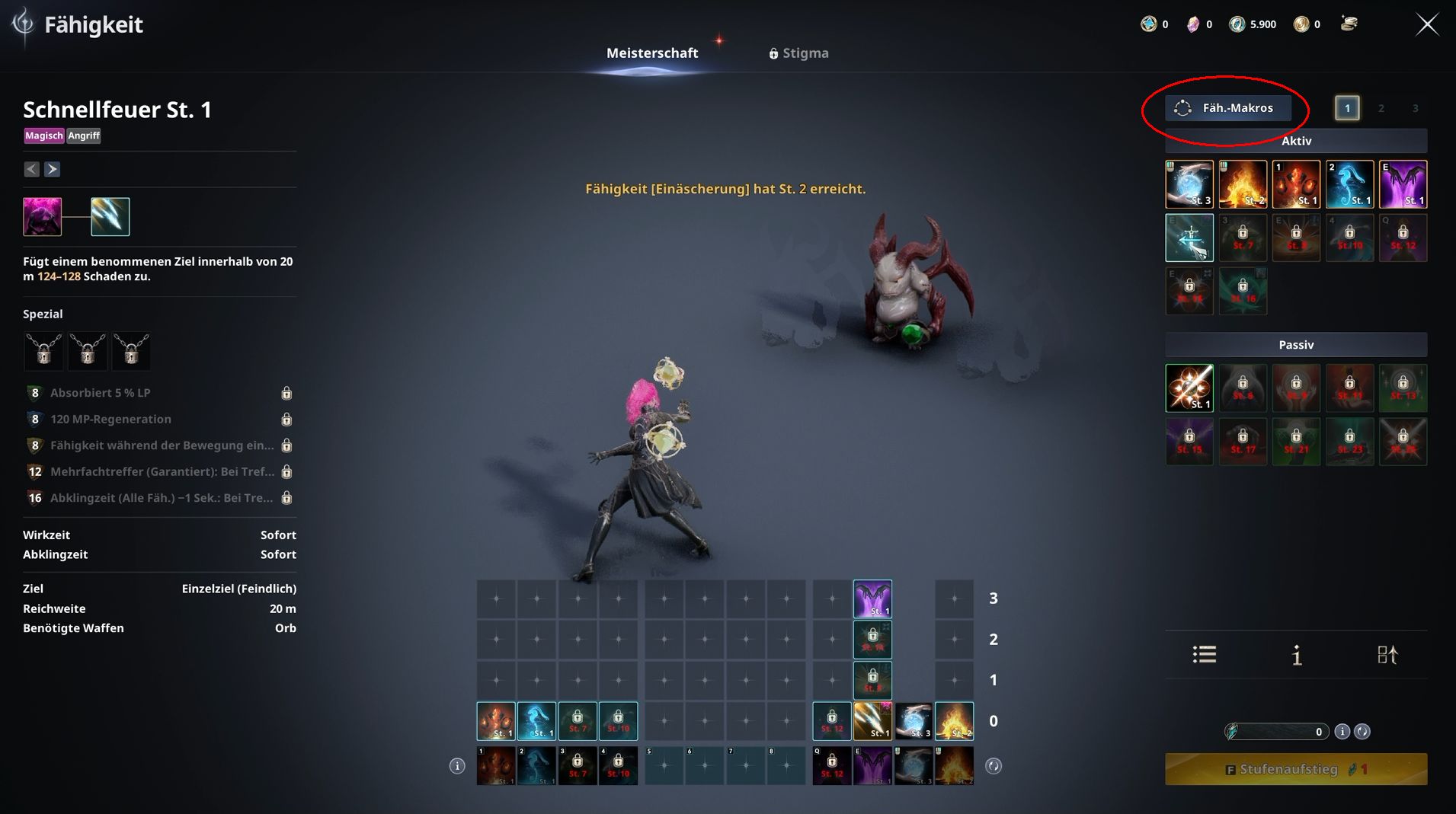
Then switch to the skill menu and select “Skill-Macros” at the top right (above your active skills). Click on “Add Macro”, then on the icon, and finally choose a slot in the skills bar that you have already linked multiple skills to.
If you press your macro key now, for example, the right mouse button, you will once again process the skills from the bottom up. The new advantage of the macro: You don’t have to keep pressing the key over and over again, but can simply hold it down. Furthermore, you can add additional skills to the macro from other slots of the skill bar.
DO NOT MAKE THIS MISTAKE! Theoretically, you could directly pack the basic attack into the macro and just hold down one key. However, this would lead to damage loss overall, as the game would less frequently insert the basic attack in the automated attack sequence. The most efficient animation cancellations can only be achieved if you trigger your basic attack separately using the left mouse button.
What all this looks like in video form is shown to you by YouTuber Grobs in his guide. Feel free to check it out.
Aion 2: How to build a macro for beginners
What should I include in my macro? Your macro should include all skills that you want to use as often as possible, not situationally. Factors such as your attack speed, cooldowns of skills, and skill levels determine how efficient your macro ultimately turns out.
So at first, focus on one or at most two macros, and only include skills that you want to use immediately as soon as they are ready.
The skill with the highest priority goes at the very bottom. Above it follows the second most important skill, then the third most important, and finally the fourth most important skill. IMPORTANT: Do not place skills without cooldown in the lower slots. In that case, any skill above would never be used, as the game would continuously use the higher-priority attack without cooldown.
With the right positioning, you can instead use your strongest skills with cooldown as soon as they are ready. Once all cooldowns are active, your basic attack and the second spam attack from position 3 or 4 will alternate until the next cooldown elapses. Thanks to the macros, you will infinitely run through this rotation by simply holding down the left mouse button and the macro key. It couldn’t be simpler.
Macros for all classes can be found below – the result in all cases: SIGNIFICANTLY MORE DAMAGE!
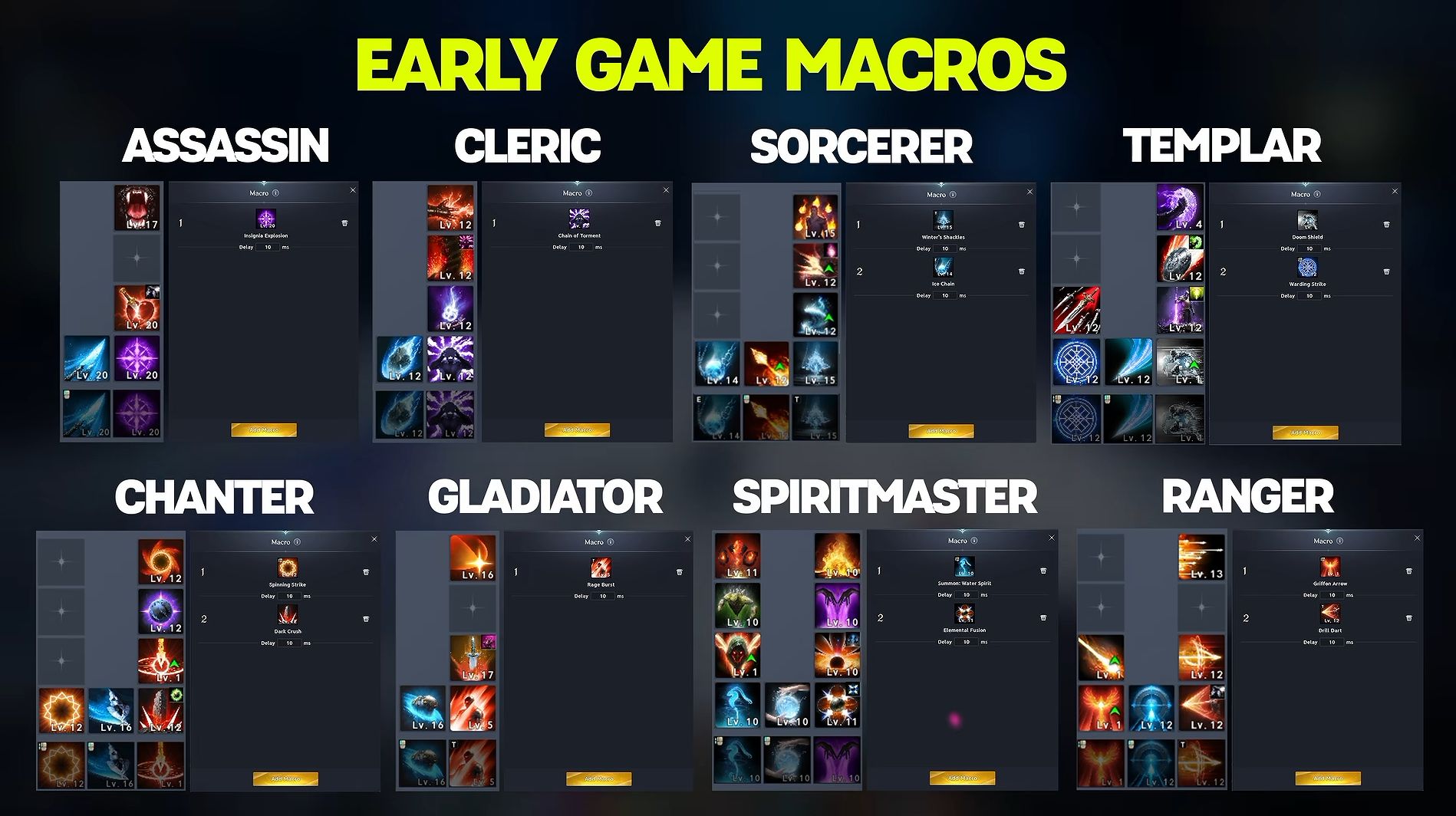
All other skills, such as mobility maneuvers, important buffs/debuffs, or emergency spells, should be assigned to extra key combinations so that you can use them as needed. These situational abilities would only crowd and worsen any macro.

What do you think of the skill system of the game? Did this guide help you? Do you have any further tips for using macros or maximizing damage? Feel free to share with us in the comments! You can find all further general information about the new MMORPG from NCSoft here: Release, Beta, Platforms, Classes, and More in the Overview of Aion 2

Your opinion is important to us!
Do you like the article? Then let us know!