


Almost every person sitting at a desk has the mouse in their hand. But why is it called a mouse?
Why do we call the device that we use daily for work or gaming a “mouse”? Modern devices have little in common with the rodent’s appearance, even though the term has become indispensable in the world of gaming mice.
The mouse was actually invented by Douglas Engelbart, but it only became widely accessible thanks to Apple on their second attempt. The name actually comes from the inventor’s team.
Douglas Engelbart invented the mouse
Who was Douglas Engelbart? Douglas Engelbart was a computer engineer and a significant pioneer for the PC. In 1963/1964, he developed several experimental display devices intended to be used as input devices instead of a keyboard. His first design from 1963 used rolling wheels. This was based on a planimeter, a measuring device invented around 1800.
Engelbart developed the first mouse together with his chief engineer, Bill English. In a patent application, the device was still described as an “X-Y position indicator for a display system.” There was no mention of a mouse at this point.
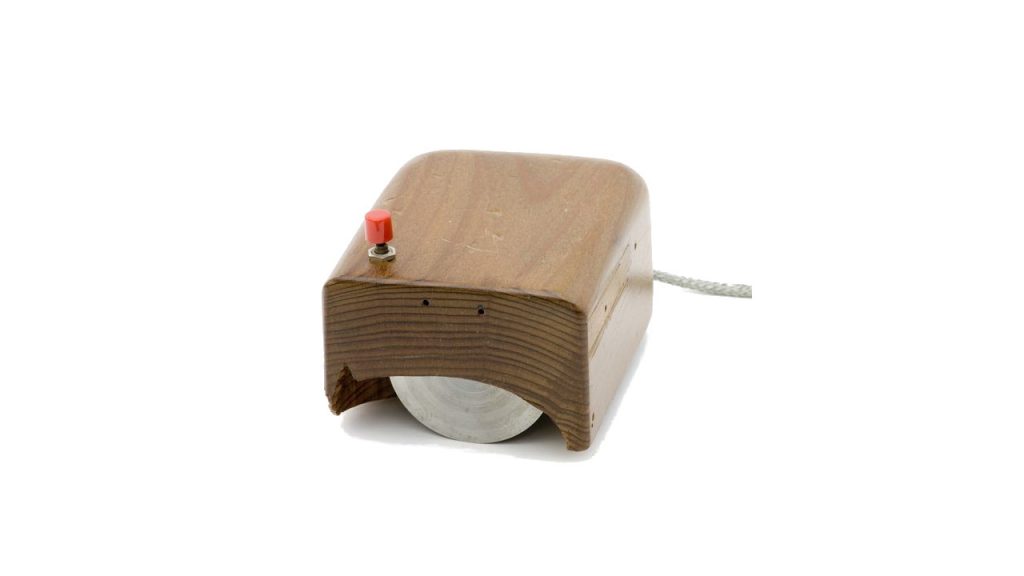
Where does the term “mouse” come from? When Engelbart, the inventor of the mouse, was asked about it, he explained in an interview that no one remembers who actually came up with the name. The mouse got its name because of its appearance:
No one can remember. It just looked like a mouse with a tail, and we all called it that.
Doug Engelbart, via devinedesign.net
Earlier, the mouse looked different. The cable used to come out of the back of the mouse, where we place our palm today. Now, the cable is attached to the front of every mouse. For this reason, the term probably seems less intuitive to us than it did for Engelbart’s team.
You can actually watch a video clip of Engelbart demonstrating the mouse in 1968. Here you can see how he uses the mouse, and the mouse cursor moves across the screen.
The mouse introduced by Engelbart initially received little attention, as there were no graphical user interfaces at the time. People working on computers relied on keyboard input.
The Computer History Museum in California has also gathered many more pictures and information about the development of the mouse (via computerhistory.org).
The path to a mass-market mouse
Where was the mouse first used? The mouse was first used in the Xerox Alto in 1973, as this computer finally provided a graphical interface. However, the device could not establish itself because the mouse cost $400 at the time and the interface for the computer was $300.
Who made the mouse mass-market? Apple licensed the rights from Xerox for its own product and developed a ball mouse together with an engineering firm. The first computer with this ball mouse was “Lisa.” However, due to its high price, “Lisa” was a failure for Apple.
The successor model, the Macintosh, was successful and required the mouse as a device for the graphical interface.
Modern mice now come in bright colors and RGB lighting
The mouse has evolved significantly over the years, and many manufacturers now offer high-precision input devices for computers. After Apple, companies like Microsoft and the Swiss company Logitech followed, whose G502 Hero Lightspeed you see in the title image.
Nowadays, you can purchase mice in various variations, colors, and with numerous features:
- Many gaming mice now offer RGB lighting.
- Some devices provide additional buttons for specific genres. Some gaming mice are particularly well-suited for shooters.
- The weight also plays an important role in today’s mice.
The shape of the mouse has also changed. Nowadays, there are ergonomic mice that are designed to be particularly comfortable for either right- or left-handed users. Additionally, you can also find ambidextrous mice that are suitable for all types of players. This raises the question of how to hold your gaming mouse “correctly.”
How do I hold my gaming mouse correctly? 3 grip types explained simply

Your opinion is important to us!
Do you like the article? Then let us know!