

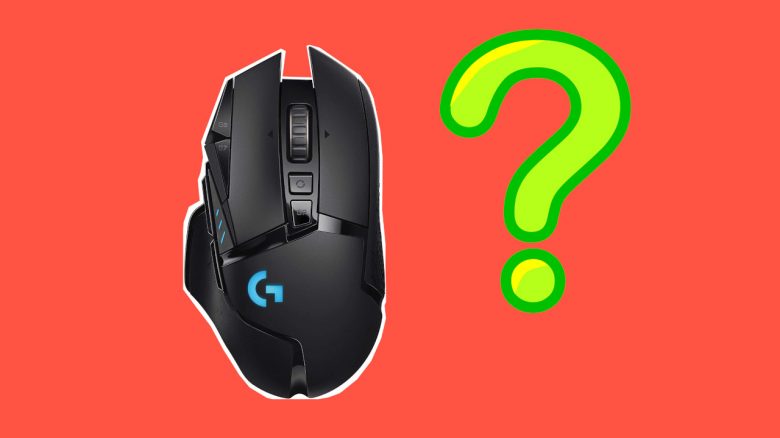
You want to buy a mouse or have come across palm, claw, or fingertip grip? MeinMMO explains the most important grip types for gaming mice.
What are grip types, anyway? If you are interested in gaming mice or want to buy a new device, you may have already come across the terms “Palm Grip,” “Claw Grip,” and “Fingertip Grip.”
These are grip types. These grip types describe how you can hold a mouse in or under your hand. But what do these terms actually mean, and how do they help me when I want to buy a gaming mouse?
Why is the grip type important? Many manufacturers design their gaming mice specifically for certain grip types. Therefore, it is important to know how you prefer to hold a mouse so that in the end, you buy the right mouse that suits you. How much DPI your gaming mouse needs is also explained here on MeinMMO.
This is what you will find in this article: In our article, we want to explain to you what grip types are and what you should pay attention to. But basically, if you have no problems with your current grip or position and don’t complain about pain, stick with it. The best grip is always the one that feels most comfortable and secure for you.
- We present all grip types to you with images
- We explain the advantages and disadvantages of the grips
- Then we give you recommendations for a mouse for each grip type
Where do our tips come from? For our article, we looked at several articles and YouTube videos from experts. We have also gained extensive experience with various gaming mice that we can draw on here.
Palm Grip
What is it? In the “Palm Grip, ” the palm rests completely on the mouse, and if possible, the thumb rests on a support. The “Palm Grip” is the most commonly used grip as it feels the most natural for many gamers. This is mainly because you almost completely encompass the mouse.
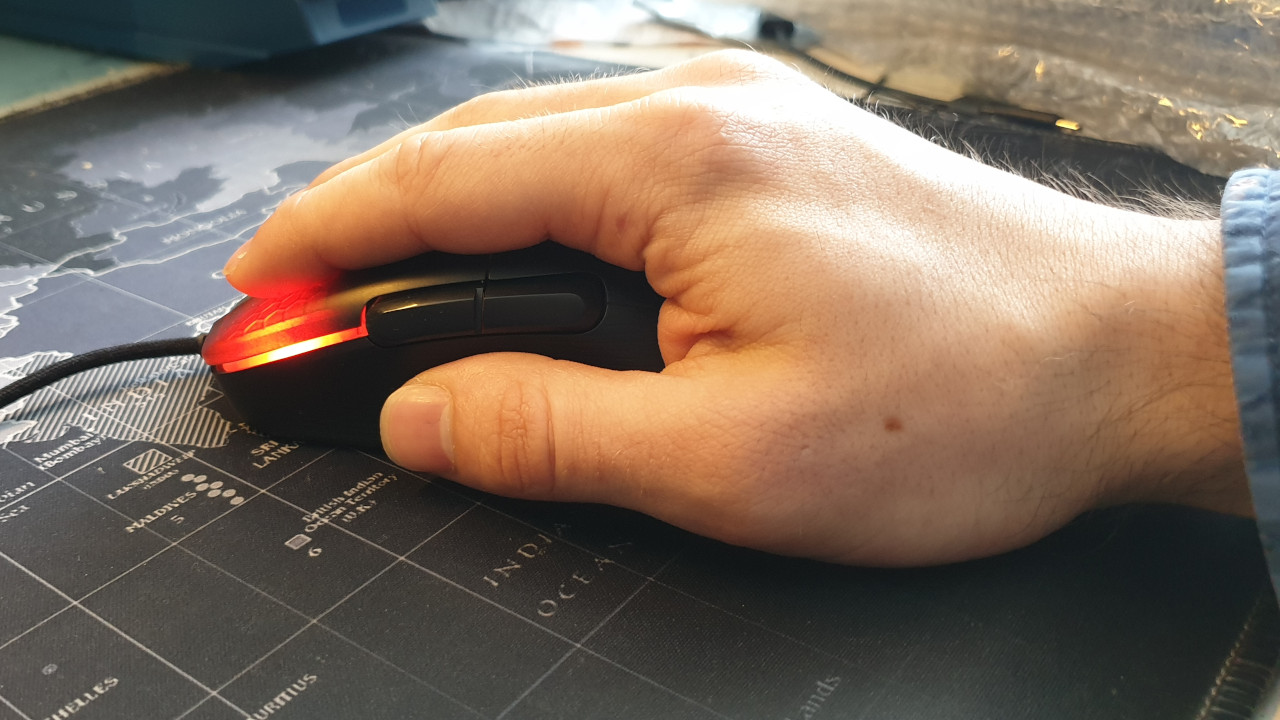
The advantage is: The grip is very comfortable, putting little strain on your hand. When you play shooters, you can aim particularly accurately because you can control the movement of the mouse through your arm and shoulder.
The grip is also suitable if you want to aim at an opponent quickly and precisely in a shooter. In technical terms, this is called a “Flick Shot.” Such a “Flick Shot” requires high precision.
The disadvantage is: If you want to click quickly and repeatedly, then the “Palm Grip” is not as well suited as the “Claw Grip.” Over time, you may feel pain in your shoulder and elbow while using it. Small and fast mouse movements are also a bit more difficult.
Which mouse is recommended for “Palm Grip”? If you mainly play in the “Palm Grip,” you should look for asymmetric mice where the thumb can rest on a support. The following mice are well suited:
- Logitech G502 Hero
- Roccat Kone AIMO Remastered
- SteelSeries Rival 5
- Razer Basilisk V2
Claw Grip
What is it? In the “Claw Grip,” the mouse is held by the fingers like a claw. The wrist rests on the bottom of the mouse, while the back of the hand is slightly above the mouse without touching it. The mouse is therefore almost exclusively controlled from the wrist.
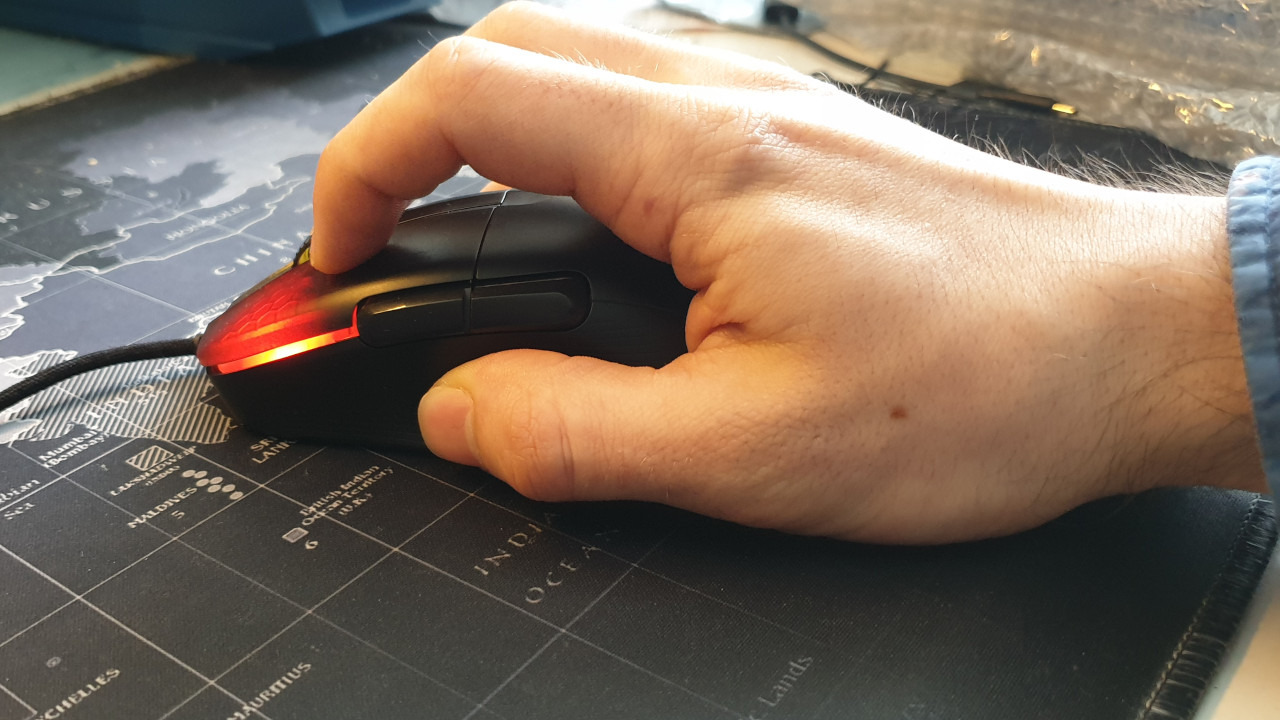
The advantage is: Due to the finger position, you can click very quickly with the “Claw Grip.” This makes you much more reactive. This is helpful when playing MOBAs or strategy games, where you need to click many times in a row.
Fast and precise movements with the mouse are also better to execute with the wrist. Similar to the “Palm Grip,” the mouse is stable in your hand.
The disadvantage is: The “Claw Grip” is only conditionally suitable for long gaming sessions because the grip is tiring for your hand.
Which mouse is recommended for “Claw Grip”? Mice for “Claw Grip” should generally be a bit lighter than for “Palm Grip” because you have less strength with the wrist than with the arm. The mice should also be a bit lower. Recommended mice are:
- Logitech G Pro Wireless
- Zowie FK1
Fingertip Grip
What is it? In the “Fingertip Grip,” the gaming mouse is only touched and controlled with the fingertips. The palm rests completely on the mouse pad and does not touch the mouse. Therefore, you hardly touch the mouse at all.

The advantage is: The “Fingertip Grip” offers you high speed as you control everything with your fingers. This enables you to react quickly and you won’t have any problems with fast “Flick Shots.” If you manage well with the “Fingertip Grip,” this grip type offers you high precision. Additionally, the hand is only slightly under tension.
If you play games like Fortnite or Apex Legends, where opponents jump or fly a lot, then fingertip grip eases vertical movements (forward and backward) on the mouse pad.
The disadvantage is: Achieving high precision with “Fingertip Grip” is significantly more difficult than, for example, with Palm Grip. Here, you need to be prepared for a steep learning curve. Since you only touch the mouse with a few fingers, additional and side buttons can be difficult to reach. The grip also limits the selection of mice that can be used effectively.
Which mouse is recommended for “Fingertip Grip”? For fingertip mice, you should definitely pay attention to a minimal weight. If the mouse is too heavy, you may not control it securely or your accuracy may suffer. Rubberized sides help ensure that the mouse sits securely in your fingers. Recommended mice are:
- Razer Viper
- Roccat Burst Pro
- Corsair KATAR
- BenQ ZOWIE EC2
Which is the best grip type for me?
There is no “best” grip type for all gamers, and this is simply because many personal characteristics play a role. Simply put, you will achieve the best performance with the grip that is most comfortable for you and your games.
Want to see all grip types in action? Then check out the YouTube video by Brandon Taylor. In his embedded video, he explains the three most important grip types and shows them to you with examples:
Which grip is suitable for what? We can basically give you an orientation:
- The most widely used grip is the “Palm Grip.” FPS players benefit from the high accuracy and precision you have through your arm and wrist.
- The “Claw Grip” is generally suitable for players who play games where you have to click a lot and quickly. This applies, for example, to fast MOBAs or strategy games (RTS).
- The “Fingertip Grip” is generally best for MMOs or RTS as you can move the mouse very quickly and benefit from high precision here. However, you will need to prepare for a steep learning curve. Fingertip grip is also helpful for games that set focus on verticality, like Fortnite or Apex.
Here is our tip: If you are not sure which mouse is best for you, order two mice of similar size for different grip types. Then you can try them out yourself and keep the mouse that suits you better.
It is also helpful to use a service offered by the manufacturer Razer. At Razer, you will find a chart to measure your hand. This also makes it easier for you to decide when buying a mouse (via Razer.com). Razer also shows you suitable Razer mice for every hand size and player type.
If you are still looking for a good and recommended gaming mouse, check out our buying guide: Here you will find the best gaming mice currently available for purchase. Here you will find the right gaming mouse for every grip type.

Your opinion is important to us!
Do you like the article? Then let us know!
Comments