

The survival game Valheim offers a progression system for your character and the entire world in which you play. To ensure that nothing is lost due to errors, a backup can help you. MeinMMO explains where to find your save games and how to secure them.

Why do I need a backup? Valheim is currently still in development. This can lead to some bugs sneaking into the game, which can be more or less severe.
There has already been a bug that destroyed your entire world – and for which a simple backup helped to keep your progress.
Additionally, in Valheim, you can progress further by defeating massive bosses and other enemies. To ensure you don’t lose this progress in the world and story, you can easily secure your save files.
Backups and save games in Valheim – Here’s how
How to create a backup of your save game: First, make sure that you can see hidden files on your PC. This may vary depending on your Windows version. You can find instructions on how to display hidden files on the Microsoft support page.
If Valheim is currently running, close the game. Otherwise, it can lead to corrupted files. Then navigate to the save game folder of Valheim. You can find it by default on your system partition at the following path:
- C:Users%USERNAME%AppDataLocalLowIronGateValheim
The drive letter corresponds to the drive on which you have created the user folder. If you have difficulties finding the folder, type %appdata% into the search bar and press Enter; this will take you directly to the parent folder.
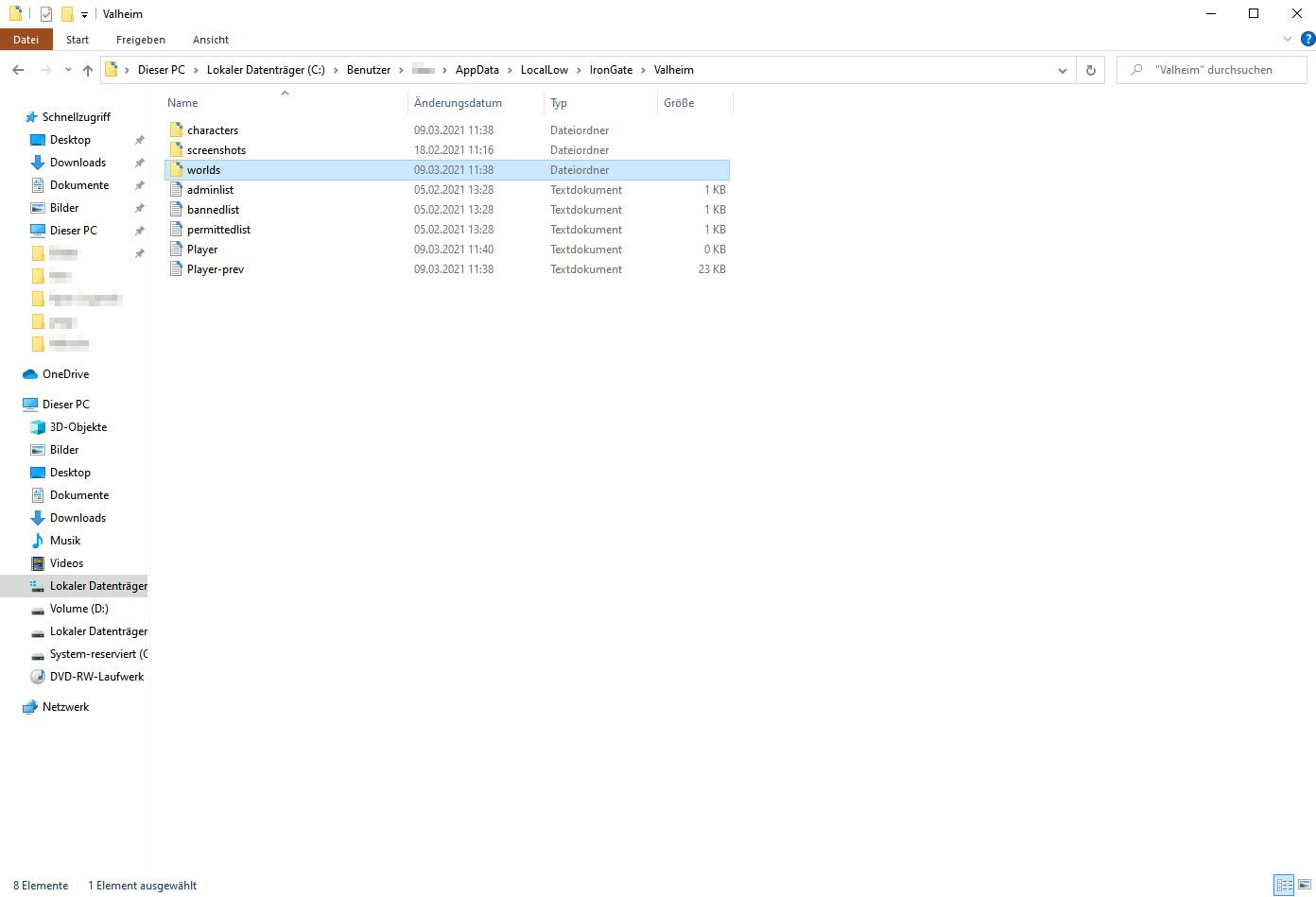
Then, copy at least the “characters” and “worlds” folders and save them in another location, such as the desktop or another hard drive. You can also copy the entire Valheim folder directly.
Remember to frequently create a backup if you want to secure yourself. You can also save different times separately if you want to revert to an earlier state of your world.
Server backups and foreign save games
How does it work with your own server? If you rent your own server, most providers already create backups automatically that you can rely on. Depending on the provider, you may even be able to force a backup – you can usually find the options in the server management.
If you have set up your own server via Steam, you will find the settings in the same folder as your own world. A backup of it also secures the server world. In our guide, we explain how to get your own server in Valheim and play with friends.
Can I use other save games? In principle, yes, you can copy data from other players into your folder or transfer your own worlds to dedicated servers. However, be aware that this doesn’t always work smoothly.
You can completely copy both worlds and characters from other players. To do this, simply copy the respective contents into your folder:
- .fch files for characters
- .fwl files and the corresponding databases for worlds
- the file “steam_autocloud.vdf” should not be copied for safety reasons
Due to different versions, corrupted files, or bugs, it can happen that you destroy your save game with this. Make sure to back everything up beforehand.
If you just want to play on the same world as another player without taking over their buildings or progress, you just need to play on the same seed. In our special, you’ll find the best seeds for Valheim.

Your opinion is important to us!
Do you like the article? Then let us know!