

You want to switch servers in Throne and Liberty. MeinMMO has a step-by-step guide for you and tells you what to pay attention to.

Switching servers in Throne and Liberty: In Throne and Liberty, there are many different servers that are, however, separated from each other. If, for example, your friend is on Server A and you are on Server B, you cannot play together.
However, a solution is possible, as it is possible to switch servers later. You have to pay attention to a few things in this regard. MeinMMO has a step-by-step guide for you to ensure that nothing goes wrong.
Join a guild in Throne and Liberty to explore the game together:
Guide to Switching Servers in Throne and Liberty
How does the server switch work in Throne and Liberty?
- Step 1: Open the menu
- Step 2: Select the shop
- Step 3: Scroll to the tools in the shop and buy a server transfer ticket
- Step 4: Click on “Switch Server” at the top right of the shop screen
- Step 5: Choose the server you want to switch to
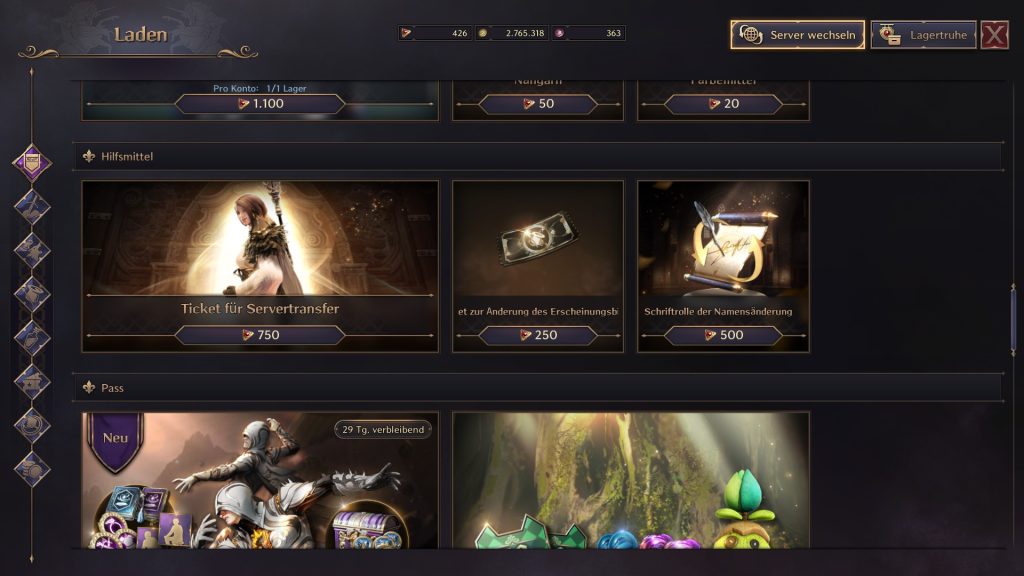
Note: If an event is taking place, you may be able to receive the ticket for free. Otherwise, the ticket costs 750 Luzent. This is the real money currency in the game, which you can also earn as a Free2Play player. 750 Luzent is otherwise equivalent to about 15 euros. The smallest Luzent package with enough currency costs 19.99 euros for 1,125 Luzent.
Also pay attention to the requirements for the transfer; if these are not met, you cannot change the server.
Requirements for transferring to another server
To switch servers in Throne and Liberty, you must meet the following requirements according to amazongames.com:
- There must be fewer than the maximum allowed characters on the target server.
- The character must have reached at least level 10.
- The character must not have been transferred in the last 30 days.
- The character must not be in a guild.
- All active marketplace transactions of the character must be canceled before the transfer.
- The character must have read all its in-game mail before the transfer.
- The character must have retrieved all its message attachments in-game before the transfer.
- The character must have claimed all restored items before the transfer.
- Unless explicitly stated as a free transfer, there are costs associated with each character transfer.
You cannot enter the target server if:
- You do not meet the transfer requirements. Each point must be marked in-game with a small green circle.
- You want to switch from an early access server to a launch server. This is currently not possible.
- The target server has achieved more milestones than your current server because it is already further along in progression.
- The population cap of your target server has already been reached.
If you have a problem after the transfer, you can contact support via amazongames.com. Make sure that the character has been transferred to the target server and provide customer support with as many details as possible so they can assist you.


These contents will be transferred with the server transfer
When you switch servers, you can take some contents with you. Here we have a list for you:
Contents that are transferred during the server transfer
- Character name
- Character level and XP
- Sollant
- Luzent
- Contract coin
- Guild coin
- Restoration coin
- Decorated coin
- Mystical key
- Abyss points
- Daily purchase counter in the Sollant shop
- Daily purchase counter in the Luzent shop
- Purchase counter in the NPC shop
- Portrait
- Season pass progress and target info
- Character stats
- Equipment info
- XP restoration
- Title
- Skills and mastery
- Items in the inventory
- Items in the storage
- Items auto use and lock
- Expanded storage slots
- Information about growth milestones
- Guardians
- Amitoi
- Lithography book progress
- Codex progress
- Auto-add in the shop
- Crafting favorites
- Map pins
- Progress in secret dungeons
- Check-in progress
- Settings
- Quick selection slots
- Chat settings
If you don’t want to miss anything about Throne and Liberty, then check out our overview. We have packed all guides for the MMORPG into a handy article, which we keep up to date: Throne and Liberty: All guides for starting the new MMORPG.

Your opinion is important to us!
Do you like the article? Then let us know!