


MeinMMO author Philipp Hansen finally got his PS5. However, he is struggling to add a friend and shares his story of suffering so that you have it easier.
That’s why I should be happy: My PS5 was ordered back in September 2020, paid for, and awaited. I’ve only been a proud owner since January 2021. And honestly, I didn’t even expect that.
Of course, the joy was immense, and I really hope that all waiting pre-orderers and interested parties will soon manage to get their delivery as well. My gaming experience has noticeably improved.
- Since then, I’ve finally been experiencing buttery smooth FPS and noticeably faster loading times as a hardcore console gamer. What PC gamers might scoff at is an eye-opener for me.
- The “horrible stuttering” of the past – which was just a few weeks ago – I can only imagine as torture after a short time.
- Now I’m shooting and fighting my way through the prettier next-gen versions of Destiny 2 or God of War and I am very positively surprised.
- And I have also been completely spared from annoying noises from the PS5 or other teething problems.
What is my problem now? It’s about the unnecessarily complicated menus. But not in general. Specifically, I’m talking about the function to add a new friend.
Despite my casual 25 years of gaming experience, most of which I spent on consoles, I suddenly felt like a helpless idiot. I want to share this experience with you and help ensure you don’t have to go through what I did.
What other problem, which I can relate to, my colleague Sven Galitzki has with the PlayStation 5, you can read here:

The woes of the young, old PS5 owner
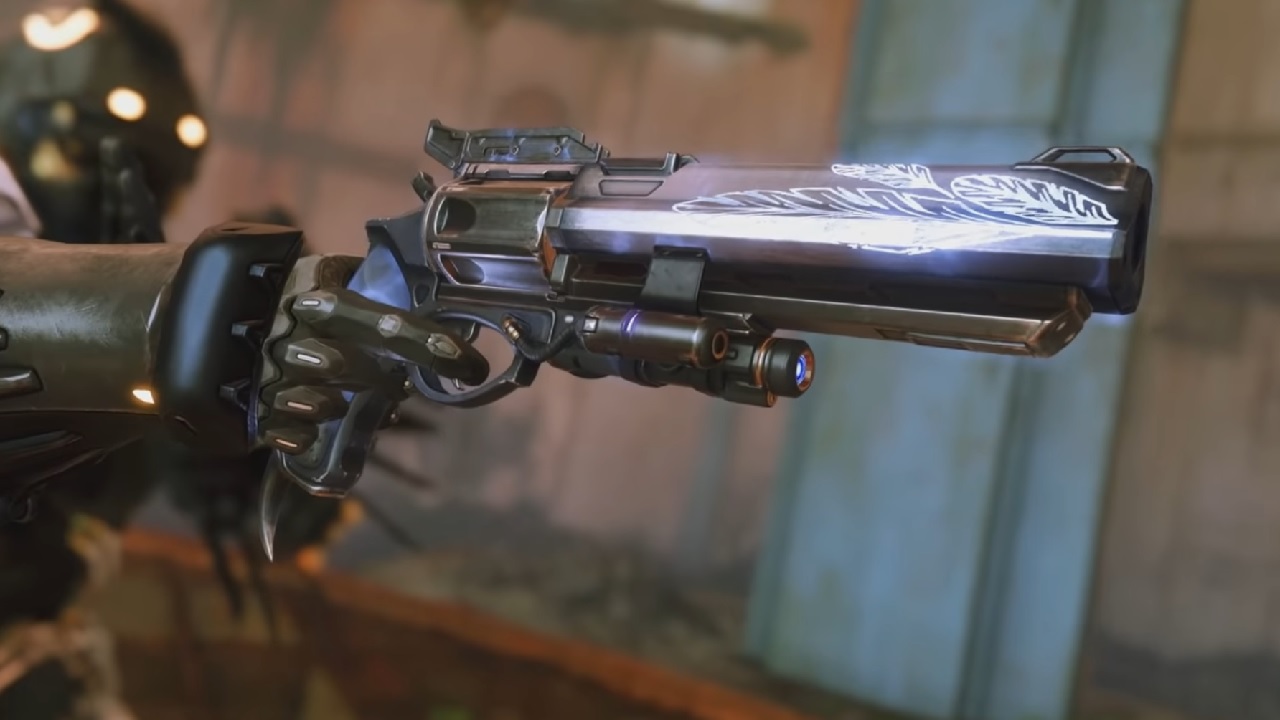
This was the specific situation of my failure: In Destiny 2 a cool mission surprisingly went live: It’s quite difficult and designed for team play, but it offers no automatic player search. The clan roster was empty late at night, so I grabbed the official Destiny app, because it has a useful LFG tool (Looking for Group).
And lo and behold, my created group with the requirement “No microphone needed, just play Omen” (in the original English) was filled within seconds. And I was already clearing space in my inventory for the new loot. Unfortunately, the app occasionally has its problems, and none of my found teammates could be invited via mobile. So, I received notifications like “Invite me!” or “Add me on PSN”.
Is making friends so hard? It shouldn’t be that difficult. Just search for the person on the PS5 and add them. But however I turned it, I simply couldn’t find the function for that.
- With a key press, I saw friends who were online, playing other games, but nowhere was there anything like “New friends” or “Search players”.
- I found parties of old acquaintances, and the “Game Base” only spoke of parties. Here you can search, but I didn’t want to create a chat.
- A jump to the home screen doesn’t show any friends anymore, unlike on the PS4.
More and more often, my smartphone rang with notifications that a user had left my team. Not surprisingly, the mission was new, and many wanted to play it, not wait for a fool like me.
That really put pressure on me – which didn’t improve the situation.
Why not so easy? I felt sorry for having ripped the good PS4 so smoothly. No matter if PlayStation button or home screen – it boldly states “Friends” each time, and a key press jumps to the screen, where a magnifying glass is directly shown at the top, and the search function connects me to the rest of the world.

I had to do it: Then I did what I had dreamed of and grabbed my smartphone. I typed into the search engine “How do I add friends on the PS5?”
And lo and behold, I’m not such a big idiot after all. Others also had the same question and wondered about the nested menu structure. After some research, I was finally able to fill my team with new friends and complete the mission in Destiny 2 – but somehow that left its mark.
Adding friends on the PS5 – Here’s how
So that you don’t have to go through the effort of searching for it yourself, I’m providing you here with the result of my friend-search-adventure:
Time required: 1 minute.
Add friends on PlayStation 5
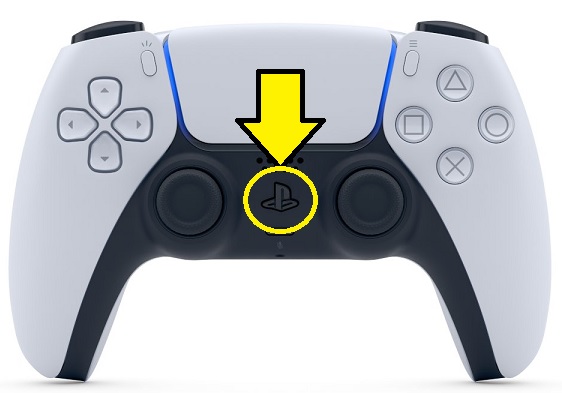
- Press PlayStation button
Press the PlayStation button in the middle of the controller
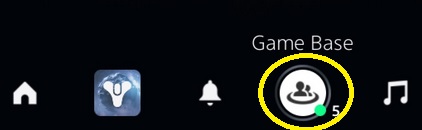
- Select Game Base
Select “Game Base” in the bottom menu (The icon with 2 people, next to the bell)
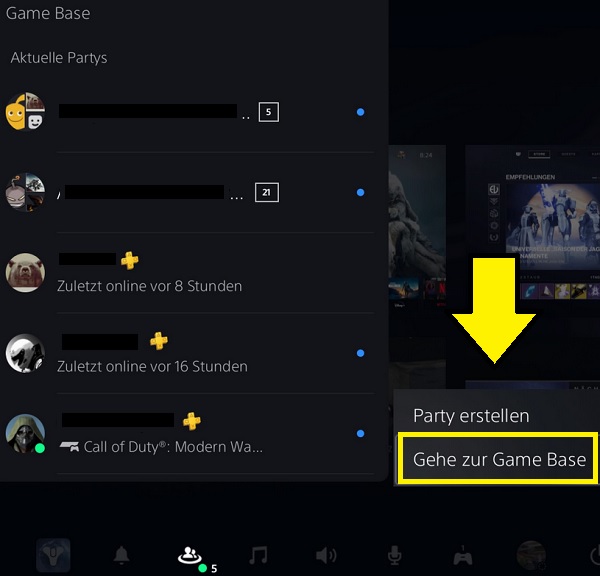
- Option 1
Press the options button (3 lines next to the triangle button) and select “Go to Game Base”
- Option 2
Navigate all the way down and click on “Show all friends”
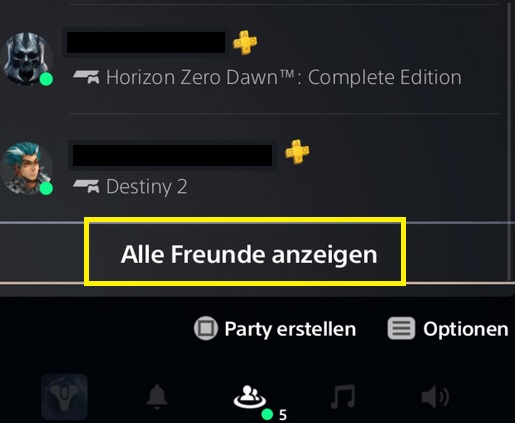
- Enter Name
Enter the gamertag/name of the new friend in the “Search” field on the right
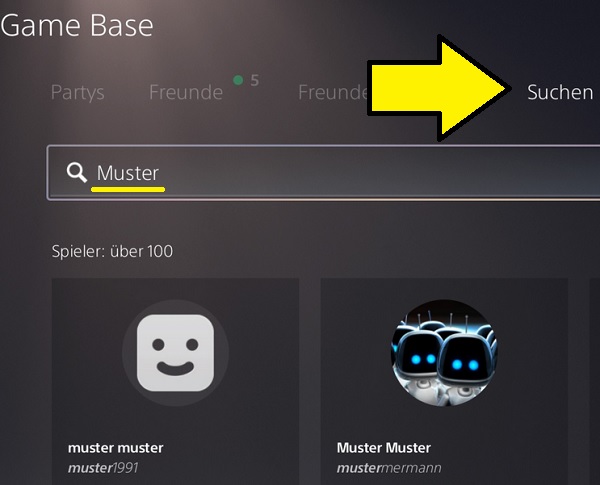
- Add Friend
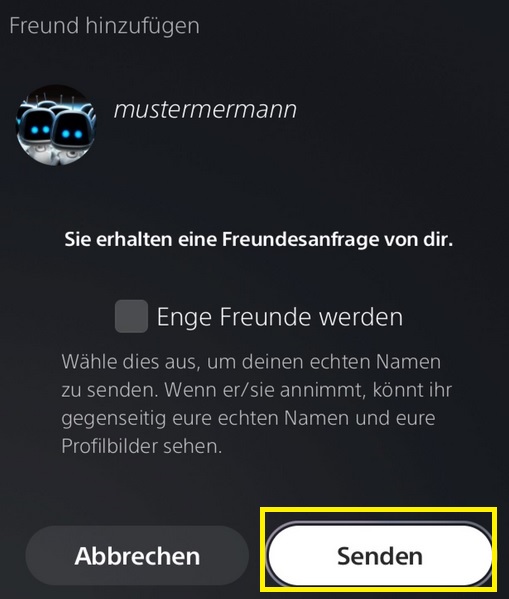
Select their profile and press “Add Friend” at the top (just below their name) – then send the request with “Send”
I hope and think that Sony will improve here. How was your start with the PlayStation 5? Did years of habit trip you up, do you have a similar “luxury problem” or have you had no issues transitioning to the next-gen? What features do you think Sony should improve? Let me know in the comments.
Oh, and if you are still looking for the new PlayStation 5, we always deliver the latest info on MeinMMO – also regarding availability: Will it be easier to buy a PS5 in 2021? New message gives hope

Your opinion is important to us!
Do you like the article? Then let us know!