In The Division, players should be able to choose between framerate and image quality on PS4 and Xbox One. However, this option is not available in the graphics settings of the consoles.
A few weeks ago, a developer from Massive spoke in a conversation with YouTubers about how players could either set FPS or image quality on PlayStation 4 and Xbox One. Players could “disable certain lighting aspects to improve framerates.” This option is not available in the full version.
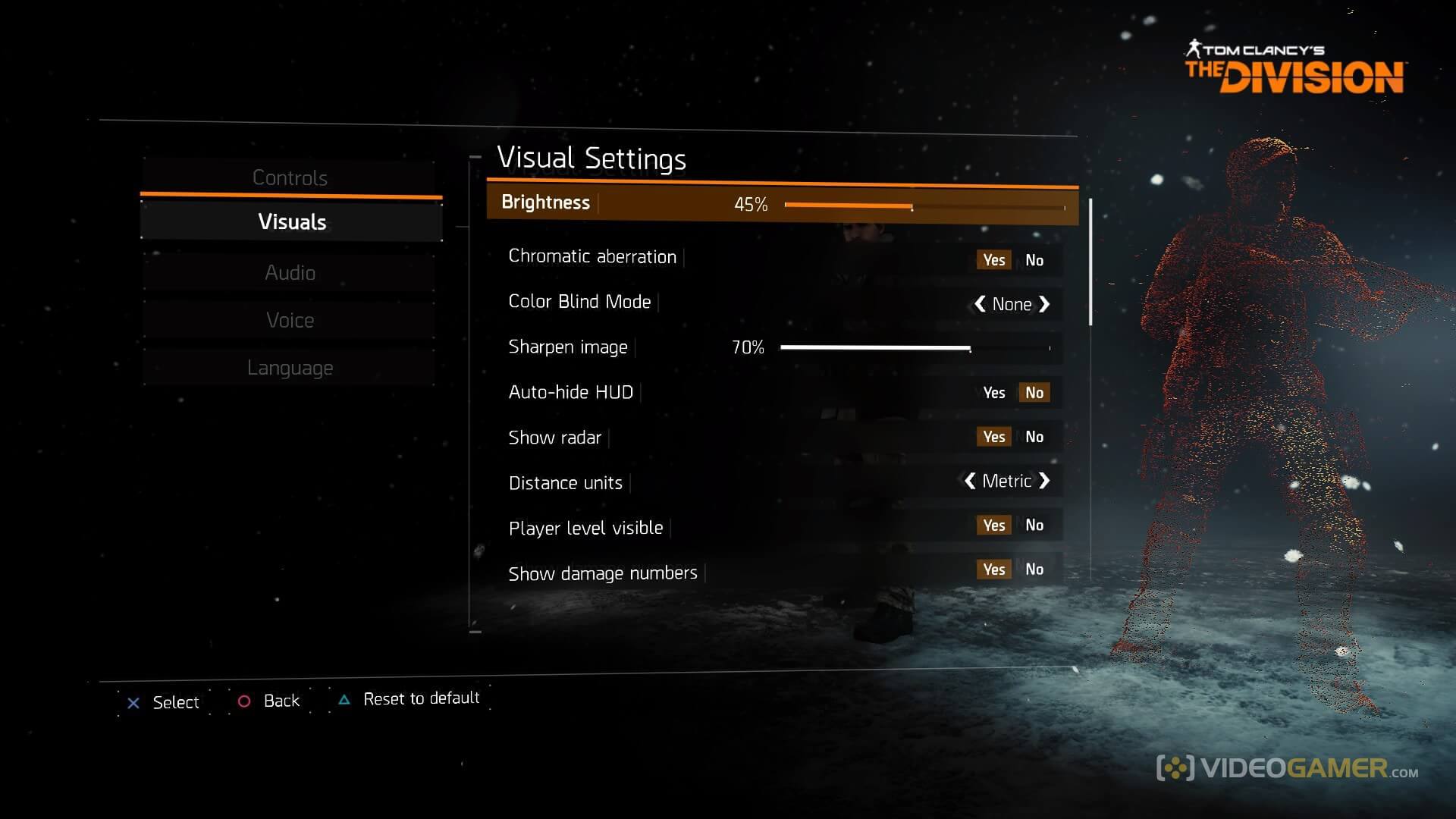
Videogamers have searched for this option in the graphics settings in vain, only finding the same options that were already available in the beta. While one can adjust sharpness, toggle chromatic aberrations on and off, and tweak the HUD, one cannot disable certain lighting aspects to increase FPS. These graphic settings are identical on PS4 and Xbox One.
Last month, this option was still highly praised by the developer:
It is really great that we provide the option to disable certain lighting aspects to improve the framerates of the console versions, which, to my knowledge, is not available in any other game.
What has happened to this option now? Ubisoft has not yet made any statement. Has it been removed, postponed, or was it never planned? One does not know. You can find the article where we discuss the graphics settings on the consoles here.