In Teamfight Tactics, it is important to know how to combine items and which champions bring which attributes. Cheat sheets are popular for this purpose. With a tool, you can use them as an in-game overlay and utilize other useful functions.
What kind of tool is it? The tool we want to introduce to you is called TFTacticts. It is a free overlay that offers you many functions:
- It shows you all items and possible combinations directly in the game.
- It gives you details about all champions.
- It shows you the chances of rolling the various rarities with your level.
- It displays current meta-combs directly.
- You can build your own teams in the tool that you want to set up in-game.
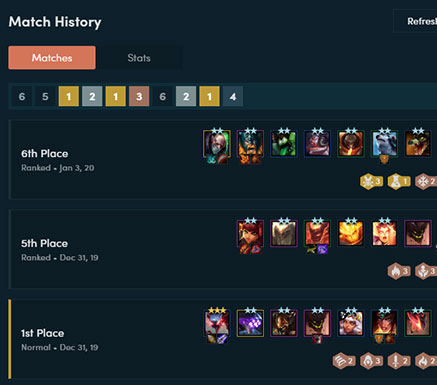
- You have a detailed match history.
This way, the tool not only replaces the cheat sheets, which require you to exit the game, but also provides some additional content.
Is the tool legal? Yes, TFtactics is tolerated by Riot Games’ Terms of Service. The tool is just an overlay. It overlays the actual game area.
However, since it does not have an independent influence on the game, the tool can be used without concerns.

Cheat Sheet and Overview of Meta-Combs
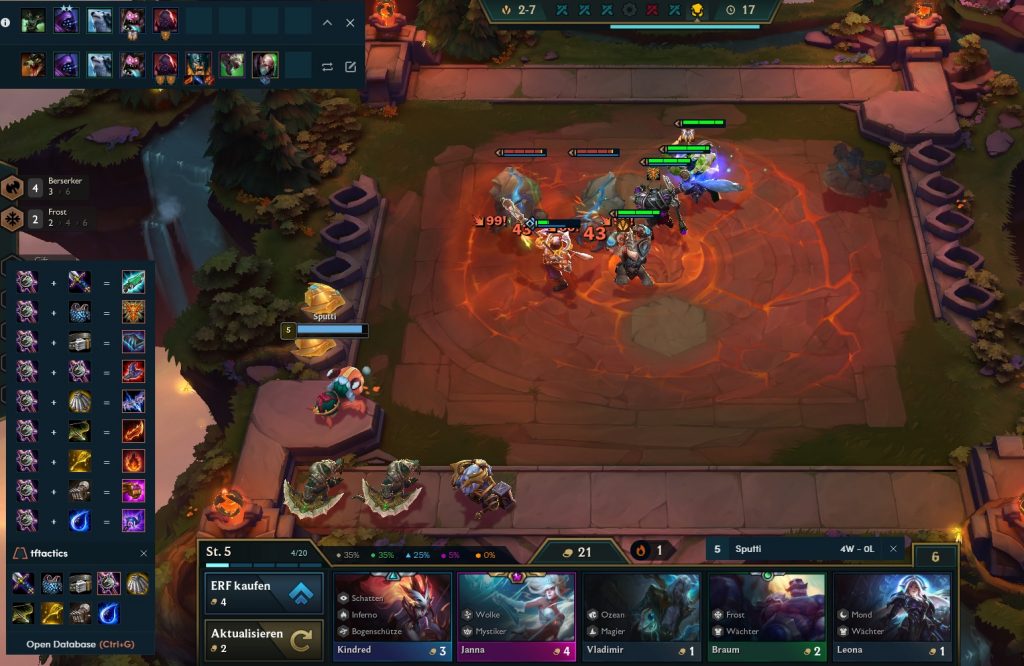
What can the overlay do exactly? In the upper left corner, there is a champion overview. There, you see the champions you have on the field (top row). Detailed statistics for the champions and what changes when you upgrade them are available.
In the row below, you see a team of champions that you want to “rebuild”. You can create your own teams or select directly from the meta-combs.

In the lower left corner, there is an item overview. When you hover your mouse over a corresponding icon, you can see how it is assembled and what it can do.
Finally, you can find your name above the “bench.” There you can see current statistics of the fights. Additionally, you will receive information about your chances of rolling certain rarities of champions when you hover over them with the mouse.

What does the tool offer for match history? TFTactics is great for analyzing past matches. You can see how many of your matchups you have won and with which combo.
Ads in the app and no German language
Does the tool have disadvantages? For TFTactics to function as an overlay in the game, you need the Overwolf application. You automatically download it with it. You can learn more about Overwolf on the official website.
TFTactics also uses advertisements so that it can be offered for free. The tool also offers an English version, but not a German one. Knowledge of champion and item names is accordingly required.
Finally, you should also keep an eye on the champion combos. These are currently up to date, but that may change with a new patch.
Are there alternative tools? Yes, besides TFTactics, there are Blitz.gg and Facecheck. The latter also requires Overwolf, while Blitz.gg does not. Both offer similar functions, but overall less than TFTactics.
TFT and auto battlers, in general, unexpectedly emerged in 2019 from a small mod. They are among the games that have positively surprised us: