

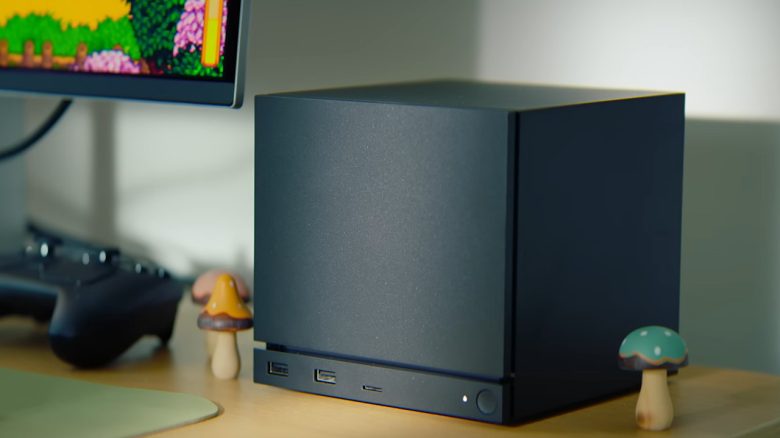
The Steam Machine has been introduced. MeinMMO has gathered the most important questions and answers for you and presents them to you.
Valve has introduced the Steam Machine as new hardware. But what exactly can we expect? A console, a gaming PC, or something completely different? And can I even play all my games? MeinMMO has collected the most important questions for you and tried to answer them. We have sorted the questions into specific categories to make it easier for you to navigate.
If you have any further questions or think of any: Use our comment function!
Product Information and Specifications
This section covers the basic facts, hardware details, and the possible components of the Steam Machine.
What is the Steam Machine anyway? The Steam Machine is an initiative by Valve to bring the PC market into the living room. The first attempt failed in 2018, four years after its market launch, with the first Steam Machine. Now the Steam Machine is making a comeback. Valve promises PC gaming in a compact form.
How much does the Steam Machine cost? Nothing is known about the price at this time (November 20, 2025). The Steam Machine probably won’t be as cheap as a console, reports a well-known YouTuber. Players and experts estimate that the price could be between 500 and 1,000 Euros.
What accessories are included? This is still unknown. A power cable will definitely be included.
Is a controller included? You can buy the Steam Machine either with or without the new Steam controller. The price will likely be a bit higher with the controller.
Is the Steam Machine upgradable? No, or only to a limited extent. The Steam Machine relies on a proprietary motherboard with a soldered CPU and GPU. Therefore, you cannot easily change the base. The general performance cannot be changed either.
Other components, such as SSD storage and RAM, should be easily upgradable. According to experts, the Steam Machine uses standard DDR5 laptop memory modules that you can buy on the market.
Will there be different models/versions? Basically, all Steam Machines contain the same hardware.
However, there will be models with different storage capacities: one model with 512 GB and one with 2 TB of storage.
Does the Steam Machine compete with my PS4 or is it quiet? Valve states on its own product page: “The Steam Machine remains cool and quiet even while playing the most demanding titles.” According to Valve, you shouldn’t expect a jet engine level noise like on the PS4.
Steam Machine: Technical Data and Specifications
| CPU: | Modified AMD Zen 4 with 6 Cores/12 Threads; Up to 4.8 GHz, 30 W TDP |
| GPU: | Modified AMD RDNA3 28 Cus; 2.45 GHz maximum clock frequency, 110 W TDP |
| RAM and Video Memory: | 16 GB DDR5 + 8 GB GDDR6 VRAM |
| Power Supply: | Internal power supply, AC 110-240 V |
| Storage: | Available in either 512 GB NVMe-SSD or 2 TB NVMe-SSD. Additionally, microSD card slot. |
| Wi-Fi and Bluetooth: | 2×2 Wi-Fi 6E and dedicated Bluetooth antenna |
| Steam Controller: | Integrated 2.4 GHz wireless adapter for the Steam Controller |
| Ports: | DisplayPort 1.4: Up to 4K at 240 Hz or 8K at 60 Hz. Supports HDR, FreeSync, and Daisy Chain. |
| HDMI 2.0: Up to 4K at 120 Hz. Supports HDR, FreeSync, and CEC. | |
| USB: 2 USB-A 3.2 Gen 1 ports on the front; 2 USB-A 2.0 ports on the back; 1 USB-C 3.2 Gen 2 port on the back. | |
| Dimensions and Weight: | 152 mm high (148 mm without feet), 162.4 mm deep, 156 mm wide |
| Weight: | 2.6 kg |
Operating System and Compatibility
This section discusses the software base, the installed operating system, and the possibilities of use beyond Steam.
What operating system is installed? The Steam Machine has SteamOS pre-installed, just like the Steam Deck. Steam OS is based on Arch Linux and features a KDE Plasma desktop.
Can I also install Windows? Yes, you can! Valve has explicitly stated that you can also install Windows on your Steam Machine. However, the Steam Machine is optimized for SteamOS, so performance may be lower on Windows.
Can I use Epic, GOG, Battle.net on the Steam Machine? Yes, that is basically possible, but it involves some effort. If SteamOS is set up as it is on the Steam Deck, then you can install other launchers on the Steam Machine. Or access them using Lutris.
Can I use Game Pass? The same applies to Game Pass and streaming services as to the launchers: it is generally not a problem, but it involves effort. Using Game Pass on the Steam Deck was quite cumbersome because there is no official application.
Can I use the Steam Machine as a real PC? Yes, that is possible without any issues. The Steam Machine has a freely accessible desktop interface, just like the Steam Deck, where you can use a browser, use word processing software (LibreOffice), edit pictures (Gimp), or watch YouTube. Streaming on Twitch should also generally be possible.
However, if you want to install specific Windows software, you should expect to put in a bit more effort, for example, products from Adobe. If you want to install software directly from the Linux package management (think of it like a software store), it is very easy.
Can I use a mouse, keyboard, and other controllers? Yes, that works smoothly. SteamOS supports nearly all modern input devices, even mice and keyboards that are a few years older. Only specific software such as iCue (Corsair) or Synapse (Razer) may cause problems. The hardware itself should work perfectly.


Gaming Experience and Functionality
This section focuses on the game selection, controls, and additional gaming features.
Is the Steam Machine a PC or a console? Valve intentionally sells the Steam Machine as a gaming PC and not as a console. And theoretically, you can do whatever you want with the Steam Machine, even install Windows. However, with a real console, like the PS5, that is not possible. The Steam Machine is also equipped with standard PC hardware that Valve has modified for its purposes.
However, the user interface and accessibility provide more of a console player experience.
Can I play all games? No. Many games can be played without issues through the Steam Machine and SteamOS, but some titles may have problems:
- If games rely on a third-party application, such as Anno 117 with Ubisoft Connect, there may be difficulties.
- Some anti-cheat systems are not fully supported by Linux, which can also lead to problems.
- Especially games that you do not install directly via Steam or rely on very old copy protection measures (such as Securom) often do not run on Linux.
As a general rule, the tip is: Pay attention to whether games are verified for the Steam Deck (via Steamdeck.com). They should generally also run on the Steam Machine. In the future, there will be a separate category for the Steam Machine.
Can I enjoy the latest games in 4K and highest quality? That is rather unlikely. The performance of the Steam Machine is said to be closer to that of the PS5. You can play the latest games without issues, but you will have to live with limitations. Valve has also emphasized that 60 FPS in 4K is only possible with AMD’s FSR. The manufacturer stated in the official trailer:
Experience gaming at desktop level with FSR-supported 4K gaming at 60 FPS thanks to a modified AMD processor and a dedicated graphics card.
Without upscaling, performance will likely fall even lower. It is also disappointing that the Steam Machine still relies on RDNA3, which is AMD’s last generation of graphics cards. The best version, FSR 4, can therefore only be used by the Steam Machine in theory.
Furthermore, the 8 GB video memory is likely to be too low for high resolutions (WQHD and 4K). Already now, 8 GB of video memory is too tight for many games.
How user-friendly is the Steam Machine? The Steam Machine and SteamOS use the so-called “Big Picture” mode. This is a very user-friendly interface designed for controllers. Installing, uninstalling games, or browsing the store is very easy here.
If you want to actively use the Steam Machine as a PC alongside Steam, you will need some adjustment time for the desktop environment “KDE Plasma”. Because the interface looks different from Windows.
Can I install mods for my games? In principle, SteamOS and the Steam Machine support the official “Steam Workshop” of your games. This means that the most popular Skyrim mods can also be installed on your Steam Machine.
If you want to install external mods, such as from ModDB or Nexusmods, that is also possible, but it involves effort.
Can I install software like Discord? Yes, that should be possible without issues. You can install Discord directly through the desktop mode on the Steam Deck, for example. You can read how to install Discord on the Steam Deck on MeinMMO. On the Steam Machine, which uses the same operating system (SteamOS), it shouldn’t be much different.
Can I replace my gaming PC now? No, the Steam Machine is not a full-fledged replacement for a gaming PC. You need to make that clear to yourself. The hardware installed is not up to date and can only be partially replaced. While you are buying a compact and modern system, you will get less performance than if you bought a real gaming PC with RX 9070 XT or RTX 5070. However, Valve recently stated in an interview that the Steam Machine is faster than most gaming PCs.



Anyone looking to get more out of their gaming PC might consider buying a new graphics card. But does it even matter at the end whether I choose AMD or Nvidia? MeinMMO presents the similarities and differences between AMD and Nvidia and explains what you should consider before your next graphics card purchase: How important is it whether I buy AMD or Nvidia for a graphics card?

Your opinion is important to us!
Do you like the article? Then let us know!