Many players were able to gain first experiences with the game during the last beta of New World. It is already known that there will be no console release, but what about controller support? We at MeinMMO show you how to play New World with a gamepad.
What about the support? New World has made contradictory statements about gamepad support in the past. However, it currently looks like there is no controller support on PC for the new MMORPG.
And this is despite the fact that New World confirmed upcoming controller support back in March (via Twitter). Amazon is now backtracking and also informed a fan on Twitter that “Sorry, but we are not currently planning gamepad support”.

Here is the link to the tweet:
This tweet currently represents the latest statement (as of 09.08.2021). However, we do not expect anything to change before the release.
How to play with a controller: There is, however, a way to bypass the officially unsupported gamepad feature, and that works through Steam. Whether you’re using an Xbox or a Steam controller, you can use any gamepad that your PC recognizes.
To play New World with the controller, follow this guide:
- Connect your controller to the PC
- Then open Steam
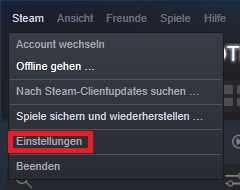
- In the top left, click on the “Steam” button
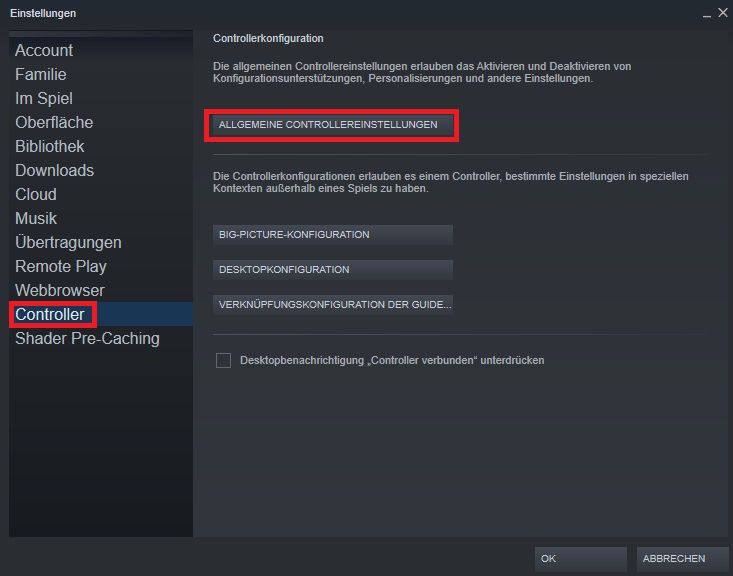
- Select the “Settings” tab and click on the “Controller” button
- Go to “General Controller Settings” to choose your controller
- Configure your controller as you like and save the configuration
- Now you need to put Steam into “Big Picture” mode. To do this, click the small “maximize” button in the top right of your library’s main menu
- When you start the game, Steam will force the controller on the game, and you can play


However, please note that New World will not function perfectly this way. The game is not designed for controller and gamepad control. We cannot guarantee that you will be able to use the full functionality of New World in this manner.
Alternatively, you can also resort to the following programs. However, we do not guarantee the functionality of the external tools:
- JoyToKey (via joytokey.net)
- MotioninJoy for PlayStation controllers (via uptodown.com)
- Joystick 2 Mouse (via no-ip.org)
None of these are optimal solutions for playing with the controller, but they at least provide a way to experience New World with a gamepad. At least until, perhaps someday, official support comes.
Controller support is more than convenience
What else is at stake? Controller support is just a matter of convenience for many, as they prefer using a gamepad. However, it goes much further than that. There are many players with disabilities who have difficulty or are unable to use a mouse and keyboard.
For this group of people, it is crucial whether a game offers official controller support, as they simply cannot play otherwise. Even workarounds are of little help since they usually only provide suboptimal support.
Official support for gamepads and controllers would also make it easier to connect aids like an adaptive controller (via GamePro). This greatly facilitates gaming for people with disabilities.
Do you want to play New World with a controller, or can you perhaps not play any other way? Do you find the controls with mouse and keyboard well implemented? Let us know in the comments.
If you want to know more about Amazon’s New World, we have all the information for you on one page.