


MeinMMO author Dariusz Müller has bought a new gaming mouse. It weighs as much as 2 Knoppers and is supposed to improve aim due to its small size and light weight. But is it worth the proud price of 110 euros?
Who is writing here? Dariusz Müller is a big fan of competitive shooters and has been logging hours in games like Rainbow Six Siege, Valorant, or Overwatch. Accordingly, he also approaches the purchase of his hardware and acquires products that are more suitable for shooters rather than for MMOs or story-based games.
What can you expect here? This is an experience report. I am not a hardware expert and cannot make statements about the switches, sensors, or other components. My focus is on aspects that an average player without industrial knowledge can assess. These include the shape of the mouse, the weight, which grip type it is suitable for, and whether it is appropriate for large or small hands.
Why did I choose the Lamzu Altantis Mini?
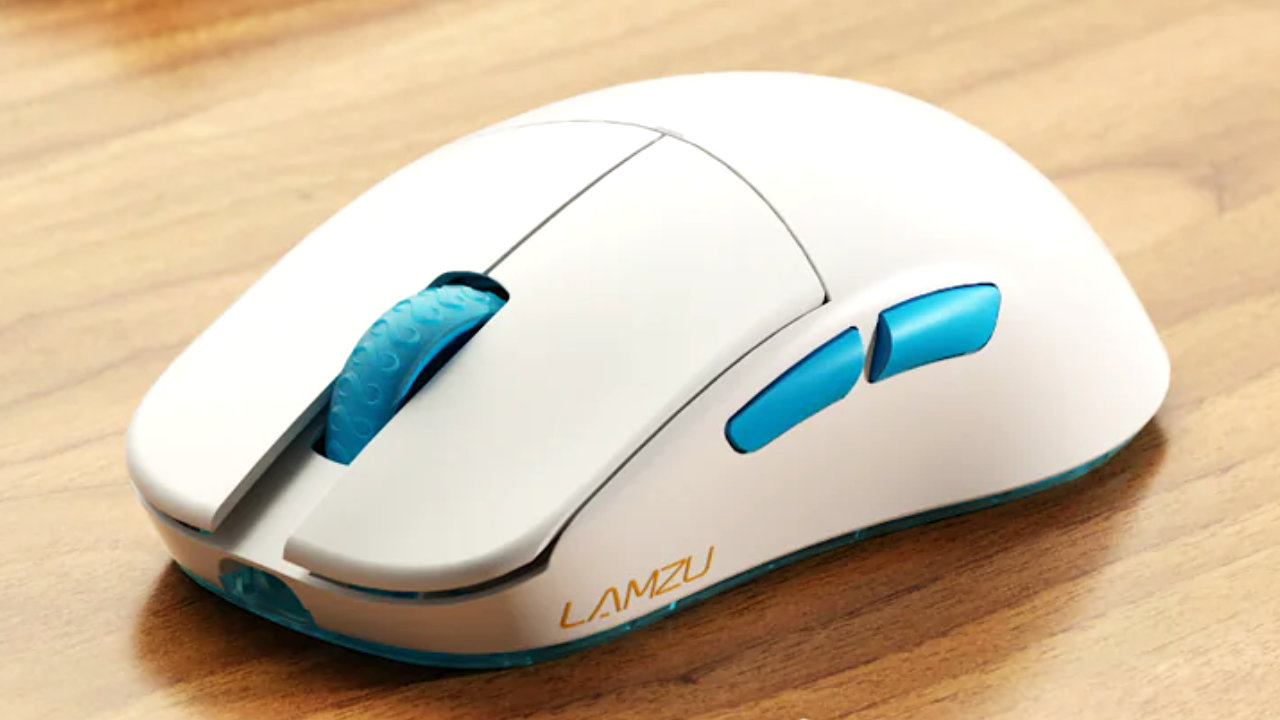
The Lamzu Atlantis Mini weighs 49 grams according to the manufacturer, which is about as much as two Knoppers – one Knoppers weighs 25 grams. It cost me 109.99 euros and is supposed to replace my Logitech G Pro Wireless in the future.
I was mostly satisfied with my Logitech. Sometimes the software annoyed me a bit, but the hardware did its job. Now I wanted a mouse that is even better suited for my hands – they are quite small.
The Lamzu Atlantis Mini is slightly smaller in all dimensions compared to the G Pro Wireless. Also, at 49 grams, it is lighter – the G Pro Wireless weighs around 80g, while the successor is only 63g.
Here you can see a quick overview of the specifications of the Lamzu Atlantis Mini, the standard version of the mouse, as well as the G Pro Wireless and the G Pro x Superlight:
- Lamzu Atlantis: 117 mm x 37 mm x 63 mm; Weight: 49 g
- Lamzu Atlantis: 123 mm x 38 mm x 66 mm; Weight: 55 g
- Logitech G Pro Wireless/ G Pro x Superlight: 125 mm x 40 mm x 63.5 mm; Weight: 80 g / 63 g
The Lamzu Atlantis Mini is available in black and white with blue accents. The packaging includes not just the mouse, but also a 1.8 m “USB-C” cable wrapped in paracord, a USB dongle that establishes the wireless connection, and a USB to USB-C adapter.
Additionally, extra PTFE skates are included – these are the white “feet” on the underside that the mouse moves on. A small cloth bag for storage or transportation of the mouse is also included.
Here you can see the official trailer for the Lamzu Atlantis Mini:
Light mouse for small hands
The shape of the Lamzu Atlantis Mini and its reduced size compared to my old Logitech mouse allow me to grip the mouse better. It fits significantly better in my hand and lets me maneuver more accurately with the mouse.
In my currently most-played shooter Rainbow Six: Siege, I initially noticed only a minimal difference, but various exercises in aim trainers like AimLab confirmed this impression. I switched multiple times between the mice and was generally able to hit more targets within the given time with the Lamzu Atlantis Mini.
Additionally, I was quicker on the targets than with the Logitech G Pro Wireless. I suspect the reason for this is the lower weight. When I switched from the lighter Lamzu to the Logitech, playing with the Logitech mouse felt like trudging through deep snow in boots.
The movements felt clumsier. It seemed like I had to exert more force for a movement, and I was surprised at how noticeably I felt a seemingly slight difference of about 30 grams.
Furthermore, I can reach the thumb buttons better on the Lamzu Altantis Mini. With the Logitech mouse, the front button was not easily reachable for me.
The disadvantages of the Lamzu Atlantis Mini
I have identified three more or less minor disadvantages for me regarding the Lamzu Atlantis Mini. These include the price and availability in Europe, a detail in the shape of the mouse, and the USB-C connection.
Criticism for availability and price
The availability of the Lamzu Atlantis Mini is currently very limited in Europe, especially in Germany. The official German partner of the manufacturer, an online shop named Dornfinger, currently does not have the mouse in stock (as of June 9). The Swedish retailer MaxGaming has also sold out of the black version of the mouse.
Moreover, there is a significant price difference depending on where you purchase the mouse. On the manufacturer’s website, the Lamzu Atlantis Mini costs only $89.99 – about 84 euros. Shipping costs are additional. At European distribution partners, the mouse costs 109.99 euros plus shipping. I find a surcharge of 20 euros unjustified.
A silver lining for you, however, might be that shortly after my order at MaxGaming, the mouse costs only 99.99 euros. This is extremely frustrating for me, but for you, the mouse would now be 10 € cheaper.
Possible Design Weaknesses
The Lamzu Atlantis is curved inward on both the left and right sides, one could almost say the mouse is tapered. This feels good to me on the left side, but initially bothered me on the right.
Due to the curvature, I had to shift my little finger, which rests on the edge of the mouse, further inward. This initially felt very unnatural and uncomfortable, but I got used to the change after just a few days.
However, in my opinion, the absence of thumb buttons on the right side is definitely a negative point – these would allow left-handers to use the mouse. This would theoretically be possible since the mouse is symmetrically shaped except for the thumb buttons. The manufacturer probably sacrificed a few grams of additional weight here, effectively excluding left-handers.
Terrible USB-C Connection
Theoretically, the USB-C connection of the mouse is good and causes no problems. However, practically, Lamzu continues a trend of some manufacturers that I find really terrible: Only the included cable from Lamzu fits.
Lamzu does this through a kind of tunnel that the plug runs through when you connect it to the mouse. This means that the cables of my controller, my smartphone, and other hardware are all unusable for the mouse. They simply do not fit… And that in an age when all of us, really everyone, has numerous matching cables lying around the house.
For which hands is the mouse suitable?
In my opinion, the Lamzu Atlantis Mini is more suitable for small to medium-sized hands. Players with large hands can opt for the regular Lamzu Atlantis. It has the same shape but is a few millimeters larger. However, it also weighs a few grams more than the Mini.
I cannot recommend the mouse to left-handers due to the absence of thumb buttons on the right side.
Another factor is the way you grip your mouse. There are three different grip types: the palm grip, the claw grip, and the fingertip grip. The Lamzu Atlantis claims to be ideal for “claw grip” players.
I personally play a variation of the claw grip and therefore get along well with the shape of the mouse. If you play a different grip type, you may find the shape of the mouse significantly less appealing.

Is the mouse worth the money?
In my opinion, the Lamzu Altantis Mini is worth the money. It feels really good in my hand and improves my overall gaming experience – that is the most important thing for me personally. The smaller size and lower weight compared to the Logitech mouse also make a noticeable difference.
The mouse’s software also works and is pleasantly minimalist. It is straightforward and does what it is supposed to do – nothing more.
Overall, the mouse seems well-made to me, has no gaps, unevenness, or creaky plastic, yet I would find a new price of 80-90 euros more appropriate. Nearly 100 to 110 euros for European customers is too much for me.
Although I am generally satisfied with the mouse, I would not recommend it to everyone. Someone who casually plays a few PvE titles in the evening does not need a mouse for around 100 euros: And an MMO player probably requires more than just two thumb buttons, but is willing to compromise on a higher weight.
For me, various factors come together as to why I wanted to buy the mouse:
- I play competitive shooters and am interested in their eSports.
- I also have small hands – this greatly limits my selection.
- Additionally, my general interest in trying out new peripherals such as mice, keyboards, and headphones and forming my own opinion plays a role.
If these points do not apply to you, you can save your money and invest it better.
By the way, I do not always spend too much money on new hardware. I bought my headphones cheaply and was not disappointed:
Audio expert designs headphones for under 30 € and I’ve never heard footsteps in a shooter so well

Your opinion is important to us!
Do you like the article? Then let us know!