

When you start Call of Duty: Warzone 2, the default settings are not optimal for the fast-paced battles in battle royale. MeinMMO shows you some settings here that will improve your game with just one click.
One thing upfront: You won’t find any optimal settings for your graphic settings on PC here. This is about minor adjustments that give you an advantage over players who don’t change their settings.
Some points on the list already show the default settings, but you should still check if you have selected the corresponding setting correctly.
If you want to find out about the new battle pass system, start the video:
CoD Warzone 2: Best Settings
We will first list the settings along with the menus where you can find them on PC & console, and provide a brief explanation below the list of how the changes will affect your gameplay.
Additionally, you will find optional settings further down that you can try out, as well as tips for controller and mouse & keyboard.
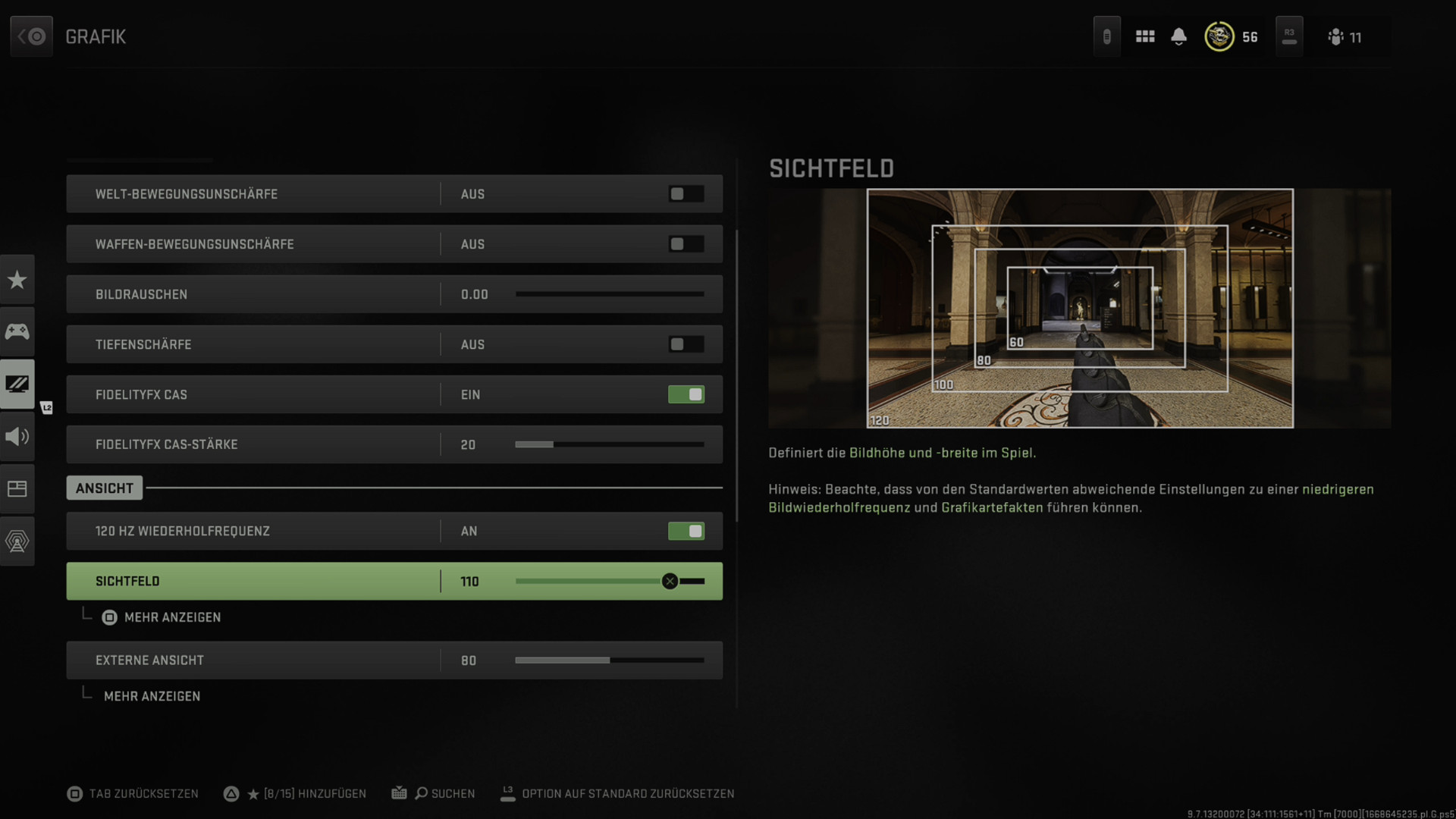
- World Motion Blur: Off
- Weapon Motion Blur: Off
- Film Grain: 0.00
- Depth of Field: Off
- Console: Graphics – Post-Processing
- PC: Graphics – Quality – Post-Processing
- Field of View: 90, 103, 110 or 120
- Console: Graphics – View
- PC: Graphics – View – Field of View
- Camera Movement First Person: Minimal (50 %)
- Console: Graphics – View
- PC: Graphics – View – Camera
- Audio Mix: Headphones Bass Boost
- Overall Volume: 100
- Music Volume: 0 – 30
- Dialogue Volume: 25 – 50
- Effects Volume: 90
- Hit Sound Volume: 70 – 90
- Console & PC: Audio – Volume
- Tinnitus Sound Reduction: On
- Console & PC: Audio – Advanced Audio Settings
- Minimap Shape: Square
- Minimap Rotation: Off
- Console & PC: Interface – HUD
- Automatic Parachute Deployment: Off
- Console: Controller – Advanced
- PC: Keyboard & Mouse – Gameplay – Advanced Movement Settings – Posture
Here are some settings for controller and mouse & keyboard:
- Controller
- Swapped Triggers: On
- Controller Vibration: Off
- Trigger Effect (PS5): Off
- Dead Zone Sensitivity Multiplier: 0.90
- Interact/Reload Behavior: Prioritize Interacting
- Manually Calibrate Deadzone
- Mouse & Keyboard
- Crouch on a comfortable key
- Assign grenade to a mouse button
- Sensitivity: Find a setting that allows for quick 180-degree turns without cranking up the sensitivity too high.
CoD Warzone 2: Best Settings – Explanation
Film Grain, Blur, Depth of Field: Such image filters look nice in the campaign, but have no place in competitive modes. They distort your view of what’s important – definitely disable them.
Field of View: The preset values are standard measurements that have shaped different shooters over the years. 103 is about the default setting in games like Valorant, 120 in Quake Champions.
As a general rule: The larger your field of view, the more you can see of the game and the faster your own turning speed appears – this may also require adjustments to your device sensitivity.
Additionally, enemies appear smaller. Conversely, a small field of view might help you better spot and hit enemies.
In Warzone 2, a large field of view can also help with controlling recoil. The so-called “visual recoil” is significantly reduced. Experiment a bit with your field of view.
Audio Mix: These settings are also highly dependent on your devices – test the different settings a bit. “Headphones Bass Boost” has a rather small dynamic range and therefore focuses on the important effect sounds.
Minimap: Even if you know it differently from the past: Keep the minimap / minimap square. This way you see a larger portion of the map. The disabled rotation takes some getting used to, but especially with a team, you can align directions better.
Automatic Parachute Deployment: If you leave this option on, you will deploy the parachute too high above the ground and will be slower than the enemy – this can be a significant disadvantage especially at the start of the match. Or it can be a huge advantage.
Controller: Turn off all effects of your controller – vibration or the trigger effect from the PS5 DualSense affect your performance. Also effective are swapped triggers when your rear triggers have a long activation distance. This way, you save valuable milliseconds when firing a weapon.
Often it is moments, little things, milliseconds that make the difference in Call of Duty. With these settings, you create a small advantage that can often determine between victory and defeat in a battle.
If you also have recommendations, leave a comment on the topic.
If you are looking for a strong weapon shortly after starting, we have a recommendation for you: CoD Warzone 2: The best weapons with setups – constantly updated.

Your opinion is important to us!
Do you like the article? Then let us know!