Steam Family has officially launched. MeinMMO editor Benedikt Schlotmann has been using the feature for months in beta and has saved a lot of money since then.
Steam introduced the new “Steam Family” feature a few months ago. However, the feature could already be tested in beta since March 2024. I tried the beta and have saved a lot of money over the past six months together with my wife.
Why I find the feature so great, and why you should try it too, you can read in this article.
Who is writing here?
I am a Tech Editor at MeinMMO and have a passion for peripherals, testing mice, keyboards, and gaming headsets. For MeinMMO, I have been testing hardware for our readers for many years. Specifically, gaming mice are among my absolute favorites. Besides the PS5, I also play on my Steam Deck.

Benedikt Schlotmann
Hardware Editor MeinMMO
Saved several hundred euros in about 6 months thanks to “Steam Family”
Why am I saving money? My partner and I both use Steam. Previously, we always bought every game we wanted to play. However, this also led to us buying games multiple times.
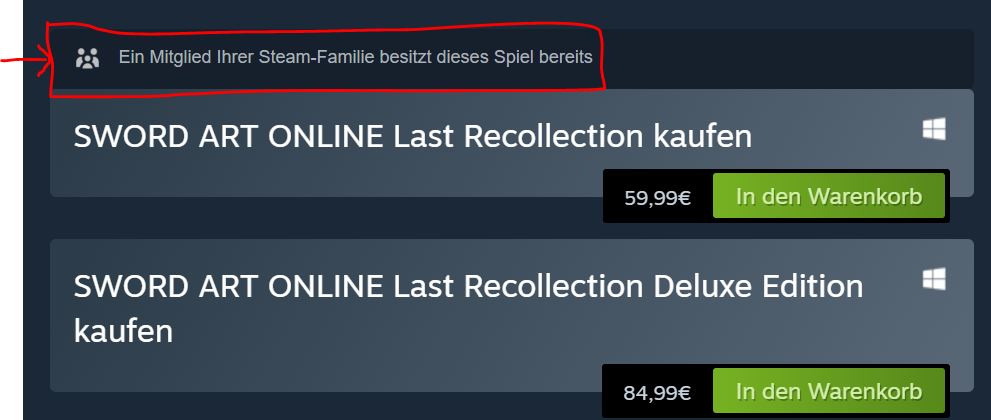
However, with Steam Family, you can share your family’s library. If my partner has already purchased a game, I can borrow the license from her, but she can continue to use her library. The store also clearly indicates that a family member already owns the game. This prevents double purchases.
Steam is very transparent about this and clearly shows me, both on the store page and in the shopping cart, that I am about to purchase a game twice, even though I don’t have to.
Wasn’t this available before? Not exactly. Previously, there was “Family Sharing”: You could borrow a game from a friend or family member, but as soon as you played the borrowed game, the account would be locked for the other person, so only you could play. With the adjustment of Steam Family, a family member can “borrow” your game, and you can play something else at the same time. And I think that’s an excellent change.
How much money have I saved? In recent months, this has already saved us several hundred euros. And there are now several titles:
- Dragon’s Dogma 2 (€64.99) and Persona 3 (€69.99) were purchased by one of us, and the other used the license.
- Shin Megami Tensei V: Vengeance (€59.99) has been actively used by my wife through my account.
- Coral Island (€29.99) I borrowed for weeks through my wife’s account.
- SWORD ART ONLINE: Alicization Lycoris (€49.99) was purchased by my wife, so I could borrow the game from her at no extra cost.
The advantage is also that you borrow all DLCs. In addition, there are older games that have been purchased for a longer time, and the partner borrows them from time to time. If I summed up all the games, I would come up with several hundred euros that we saved in recent months because we simply didn’t have to buy a second license.
If you play games like Baldur’s Gate 3 in couch co-op on one computer, one license is sufficient. And here it doesn’t matter which library you are currently using for the license.



Another feature you should probably not use if you are on Steam and want to play Counter-Strike 2. Because if you don’t immediately turn off a feature of your keyboard in Counter-Strike 2, you will be ruthlessly kicked out of your match: Anyone who doesn’t turn off a feature of their keyboard in Counter-Strike 2 will be banned
Also convenient: Steam Family works seamlessly on the Steam Deck. If I am traveling for work and have my Steam Deck in my luggage, I can continue to borrow games from my wife’s library and vice versa.
Steam Family excludes a few games from lending
Is there a catch? Yes, “Steam Family” does not work with every game. Excluded are:
- Nearly all Ubisoft games (such as The Division 2, Anno 1800).
- Several games from Electronic Arts (Mass Effect, Dragon Age, Need for Speed).
- Many online games (Temtem, New World).
- Basically, all games that rely on an additional account that must be linked to the Steam account.
- Demo versions are also excluded.
It is important to note: Manufacturers can generally choose whether or not to enable a game for “Steam Family”. Of about 1,000 games, around 30 are excluded from “Steam Family”. So it’s really not that much.
Multiplayer limitation: Another limitation exists if you want to play a game on two computers in multiplayer. For example, if I want to play Darksiders Genesis co-op with my wife on two computers, my wife would also need to buy the game because the only license from “Steam Family” is already being used by me.
If you play games like Baldur’s Gate 3 in couch co-op on one computer, one license is sufficient. And here it doesn’t matter which library you are currently using for the license.
Another feature you should probably not use if you are on Steam and want to play Counter-Strike 2. Because if you don’t immediately turn off a feature of your keyboard in Counter-Strike 2, you will be ruthlessly kicked out of your match: Anyone who doesn’t turn off a feature of their keyboard in Counter-Strike 2 will be banned