

Call of Duty: Warzone has not yet received a next-gen upgrade and is still only available as a last-gen version on the PS5 and Xbox Series X. However, there is now a new package with high-resolution textures.

What is it about? Call of Duty: Warzone was released over half a year before the next-gen consoles PlayStation 5 and Xbox Series X and is therefore a last-gen title.
Many big games like The Division 2, Black Ops Cold War, or FIFA 21 have released separate versions for the new consoles – but Warzone remains purely a last-gen game so far. Currently, there are also no hints or announcements regarding a new, improved version.
In order to still benefit from the higher performance of the new consoles, the battle royale introduces graphic features into the last-gen versions – the so-called “High Resolution Texture Packs”. Shortly after the start of season 2, the 3rd package went online, and MeinMMO shows you what it’s all about and how you can download them.
Warzone: High-Resolution Texture Packs for better resolution models
What do the packages provide? In total, there are 3 packages with which you can obtain higher resolution textures for Modern Warfare and Warzone. On PlayStation, the packages have a data size of:
- 1st package – 25.06 GB
- 2nd package – 10.49 GB
- 3rd package – 8.36 GB
With the packages, you increase the resolution of some elements in the game. The description text of the packages states: “This package supports more detailed textures for weapons and operators in Modern Warfare and Warzone”. However, it is not clear which textures are polished by the respective packages.
In addition to the weapons and operators, elements on the maps of CoD MW and Warzone are likely to receive sharper textures through the download (via Twitter). At least this is shown by the experience of some players. A YouTube video shows some of the small but fine differences:
How do I install the packages? You have always received an in-game message when starting the game shortly after the release of a package. This also applies to package 3. Here you can start the download directly.
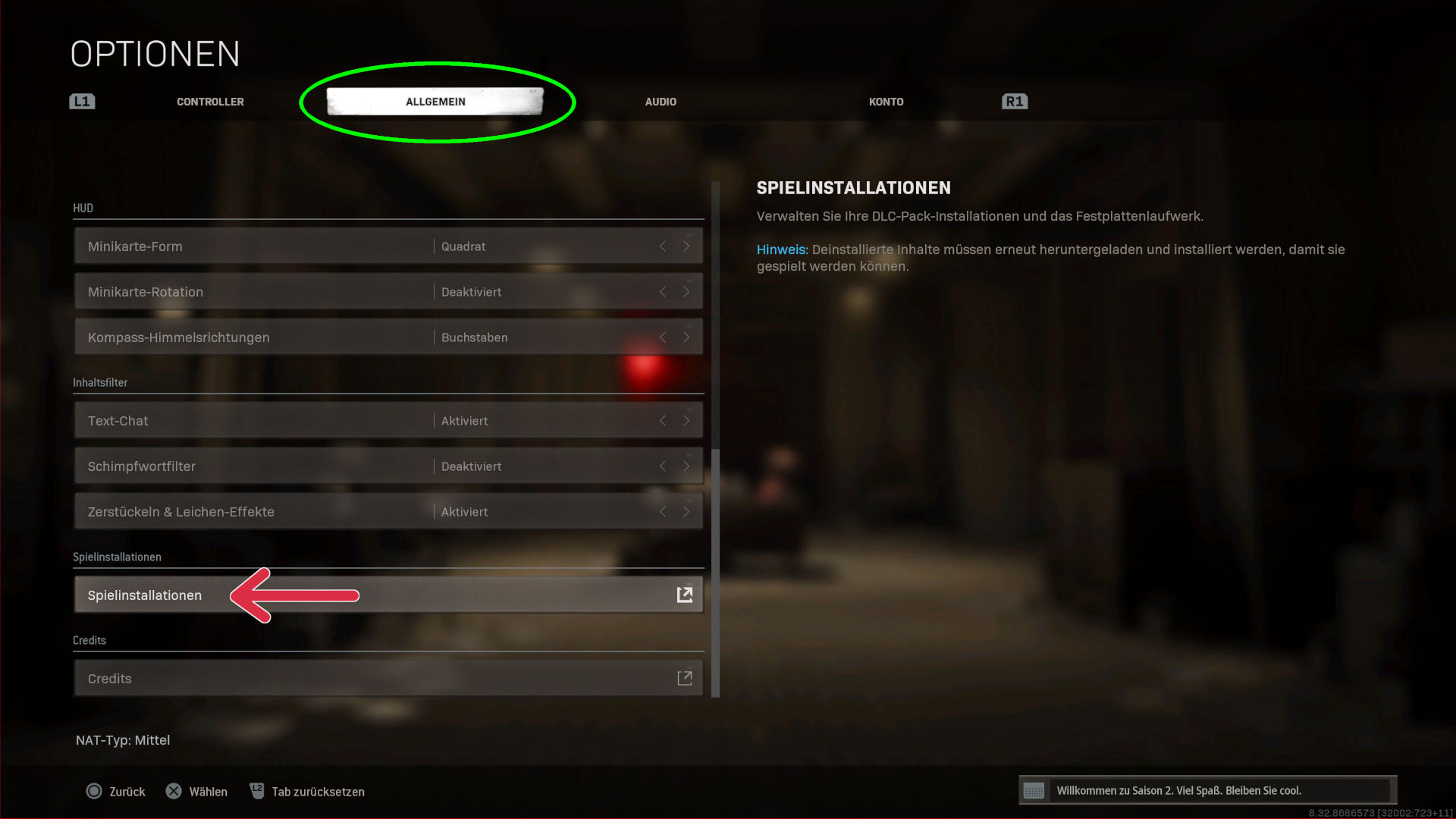
If you closed the window or want to manage the game content, you need to go to the menu item “Game Installations”:
- Start the game
- In the selection screen with Cold War, Warzone, and CoD MW, go to the game settings
- Select the “General” tab
- Scroll all the way down – above the credits are the “Game Installations”
- In the next menu, you can download the desired game contents
Questions and Answers about the Texture Packs
What do I do in case of error messages? There are reports that players receive error messages during the download such as: “Please download package 2 before downloading package 3”. This seems to be a mistake.
If you have problems with the download, try restarting the game, and if that doesn’t work, also restart your console. If the problem persists, remove all high-resolution packages and download them in the correct order – first package 1, then package 2, and finally the 3rd package.
What about the framerate? 120 FPS is still only available on the Xbox Series X. The texture packages only change the resolution of the graphic models in the game but have no direct impact on your framerate.
Think of your storage space: Downloads will increase the game files of Warzone. If you want to have Cold War, CoD MW, and Warzone simultaneously on the drive, 500 GB is no longer sufficient according to the developers.
Since the packs also work on the PS4 Pro and many models only come with an internal 500GB hard drive, you will have to forgo better textures, as the three CoDs will no longer fit on your storage.

Your opinion is important to us!
Do you like the article? Then let us know!