
The FIFA 20 Companion App launches today, on September 19. What time can we download it? When will the mobile app be released on iOS and Android? This is what EA says.
Today the Companion App is coming: After the Web App went live just after 7 PM yesterday, on September 18 and ushered in the FUT 20 season, the Companion App for mobile will follow today.
The release date of the Companion App for FIFA 20: EA Sports has officially confirmed that the Companion App will start on September 19. So today, Thursday.
The time for the download: The developers do not reveal exactly when the companion app will start.
- Update: The Companion App is live since 7:30 PM!
Link to download on iOS and Android: On this official EA page, the links to the app on iOS and Android should become available. Otherwise, you can find them in the respective stores:

While waiting for the Companion App for FIFA 20 Ultimate Team to go live, here’s an interesting article for you if you plan to create a Bundesliga team in FUT 20:

Everything you need to know about the daily gifts in the FUT 20 app.
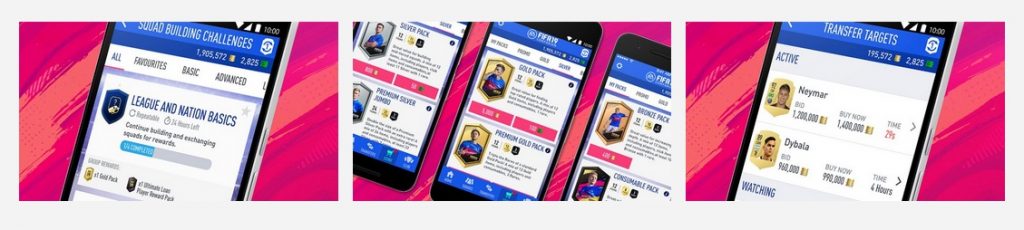
Requirements to start today in the EA Companion App
This is how you can start in FUT 20 ahead of time: Not all interested FUT 20 players are allowed to start the season today. Currently, only early access through the Web App and the Companion App is available. Here are the requirements for early access:
- You must have created a FUT Club in FIFA 19 before August 1, 2019.
- This FUT 19 Club must be valid until the launch of the Web App or Companion App of FUT 20. If you have deleted it, you will not start today in FUT 20.
- Additionally, your account must have a “good standing”. This means if you have been banned or have otherwise received negativity, you may not receive early access.
When is the start without early access? If you are not a FUT 19 veteran, you will only gain access to the Web App or Companion App after logging in to FIFA 20 for the first time, creating your club in FUT 20, and answering a security question there.
Then you need to wait until the release of FIFA 20 on September 27 or until the start of the early access offers.

Download and update of the Companion App for mobile
This is what you need to know about the download: While the Web App is a browser application that doesn’t require a download, you must download and install the Companion App via the stores for iOS and Android devices.
How large the mobile app for iOS and Android will be is unknown. It is expected to be around 40 MB. The other requirements and download prerequisites will also be revealed later.
The Companion App is free. You will need an EA account with your email address, password, and security question to log in.
If you still have the Companion App for FUT 19 installed, there will be an update for you today once the update occurs.
Keep in mind that there may be login issues during the release.



Contents of the Companion App
This is what you can do in the Companion App: In the Companion App, you have the same features as in the Web App. You can:
- Manage your FUT teams and club items,
- Complete Squad Building Challenges (SBCs),
- Visit the transfer market to buy and sell players and items – thus trading,
- View the TOTW (Team of the Week),
- Inspect all cards, leaderboards, and other stats,
- Buy packs in the FUT store (with coins or FIFA Points),
- Redeem weekly rewards from Squad Battles, Division Rivals, and FUT Champions,
- Share your teams with others thanks to unique URLs
- and complete objectives.
New, confirmed features for the FUT 20 app include:
- You can create individual tactics for the active FUT team.
- Additionally, you can make new club customizations that are introduced in FUT 20.
- You can track your progress on the new seasonal tasks. Some tasks can even be checked off directly via the app.
- You can apply an “SBC protection” to players. This will prevent you from accidentally redeeming one of your important players in an SBC.
You can also claim daily rewards through the app.