

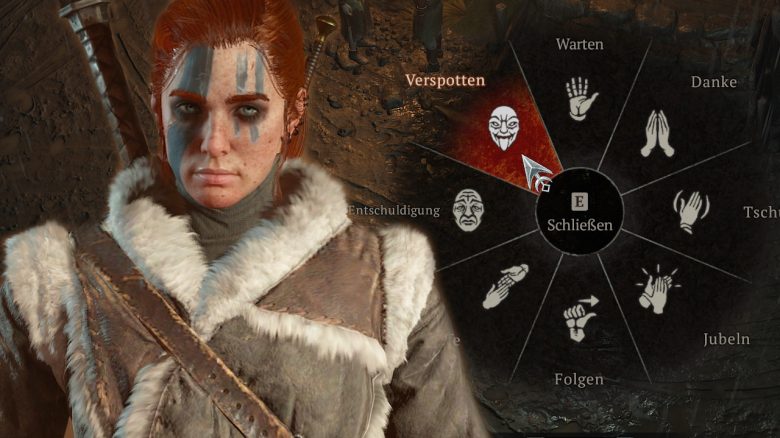
Diablo 4 gives you the opportunity to communicate with other players through emotes. There is a wheel available that already has various functions preset. With a few small adjustments, however, this inconspicuous feature can become a powerful tool.

This is what you are doing wrong: If you call up the emote wheel using the “E” key (PC) or the “up direction button” (PS5, Xbox), you will find functions there by default to greet other players or to quickly leave a dungeon.
To the left and right of the standard wheel, there are two more wheels that are likely largely empty for you. What many do not know: you can completely freely assign many different functions to all wheels.
This is how to use the emote wheel correctly: By using the “Customize” button or the corresponding button on your gamepad, you can customize the emote wheel. This way, you can reassign all slots and even overwrite presets.
However, you not only have emotes available, but a ton of other options:
- Elixirs that secure you buffs and additional XP
- Incense that strengthens all players in the area
- Scrolls that are especially useful for Hardcore mode and PvP
Additionally, you can also assign every slot in the wheel to social interactions, such as a group invitation, an enemy marking for PvP, or an invitation to a group or trade. You can find more about this in our guide to trading in Diablo 4.
Assign emote slots to hotkeys – Here’s how
To have even faster access to your items and functions, you can also assign each individual slot in the emote wheel to its own hotkey. To do this, navigate to the game menu:
- Options
- Controls
- Wheel
Here you can specifically assign keys and activate the corresponding slot in the wheel by pressing them. This helps you escape particularly critical situations and even prevents embarrassing mistakes that could cost you your character:
Diablo 4: Expert accidentally asks the hardest boss to wait – Dies, loses 150 hours of gameplay

Your opinion is important to us!
Do you like the article? Then let us know!