

Through Twitch Drops, you can get exclusive cosmetics for Call of Duty: Modern Warfare 2. For this, events are running on Twitch from time to time, where you can watch certain streamers for gifts. We will show you how to set up Twitch Drops here.
What are “Twitch Drops”? These are promotional actions between game developers and Twitch. When you watch selected streamers during an event, you can earn in-game items. The longer you watch, the more items you can receive.
From October 28 to November 6, such an event is taking place for Call of Duty: Modern Warfare 2. In total, you can secure 5 items – from stickers to weapon blueprints, everything is included.
If you are still looking for a good weapon for multiplayer, you will find it here: CoD MW2: The best weapons with setups – Continuously updated
In the video, you will see the latest information about Warzone 2.0:
These items you can grab:
- “Medallion 141” – Weapon ornament: Available if you watch for 15 minutes
- “Death’s Angel” – Calling card and emblem: Available if you watch for 30 minutes
- “Something in My Teeth” – Weapon sticker: Available if you watch for 45 minutes
- “Watchdog 141” – Weapon blueprint: Available if you watch for 1 hour
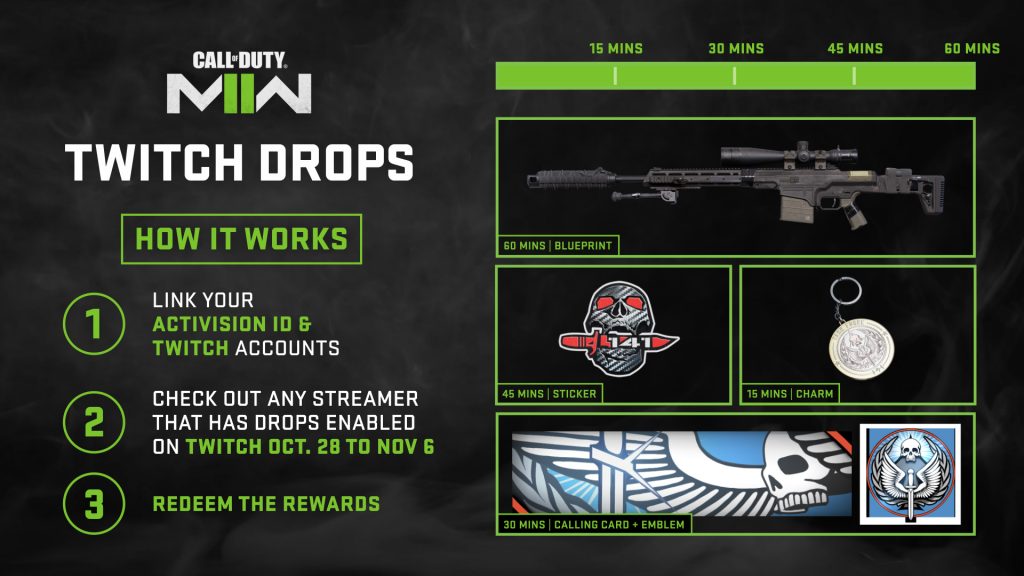
How do Twitch Drops work for CoD: MW2?
First, you need a Twitch account. Follow the link to create an account if you don’t have one yet. After that, the further procedure differs depending on whether you have an Activision account or a Battle.net account:
Activision Account – First, you need to create an Activision account. After that, you can link your Activision account with your Twitch account.
Battle.net Account – If you don’t have an account with Battle.net yet, you can do this through this link: Create Battle.net account. Afterward, you need to link your Battle.net account with your Twitch account.
What’s next? Once you have successfully linked your account, you are ready to participate in the Twitch Drops.
To do this, visit the website Twitch.tv and navigate through the search to streamers who regularly play Call of Duty. Pay attention to messages in the chat that drops are active with these streamers. Streamers often write this in the titles of their streams as well.
Then you just have to watch them play Call of Duty for a while. You should receive a notification that the stream is enabled for Twitch Drops. If you have watched long enough, there will be a notification that you have earned an item. After one hour, you will have earned all the rewards.
Sometimes it may take a little while before you can access the rewards in the game. Just be patient; the items usually appear after a few minutes.
Do you want to get the most out of your weapons in CoD: MW2? The Weapon Tuning Guide – So you can customize your attachments can help you with that.

Your opinion is important to us!
Do you like the article? Then let us know!