

The new update in FIFA 21 has changed many aspects of the game. However, on the PS4, there is suddenly a problem: Share Play is not functioning as usual.

What is Share Play? Share Play is a way to share your games online with friends on PS4. They can try out the games, for example, if they don’t own them, or play with you. Just watching is also possible through Share Play.
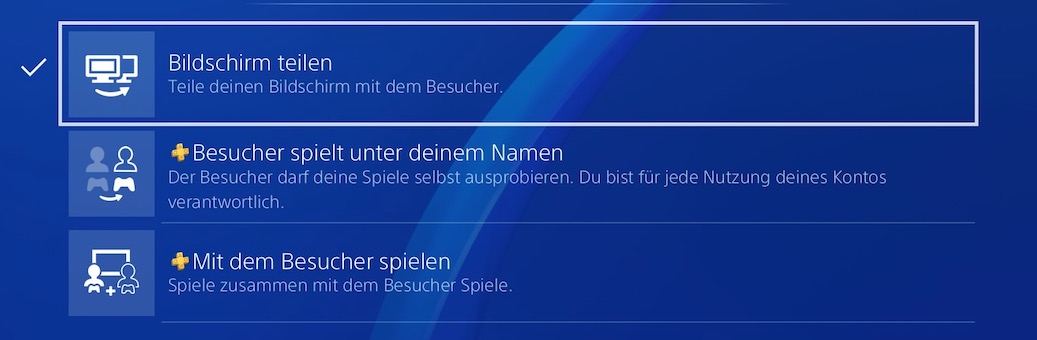
To use Share Play, you just need to create a party with a friend and then start a corresponding session via the Share button or the party menu. There you will find the functions:
- Share screen
- Visitor plays under your name
- Play with the visitor
Share Play not available because “Game not published”
How does Share Play look in FIFA 21? So far, Share Play worked smoothly in FIFA 21 (provided the internet connection was stable). For example, you could play against each other or take over a friend’s career mode.
You could also watch friends play the game and give each other tips on the field or for SBCs. All of this was possible even if only one player owned the game – it could be shared between players. Since the new update, this seems to no longer be possible.
This is the problem: Currently, if you try to start a Share Play session with friends in FIFA 21, you only receive an error message. This states that the host’s game screen cannot be displayed because the game is not published in the region of the participant.
Several players are reporting this issue on Twitter, and it also appeared in our test instead of starting a Share Play session. Before the update, this was possible without issues.

So far, there is no official information on whether the error lies with EA Sports or if it is a PS4 issue. There is currently no official statement on this. We will keep you updated on this matter.
The new online co-op features of the game, which do not rely on Share Play, can still be used – but both players need to own the game. You can find tips for the coop matches here.

Your opinion is important to us!
Do you like the article? Then let us know!