
Valorant is most fun when you play in a team with your friends. To make it work smoothly, you should add them to your friends list. But how can you add friends and what the hell is a Riot ID and its associated Tagline? We explain that here.
How can you add friends in Valorant? It is not hard to add a friend to your Valorant Beta friends list. Just go to the small “person-plus-symbol” in the bottom right of the side menu in the main menu of the game.
A box will pop up where you should enter your friend’s “Riot ID” and “Tagline.” And this is exactly where many confused players ask themselves: “What is that supposed to be?”

How to get your Riot ID and Tagline
What are Riot ID and Tagline? It is not enough to just enter your friend’s username; you need the exact Riot ID and Tagline.
- RiotID: This is a unique name that identifies you within all Riot Games. It is not necessarily identical to the username.
- Tagline: This number sequence serves to further identify your account in your region.
Keep in mind that you must enter both pieces of information to add your friends.
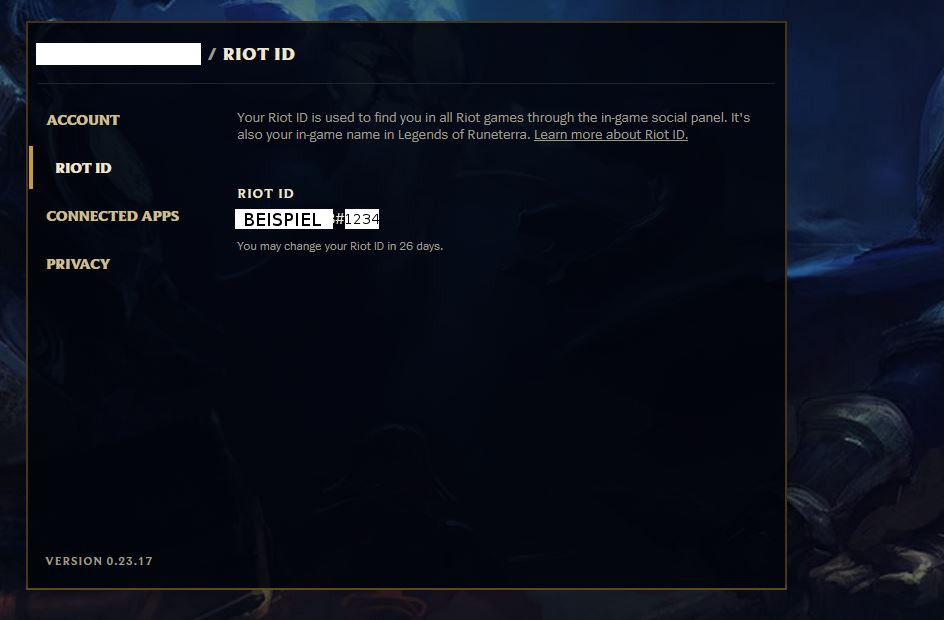
Where to find Riot ID and Tagline? If you want to find out what your Riot ID and Tagline are, you need to log into your Riot account. Use the link here to the Riot Account Homepage.
Log in and then click on the Riot ID tab. There you will find your ID. It is the name before the hashtag. The number behind the hashtag is the Tagline. You only need the number, not the symbol.
Alternatively, instead of the Tagline, you can simply enter the abbreviation of the corresponding region. For Germany and surrounding areas, that would be “EUW”, meaning Western Europe.
Is there feedback that the request has been sent? It is hidden. If you enter the information incorrectly, you will not receive direct feedback at the point where the adding takes place.
However, at least a patch has been deployed that introduced a note displayed in the chat console on the left. The “system” will then report in the chat whether you have added the corresponding person. Pay attention to this if the chat is hidden.
Or ideally, ask your friends outside of the game if they really received your friendship request.
Add friends from Riot Games like LoL and Co. – Here’s how
How to find friends from other Riot Games: It is a bit easier if you also play other games from Riot Games. If you actively play League of Legends and your friends can also be found there, you can add them more easily.
Because the friends list is also displayed under the “Other Games” tab in Valorant. Once your friends have registered for the Valorant Beta, you can then add them for Valorant with a right-click. Your friends are not in the beta? Then check out our article on the background of Twitch Drops and Beta Registration in Valorant.