Soon you will finally be able to expand the fast but limited internal storage of the PlayStation 5 with M.2 NVMe SSDs. But can a storage expansion actually keep up with the internal SSD of the PS5 in terms of speed? And for whom is it worth it?
Many PS5 owners are waiting for this: Many PS5 players are currently eagerly awaiting the release of PS5 firmware 2.0. This firmware is still in beta phase, but with its introduction a highly anticipated feature will come: the expansion of fast storage with PCIe 4.0 M.2 NVMe SSDs. And the expansion of the SSD has been one of the biggest wishes of many users since the release of Sony’s latest console.
Yes, Sony’s internally installed SSD is really fast, but this fast storage is relatively limited. Players effectively have only 667 GB of free storage available for games, apps, or media. And it fills up faster than you can look. Furthermore, PS5 games can only be played from the internal SSD or equivalent alternatives, which is still not possible outside the beta. Therefore, many users are eagerly anticipating the final release of the new system software.
This is the question many PS5 users are asking: But how does it look? Can subsequently installed SSDs keep up with the speed of the internal storage? After all, Sony has always touted its custom SSD of the PS5 as ultra-fast.
Well, some beta testers have already been able to install a compatible SSD in their PS5 and have gathered first experiences and conducted tests, including experts from Digital Foundry. And the results are optimistic.
The new SSD loads games even faster than the internal one
Digital Foundry traditionally conducted extensive tests. Various games and apps were tested on the newly installed SSD regarding loading times and compared with the built-in SSD of the PS5.
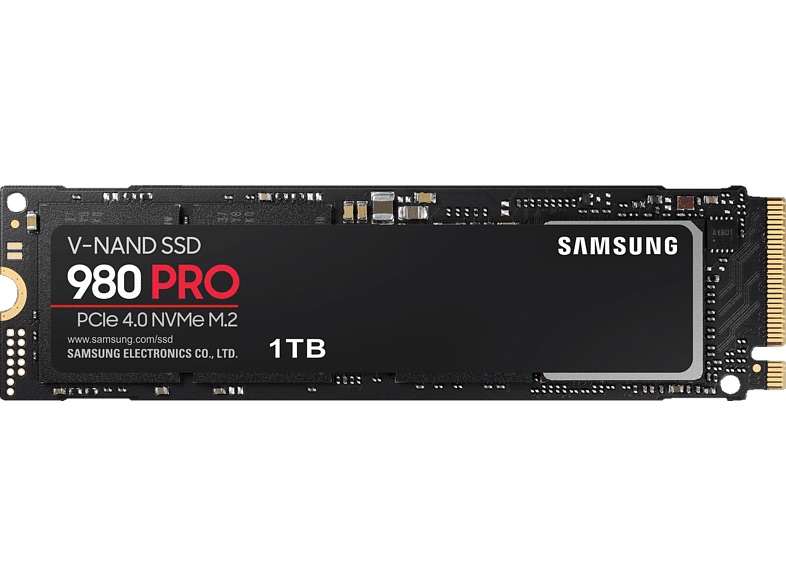
This SSD was tested: The 500GB version of the Samsung 980 Pro SSD was installed – once “naked” and once with heatsink (passive cooling, recommended by Sony but not mandatory). The Samsung 980 Pro SSD is one of the few SSDs currently known to be suitable as an equivalent alternative to the internally built storage (alongside, for example, the Western Digital SN850 or the Seagate FireCuda 530).
For not every SSD can be used with the PS5 – here are the requirements.
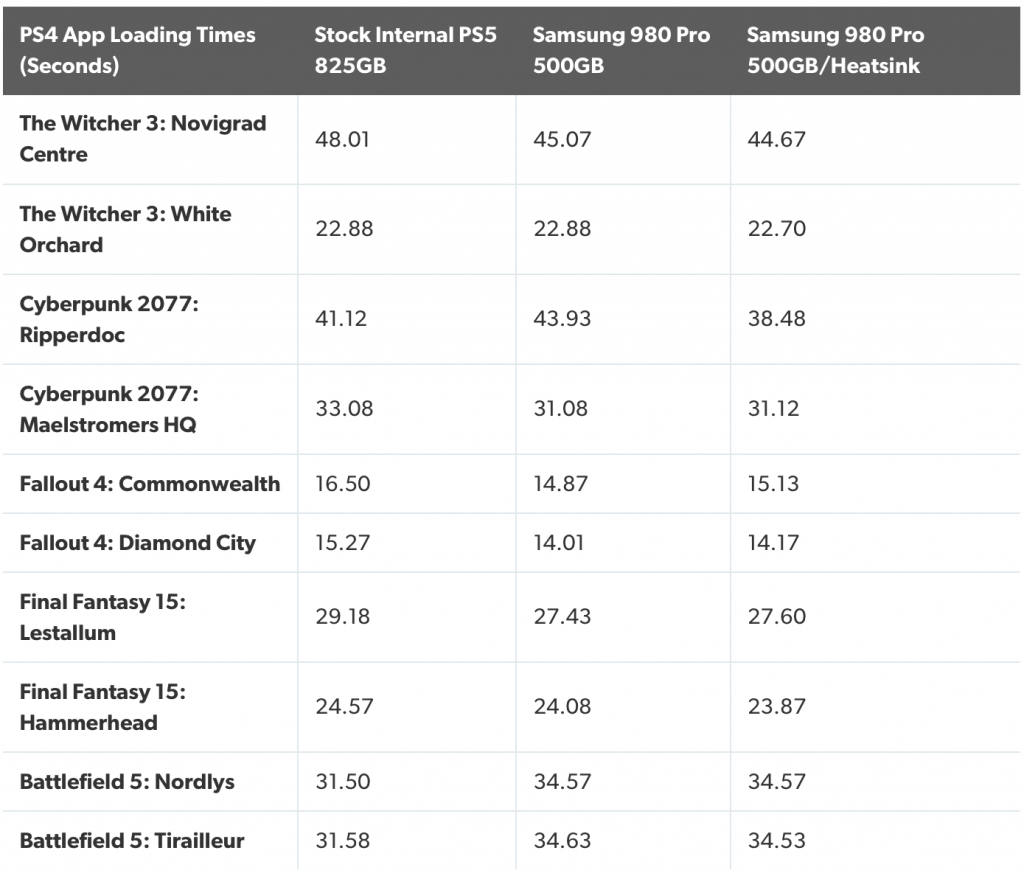
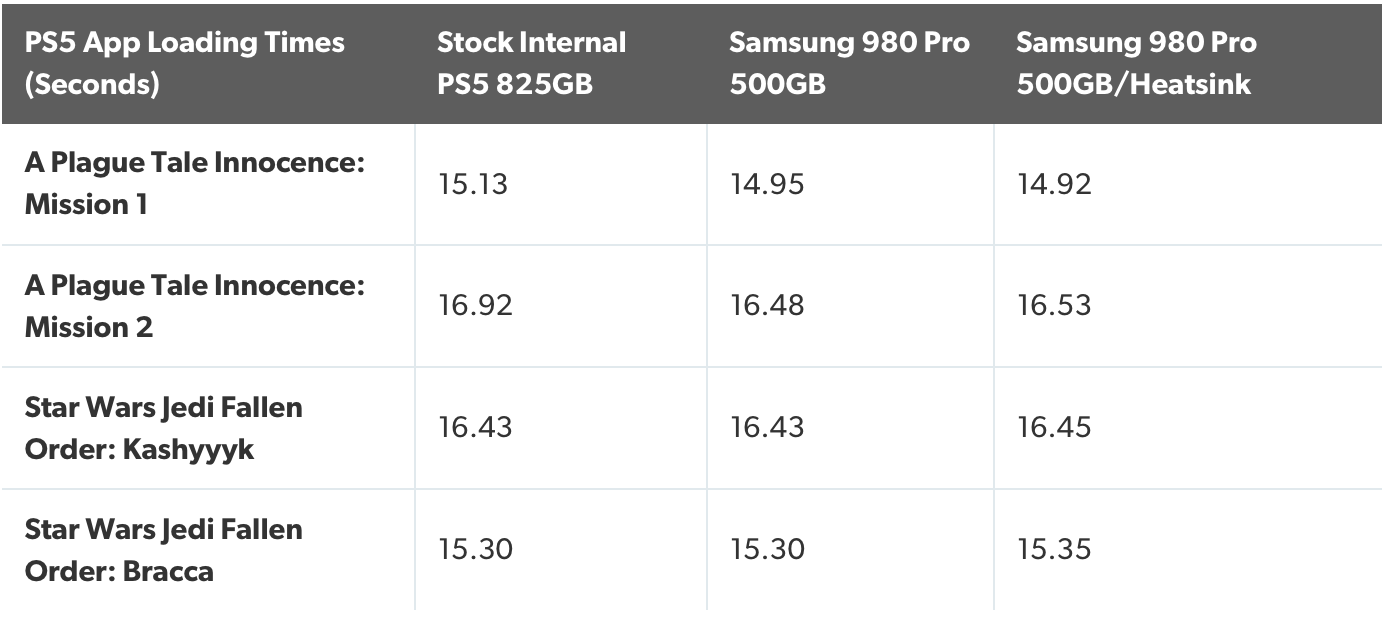
The result: In short: the loading times of the Samsung 980 Pro are almost identical in both used versions (with and without heatsink).
The interesting thing about it: in some games, the upgraded SSD loads even faster than the internal custom variant from Sony. However, loading times are in most cases only a few seconds (or less) faster, so there are no earth-shattering differences like there were between the PS5’s SSD and the PS4’s hard drive.
Here you can see some summarized test results from Digital Foundry (Here for PS4 games):
For PS5 games, the picture is very similar:
Here is how to install the new SSD: This is still relatively simple, but far from the convenient “plug & play” solution that Microsoft offers with the memory card for its Xbox Series X. With the PS5, the whole process should take no longer than 10 minutes.
You need to remove the right side panel of the PS5, open the slot for the SSD (with a Phillips screwdriver), then insert the SSD accordingly and close everything again.
See the installation and test explained in detail in the video from Digital Foundry here:
Is the upgrade worth it?
It basically depends on what you aim to achieve with the upgrade or what you hope for it.
If you generally want more faster storage: In this case, the upgrade is definitely worth it. If you are already having trouble fitting all your games on the internal SSD, but do not want to offload them to an external (and slower) USB device due to faster loading times, you will hardly be able to avoid getting another SSD – especially if it involves PS5 games. For those, an equivalent SSD alternative is indeed a must.
If you just want even faster loading times: If you are generally fine with the storage capacity of the PS5’s built-in SSD but are looking for even faster loading times – then the upgrade is not really worth it – at least not with the test model used. Yes, the 980 Pro SSD from Samsung is faster than the internal solution in several games, but the difference is so minimal that it can easily be overlooked. Overall, it is approximately on the same level as the factory-installed solution. So you can comfortably save the money here.
What about you? Are you also looking forward to the new firmware to finally install another fast SSD in the PS5? Or do you not care and are you managing just fine with the internal storage? Let us know in the comments and other readers of MeinMMO.
By the way, if you are still on the hunt for a PS5, then check out our live ticker: Buy PS5 in August 2021 – Keep an eye on these retailers from now on