

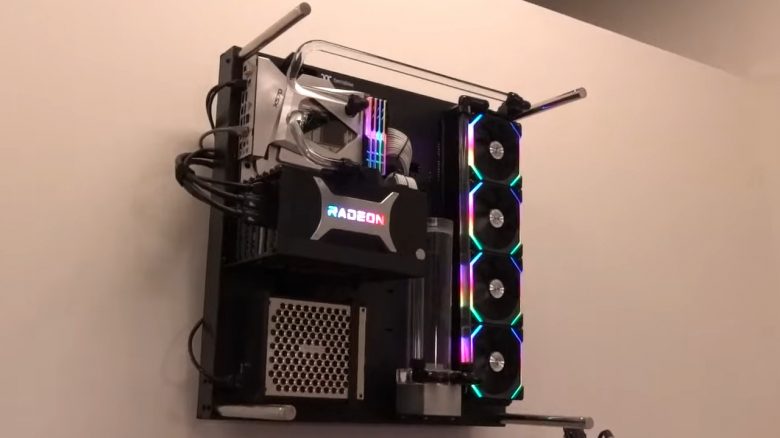
A YouTuber has fulfilled a dream and mounted his gaming PC to the wall. The mount looks really stylish. We’ll show you what the YouTuber did and give you tips on how you can also hang your PC.
Here’s what it’s about: The YouTuber Bitwit wanted to fulfill a dream he has had for a few months: mounting his gaming PC above his monitor setup on the wall.
And this is not Bitwit’s first attempt, as he had some problems to solve ahead of time:
- On one hand, the power cables to the power supply were incompatible with the rest of the computer, so they didn’t supply his system with power. He received a replacement from the power supply manufacturer.
- On the other hand, he wasn’t getting a video signal on all his monitors. He suspected the cable here as well and bought a new DisplayPort cable.
This is what he did: He mounted his PC components on a wall case from Thermaltake. This is the Thermaltake Core P5 Case. This case features a built-in bracket that allows you to securely screw the case to the wall.
After some back and forth, he was able to resolve the power supply issues. The new DisplayPort cable works on his monitors too.
He then begins mounting the case to the wall. But this is quite tedious, as some things don’t work right away.
You can actually watch the entire mounting process and how it looks in the end in the (English) video:
For the mounting, he bought a wall bracket that has 4 mounting points. This is particularly stable and can securely hold the heavy case against the wall.
He also used cable management to make the computer’s cables disappear into the wall. This gives the entire system a very tidy appearance.
The only problem in the end for Bitwit is reaching the power button of his PC. The button is so far up that he can hardly reach this switch.
What you need if you want to hang your PC
Are you interested in the idea of mounting the PC to the wall or at least hanging it up? Generally, this is possible with less effort than with the YouTuber. However, you should keep a few things in mind:
This is what you need: In principle, there are two options: Either hang your old case up, or buy a specially designed case that already has hangers.
- If you buy a case with suspension like the one from Thermaltake, you already have corresponding holes on the back where you can attach the case. Now you just need a corresponding mount for the case. TV mounts designed for heavy devices are particularly suitable here.
- If you instead want to hang your old case on the wall, you can also buy a suspension that is directly adapted to the case. They look like a swing, where you can then place your case. Thick straps keep your PC in place. You can also adjust the base plate of these “swings” to the width of your case and hang your PC under your desk.
This is what you should consider when hanging your PC:
- Weight: Check the manual or the specifications of the suspension for the maximum weight it can carry. Otherwise, you risk your PC falling and that could become an expensive problem.
- Test the system: Test your system before you hang it up. Once it’s hanging on the wall, troubleshooting becomes much more complicated.
- Location: In general, you should not expose your hardware to highly fluctuating temperatures. Hanging your PC by a window or next to a heater is not a good idea. Moisture or additional heat is not suitable for a PC.
- Wires/power cables in the wall: Be aware of where you want to hang your device, as you should not drill into any wires in the wall. Outlets are a good indication of wires in the wall. Alternatively, you can also use a cable detector, which will help you find metal pipes as well.
Another exciting case has been announced by manufacturer Thermaltake with the The Tower 100 Mini Chassis at this year’s CES 2021. This is a Mini-ITX case that primarily targets people interested in small gaming PCs. The case offers a view of your gaming setup from all sides and is expected to cost around 100 Euros.
What do you think about the idea of hanging the PC on the wall? Do you think the idea is crazy, or is your PC already hanging next to you on the wall or under your desk?

Your opinion is important to us!
Do you like the article? Then let us know!