


If you want to compare your gear in WoW Classic, you either have to do a lot of calculations or rely on addons. This also applies to the new expansion Wrath of the Lich King. MeinMMO explains what such addons can do for you and how to use them.

What is Gearscore? The term Gearscore colloquially refers to the “strength” of the equipment a character is wearing. The value is calculated from various attributes of your armor and weapons.
Closely related is the item level of items. Basically, there are two main applications for Gearscore and item levels:
- You can check if you meet the requirements for for example, the raids of Wrath of the Lich King
- You can better recognize whether a new item is a potential upgrade and whether you should roll on it or spend your DKP on it.
Although there are elite players who are always looking for the absolute top groups and misuse the Gearscore for such purposes, do not let that discourage you. If in doubt, form your own group and use the values for personal comparison.
WotLK is incredibly popular among tens of thousands of players. Just the first ship to Northrend in the middle of the night was packed:
Why do I need an addon for this? In Retail WoW, you can easily read the numbers from the equipment; in WotLK Classic, however, the value is hidden. The strength of items is only evident from their attributes, and not everyone wants to do constant calculations.
Gearscore addons take this work off your hands and show you a simple number indicating how “good” an item really is.
TacoTip – Gearscore addon, easy to install and use
Which addon should I use? TacoTip is the currently most common addon for gear scores and item levels in WotLK Classic. The operation is quite simple: After installation, you will see the score and the average item level of players as well as the individual item level directly on the items in the tooltip.
To install, you just need to extract the file in your WoW folder under /_classic_/Interface/Addons or use an addon manager. We recommend WoWUp for addons in WoW as an alternative to Curse.

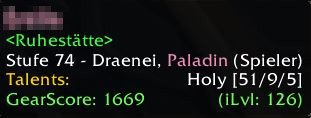
TacoTip offers you some settings. For example, you can turn on and off what exactly is displayed to you in the tooltip, including:
- Name, title, guild, and rank of the character
- Target, faction, and health bar
- Class colors
- Gearscore and equipped item level of the character
- Individual item level directly on items
We recommend the default settings. These provide you with the most important information. However, keep in mind that a higher item level is not always better. As you play longer, you’ll develop a better feeling for items and can rely on experience to properly compare items. Don’t hesitate to ask other players for help.
We present more addons for WotLK Classic here:
The 10 best addons for WoW WotLK Classic and how to install them

Your opinion is important to us!
Do you like the article? Then let us know!