

Actually, Wrath of the Lich King has a Dungeon Finder. However, it was not implemented in WoW Classic. Instead, there is a new LFG tool. MeinMMO explains the group search in detail.

What is this tool? The developers decided that the Dungeon Finder does not fit WoW Classic. The new tool is a kind of “enhancement” of the group search that you already know from The Burning Crusade.
You can list yourself as a character or as a group to then search for players for dungeons and the like. However, the new tool brings some problems with it; among other things, players complain that the chat gets completely flooded.
To quickly and easily find groups for the new dungeons at the release of WotLK, we give you tips on how to best use the tool.
The influx for WotLK was huge … and MeinMMO editor Benedict Grothaus was there:
Searching for groups and finding members
How to use the tool: The basic function is quite simple. You open the group search tool via the menu bar or by default with the “I” key. There you select your role, whether you have experience with the content, and the content itself.
If you choose dungeons, you can check off one or more instances and will then be listed for these. Players who are looking for members will then see your selected roles and with a mouseover, which content you are interested in.
As the developers explained in the interview, the tool is supposed to allow you to search for a group “on the side.” You can list yourself and continue questing. This way, you simply indicate that you are interested in group content, but do not want to spend time looking for it.
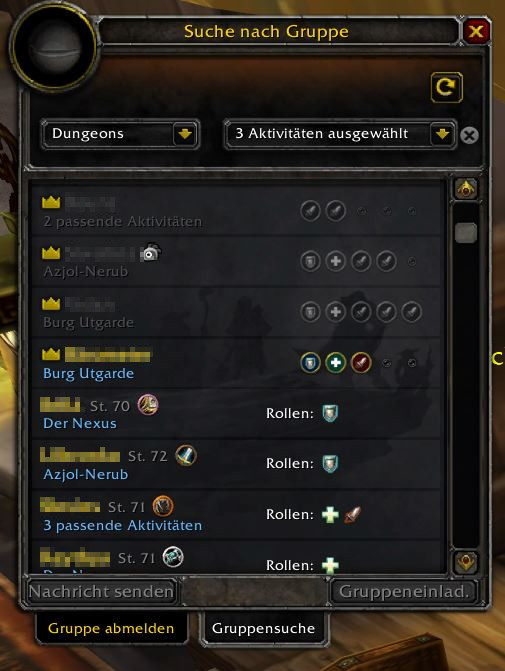
How to find a group faster: If you want to form a group faster, you should search purposefully. Combine the LFG tool with some other group search options:
- regularly update the LFG tool to find new players and groups
- use the “LookingForGroup” channel to actively recruit players
- check the “General” chat to see if anyone is also looking for groups
In the chat, there are some abbreviations that can confuse new players. We break down the most important abbreviations for you here.
- LFM = Looking for Member
- LFG = Looking For Group
- exp req = experience required
- rDD = ranged Damage Dealer
- mDD (or simply Melee) = class that deals damage in close combat
- hc = heroic difficulty
- nhc = normal difficulty
For raids, there’s even more to consider:

There are also abbreviations for classes and dungeons that often arise from the context. Translated, the statement “LFM 1 Heal, 1 rDD for HdS nhc, port rdy” would mean: “We are still looking for a healer and a ranged damage dealer for the Hall of Stone on normal difficulty, can summon you.”
Help, I am (not) a tank!
What you need to pay attention to: Currently, there are some issues with the new LFG tool. For example, players may be listed as tanks even though they did not sign up as such or cannot tank at all.
This happens, according to the developers, when you log out of the search or when the active talent tree is assigned the wrong role. Check your talents to see which role you have selected there.
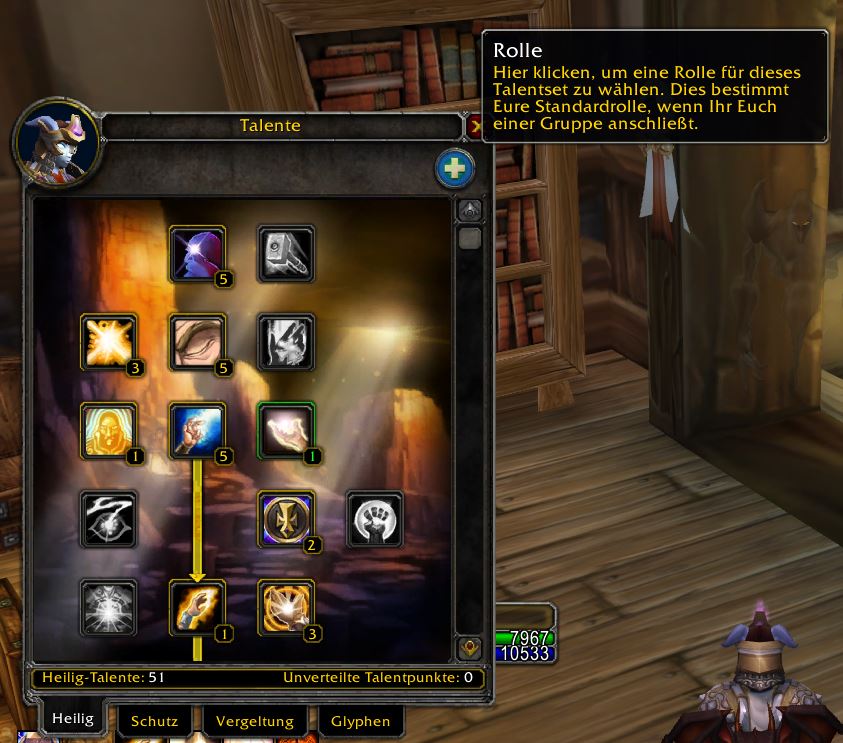
In general, it applies: hover over a player or a group in the tool and read through what exactly is being sought or offered to avoid confusion. If, for example, a mage is listed as a tank, the group probably does not actually have a tank. It is also important to check the sought activities, as players often look for dungeons for several instances. Communicate with each other!
The new LFG tool is different from any other tool we have ever had in WoW. Even for veterans, it may be unfamiliar – and there are many of them here:
Most of you are real WoW veterans – You have been playing forever

Your opinion is important to us!
Do you like the article? Then let us know!