


To make World of Warcraft a bit more enjoyable, players can rely on a whole range of modifications that change all sorts of things – so-called addons. We’ll show you some of the best addons for the different areas in the new expansion Midnight.

Update: We have reviewed and updated the article on March 3, 2026.
Addon List for Midnight: Addons serve the purpose of providing players with additional information, making the game more comfortable, or simply passing the time. However, for certain areas like PvP or raids, there are numerous helpers that are a must-have
, both for beginners and for the endgame.
Blizzard’s “crusade” against addons continues and also carries over into Midnight. This time, popular combat addons have also been affected, becoming unusable for many fans due to their limited functionality.
The best addons for dungeons and raids in Midnight
The Player versus Environment
content (PvE) is the largest part of every expansion of WoW. In dungeons and raids, it is therefore important to be well-prepared. Many well-known addons have become unusable since Midnight, with few exceptions.
Premade Groups Filter
The group browser in WoW has now even received better functions, but filtering for specific groups is still not entirely optimally resolved. This is where Premade Groups Filter helps.
The addon helps you specifically search for groups with certain requirements, for example with options for:
- the number of members already in the group
- the number of tank, healer, or DPS slots that are already filled
- the number of bosses that have already been defeated
- specific abilities that are already in the group or not, such as a
Battlerez
or Battle Rage
Disadvantage: Some of the filter options are not directly visible and only available through written commands. You will need to read a bit into the functions.

Pawn
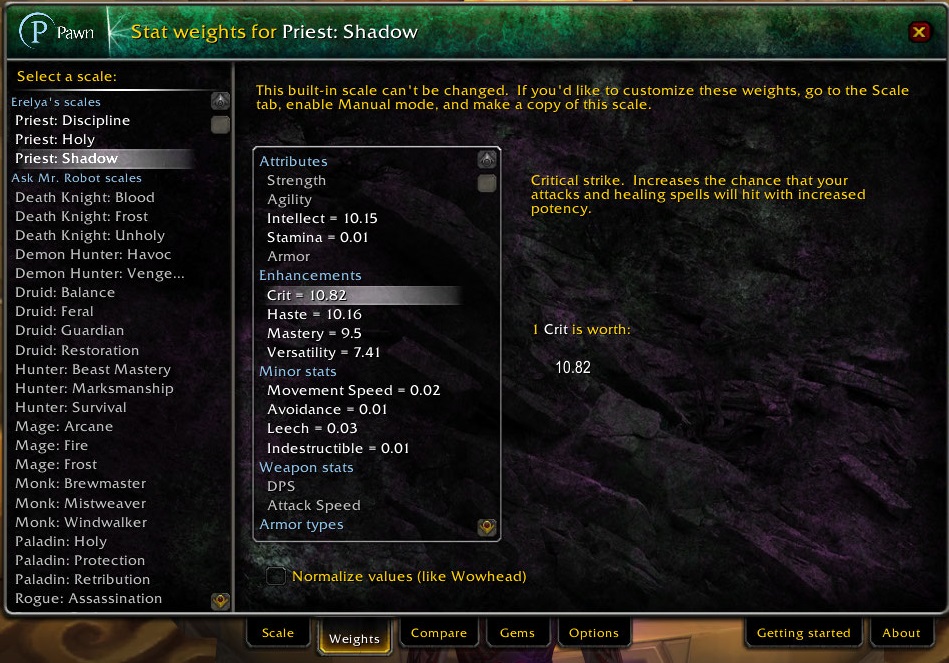
The function of Pawn is quite simple: the addon compares two items and tells you how much stronger or weaker a corresponding piece of equipment is. Or more simply: Pawn tells you which item you should equip.
You can rely on predefined values or feed the addon with your own values that you have determined through simulations – for example via Raidbots. Many raiders swear by Pawn and update their profiles every time their values change.
If you are not exactly sure what to do with the data you receive or how to improve your character with it, you can find a guide to 2 useful tools to get the most out of your character in WoW here.
The Best Addons for Leveling in Midnight 2026
Midnight raises the maximum level to 90 and significantly changes leveling. There are countless addons for WoW that aim to make leveling easier or faster. We have picked out some addons that will give you a few advantages on your way to the maximum level or make everything more enjoyable.
Azeroth Pilot Reloaded
The probably most popular addon for leveling and questing in WoW is Azeroth AutoPilot, or in the new version: Azeroth Pilot Reloaded. In short, the addon is meant to simply turn off your brain and start playing.
Instead of painstakingly having to read all the quests and think about where you need to go next, the addon provides you with the current objectives, shows the direction with an arrow, and even automatically accepts or hands in quests.
Warning: it is possible that Blizzard sees the autopilot as too strong
, as was the case with WeakAuras. You cannot be punished for its use, but in the future, the features may be restricted. However, this has not yet happened in Midnight.
RareScanner
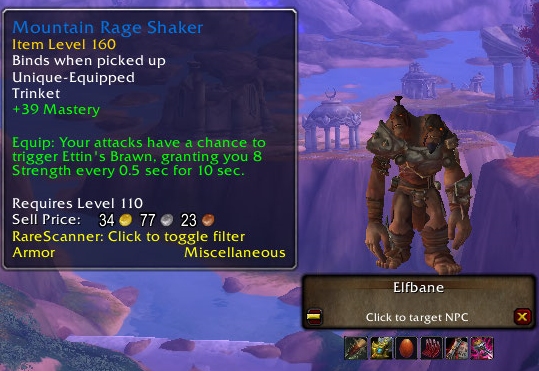
The probably most useful addon for leveling and also later is RareScanner. The addon notifies you when you have a rare enemy (Raremob) nearby and provides information about what you can loot from it. To do this, RareScanner places symbols on the map to mark locations.
You can select a found NPC directly through the interface of the addon. Raremobs reward you with special loot or even a large chunk of experience, making RareScanner particularly helpful for leveling.
- To the Curse page of RareScanner
- alternatively: SilverDragon on Curse does basically the same job
By the way: rare enemies are traditionally marked with a silver dragon. It almost disappeared after 18 years of WoW.
TomTom
With TomTom you can navigate much better in Azeroth thanks to its features in navigation. The addon shows your coordinates in a small window. Thus, you know exactly where you are and can track the coordinates of other users when searching for a specific place. This is especially helpful when you want to look for quests or NPCs that are not marked.
Additionally, you can set multiple waypoints on the map according to the coordinates. With a floating arrow marker, TomTom also shows you where to run or fly to reach your destination. You also receive an approximate travel time and the remaining meters to cover, depending on your movement speed.
Midnight Routine
Midnight Routine is primarily intended for newcomers who are still not quite familiar with Azeroth. This addon lists all important daily and weekly tasks for you and checks them off once you have completed them.
World of Warcraft has many activities and tasks that a hero can complete each week, and those who want to keep everything organized and act efficiently can do so with Midnight Routine even without experience.


The best addons for PvP
With Midnight, many useful addons for PvP have been affected, but one option will not let you down.
sArena Reloaded
If you are looking for an interface addon for Midnight so you won’t miss anything in PvP, you should resort to sArena Reloaded. With this addon, you can customize the various windows of your allies and enemies to your liking.
Additionally, you also receive information regarding the cooldowns of various abilities that do not actually show cooldowns – these include Smoke Bomb, Earthen Wall, Barrier, etc. This is a rather resource-light addon with superficial options and QoL features for PvP.
Guide in English: How to install WoW addons
To get an addon up and running, you must first install it. There are two ways to do this: directly or through a client.
Direct Installation
If you want to integrate an addon into WoW yourself, the easiest way is to visit the Curse website. Curse is the largest website for WoW modifications.
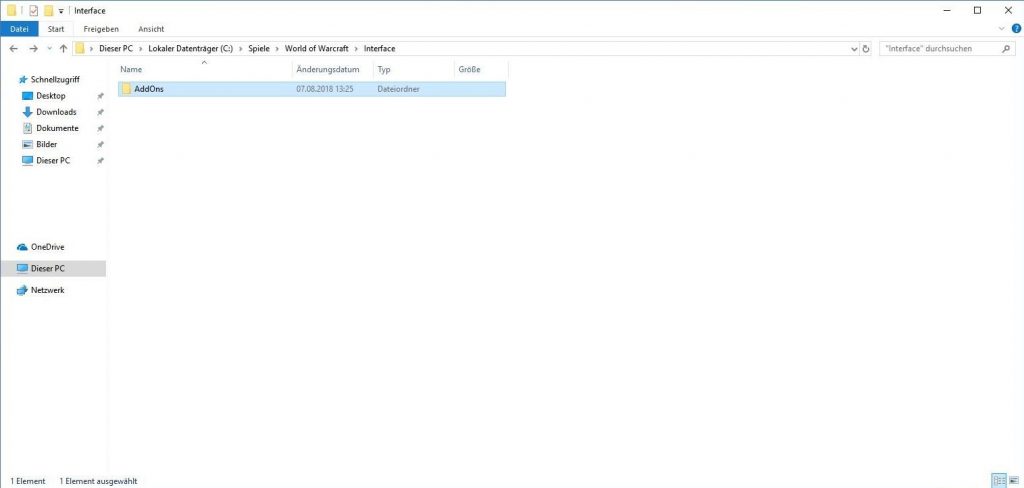
Choose an addon and download it. You will receive a .zip or .rar file, which you need to unpack with a program like 7zip, and then you have the addon in a folder with the same name. You drag this folder into the path _retail_/Interface/Addons in your WoW directory.
Installation with Overwolf and CurseForge
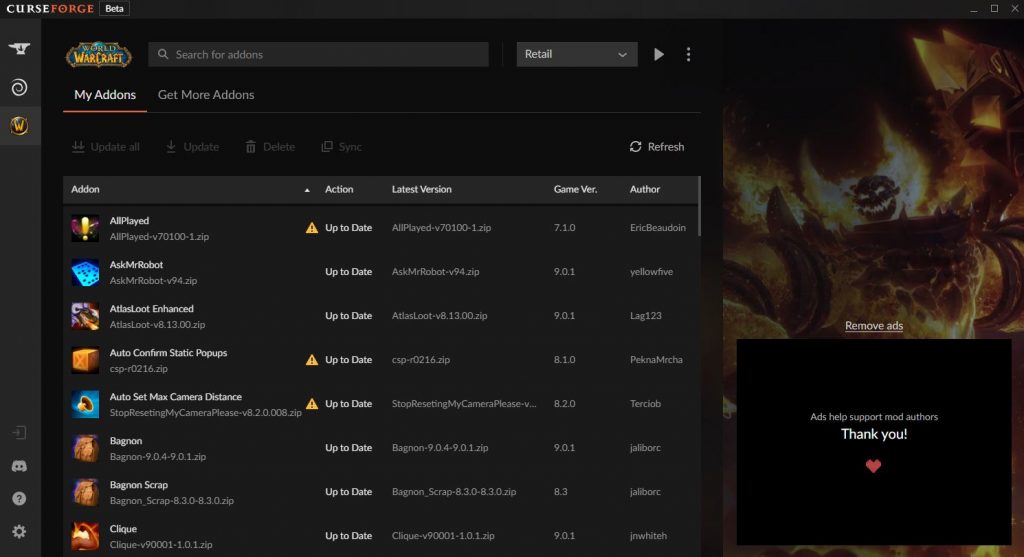
Curse has its own client, which you can get on the website. With the CurseForge client, installation is a bit easier.
The client searches for installed games, and you can then simply select WoW from the list. Make sure to choose the correct partition. If you have WoW and WoW Classic installed, the correct path for Dragonflight looks like this:
- C:GamesWorld of Warcraft_retail_
CurseForge gives you a selection from the retail and the classic version as a dropdown. By clicking on Get More Addons
, you get a list of all addons from Curse. Once you find what you want, simply click Install
. The client takes care of the rest.
Installing addons with WoWUp
An alternative to Overwolf is the independent client WoWUp. You can get it on the official homepage and simply download the file for Windows, Linux, and Mac, unpack it, and run it. No installation is necessary.
Like Overwolf, WoWUp also recognizes your WoW installation and allows you to update, install, and uninstall addons with a simple click. We explain in detail how this works in our comprehensive guide to WoWUp on MeinMMO.
Activating addons
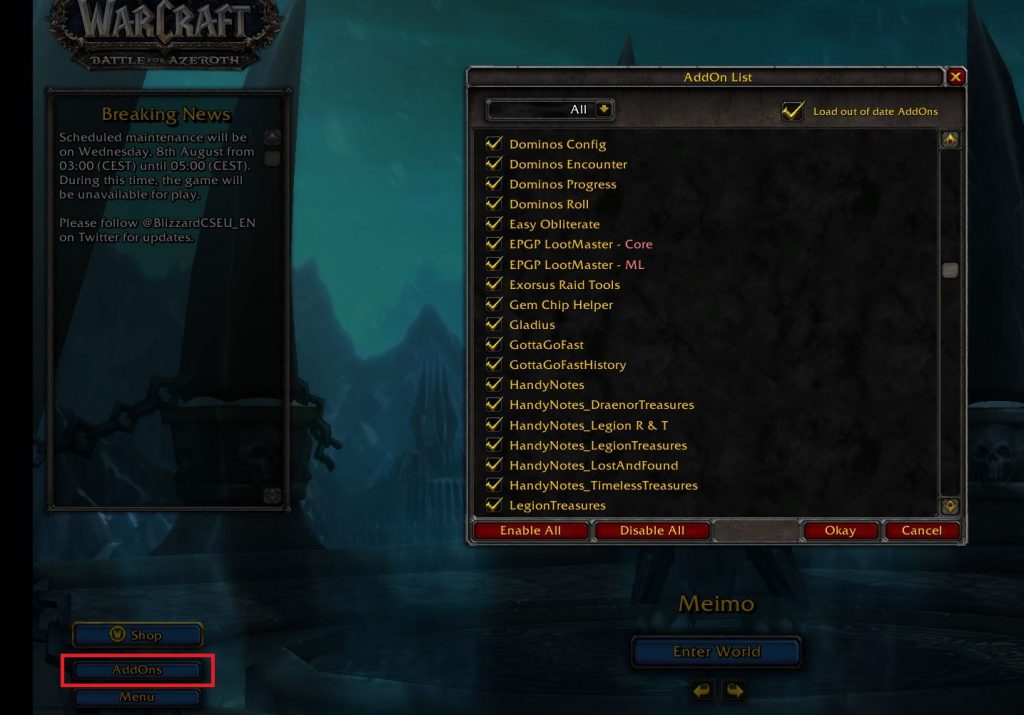
Once you have installed the addons, you just need to activate them. The next time you start WoW, you will see the “Menu” button at the top of the character selection screen, and you can then click on “AddOns”. Here you select all the addons you want to activate, and they will be ready for you when you log in.
With Midnight, WoW is now in its eleventh expansion, and addons are part of the daily routine for the majority of players. With our tips, you are optimally equipped to master every content of World of Warcraft.
Do you have any addons that you would urgently recommend?



Addons help you make the game easier, but they don’t take the playing away from you. For some things in WoW, you simply need experience or practice – or the right tricks, as professionals show in their dungeon runs: WoW: “The most creative strategy ever – How pros play dungeons in an insane way

Your opinion is important to us!
Do you like the article? Then let us know!