
Whether one finds Lost Ark good or bad after more than a year is a matter of debate. However, long loading times and stuttering while playing are universally criticized. Fortunately, there is a simple solution, provided your system can handle it.

What is the problem in Lost Ark? Lost Ark has a large world that is not entirely open. This means you have to frequently travel back and forth between different areas, and there is always a short loading screen during this process.
But that’s not all; when you load the new map, you often have the issue where you can hardly act for several seconds. NPCs do not load, additional textures are missing, and sometimes you cannot even move while the world around you builds itself up.
This is quite frustrating. Especially when entering your fortress, the image often freezes for seconds. This completely drains the motivation to beautify your island, as the loading time increases with each new decoration.
It is also annoying with the daily tasks. If you often do your silver dailies on Lopang Island, you often have to teleport. Although you only need to talk to an NPC to complete the quest, it often takes a long time for the NPC to appear.
Loading issues are also a problem on Witcher Island:
One option changes everything: The trick to eliminating these annoying loading issues lies in the engine itself. Lost Ark runs on the popular Unreal Engine, and you can conveniently and directly provide so-called launch options through Steam.
To do this, find Lost Ark in your Steam library, right-click on it and select “Properties.” In the now open window, you will find the empty text box “Launch Options,” and that is where it gets interesting.
Here you will write the following text: -notexturestreaming
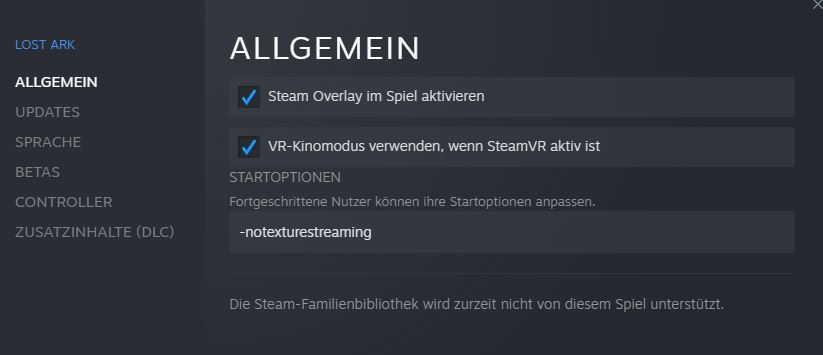
After that, you can close the window and enjoy a much more pleasant performance in Lost Ark, if your PC can handle it.
Can this also cause problems?
What exactly does the option do? The so-called “Texture Streaming” in the Unreal Engine ensures that textures in the game are not loaded in full resolution immediately. Only when you get close to objects do the textures eventually load.
This often causes the annoying loading times when entering a new map in Lost Ark. The launch option disables this texture streaming. As a result, Lost Ark loads all textures of the new map in full resolution during the loading screen, and the annoying stutters are a thing of the past.
In return, you have slightly longer loading times before entering the map. However, with a fast SSD, this is hardly noticeable. However, you should also keep an eye on your graphics memory and your RAM. Both will be more heavily loaded without texture streaming.
Can this cause problems? On a modern system, not really. Generally, it can be said that texture streaming is beneficial for you, as your hardware gets older or is less powerful. Here, your weak graphics card is overloaded more than it should be. This can lead to lower FPS or even crashes.
Conversely, the option can be more annoying for you if you use current and powerful hardware. You will have to estimate and test whether disabling texture streaming is worth it for you. However, nothing serious can happen.
In the worst case, your game could crash because you don’t have enough memory available. Then the textures without streaming demand more from your system than it can provide. If this happens frequently, you should reactivate streaming.
Aside from that, there is nothing else to consider. The new, fast loading times are, by the way, one reason why MeinMMO author Mark Sellner loves Lost Ark even more a year later than before.

Your opinion is important to us!
Do you like the article? Then let us know!