


Many players complain that the interface of WildStar is not optimal in some places, as it could have been, and that many comfort features that one knows from other MMORPGs are completely missing.

What many do not know: For most of these functions, there are small additional programs written by players themselves that can greatly simplify life on Nexus, and these are completely legal: We are talking about addons. Today, I would like to introduce you to some addons that I have come to love over the past few weeks.
Curse Client and Installation
The easiest way to install the addons is to download the “Curse Client”. This program manages all your addons for a variety of MMOs, informs you as soon as there is a new version, and allows you to update them with a single click – and it is completely free. To use the program, simply create a free account at www.curse.com and download the client. While using this program is not a must, it greatly facilitates the maintenance of your addons, as Curse has one of the most up-to-date databases for these additional programs, which can also be downloaded individually and manually if desired.
Manually installing the addons in WildStar is unfortunately a bit more complicated, but after the first time it is not a major obstacle anymore. To do this, simply open the Explorer or your workspace and enter “%APPDATA%” (without quotes) in the path display at the top and confirm with Enter (you must have administrator rights for this). From there, navigate to “NCSoft” – “WildStar” – “Addons”. If the last folder is not yet present, simply create it. From now on, all future addons should be extracted to exactly this folder.
WildStar Addons on curse.com [intense_icon type=”download” size=”2″ color=”#FFFFF” /]
1. RareTracker
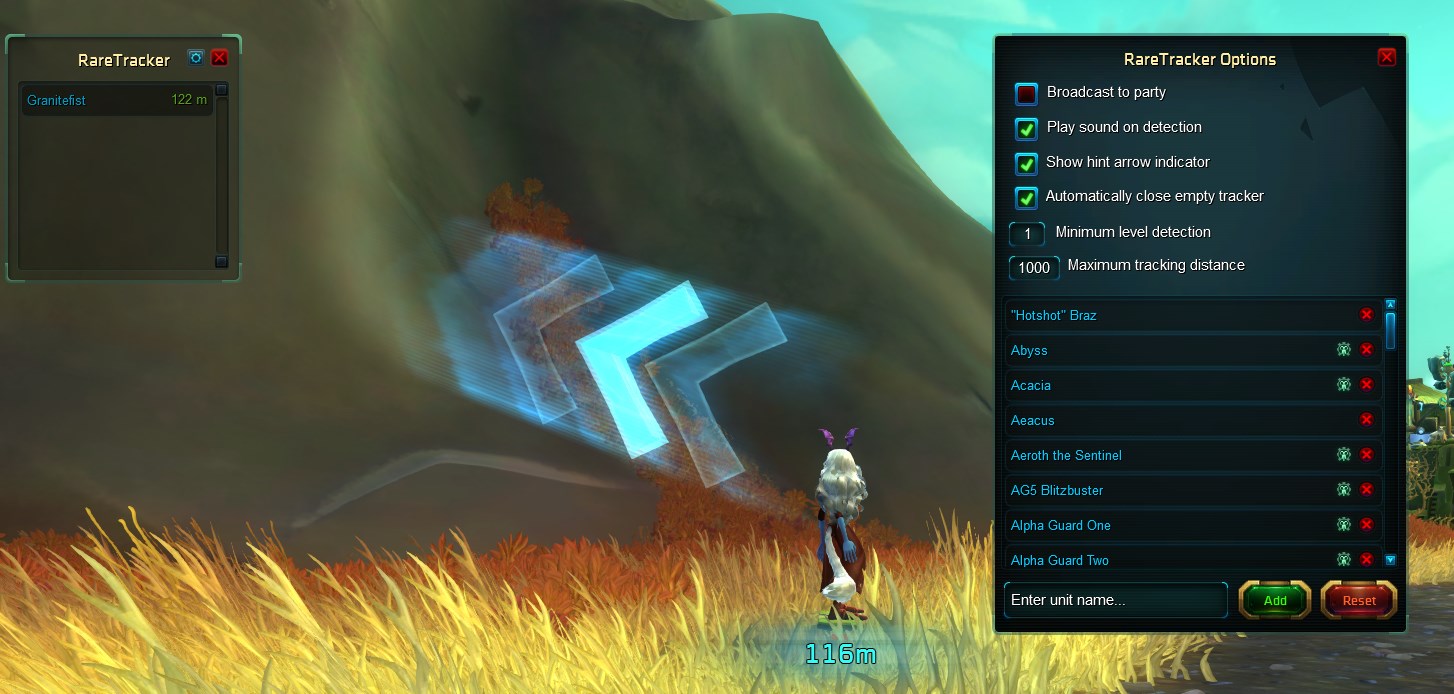
The name says it all (ha, pun! Who noticed? Na? Naaa?). This small addon informs you whenever a rare enemy, a so-called “rarespawn”, is detected near you. Since these enemies usually appear only once per hour and possess unique loot, it is often worth killing them, even if the fight is a bit more challenging. As soon as such an enemy is scanned by the addon, you will hear a warning sound, and a list will appear with all the rare enemies in the vicinity – clicking on the enemy’s name even shows you an arrow that leads you directly to it, as if it were a quest target.
Optionally, a chat message can also be sent directly to the entire group, so everyone knows right away. Alternatively, you can also add regular monsters to the list if you are hoping for a certain drop and always want to see the shortest path to the next enemy. Conveniently, if no enemy from the list is nearby, the addon becomes virtually invisible and does not take up space in your interface.
To the download page of RareTracker [intense_icon type=”download” size=”2″ color=”#FFFFF” /]
2. The Visitor
Countless players do really cool things with their properties in WildStar – from gigantic jumping puzzles to shady taverns to the largest plush toy collection, almost every idea can be realized in WildStar. Many players now set their properties to public and advertise them in the zone chat, inviting people to come by and take a look. But… you definitely do not want these players on your neighborhood list – you don’t know them that well.
The addon “Visitor” can be opened in the game with /visit (you have to be on a property, e.g., your own) and allows you to specifically search for public properties. In doing so, you can either view a complete list of all publicly accessible houses or specifically search by a player’s name for a quick visit. You can save particularly nice properties in a favorites list and quickly access them from there.
To the download page of The Visitor [intense_icon type=”download” size=”2″ color=”#FFFFF” /]
3. JunkIt
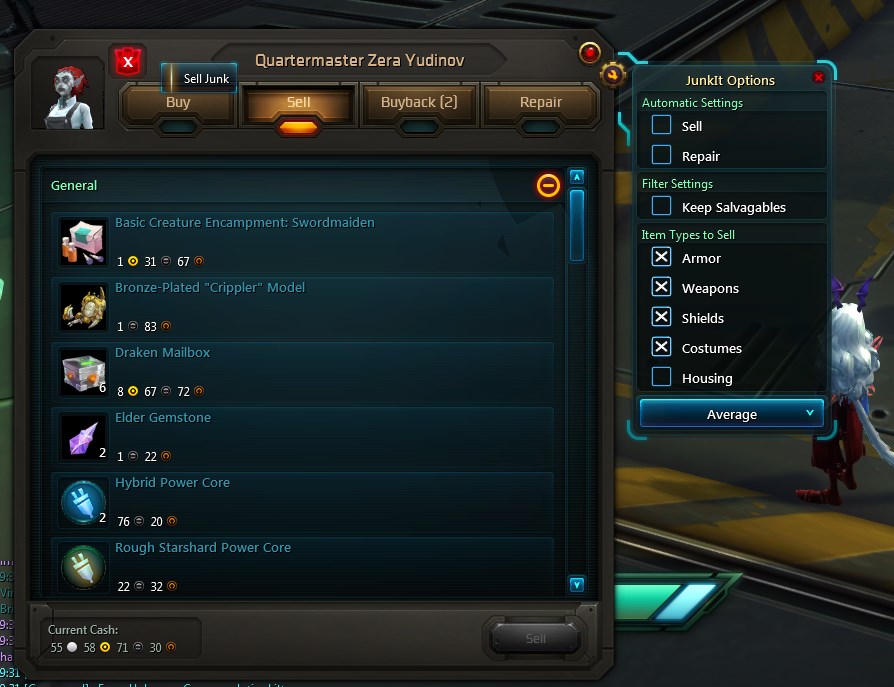
For time-savers and all fans of organized inventories, “JunkIt” is recommended. This addon adds an additional button to every vendor NPC, which allows you to sell all gray items with just one click. This completely eliminates the time-consuming processing of the inventory list. In the options, you can also set what items should be sold directly and what quality level they should have. For example, all “green armor pieces” that are not currently equipped can be sold automatically.
A nice addition: You can set whether simply clicking on a vendor should sell all junk and whether repairs should be done automatically.
To the download page of JunkIT [intense_icon type=”download” size=”2″ color=”#FFFFF” /]
4. BijiPlates

For most players, this addon has become an absolute must, although it has relatively high resource requirements and can negatively affect your frame rate. BijiPlates replaces the name display of all creatures, as well as the associated health and shield display, and separates them from each other. But this true allrounder can do much more: You can set at what distance the name displays should be shown and whether you want to see them through objects (walls, trees, etc.). Especially useful is the enhanced spell display of friends and foes, it is now much easier to recognize what someone is doing and if you should interrupt it quickly.
It is also helpful to receive a warning when the tank has just lost aggro and the boss is looking at you. Especially for aspiring raiders, this addon is worth more than just a quick glance, and it has proven to be an irreplaceable companion in PvP as well.
To the download page of BijiPlates [intense_icon type=”download” size=”2″ color=”#FFFFF” /]
5. AMP Finder
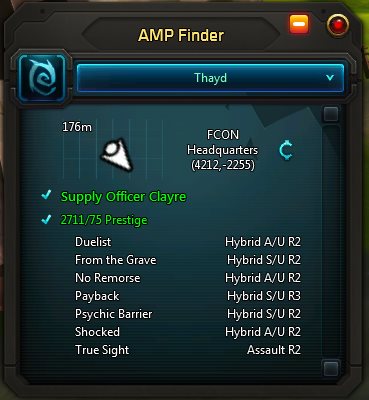
>Especially for new players, it can be confusing that the talent points of WildStar, known as “VIPs” (in English “AMPs”), must first be found in the world before they can be used. About 40 AMPs can be unlocked per character, and only a fraction of them are really needed for your own build. To make the search for the corresponding objects easier, the addon with the prophetic name “AMP Finder” is worth it. It lists for each class where the worthwhile amplifiers can be found and even guides you to the corresponding vendors with the push of a button. This eliminates the need to scour online databases for information and saves a lot of nerves. Win-win!
To the download page of AMP Finder [intense_icon type=”download” size=”2″ color=”#FFFFF” /]
6. Killroy
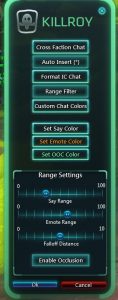
Lastly, I have a real gem for all role-players among you. Since at least after this sentence half of all people have stopped reading, I can get straight to the point: Killroy allows you to bypass the language barrier of Carbine and enables communication with the enemy faction via the /say channel – of course, only if the conversation partner also has this addon.
Moreover, you can set the distance at which conversations from the /say channel should be displayed, as the standard range is currently one hundred meters and can be shortened, which is especially helpful for role-players who would otherwise feel overwhelmed by a flood of chat. The addon also recognizes whether a character is behind a wall and therefore should not be hearable, and offers a number of other convenient features, such as easily coloring the most important role-play channels.
To the download page of Killroy [intense_icon type=”download” size=”2″ color=”#FFFFF” /]
I hope you enjoyed this little selection. Please always remember that you need to update your addons regularly (i.e., after every patch) so that they continue to work. Since all addons are programmed by players, it can sometimes take a few days for an updated version to be available, but this can always be checked in the Curse Client.
What addons do you use and what features do you think are still missing in WildStar? Let me know in the comments!

Your opinion is important to us!
Do you like the article? Then let us know!