


The new game Wild Hearts by EA suffers from performance issues. However, with a simple trick, you can significantly improve your frame rate.
Many people currently playing Wild Hearts on PC are experiencing significant problems with stable performance. Whether it’s AMD or Nvidia, low-end or high-end PC: Many players are affected and frustrated by these issues.
The developers have already announced that a bug fix will be available next week (starting February 20, 2023). However, users have now presented a trick that is said to actually help and is quite simple.
The weak performance is particularly frustrating because the game is said to be really good otherwise, according to well-known experts:

Performance trick for Wild Hearts should work with both AMD and Nvidia
How does the trick work?
- You go to the settings of Wild Hearts and select the “Sound” tab in the settings.
- Here, you then select the output settings.
- Now, you change the output from “Stereo” to “7.1 /5.1”. Stereo is enabled by default.
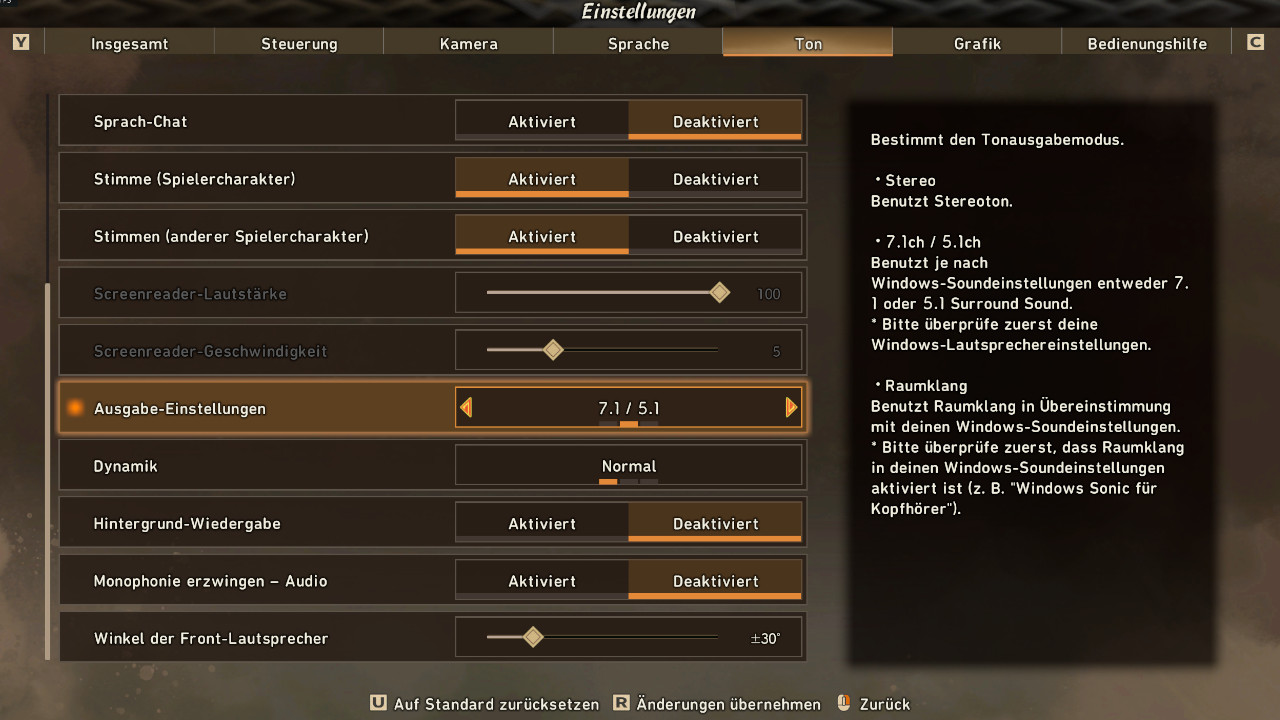
Many users explain on Steam that the trick really helps them. While the frame rate in the game initially dropped regularly below 20 frames per second, many can now play with significantly more than 60 FPS. For example, one user writes:
I played at 1080p with low settings, with an [RTX] 3070ti and there were all kinds of stuttering. After the change in sound, I can run the game on 1440p with medium settings without any problems.
This applies to both systems with AMD and Nvidia graphics cards. Therefore, if you are currently playing Wild Hearts and also have performance problems, be sure to test this tip. If the tip doesn’t work, the change can easily be reverted.
If you are looking for more tips for the new monster game by EA, then check here. Here, MeinMMO editor Benedict Grothaus presents a handful of tips that will make your start in Wild Hearts easier:
I played 14 hours of Wild Hearts – 7 tips I wish I had known beforehand

Your opinion is important to us!
Do you like the article? Then let us know!