

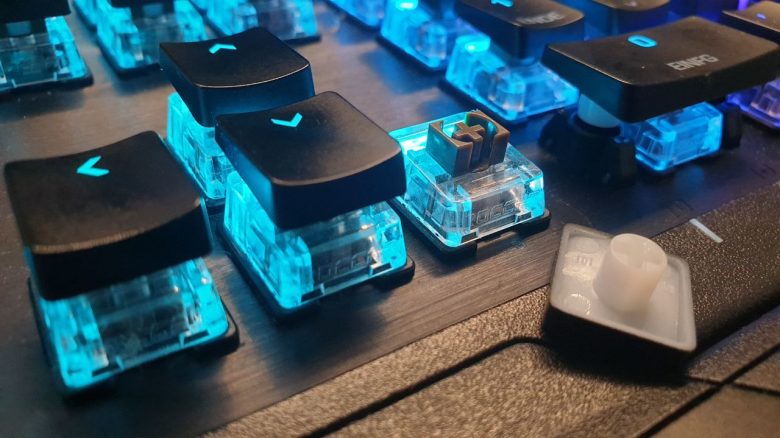
Mechanical keyboards have switches installed. But which switches should I choose when I want to buy a new keyboard? MeinMMO presents the most important switches and explains the differences.
If you want to buy a mechanical keyboard for your computer, you need to decide on key switches. These are installed under the keys and ensure that your inputs are registered by the computer.
Which switches are the best? There is no simple answer. It depends on you and what you want to do with your future keyboard. Depending on whether you are just gaming, working a lot, or need the keyboard for various purposes, different switches are recommended.
Therefore, we will explain which key switches exist and what you need to consider when buying a keyboard.
Switches: Types and Differences
What are key switches? Switches are located under the keycaps of your keyboard. A mechanical switch consists of a base, a spring, and a stem. The stem ultimately determines what type of switches you have in your keyboard.
What types of switches are there? The three most well-known switch types are linear, tactile, and “Clicky” switches. These types have different properties and are suitable for specific tasks.
In addition, there are also silver, black, and green switches, which we want to mention for completeness.
Why are there different switches? The switches differ in various properties. Each switch has a different actuation point. The actuation point describes how far you need to press the key until the switch activates. The total distance is referred to as the total travel. It also requires different amounts of force when you press a key. The required force is measured in centinewtons (cN). The less force you need, the faster you can press the keys.
Different types reflect different needs. Some people want to have particularly fast keyboards but hate the loud clicking of keys. Others, however, want the “click” because it makes them feel more precise.
Linear Switches (red)
Red switches are linear switches. This means you do not feel or hear the switch when you press the keys. There is no resistance when you want to press the keys, so you don’t notice when you have pressed the key.
For whom are the switches recommended? Linear switches are mainly aimed at gamers who focus on high speed in their key presses. The required force is lowest at 45 cN.
| Actuation Force | 45 cN |
| Travel Distance | 2.0 mm |
| Total Travel | 4.0 mm |
Clicky Switches (blue)
Blue switches are known as “Clicky” switches. They get their name from the sound, the “click,” that the switches make with each activation. You get clear audible and tactile feedback when you press the keys. Blue switches require more force than the linear type.
For whom are the switches recommended? Blue switches offer you tactile and audible precision. The clicking sound while typing is also very satisfying. Keyboards with “Clicky” switches are mainly aimed at heavy typists but are also suitable for gamers.
| Actuation Force | 60 cN |
| Travel Distance | 2.2 mm |
| Total Travel | 4.0 mm |
Tactile Switches (brown)
Brown switches are a compromise between red and blue switches. They are quieter than blue switches but offer a clear actuation point. You feel a slight resistance indicating that the key has been successfully pressed.
Brown switches thus try to combine the advantages of both types by forgoing the “click” of the switches while retaining the clear pressure point. The force required lies between the red and blue switches, and the travel distance is similar to that of the red types.
For whom are the switches recommended? Brown switches represent the best compromise if you want to write and play with your keyboard. The tactile feedback remains, while the noise is reduced. This is especially helpful when you sit in an office and don’t want to disturb your colleagues or when you play with a sensitive microphone.
| Actuation Force | 55 cN |
| Travel Distance | 2.0 mm |
| Total Travel | 4.0 mm |
Silent Switches
Silent switches make no noise when pressed. Silent switches are now available from various switch types. The most well-known German manufacturer Cherry offers both red and black switches in silent models.
For whom are the switches recommended? Silent switches are simply quieter than standard switches. However, you usually pay more for the silent models.
Can I hear them somewhere? If you want to hear the differences between the switches, you can do so directly at Cherry. At the manufacturer Cherry you can listen to all the switches with their sounds. This also helps you if you want to decide on a switch type but are unsure about the volume of the keys.
More news about keyboards: Besides switches, some manufacturers also rely on membrane technology. This is a rubber plate that sits on the circuit board and transmits your commands. The most popular gaming keyboard with such membrane technology has been tested for you on MeinMMO:I tested the most popular gaming bestseller on Amazon – Here’s how good the mouse and keyboard are for 30 euros

Your opinion is important to us!
Do you like the article? Then let us know!