


You want to buy a gaming keyboard but don’t know what to look for? MeinMMO explains all the special features of keyboards and tells you what to pay attention to.
Next to the mouse, the keyboard is one of the most important tools you need in your daily computer use. However, there are now a whole bunch of options available when you want to buy a keyboard.
MeinMMO explains what to consider when choosing and buying a gaming keyboard. We’ll cover the basic points without going into extreme detail.
- Switches and technology under the keys
- Material of the keycaps
- Lighting of the keyboard
- Form Factor
- Keyboard Layout
- Additional Features
- Wired vs. Wireless
- Budget
Switches and technology under the keys
Basically, you need to decide before buying what kind of technology you want under the keys. Because this ultimately determines the feel, responsiveness, and volume of the keyboard.
Mechanical switches: The best-known switches under the keys. Depending on your needs, there are now very different types available. In total, there are three important types you should know:
- Linear, fast switches without resistance (red).
- Tactile switches, where you feel and hear resistance with each press (blue).
- Mix switches that aim to combine the best of both worlds (brown).
In addition, there are many proprietary products from various manufacturers. Razer, for example, with its “Green Switches” or Akko with its Cream Yellow Switches, which feel linear. It should be noted that there can be subtle differences depending on the manufacturer. The feel, linear without resistance and tactile with resistance, remains the same with slight variations. Most proprietary products are based on the three known types.
Membrane switches/Rubber dome: This technology relies on a rubber membrane in the keyboard on which the keys sit. When the membrane is pressed together, the electrical contact that registers the key press is transmitted to the computer.
Some manufacturers are now trying to combine the rubber dome technology with the precision of mechanical switches. Membrane technology is very inexpensive and is considered less precise than mechanical.
Scissor switches: This technology uses a scissor mechanism under each key to allow for smooth, short travel. They feature a flat keycap arrangement and are very thin. Scissor switches are often used in laptop keyboards.
Low-profile switches: Low-profile switches are characterized by a low height. Both the switches and keycaps are noticeably lower than those of normal keyboards, allowing the keyboards to be made very flat. Keyboards with low-profile switches are generally more ergonomic than keyboards with high keycaps.

Optical switches: Detect key presses using an infrared light beam that is interrupted when a key is pressed. They offer extremely fast response times comparable to those of mechanical switches. Optical switches also have the advantage of no mechanical friction inside the key. This makes the switches more durable than typical mechanical ones.
Magnetic switches: Currently the fastest switches on the market, but relatively expensive. Magnetic switches support modern functions such as Dynamic Keystroke (DKS) and Rapid Trigger (RT).
Hotswap: Hotswap is not a type of switch, but a design feature of the keyboard. If a keyboard is hotswap-capable, you can swap out the installed switches for other switches: either when switches are broken or because you want different switches on your keyboard.
If a keyboard is not hotswap-capable, the switches are usually soldered to the keyboard’s circuit board and are not replaceable.
Material of the keycaps
ABS: The acronym ABS stands for Acrylonitrile Butadiene Styrene. You will find ABS keycaps mainly in inexpensive keyboards, but also in expensive models. Even manufacturers like Logitech or Razer have long used cheap ABS keycaps in high-end keyboards. ABS keycaps have the disadvantage of quickly looking smudged and dirty. This makes new keyboards appear dirty and grimy after just a few days.
PBT: PBT is the acronym for Polybutylene Terephthalate. PBT keycaps are of higher quality than ABS. In addition, PBT keycaps have a rough surface that does not become smooth or shiny with use.
In the German-speaking world, however, there is only a very limited selection of PBT keycaps. Some third-party manufacturers have specialized in offering PBT keycaps for German keyboards.
Double-Shot and Dye-Sublimation: These are not keycap materials, but rather the methods by which keycaps are printed:
- Double-shot keycaps consist of two layers, one for the labeling and the other for the rest of the keycap – hence the “double” in the name.
- Dye-sublimation is a printing process in which the labeling is transferred to the PBT material with the help of dye, heat, and pressure.
Lighting of the keyboard
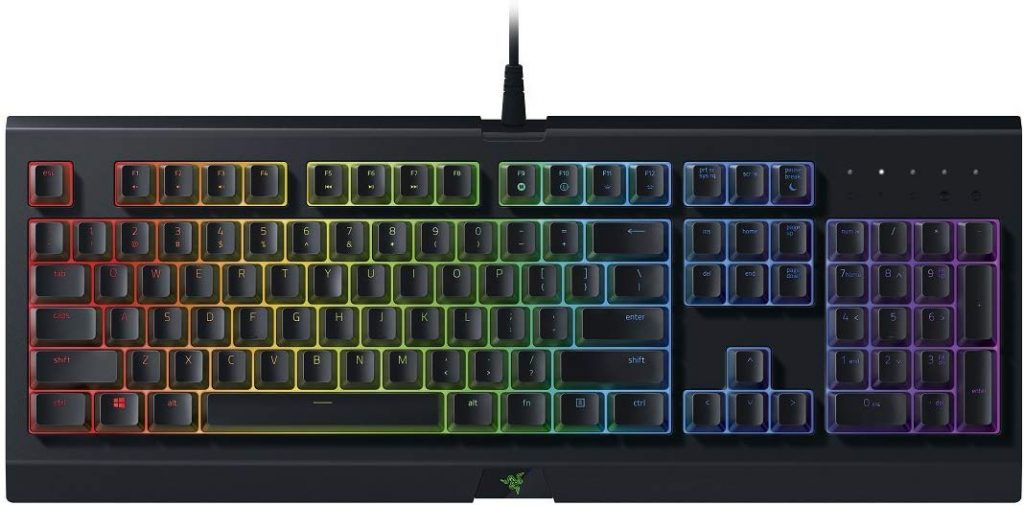
Gaming keyboards focus on lighting the keys or the keyboard in general. Nevertheless, there are a few subtle differences you should pay attention to:
- Pure backlighting: The keyboard lights up, but the keys and their labeling do not.
- Single color: The keys light up in a single color. You will mainly find this type in very inexpensive products.
- Zone RGB: Each key can be illuminated in practically any color using RGB LEDs under each key.
- RGB for each key: The RGB backlighting goes a step further, allowing each individual key to be illuminated in its own color.
Essentially, you should pay attention to what kind of lighting you prefer before buying. Pure backlighting may look stylish, but in the dark, you won’t be able to read the labeling anymore. Usually, you can also change the type of lighting in the software, if the keyboard allows it.
In some cases, you can buy translucent keycaps, then pure backlighting will also become an RGB keyboard.
Form Factor
One of the most important decisions you need to make when buying a keyboard is the form factor because this cannot be changed later. Unless you buy a new keyboard. While with some keyboards – thanks to hotswap technology – you can change the switches, you are committed to the keyboard’s form factor.
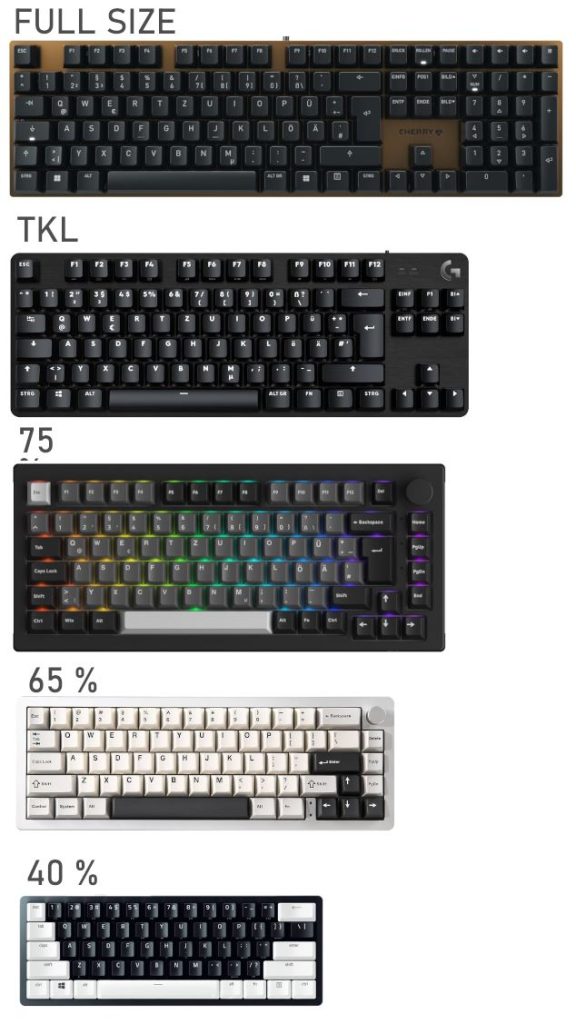
1800 Layout: Keyboards with 1800 layout are particularly large and offer more keys than the conventional full-size format. However, such keyboards are relatively rare.
Full-Size: The official full format of keyboards. Here you get a complete keyboard with a number pad and numerous extra keys. Typically, a full-size format consists of 104 keys.
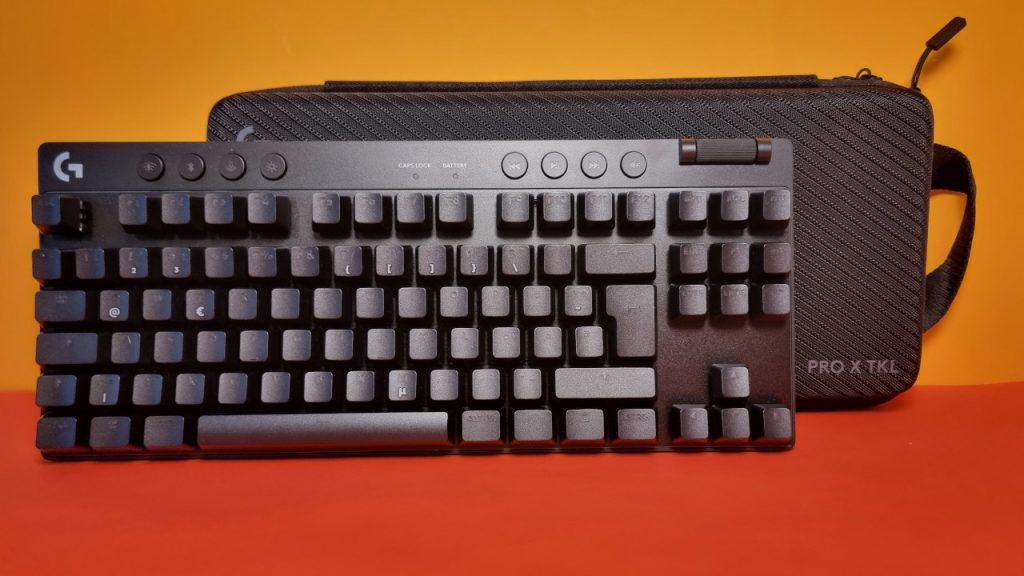
Tenkeyless (TKL): Tenkeyless is smaller compared to full-size, as it lacks the number pad on the right side. Typically, TKL consists of 87 keys.
75%: Keyboards of this type are somewhat reminiscent of TKL keyboards, but there can be a few fewer keys. Usually, you have between 83 and 87 keys. There is no number pad here either.
Mini (60%): 60% keyboards are even more compact than TKL and 75%. This design usually omits the function keys (F keys) and often also the arrow keys. In some cases, the arrow keys are available, but then other keys may be missing. On a 60%-keyboard, you will find 62 keys.
40%: The currently smallest layout also omits the number keys at the top of the keyboard, the space bar is often significantly shortened, and arrow keys are also missing. The 40% format is rather rare.
Keyboard Layout
When buying a keyboard, you need to pay attention to which layout you are getting. Because the layout determines the arrangement of keys on the keyboard:
- ISO: A keyboard layout that occurs almost everywhere with variations in Europe. The British, the Swedes, and also the Germans use the ISO layout.
- ANSI: The international or American key layout. Typically, the Enter key is noticeably shorter, and some keys (like the Shift key) are arranged differently.
Basically, you can also use a keyboard with ANSI layout in Germany, but it takes some getting used to. PBT keycaps are significantly more available for the ANSI layout than for the German ISO-DE layout.
Some manufacturers, including Razer, also offer German keycaps for the ANSI layout.
Additional Features
Macros: Some manufacturers offer extensive options for assigning functions or other features to keys. This sometimes goes as far as Valve banning a keyboard feature in Counterstrike.
Wrist rest: Depending on the height and size of the keyboard, a wrist rest can be worthwhile. Ideally, one is already included with your keyboard. Otherwise, you can buy wrist rests separately for a small price. However, when purchasing, pay attention to getting the right size for your keyboard.
USB passthrough: You can connect USB devices to your keyboard, and the signals are then forwarded to your PC through your keyboard. Your keyboard then functions somewhat like a USB hub.
Media keys: They are usually practical if you want to control certain things directly via the keyboard instead of through the Windows menus. They are not mandatory for a purchase but are often very practical.
Wired vs Wireless
Wired: If you use a wired keyboard, you don’t have to worry about battery life. Wired keyboards are also cheaper than wireless models. However, the downside is that you need to manage the cable of your keyboard. Some keyboards offer an option to detach the cable for transport.
Wireless: With a wireless keyboard, you are more flexible than with a wired keyboard. Additionally, your desk looks much neater without cables. Wireless models are generally more expensive than wired variants, and you are dependent on battery life.
Latency is almost no longer an issue with wireless keyboards, especially with manufacturers like Razer (Hyperspeed) or Logitech (Lightspeed).
Budget
An important factor when buying a keyboard is the budget: you need to be clear about how much you want to spend on your new gaming keyboard. Depending on your budget, you will get different technology or features:
Under 50 Euro: For little money, you normally get membrane keyboards and very cheap mechanical keyboards. Especially in terms of build quality and software, you will have to make compromises here.
Up to 100 Euro: 100 Euros is for many gamers the sweet spot for how much they want to spend on hardware. For around 100 Euros, you can already get decent keyboards with plenty of features. Even in the 100 Euro range, you already get PBT keycaps and hotswap technology. Depending on the manufacturer, however, you may have to make compromises regarding build quality and/or software.
Up to 200 Euro: Between 100 and 200 Euros, you will mainly find keyboards that use optical or magnetic switches. Additionally, wireless keyboards usually cost more than 100 Euros.
More than 200 Euro: In general, you get the same hardware as under 200 Euros, but you often get additional features: built-in OLED displays, extra keys or software features, a lot of accessories, and high-quality workmanship (like an aluminum keyboard frame).
How much should one spend on a gaming keyboard? For a good gaming keyboard, you should budget between 100 and 150 Euros. For this budget, you already get decent build quality and key switches that can impress. If you want to spend more, often you get only a better build quality and a few additional features, which may not be strictly necessary.

More about keyboards: One manufacturer sells a gaming keyboard for the equivalent of 750 euros. But what do you get for that much money? After all, with that money, you can also get a PS5 with games or a small gaming PC: There is a mechanical keyboard for 750 euros – Why is it so expensive?

Your opinion is important to us!
Do you like the article? Then let us know!