

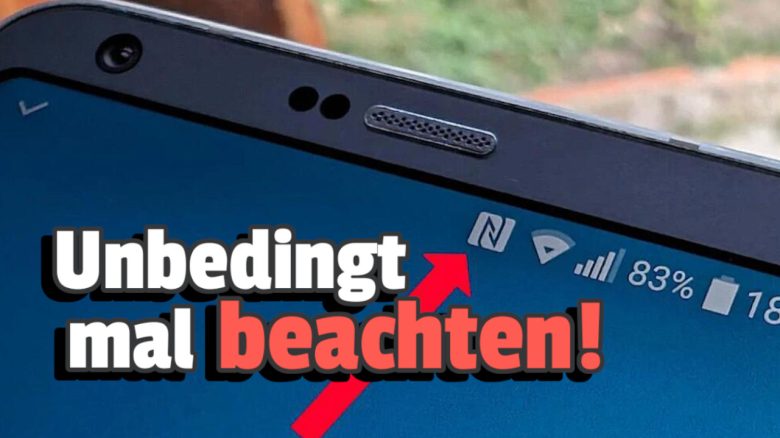
In the status bar of your mobile phone, several symbols inform you about various things. The N
stands for an exciting technology that is worth using.
What does the N
stand for? Modern mobile phones are packed with interesting technology, some of which we are very familiar with, while others are rather unknown. The N
belongs to the latter, but it represents a useful chip inside: NFC, or Near Field Communication in full.
We explain why you should engage with this technology, as your mobile phone will most likely support it.
Short range, extensive possibilities
What is Near Field Communication (NFC)? In German, it is called Nahfeldkommunikation and already tells half the story. This tiny chip in your phone can exchange data with other chips over just a few centimeters. Have you ever seen someone pay at a supermarket checkout with their smartphone? That’s where NFC comes into play.
How can I activate NFC? On iOS, you never have to manually enable it, as it is already switched on by default and cannot be turned off. There is also no NFC symbol in the status bar here.
To check the status on Android, either go to the connections under settings or look for the option labeled NFC
in the quick menu.
Do I always see the NFC symbol? When the N symbol appears varies depending on your phone’s provider. Some models have it always active once NFC is turned on in the menu. On others, you may need to pull down the status bar to see it, including the current Galaxy phones. Some, like Google’s Pixel phones, always hide it, whether in standby or actively exchanging data.

Does NFC consume a lot of battery? No, the energy consumption of an actively communicating NFC chip or one in standby is very low. Those who turn it off to save power will be disappointed.
What is NFC used for?
- Contactless payment: The most common case, as described above.
- Data exchange between phones: When permitted, two phones can exchange data.
- Alternative to QR codes: Similar to QR codes, further information or websites can be accessed by holding up the phone. This is where
NFC tags
come into play. - You can also set up these tags yourself and use them at home to control smart home devices or to create and read digital indexes for storage boxes. The versatility of the technology is immense and ideal for anyone who enjoys experimenting with technology.
Abuse of or danger from NFC?
Should I turn off NFC if I’m not using it? If you are absolutely certain you never want to use it, feel free to switch it off.
Otherwise, three factors help secure NFC:
- Short range: You need to hold your device really close to tags or other chips to establish a connection.
- Encryption of every transmission
- Transactions must always be confirmed by you
officialtag.

If after this excursion into the status bar of your phone you’d like to know more about the symbols located there, we can recommend the following story on MeinMMO: Here we explain in detail what the various arrow-like signs mean and what you need to be aware of.

Your opinion is important to us!
Do you like the article? Then let us know!