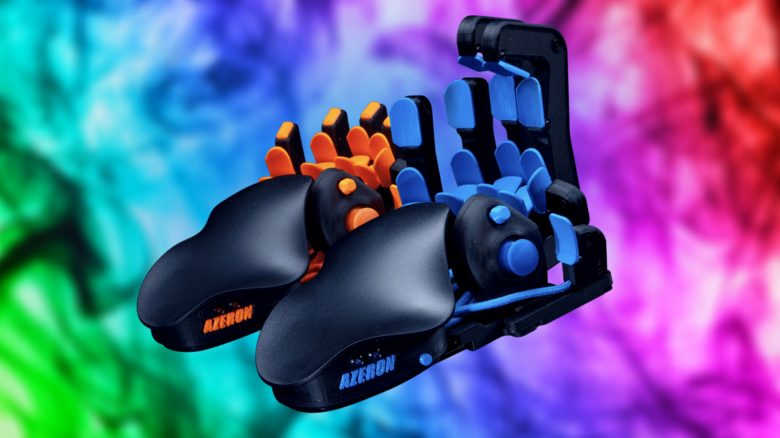
The Azeron Gaming Keypad is a new gamepad for the PC that aims to free you from a keyboard. MeinMMO presents to you the crazy hand controller and shows why it could work.
What kind of device is this? The Azeron Gaming Keypad is a gaming controller in hand form, where you can rest your hand. This way, your fingers rest between several buttons that you then operate with small movements. A short trailer of the gamepad on YouTube illustrates how it looks in use:
How is it supposed to work? The trailer is meant to show that it is possible to perform fast and demanding movements – even in a competitive PvP environment like in Fortnite. There are two different models: Classic and Compact. The Classic variant offers you the following buttons and functions for your gaming sessions:
- A programmable analog stick on the side
- 26 programmable buttons
- Customizable ergonomics
- 5-way directional switch
The analog stick can be used as a WASD replacement if desired. The placements of the buttons on your fingers can be extensively adjusted, as can the functions when pressed. You can assign these to keyboard keys, but also to controller functions or macros, and even use them as mouse buttons. In addition, you can quickly switch between two mapping profiles, effectively doubling the number of assignable buttons.
The manufacturers also state that no software is needed to get the gamepad running – the button profiles are stored on the device. However, with software, you can set up more than 2 button profiles.
Another presentation video of the controller shows the functions on the device in detail:
How much does it cost? On the Azeron homepage, you can get the pad for 150 euros. Both the Classic and Compact variants cost the same. However, Compact is slightly smaller and has a few fewer buttons. The gamepad is available in 18 different colors, and the delivery time is between 1 – 3 months.
Why could it be a better gaming keyboard? So far, no real performance comparisons to gaming keyboards can be found for this device. However, there are already a few hardware testers who have dared to try the futuristic-looking device, such as the YouTube channel Hardware Canucks. In an English YouTube video, the channel shows the keypad and rates it after some attempts as somewhere between “frustration and fascination.”
Getting used to the new input device is indeed a real challenge, but it is possible with some perseverance. Once accustomed, you will have a fully functional gaming keyboard programmed according to your preferences.
Compared to conventional gaming keyboards, the Azeron Gaming Keypad has two advantages:
- The device is very small
- The hand shape ensures excellent ergonomics
However, the steep learning curve of the input device may discourage many players who are not satisfied with their current keyboard solution. It is indeed a bit easier to grab one of the best gaming keyboards than to get to know a completely new input device.