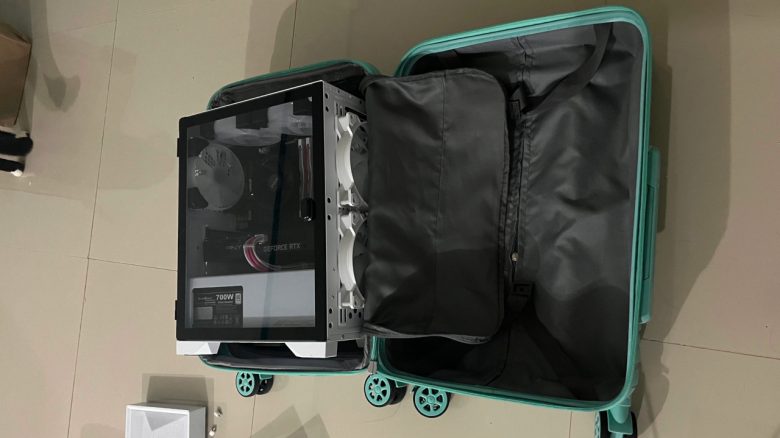
A gamer wants to transport his gaming PC in a suitcase and faces backlash. He still transports his computer in this way.
Anyone who wants to travel or is simply planning a move needs to consider the transport of their belongings. Especially sensitive devices like a gaming PC require a lot of care.
A gamer has found an unusual way to transport his computer. He packed his gaming PC into a rolling suitcase and transported it this way for 15 hours.
In the community, this idea was not taken lightly, so the user quickly deleted his first post. In his second post, he now explains that he has completed the journey and his PC still works.
Gaming PC survives the long journey
How did the journey turn out? He himself writes about it on reddit:
If anyone is interested, I was the OP who was hated in my previous deleted post with this photo attached. My PC is fine and works! I removed the GPU and took out the RAM, stuffed the inside with cloths, and wrapped it all in bubble wrap. I was on a 9-hour flight and then a 6-hour flight.
The reactions are very mixed. Some still find the idea incredibly crazy and believe that the hardware will get damaged in this way. And a graphics card for 1,500 euros is not something you would want to expose to damage so easily.
Another asks how he exactly traveled. Because he himself wanted to move with his computer, but the rolling suitcase seems to be the cheaper option compared to insured shipping (via reddit.com):
I don’t have the context from the original post because I never saw it, but did you take it as carry-on or just as regular luggage?
I’m asking mainly because I might be moving with my PC, but I was considering insured shipping, and that seems to be a much cheaper option.
Most people at least express their admiration that the user really went through with his travel plan and that the PC survived.
Basically, one should keep a few tips and hints in mind if one wants to take their gaming PC on a journey or move it.


Hardware should be well secured during transport
How should I protect my gaming PC? Ideally, you still have the old original packaging of your PC case with protective modules made of foam. Because here, your system fits perfectly inside and cannot move around inside.
In general, it is recommended to carefully fill sharp corners in the computer with newspaper. Some manufacturers recommend using an inflated garbage bag for larger gaps. Bubble wrap is also a good and safe option to protect individual components.
However, you should carefully fill paper, foil, and other packaging materials into your case. Because with force and pressure, there is a risk of damaging the components. Anti-static foil is also recommended for sensitive parts.
What can be done as an alternative for safety? For safety reasons, you can also disassemble individual components and transport them separately:
- You can remove the heavy graphics card, for example, and transport it in its own packaging (if available).
- RAM can also be easily removed before it bends during transport or damages the motherboard.
- Large or heavy coolers for your CPU can also be removed and transported separately.
Other people buy a new gaming PC and first have to deal with annoying problems. This recently happened to a user who just wanted to play with his gaming PC:
A user can only play with his new gaming PC after he found a nasty hidden error