

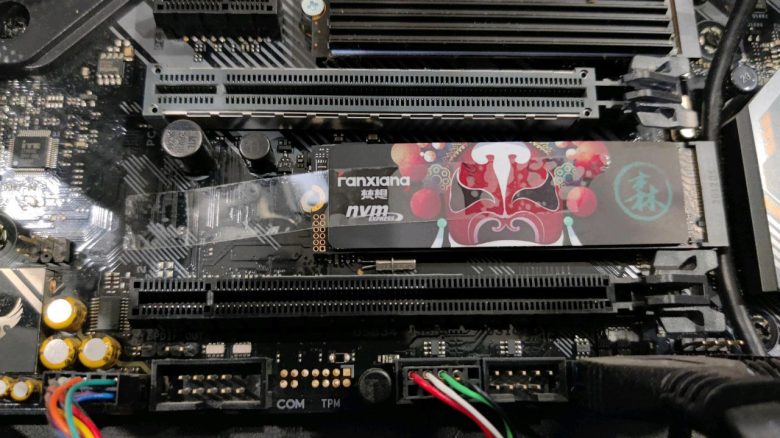
When installing his M.2 SSD, a user was missing a screw for mounting. Instead of buying a suitable screw, he preferred to use a piece of tape.
Installing an M.2 SSD in a gaming PC is usually not a big deal. You may need to remove the graphics card first if it blocks the SSD slot. Ideally, the M.2 SSD just needs to be inserted and secured with a screw.
If the designated screws are missing or not found, one should make the effort to procure suitable replacements. A user recently demonstrated on Reddit how not to secure an M.2 SSD without the right screw.
No screw is not a solution in the long run
What did the user do with the SSD? The Reddit user MagicZhang received a picture from a friend showing his SSD. The photo shows how the M.2 SSD is mounted on the motherboard with a piece of tape. The friend asked him if his mounting method was okay.
An M.2 SSD is significantly smaller than conventional models in the SATA form factor. At the same time, it is faster in data processing than its larger predecessors that are connected via SATA interfaces. Almost every current motherboard has M.2 slots.
In the comments under the Reddit post, it quickly becomes clear what the community thinks of this solution. Many users have no understanding for this mounting method and accuse the SSD owner of a certain laziness. They fear follow-up problems due to the omission of a screw.
Are screws really so expensive today or has laziness reached a point where people feel it’s okay to solve problems half-heartedly with solutions that could later actually cause bigger problems?
kailedude on Reddit
What problems could arise? In the simplest case, the tape could simply come loose from the motherboard, and the M.2 SSD would only be held by the slot on the motherboard. If the storage medium is still fully seated in the M.2 slot, it could continue to function unnoticed.
As M.2 SSDs can reach temperatures of 60 to 70 degrees during operation under high load due to their design (via easeus.de), the tape can dry out and deform. Sooner or later, the SSD will no longer be held securely and may at least partially lose contact with the slot.
As a result, system crashes threaten if the storage medium is used as a Windows drive. In the worst case, important data will be lost if no backup is available. If the M.2 SSD unfortunately falls out of the slot, it could damage this or nearby hardware.



How to prevent follow-up problems? The simplest solution is to purchase suitable screws for the M.2 slot on the motherboard. Normally, these screws come with the motherboard or are already attached to the motherboard accordingly.
Screws that are larger than the existing thread should definitely not be used. If you want to remove the oversized screw later, it could damage the motherboard. Using the wrong screw also poses a risk of a crack in the SSD board.
Some manufacturers now offer motherboards that use a plastic clip instead of a screw for mounting. Depending on the motherboard manufacturer, this clip may need to be manually positioned correctly by the user when installing the SSD or it may self-lock during the process.
If you are unsure about either method, ask someone who is knowledgeable about it or check if the motherboard manufacturer has corresponding video tutorials available. As an example, you can find here two videos from MSI for mounting with a screw or a plastic clip.
With an M.2 SSD, it is tempting to mount it incorrectly when the suitable screws are not available. We have explained why you should not do this. For SATA-format SSDs, the conditions for installation in a gaming PC are different. But there are also users who are too lazy to do it the right way: Builders are shocked: User is too lazy to unpack his new SSD, just hangs it in his gaming PC

Your opinion is important to us!
Do you like the article? Then let us know!