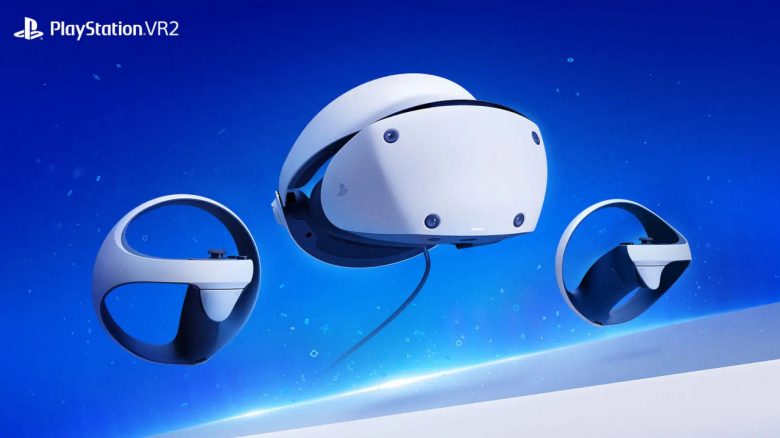
PSVR2 is officially available only for the PS5. But can Sony’s hardware also be used on a gaming PC?
What is PSVR2? PlayStation VR 2, or PSVR2 for short, is the successor to the “Virtual Reality” headset PSVR, which was released for the PS4. The successor is a massive upgrade compared to the original, capable of utilizing the performance of the PS5.
- Technical details of PSVR 2 at a glance
- Everything about the official PC support of PSVR 2
- PSVR 2: Minimum requirements for PC
- PSVR 2: All features you can use on PC and which are missing
Last updates: June 10, 2024, January 8, 2024
Technical details of PSVR2 at a glance:
| Display technology | OLED |
| Panel resolution | 2000×2040 per eye |
| Refresh rate | 90 Hz or 120 Hz |
| Lens separation | Adjustable |
| Field of view | Approx. 110 degrees |
| Sensors | Motion sensor: Six-axis motion sensor system (3-axis gyroscope, 3-axis accelerometer) Connection sensor: IR proximity sensor |
| Cameras | 4 integrated cameras for headset and controller tracking; IR camera for gaze tracking per eye |
| Feedback | Vibration in the headset |
| Communication with PS5 | USB-C |
| Audio | Input: Integrated microphone Output: Stereo headphone jack |
Official PC support for PSVR2 starting August 2024
Will there be official support? Yes, Sony announced in an official blog post that PlayStation VR2 will officially receive support for PC.
When can PSVR2 be used on PC? Official support for PlayStation VR2 on PC will be available starting August 7, 2024. From that point on, you will be able to use your PSVR device for games on Steam.
What hardware do I need on PC? If you want to use PSVR 2 on your computer, you will need the so-called “PlayStation VR2” PC adapter. The adapter will cost €59.99 at launch and will be available directly from Sony or from other retailers.
The community had previously speculated that “due to Sony’s design decisions,” an additional device would be needed to get PSVR2 running on PC. This was reported back then by Videogameschronicle.
How can you use PSVR 2 on PC?
- Connect your PlayStation VR2 to the PC using the “PS VR2 PC” adapter and the DisplayPort 1.4 cable.
- Then download the “PlayStation VR2” app and the “SteamVR” app from Steam. Now you can set up and configure PS VR2 on your PC.
PSVR 2: Minimum requirements for PC
| Operating System | Windows 10 64-bit / Windows 11 64-bit |
| Processor | Intel Core i5-7600 / AMD Ryzen 3 3100 (Zen 2 or newer) |
| RAM | 8 GB or more |
| GPU | -NVIDIA GeForce GTX 1650 or newer -NVIDIA RTX series -AMD Radeon RX 5500XT or newer / AMD Radeon RX 6500XT or newer Sony recommends at least an NVIDIA GeForce RTX 3060 or AMD Radeon RX 6600XT |
| DisplayPort | DisplayPort 1.4 |
| Connectivity | Direct via USB or Bluetooth 4.0 or newer |
PSVR 2: All features you can use on PC and which are missing
PSVR 2: The following features are missing on PC:
- HDR
- Headset feedback
- Eye tracking
- Adaptive triggers
- Haptic feedback (except vibrations)
PSVR2: These functions are supported on PC:
- 4K visualization (2000×2040 per eye)
- 110-degree field of view
- Finger touch detection
- Transparency
- Foveated rendering (without eye tracking)
- 3D audio
What games can you play on PC? Sony emphasizes in its blog post that “PS VR2 games on PS5 are the most immersive experience,” but you are basically not limited in any way. With the PSVR2 headset, you can play all games from Steam or other platforms, as long as the headset or game is supported by the platform.

Is PSVR2 worth it for me? Are you considering buying the new VR system for your PS5? Then take a look at the following overview, where we explain the pros and cons of the new system and for whom it might ultimately be worthwhile: