


Lost Ark has been struggling with technical problems for weeks. However, since the last update, a new issue has caused much frustration among users and high temperatures in processors. Easy Anti-Cheat could be to blame for this. We at MeinMMO summarize.

What problems does Lost Ark have? For weeks now, fans of Lost Ark have been complaining about issues with the MMORPG. Currently, the game tends to frequently lose connection to the server or simply crash.
Frequent patches from the developers aim to counteract the problem, but the last patch caused even greater discontent. Suddenly, some players noticed that their processor gets too warm while playing Lost Ark without any apparent reason.
How does the error manifest? An inexperienced user might only recognize the problem by the fact that their PC is somewhat louder than usual or that Lost Ark occasionally freezes. However, when looking at the numbers, a curious issue is revealed.
After 10 to 30 minutes in the game, Lost Ark suddenly starts to max out one of the processor cores at 100%. This also leads to an increase in processor temperature, causing the fan to work hard to compensate.
The load on this core remains at 100% until the game is closed, and sometimes even after that. Some users report having to restart their PCs to regain control of the processor load.
You can find a guide directly on playlostark.com.
We asked Amazon for a statement on how the incident occurred and will update this article as soon as we receive a response.
Hopefully, the developers can fix this by the time Geralt arrives in Arkesia:
How to find out if you are affected
How frequently does the error occur? This is difficult to estimate. In the Lost Ark subreddit, there are several threads with over 300 upvotes discussing the issue. One of them currently even has 140 comments, many from users experiencing the same problems.
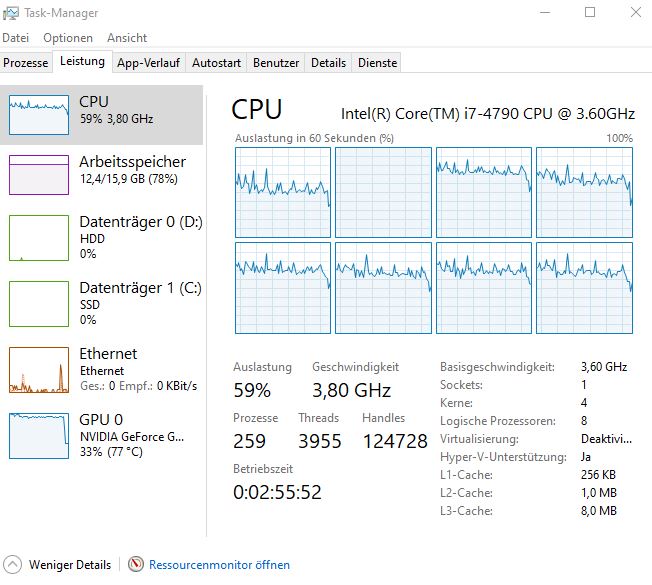
We at MeinMMO have tested it ourselves and were able to replicate the error on 2 out of 4 test systems. It didn’t matter which brand the processor was from. In our test, we had one system with a Ryzen 9 5900X and a slightly slower i7 4790. Both showed the same anomalies.
How can you find out if you are affected? First, you can keep an eye on your processor’s temperature. Some manufacturers offer built-in tools, but if you are somewhat lost, you can use external programs like CoreTemp.
Pay special attention to irregularities. Our test system with the Ryzen 9 5900X usually runs between 60 and 70 degrees in Lost Ark, and sometimes jumps to 80 to 83 degrees during loading screens.
However, once the error occurs, the system stays consistently at 85 degrees, completely independent of what we were executing in the game. This is a first indicator that something is wrong.
If you suspect a problem, you can confirm it through the Task Manager. Open it, select the “Performance” tab, and then right-click on the graph under “CPU”. Then select “Change Graph to” and set it to “Logical Processors”. Now you can see the load on your individual cores.
If one of them is continuously at 100%, then you are also experiencing the error and should keep an eye on temperatures and FPS.
Not dangerous, but simply annoying
What can overheating lead to? In the context of the problem currently occurring, it is not dangerous. You should not worry about your hardware as long as it stays within an acceptable temperature range. Minor spikes are accounted for by the manufacturers, and only overheating over an extended period would harm your hardware.
However, the problem is still annoying. Among other things, PCs can become very loud. Due to the extra heat, both test systems operated the cooling at 100%, even though that would not be necessary under normal gameplay without the error.
Some users also report experiencing fewer frames per second and other performance issues. This is because some processors reduce their performance to avoid overheating. Here, the error can be particularly irritating.
Furthermore, fans describe that lostark.exe continues to run after the game has been closed and keeps the processor at 100%, causing issues with other applications as well. Of our 4 test systems, this error only occurred on one. In this case, only a complete system restart helped, as lostark.exe could not be closed manually.
Can you do anything about it? Currently not. So far, there seems to be no fix for the problem that the community has found. Also, a remedy from the developers is not currently planned. In general, Amazon or Smilegate have not yet commented on the issues.
We have requested a statement from Amazon and will update this article accordingly as soon as we receive a response.
Lost Ark is demanding even without errors, as it simply looks good:
Easy Anti-Cheat is to blame – Problem also in other games
What is causing the problem? This has not yet been definitively clarified. However, most fans assume that it is a bug on the part of Easy Anti-Cheat. Some indications support this.
The issues have only started occurring since the last EAC update, which we can confirm on one test system; unfortunately, we have no previous data for comparison on the others. Many fans agree that the last update is to blame for the problems.
Furthermore, for some people, not only does lostark.exe remain open after closing, but also Easy Anti-Cheat continues to consume processor power. Lastly, not only fans of Lost Ark report this problem.
Similar issues are also reported in other games that use the same version of EAC. There are currently reports of the problem in The Division 2 (via reddit). Battlefield 2042 is also supposed to be affected, as MeinMMO author Dariusz Müller reports.
What are the fans saying? They are primarily angry. Many are already annoyed with Easy Anti-Cheat in Lost Ark, as the tool is also responsible for the connection drops that have plagued the MMORPG for weeks. The error message EAC Offline is likely causing high blood pressure for some.
Therefore, the mood has dropped again with the new error. We would like to let some fans from the most prominent post on this topic have their say (via reddit):
- TheAppledorian writes: “So that’s the reason why the game isn’t quitting for many right now. I wonder how many people are affected and don’t even know it.”
- Frogtoadrat says: “I have the same problem. One core is always at 100%, and the fans are really loud. I constantly have to wait 20 or 30 minutes after closing the game until EAC finally shuts down.”
- zoompooky writes: “This issue needs much more attention. Currently, I’m sorry to say, I must shelve Lost Ark for now. I can’t afford a broken CPU.”
- tikzfu says: “Whenever EAC starts, there is now a high chance that it will take your core hostage until you restart the PC. I hate every second of this; it’s a bad joke.”
Are you affected by the problem? Have you encountered it in another game, or are you annoyed by it in Lost Ark? Please feel free to share your thoughts in the comments here on MeinMMO.
Lost Ark takes servers offline for hours to take back items gifted to players

Your opinion is important to us!
Do you like the article? Then let us know!