

Tiny Tina’s Wonderlands is a fast-paced loot shooter fantasy fun. But in split-screen mode, there’s a difficulty that takes a lot of pace away from the game, finds MeinMMO author Max Handwerk.
Sizzling crossbow bolts, magical lightning storms, and grumpy skeletons making dumb jokes when shot to pieces – glorious. Tiny Tina’s Wonderlands didn’t take long to pull me fully into the fantasy madness.
The whole thing is, of course, garnished with the good old Borderlands formula of randomly generated, crazy weapons. Overall, if you’ve played the previous Borderlands games, you quickly feel at home in the Wonderlands.
This is the case for me – and for my girlfriend as well. For years, we’ve been playing the Borderlands games together in split-screen. It makes sense – after all, the Borderlands games are somewhat a dying breed. New split-screen story games on the PlayStation are rare.
Accordingly, we were excited about Tiny Tina’s Wonderlands.
What Tiny Tina’s Wonderlands does well in split-screen: Before I get to my problem with the split-screen mode, first a compliment. Basically, Tiny Tina’s Wonderlands does a lot right when it comes to playing together.
Before we started the game, there were a few worries: In 2019, we played Borderlands 3 on the PS4 also directly at release in split-screen. But that was a technical nightmare:
- For one, there was no vertical split mode at the start, only horizontal was possible.
- The text elements in the game were hard to read.
- And, the main problem: There were regular drops, stutters, and hiccups in the split-screen mode of Borderlands 3 on the PS4, which were only significantly reduced later through updates.
These problems Wonderlands does not have – at least on the PS5. The vertical mode is there from the start, and the game runs smoothly in performance mode – aside from a few annoying stutters caused by connection drops to Shift. Here, at least we have largely been spared.
Okay, the font size still pushes my glasses-wearing eyes to the limits. However, I can overlook that. The fun story, the fast-paced gameplay with the different classes, and the well-executed fantasy twist bring me so much joy that smaller problems (at least for now) don’t annoy me.
Unfortunately, there is also a nuisance that is actually extremely annoying.
What the hell have I collected here?
This is my problem: While the basic gameplay works flawlessly in split-screen when fighting or moving across the game board overworld, the game loses a lot of pace when going into the inventory.
Here, you only find a reduced view of the items you’re carrying. In comparison:
When I play alone on the screen, the inventory looks like this:
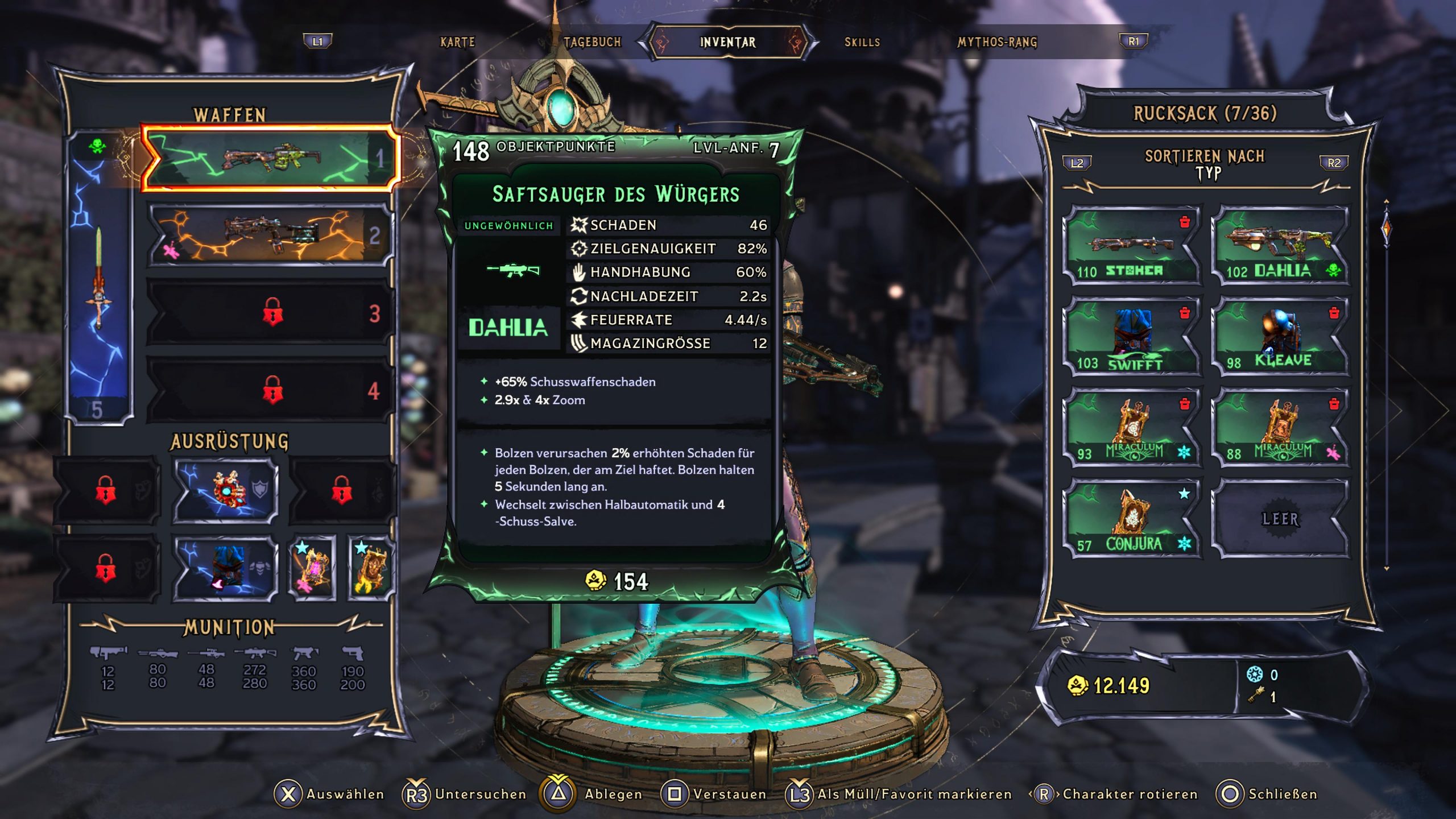
You can see the weapon, its values, effect descriptions, and even the gold value. That’s how it is known from the earlier Borderlands games.
In split-screen, however, the view is reduced. You only see a few numbers and symbols per item. Description texts, gold value, and similar details are omitted.
This is what it looks like:

The annoying thing is that the description texts, hints, and detailed values are actually essential for the loot shooter aspect of the Wonderlands. You collect a bazillion weapons, and you need an overview of what they can do in detail.
The detailed values and description texts are crucial for whether a weapon fits the current build and the chosen abilities. With the small view, you don’t really have a clue what you actually collected.
I am still uncertain whether this is a conscious decision to save space in the split-screen menu or a bug. I hope for the latter – so that it gets corrected as soon as possible. Because: In Borderlands 3, for example, you could easily view the “normal” view.
How to solve the problem in split-screen?
How do I know what I have? Admittedly, there is an “Inspect” option in the menu that can be applied to each individual item. It shows everything important and looks like this:
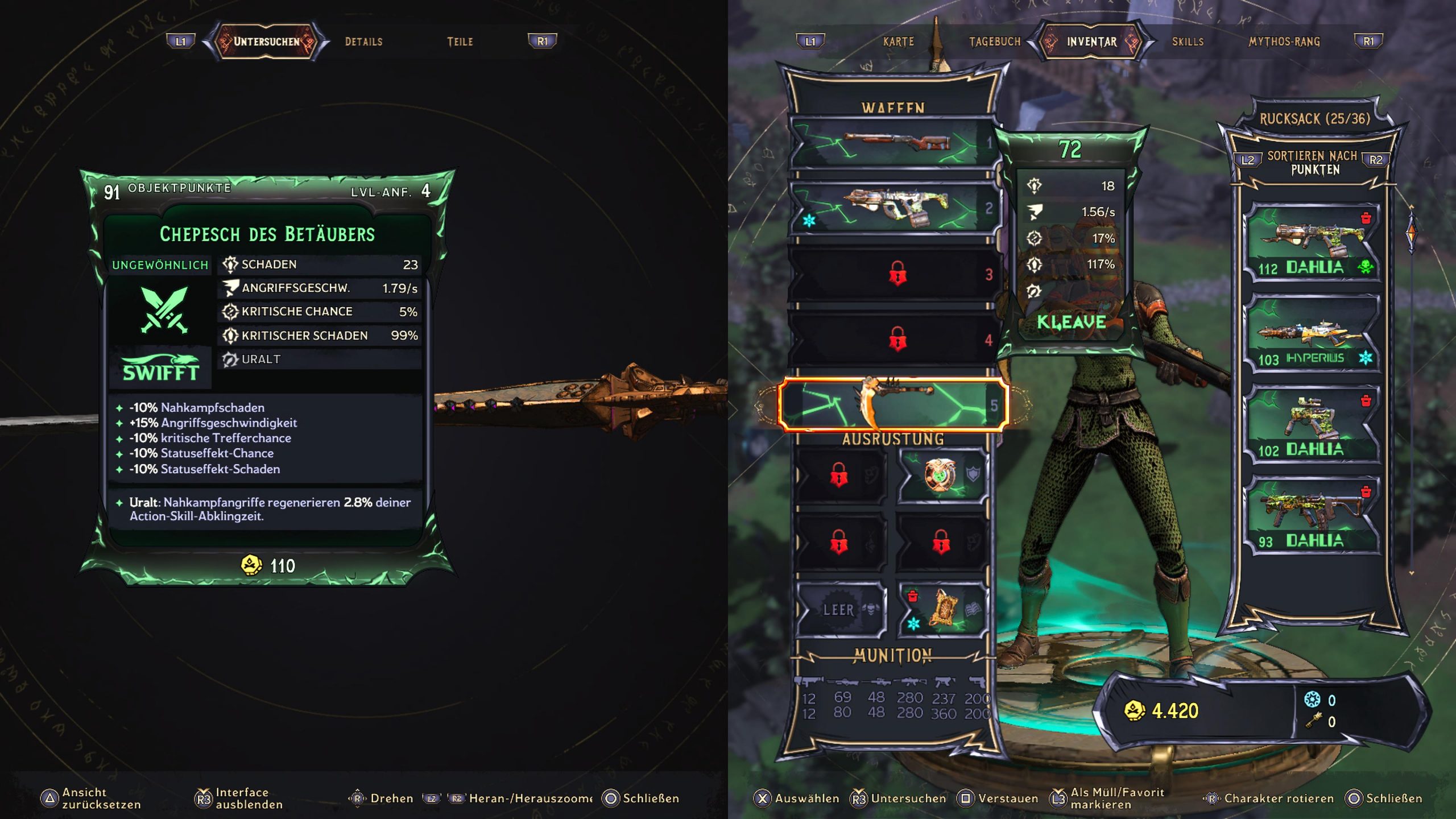
But all of this would not be a problem – if it weren’t for the strange loot overview.
What does the community say? Some players in the Wonderlands subreddit criticize the same problem and have partially contacted customer support (via reddit).
One user writes, for example, that he has already received a response stating that a 2K employee emphasized that the relevant teams have already been made aware of the issue.
Here, we must first wait and see if anything changes in the view.
What do you think? Are you playing in split-screen – and if so, how is it for you? Let us know in the comments!
Otherwise, you can find all information about Tiny Tina’s Wonderlands at release!
There will certainly be players for whom that option is enough. But there are also problems here:
- If you inspect an object and then go back to the inventory view, the cursor jumps back to the top of the list. Then you first have to search where you were in all that loot. And given a backpack full of weapons, spells, shields, and cosmetics, that’s not easy.
- You also cannot use the “compare” function in detail. So you can’t directly compare the new loot to your current loot if you want specific information.
Is this such a big problem? There will certainly be players who are not as bothered by this as I am. But the search for better loot that makes you stronger and perfectly complements the build is an important aspect of the Borderlands games.
Having to first hold a lengthy inspection session in the inventory after every fight takes a lot of pace out of the otherwise fast-paced game.
That’s annoying – especially since it was handled better in the predecessor Borderlands 3.
In fact, the split-screen also has a few other quirks. For example, there’s no decent indicator of where the teammates are when they’ve wandered too far away. Additionally, sometimes ability description texts disappear in the level-up menu.
But all of this would not be a problem – if it weren’t for the strange loot overview.
What does the community say? Some players in the Wonderlands subreddit criticize the same problem and have partially contacted customer support (via reddit).
One user writes, for example, that he has already received a response stating that a 2K employee emphasized that the relevant teams have already been made aware of the issue.
Here, we must first wait and see if anything changes in the view.
What do you think? Are you playing in split-screen – and if so, how is it for you? Let us know in the comments!
Otherwise, you can find all information about Tiny Tina’s Wonderlands at release!

Your opinion is important to us!
Do you like the article? Then let us know!