

The PS5 DualSense Controller offers a lot of interesting features that are supposed to make gaming particularly realistic. With a somewhat hidden function, you can even feel your music. MeinMMO explains how it works. And the best part is that you don’t have to buy a PS5 for it.
For many gamers, the DualSense controller is one of the best innovations on the PlayStation 5. This is partly due to the adaptive triggers and haptic feedback. For example, you should feel when you walk through sand or want to reload a weapon. This makes the gameplay feel particularly realistic.
Through a little-known feature, you can try out the DualSense controller not on your console, but on your PC. Because on your Windows PC, you can use a trick to not only hear music through the controller but also “feel” it.
This seems very strange and quite crazy at first, but it is fairly easy to set up. MeinMMO explains how the trick works and what you need for it.
With this trick, you can feel your music with the DualSense controller
What you need: A DualSense controller, a USB-C cable, a Windows PC, and music on your PC that you want to listen to, for example, via the Spotify app. Basically, the trick also works with music that you listen to via Amazon or as an audio file on your PC.
By the way, you don’t need a PS5 console; a DualSense controller is enough. If you want to buy a PS5 console, just check our PS5 ticker on MeinMMO.
This is how it works:
- Connect your DualSense controller to the PC via a USB-C cable. If you’re doing this for the first time, Windows will automatically install the necessary drivers.
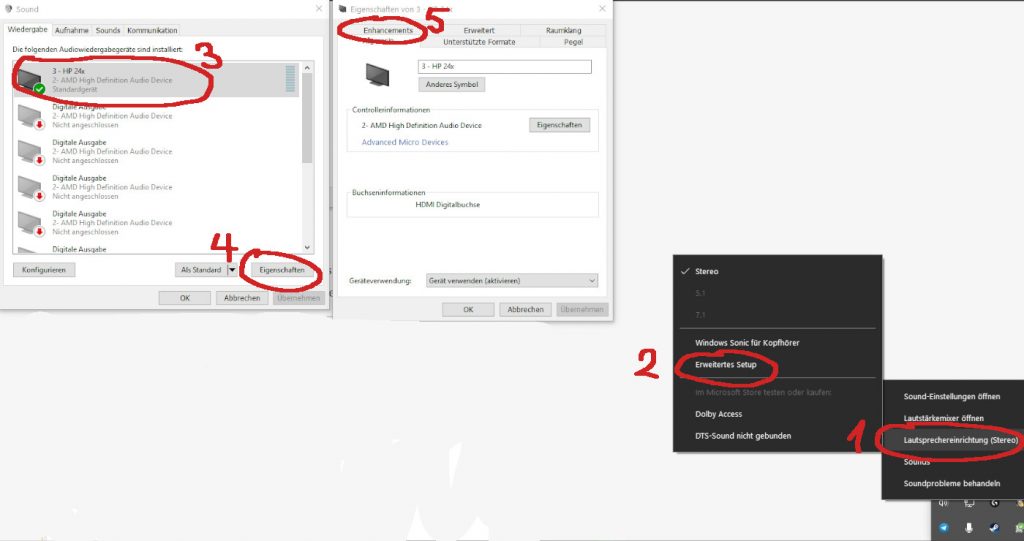
- In Windows, select your DualSense controller in the menu “Select Playback Device” (the small speaker in the taskbar). Windows refers to it as “Wireless Controller.”
- Here, select “Speaker Setup” and then choose “Advanced Setup” in the next step.
- In the Sound window, select the controller as your audio device and go to “Properties” in the window.
- In this window, select “Enhancements.”
- In this window, check the box for “Speaker Fill” and save the settings. You can then close the windows.
Now you can start music through your Spotify app or another app. Now you should be able to “feel” your music on the desktop PC. The trick does not work on the PlayStation 5.
If you want to not only feel the music but also hear it, you’ll need to connect headphones to your controller. By the way, we also introduce the best gaming headsets and headphones in detail here on MeinMMO:
The best gaming headsets you can currently buy.

Your opinion is important to us!
Do you like the article? Then let us know!